4Clicks for Federal vs. Planview ProjectPlace

Overview
ProductRatingMost Used ByProduct SummaryStarting Price
4Clicks for Federal
Score 5.0 out of 10
N/A
4Clicks for Federal provides quick access to full line item descriptions, notes, takeoffs, pricing info and more for federal engineers, estimators and facilities professionals. The software also includes RSMeans Data and can directly populate government forms. The platform can also be used to create budgets, all while keeping contracts and documents organized. 4Clicks for Federal is only available for purchase to federal and military professionals or AEC firms with current…N/A
Planview ProjectPlace
Score 8.3 out of 10
N/A
Projectplace is a collaborative work management solution. The vendor says the product is built with teams of all sizes and complexity in mind, from virtual teams of five to entire global enterprises with tens of thousands of active users. It is also designed to incorporate waterfall and agile workflows.N/A
Pricing
4Clicks for FederalPlanview ProjectPlace
Editions & Modules
No answers on this topic
Offerings
Pricing Offerings
4Clicks for FederalPlanview ProjectPlace
Free Trial
NoYes
Free/Freemium Version
NoNo
Premium Consulting/Integration Services
NoYes
Entry-level Setup FeeNo setup feeNo setup fee
Additional Details
More Pricing Information
Community Pulse
4Clicks for FederalPlanview ProjectPlace
Features
4Clicks for FederalPlanview ProjectPlace
Project Management
Comparison of Project Management features of Product A and Product B
4Clicks for Federal
-
Ratings
Planview ProjectPlace
7.7
198 Ratings
0% below category average
Task Management00 Ratings8.3191 Ratings
Resource Management00 Ratings6.7158 Ratings
Gantt Charts00 Ratings7.7171 Ratings
Scheduling00 Ratings7.7169 Ratings
Team Collaboration00 Ratings8.7193 Ratings
Support for Agile Methodology00 Ratings8.7151 Ratings
Support for Waterfall Methodology00 Ratings7.8140 Ratings
Document Management00 Ratings8.9184 Ratings
Email integration00 Ratings6.4163 Ratings
Mobile Access00 Ratings7.7147 Ratings
Timesheet Tracking00 Ratings6.0129 Ratings
Best Alternatives
4Clicks for FederalPlanview ProjectPlace
Small Businesses
Bluebeam
Bluebeam
Score 9.2 out of 10
Stackby
Stackby
Score 8.9 out of 10
Medium-sized Companies
InEight
InEight
Score 8.4 out of 10
InEight
InEight
Score 8.4 out of 10
Enterprises
InEight
InEight
Score 8.4 out of 10
InEight
InEight
Score 8.4 out of 10
All AlternativesView all alternativesView all alternatives
User Ratings
4Clicks for FederalPlanview ProjectPlace
Likelihood to Recommend
5.0
(1 ratings)
8.1
(198 ratings)
Likelihood to Renew
-
(0 ratings)
9.2
(9 ratings)
Usability
-
(0 ratings)
10.0
(75 ratings)
Availability
-
(0 ratings)
9.1
(2 ratings)
Performance
-
(0 ratings)
9.1
(2 ratings)
Support Rating
-
(0 ratings)
8.0
(72 ratings)
Implementation Rating
-
(0 ratings)
9.1
(1 ratings)
Configurability
-
(0 ratings)
6.4
(1 ratings)
Ease of integration
-
(0 ratings)
9.1
(1 ratings)
Product Scalability
-
(0 ratings)
9.1
(2 ratings)
Vendor post-sale
-
(0 ratings)
6.4
(1 ratings)
Vendor pre-sale
-
(0 ratings)
6.4
(1 ratings)
User Testimonials
4Clicks for FederalPlanview ProjectPlace
Likelihood to Recommend
The Gordian Group, Inc.
If you are considering purchasing this (very expensive) software, there is a 100% chance you are doing so because you have been awarded a Government contract that dictates you use 4Clicks Project Estimator. There are plenty of easier to use estimating packages out in the world, but you can't use any of them if you have a contract that requires 4Clicks.
Read full review
Planview
Planview ProjectPlace is a vibrant platform that manages all activities and schedules different roles based on their urgency, importance, and requests. Further, Planview ProjectPlace outlines the need for proper documentation with the aim of accurate referencing. Tasks are credibly shared, and proper reporting is enhanced to transform firms' work environment. ; Lastly, Planview ProjectPlace brings sustainable email integration for enterprises.
Read full review
Pros
The Gordian Group, Inc.
  • The estimates it produces are simple and easy to follow. The formatting is good.
  • The tech support provided is very attentive.
Read full review
Planview
  • Easy of use. Modules are well define.
  • Navigation: Users can use the tool's search functionality to find what they are looking for easily. The home page is configurable to the users' needs.
  • The knowledge center is a key function to understand the tool capabilities.
Read full review
Cons
The Gordian Group, Inc.
  • The software feels 20 years old. It has not kept up with modern times, and practically functions like an old DOS program.
  • Clunky interface, arcane commands.
  • Even their training info focuses on hotkeys like this is 1995. Even though I am of an age to remember computers in 1995, the younger generations of managers/estimators are not. It is time to bring the software into the new century!
Read full review
Planview
  • Under the time tracking, it would be nice to have a set template that would load each week and not have to click a button to load the previous week's template.
  • Somehow making it more intuitive.
  • Having to add in each service line and each detail that I cover for every service line each week is a bit ridiculous.
Read full review
Likelihood to Renew
The Gordian Group, Inc.
No answers on this topic
Planview
We're committed now & have >50 users on Projectplace. All our projects are now tracked in the tool. We this investment of time & training, the cost of maintaining Projectplace is relatively low for the benefit. So we will renew, even if there are some idiosyncrasies in the tool & there are opportunities for improvement.
Read full review
Usability
The Gordian Group, Inc.
No answers on this topic
Planview
Easy to use platform and provides the user with an amazing experience and straightforward tools that empower and help execute tasks with fast performances that allow quick and easy service delivery. Easy on implementation and get started immediately with enterprise-ready Planview Projectplace and start to connect with teams and departments at once.
Read full review
Reliability and Availability
The Gordian Group, Inc.
No answers on this topic
Planview
No downtime-issues since the implementation. It has been very stable
Read full review
Support Rating
The Gordian Group, Inc.
No answers on this topic
Planview
I haven't needed to get in touch with support because the product is quite well structured and understandable. There were no issues initially when making payments or later for monthly payments. The project manager using the software is quite skilled in the software and has not needed much help. New licenses are easy to acquire, and there is no delay in getting them. I know there are several ways of support available, so that's a plus.
Read full review
Implementation Rating
The Gordian Group, Inc.
No answers on this topic
Planview
create an extensive change management process to help folks embrace the change
Read full review
Alternatives Considered
The Gordian Group, Inc.
WinEst uses much the same database (RS Means/Gordion type) and has a similar interface. It is a bit cheaper.
Read full review
Planview
[In my experience] Jira is more refined, better looking, and easier to become familiar with. Also, the massive market share of Jira helps in consultancy as you can switch between clients easily. Projectplace has many powerful tools but so does Jira, and Jira integrates with our suite of software much easier compared to Projectplace.
Read full review
Scalability
The Gordian Group, Inc.
No answers on this topic
Planview
It is a bit more difficult to fluently use in large scale implementations
Read full review
Return on Investment
The Gordian Group, Inc.
  • As stated before, if you are buying this software, it is because you have a contract forcing you to. While it does work, it is clunky, awkward, and very expensive.
  • The price of the software and databases has always been high, but with the fairly recent acquisition of 4Clicks by Gordion (who also bought RS Means for their databases), there is literally no competition. Prices will continue to be very high, with no check on how high they can go.
  • Again, can't fault 4Clicks tech support, as I think it is the best in the industry. They know their product and they respond to issues immediately. Considering what we spend a year for this product, however, you would expect nothing less.
Read full review
Planview
  • [We have the] ability to support remote work through projects that scale across multiple groups
  • We have large-scale quarterly projects, so the ability to save and duplicate project templates are helpful for us to keep track of tasks down to the specific card
Read full review
ScreenShots

Planview ProjectPlace Screenshots

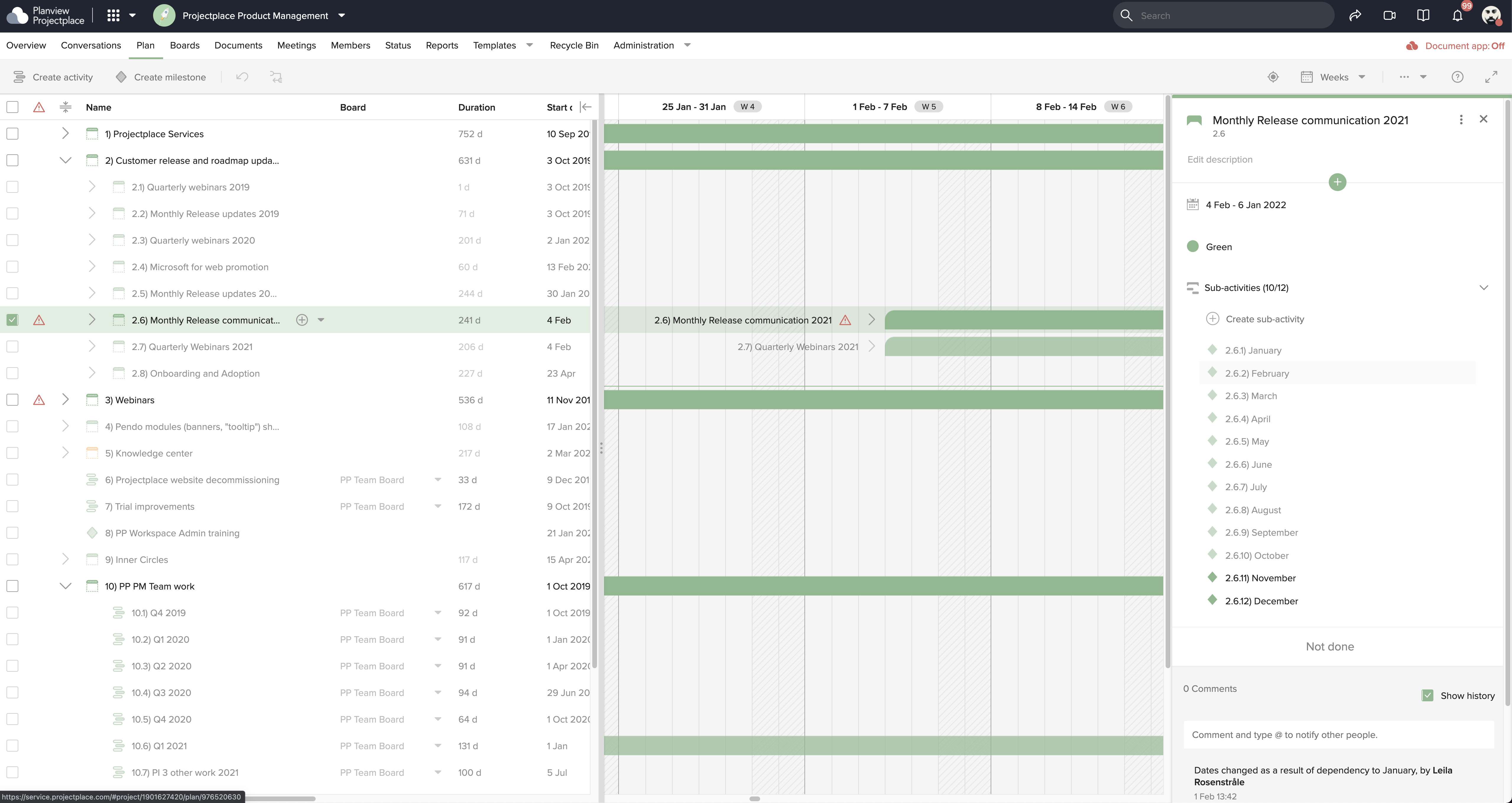
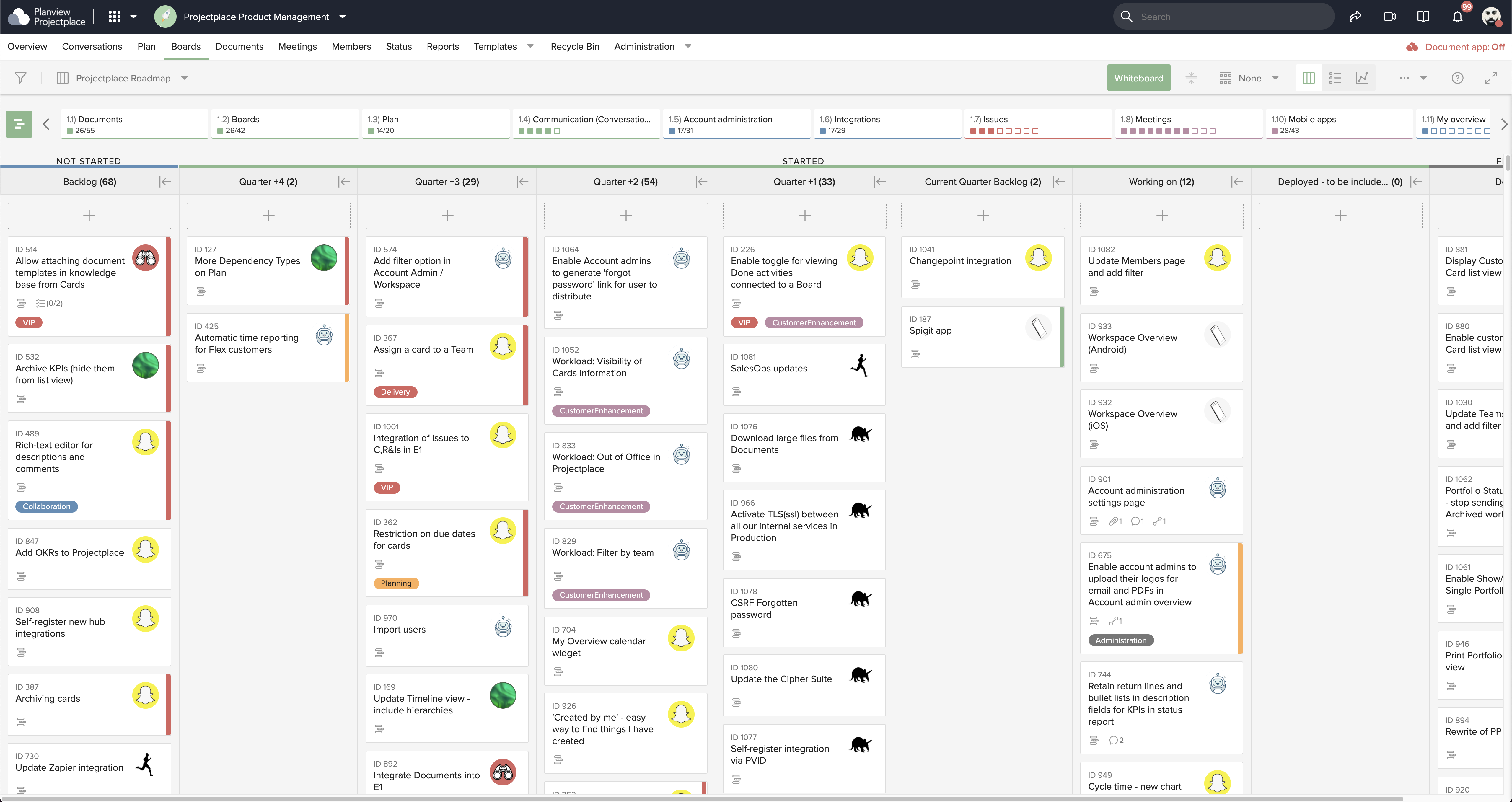
Screenshot of Collaborative Workstream: Streamlined interaction between activities, boards and cards. Users can plan and follow up in the Gantt while their teams execute and collaborate for optimum productivity on the Kanban boards.Screenshot of Document Management: This helps to ensure changes to documents are visible in real-time. Version control ensures that team members see the latest document versions with access to document history.Screenshot of Gantt Charts: These support planning and visualizing every step of enterprise work and projects with Projectplace Gantt Charts. Track progress to make sure you'll meet your deadlines and know when things are not happening on time.Screenshot of Kanban Boards: This enables teams to execute and collaborate for optimum productivity, and includes activity notifications, messaging and visualizations of progress of day-to-day tasks.Screenshot of Workload View: A visualization of the workload of members in all workspaces, used to determine whether a team member is overloaded with work, or has room to do more.Screenshot of Workspace Overview: This offers an overview of all work and tasks that have been assigned across all workspaces. Personal tasks can be added that help offer a more complete picture of what's left to do.