Eclipse is a free and open source integrated development environment (IDE).
N/A
PyCharm
Score 9.2 out of 10
N/A
PyCharm is an extensive Integrated
Development Environment (IDE) for Python developers. Its
arsenal includes intelligent code completion, error detection, and rapid
problem-solving features, all of which aim to bolster efficiency. The product supports programmers in composing orderly and maintainable
code by offering PEP8 checks, testing assistance, intelligent refactorings, and
inspections. Moreover, it caters to web development frameworks like Django and
Flask by providing framework…
$9.90
per month per user
SonarQube
Score 8.1 out of 10
N/A
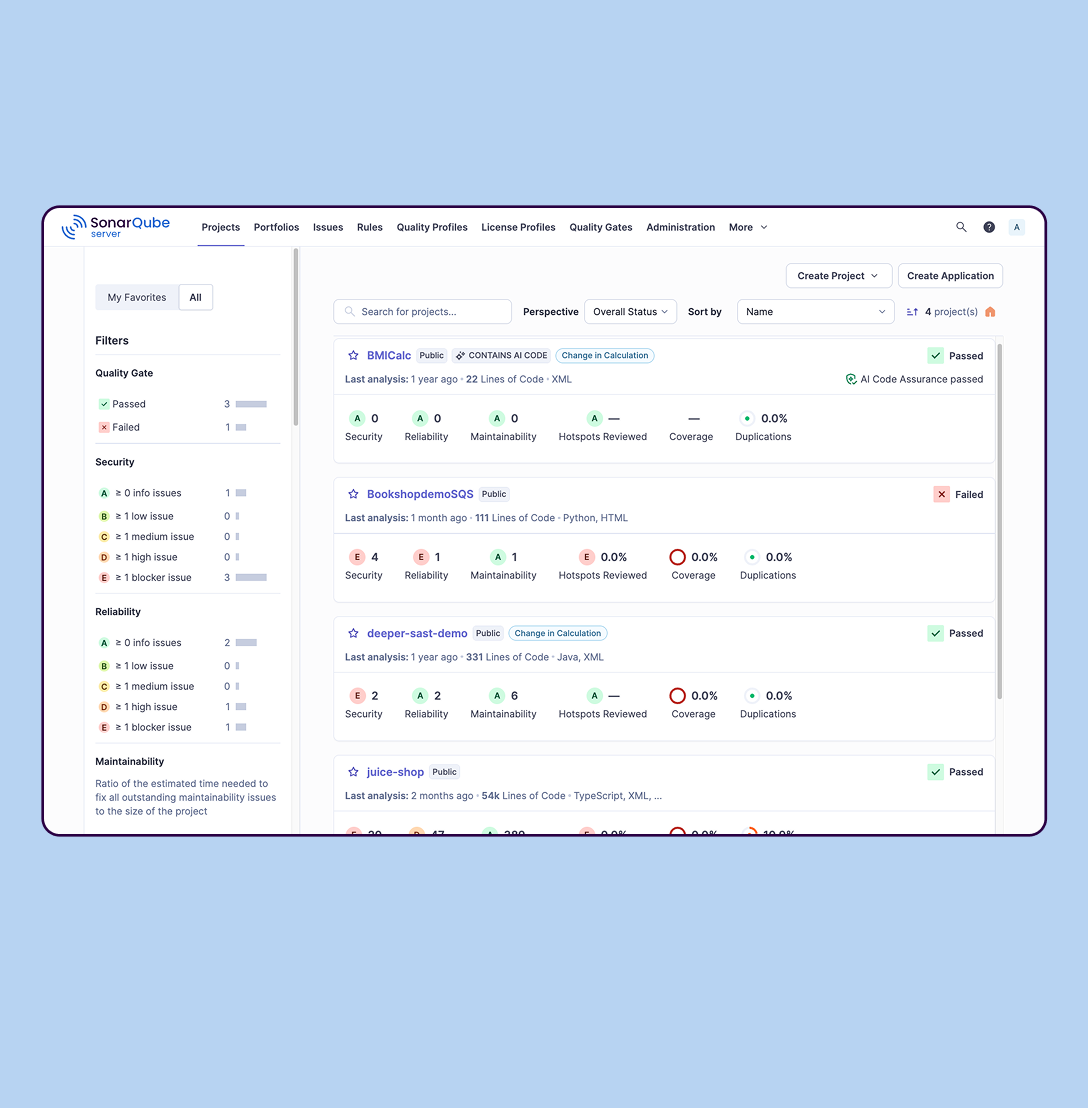
SonarQube is an automated code review solution, serving as the verification layer for code quality and SDLC security. SonarQube is used to ensure that code is secure, reliable, and maintainable. It is available through SaaS or self-managed deployment.
I have used PyCharm for projects that were implemented in Python and I have also used IDEs like notepad++ which are more generic in nature. The reason that I choose Eclipse is mostly because it is Java specific unlike PyCharm which is Python specific. Using Eclipse or not using …
For no license, Eclipse is a very good start. IntelliJ has much greater support and tools for many things like connecting to all kinds of databases and SaaS platform such as Salesforce. Code refactoring is also very cool on IntelliJ compared to Eclipse. For Python and Django …
Eclipse is the best IDE on the market for Java development. It has great error and warning handling, and many integrations with useful tools - debugger, sonarqube (static code analysis), Maven / Gradle / Ant, Tomcat / Wildfly / JBoss (web servers). The best part of eclipse is …
1. Eclipse is easy to use. 2. when you are new to building something you can go for Eclipse as it provides a clean UI. 3. Provide support to connect with other tools and technology.
As previously said, Eclipse is one of the most complete and useful tools for Java development. And as a plus, it's open-source and free, so you won't beat that price-quality relation. When starting with Java projects, you won't fail with Eclipse. But, if you are getting into …
I used IDEA prior to using Eclipse. I loved how easy I can debug in both, but the debugging feature in IDEA is just way more polished then Eclipse. Other than that, Eclipse was easy to setup and start with.
IntelliJ IDEA is geared exclusively towards Java development, and has a lot of optimization. In terms of Java development, It can do everything what Eclipse can do. It's even better in some areas. It's a commercial product, and its community version is free.
I needed a Python dedicated solution Pycharm is the best suited, giving no hassle in setting up and providing an off the shelf solution for python development. Using Eclipse is cumbersome, some additional plugins must be installed and configured
Eclipse is one of the commonly used alternative IDEs for Python programming language. It's a matter of preference whether to choose PyCharm or Eclipse. However, there is also an IDE called Spyder which is, for example, distributed along with the Anaconda Environment. It enables …
Eclipse was a bit boggy compared to using PyCharm. Eclipse has way more features for product and we wanted something more tuned for Python programming. We never turned back once we started using PyCharm.
PyCharm is the best IDE for python development. PyCharm offers various features: source code completion, support for unit testing, integration with Docker/GitLab/Git, ability to manage and configure virtual environments, auto-indentation, and re-factoring code with ease. …
What differentiates PyCharm from other products is that it is built for a particular language (Python) and works great while doing it, without losing efficiency with the rest of languages. It's simple, easy to use, fast and efficient, what else could you need?
Simply one of the best IDE's of our time. It has a lot of features, a big user base, and a professional developer team behind it. It simply surpasses most of its competitors, as there are not too many Python-specialized IDEs anyway.
PyCharm is the best tool to switch between different projects. One can connect to various technologies at a time. Package and plugin installation is easy. Dark and light mode helps in working according to the mood. One can extend it to IntelliJ, depending on the need for custom …
Best user experience. While the JavaVM is a heavy hit on resources, it is worth it because of the sheer amount of functionality. Community/Free/Educational version easily available. Excellent Git support.
I have used other tools like SoapUI and Postman, but their working and use case are totally different from the SonarQube, so basically cannot compare SonarQube with them. We use SonarQube in our project to basically calculate the code quality report mostly. In that report, we …
SonarQube contains all of their features. Findbugs has very limited capabilities. It is just a static code analyser and does not check for a continous code quality and also not possible to integrate its plugin azure devops .net pipelines and more importantly SonarQube ui is …
I think that if someone asked me for an IDE for Java programming, I would definitely recommend Eclipse as is one of the most complete solutions for this language out there. If the main programming language of that person is not Java, I don't think Eclipse would suit his needs[.]
PyCharm is well suited to developing and deploying Python applications in the cloud using Kubernetes or serverless pipelines. The integration with GitLab is great; merges and rebates are easily done and help the developer move quickly. The search engine that allows you to search inside your code is also great. It is less appropriate for other languages.
SonarQube is excellent if you start using it at the beginning when developing a new system, in this situation you will be able to fix things before they become spread and expensive to correct. It’s a bit less suitable to use on existing code with bad design as it’s usually too expensive to fix everything and only allows you to ensure the situation doesn’t get worse.
Git integration is really essential as it allows anyone to visually see the local and remote changes, compare revisions without the need for complex commands.
Complex debugging tools are basked into the IDE. Controls like break on exception are sometimes very helpful to identify errors quickly.
Multiple runtimes - Python, Flask, Django, Docker are native the to IDE. This makes development and debugging and even more seamless.
Integrates with Jupyter and Markdown files as well. Side by side rendering and editing makes it simple to develop such files.
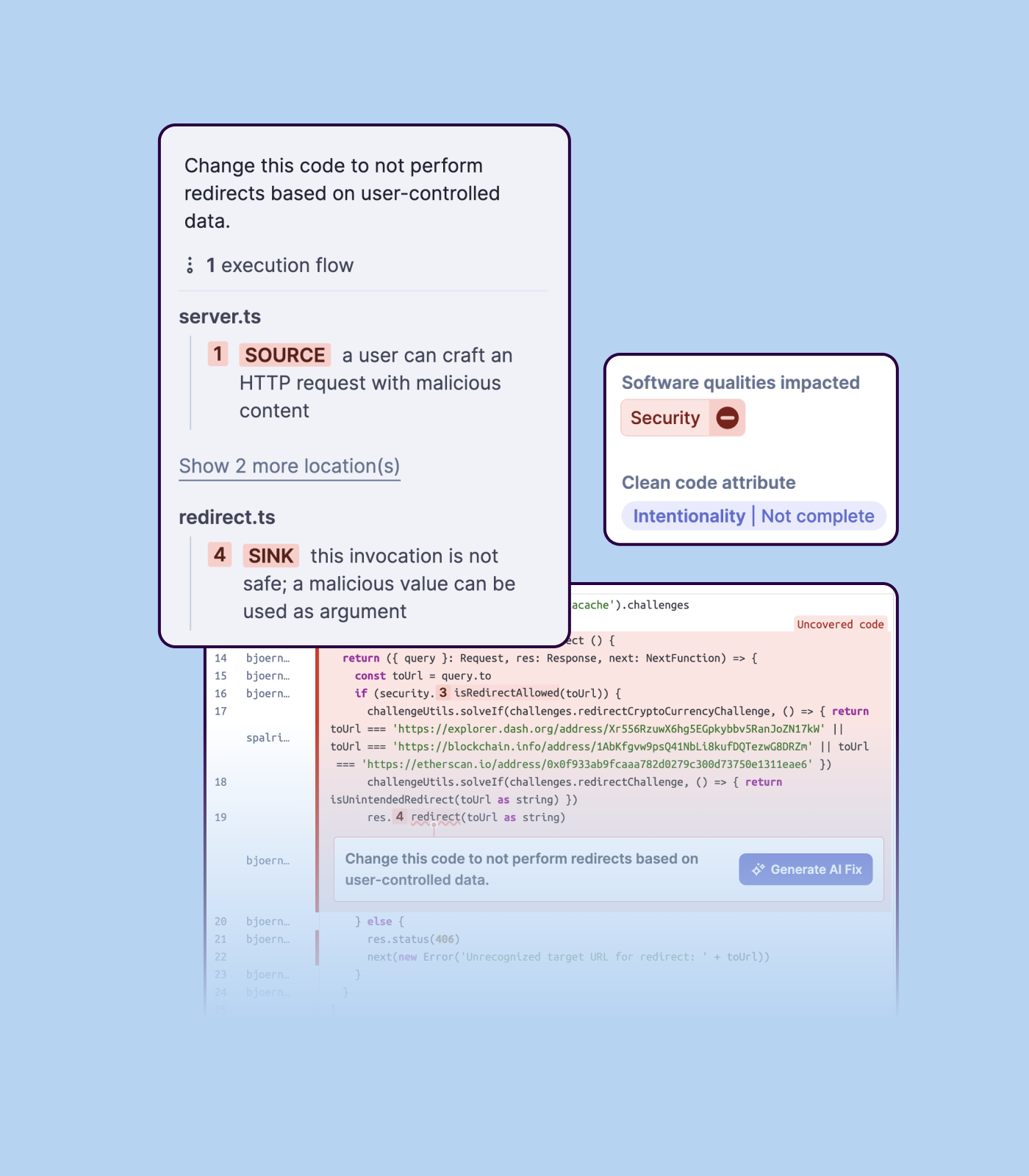
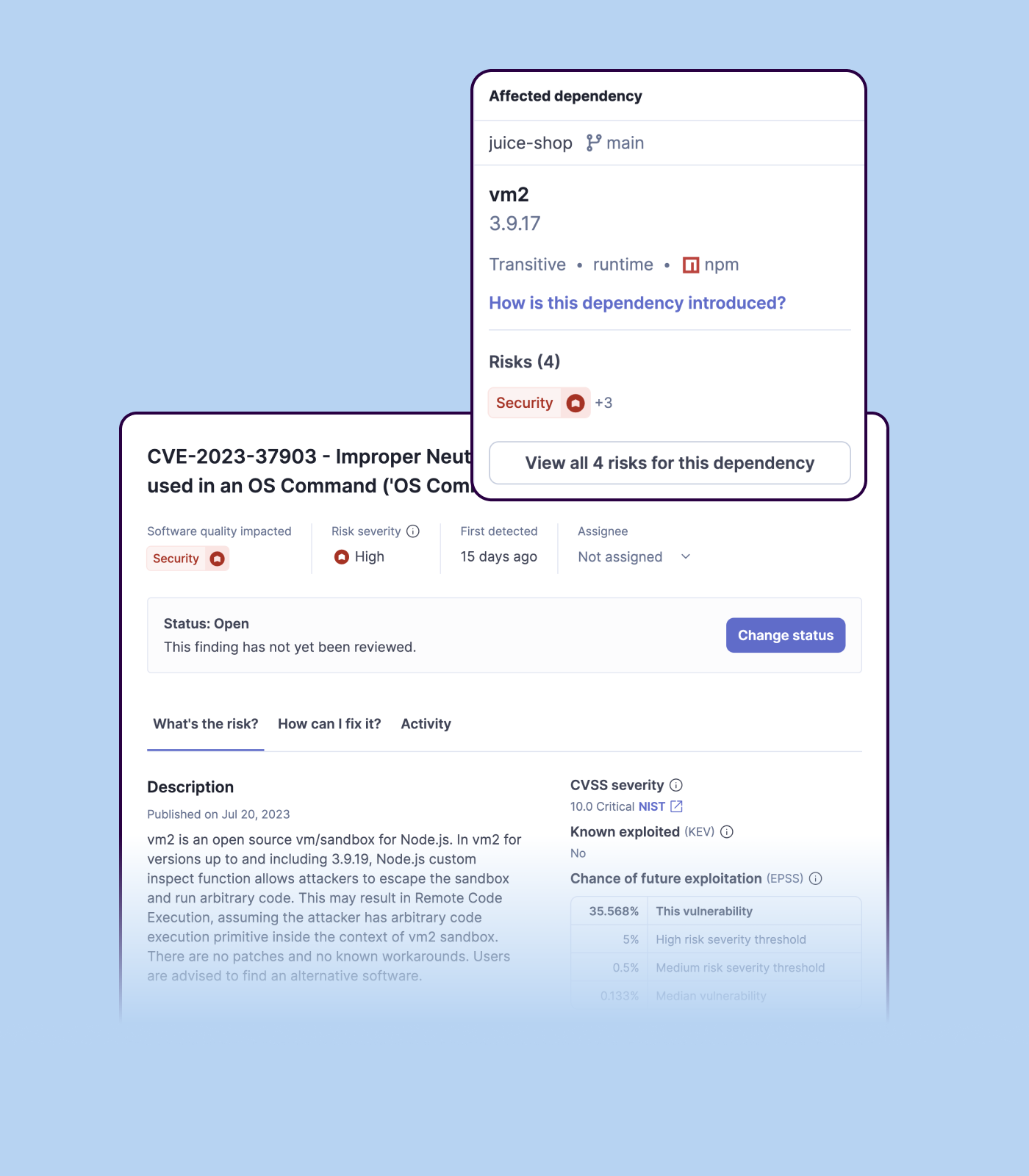
Detecting bugs and vulnerabilities: SonarQube can identify a wide range of bugs and vulnerabilities in code, such as null pointer exceptions, SQL injection, and cross-site scripting (XSS) attacks. It uses static analysis to analyze the code and identify potential issues, and it can also integrate with dynamic analysis tools to provide even more detailed analysis.
Measuring code quality: SonarQube can measure a wide range of code quality metrics, such as cyclomatic complexity, duplicated code, and code coverage. This can help teams understand the quality of their code and identify areas that need improvement.
Providing actionable insights: SonarQube provides detailed information about issues in the code, including the file and line number where the issue occurs and the severity of the issue. This makes it easy for developers to understand and address issues in the code.
Integrating with other tools: SonarQube can be integrated with a wide range of development tools and programming languages, such as Git, Maven, and Java. This allows teams to use SonarQube in their existing development workflow and take advantage of its powerful code analysis capabilities.
Managing technical debt: SonarQube provides metrics and insights on the technical debt on the codebase, enabling teams to better prioritize issues to improve the quality of the code.
Compliance with coding standards: SonarQube can check the code against industry standards like OWASP, CWE and more, making sure the code is compliant with security and coding standards.
While the DB integration is broad (many connectors) it isn't particularly deep. So if you need to do serious DB work on (for example) SQL Server, it is sometimes necessary to go directly to the SQL Server Studio. But for general access and manipulation, it is ok.
The syntax formatting is sometimes painful to set up and doesn't always support things well. For example, it doesn't effectively support SCSS.
Using it for remote debugging in a VM works pretty well, but it is difficult to set up and there is no documentation I could find to really explain how to do it. When remote debugging, the editor does not necessarily integrate the remote context. So, for example, things like Pylint don't always find the libraries in the VM and display spurious errors.
The debugging console is not the default, and my choice is never remembered, so every time I restart my program, it's a dialog and several clicks to get it back. The debugging console has the same contextual problems with remote debugging that the editor does.
The biggest complaint I have about PyCharm is that it can use a lot of RAM which slows down the computer / IDE. I use the paid version, and have otherwise found nothing to complain about the interface, utility, and capabilities.
Importing a new custom quality profile on SonarQube is a bit tricky, it can be made easier
Every second time when we want to rerun the server, we have to restart the whole system, otherwise, the server stops and closes automatically
When we generate a new report a second time and try to access the report, it shows details of the old report only and takes a lot of time to get updated with the details of the new and fresh report generated
I love this product, what makes it one of the best tool out in the market is its ability to function with a wide range of languages. The online community support is superb, so you are never stuck on an issue. The customization is endless, you can keep adding plugins or jars for more functionalities as per your requirements. It's Free !!!
It has everything that the developer needs to do the job. Few things that I have used in my day-to-day development 1. Console output. 2. Software flash functionality supporting multiple JTAG vendors like J-LINK. 3. Debugging capabilities like having a breakpoint, looking at the assembly, looking at the memory etc. this also applies to Embedded boards. 4. Plug-in like CMake, Doxygen and PlantUML are available.
It's pretty easy to use, but if it's your first time using it, you need time to adapt. Nevertheless, it has a lot of options, and everything is pretty easy to find. The console has a lot of advantages and lets you accelerate your development from the first day.
I gave this rating because Eclipse is an open-source free IDE therefore no support system is available as far as I know. I have to go through other sources to solve my problem which is very tough and annoying. So if you are using Eclipse then you are on your own, as a student, it is not a big issue for me but for developers it is a need.
I rate 10/10 because I have never needed a direct customer support from the JetBrains so far. Whenever and for whatever kind of problems I came across, I have been able to resolve it within the internet community, simply by Googling because turns out most of the time, it was me who lacked the proper information to use the IDE or simply make the proper configuration. I have never came across a bug in PyCharm either so it deserves 10/10 for overall support
We we easily able to integrate the SonarQube steps into our TFS process via the Microsoft Marektplace, we didn't have the need to call SonarQube support. We've used their online documentation and community forum if we ran into any issues.
The installation, adaptability, and ease of usage for Eclipse are pretty high and simple compared to some of the other products. Also, the fact that it is almost a plug and play once the connections are established and once a new user gets the hang of the system comes pretty handy.
When it comes to development and debugging PyCharm is better than Spyder as it provides good debugging support and top-quality code completion suggestions. Compared to Jupiter notebook it's easy to install required packages in PyCharm, also PyChram is a good option when we want to write production-grade code because it provides required suggestions.
SonarQube is an open-source. It's a scalable product. The costs for this application, for the kind of job it does, are pretty descent. Pipeline scan is more secured in SonarQube. Its a very good tool and its support multiple languages. Its main core competency is of static code analysis and that is why SonarQube exists and it does it exceedingly well. The quality of scan on code convention, best practices, coding standards, unit test coverage etc makes them one of the best competent tool in the market
This development environment offers the possibility of improving the productivity time of work teams by supporting the integration of large architectures.
It drives constant change and evolution in work teams thanks to its constant versioning.
It works well enough to develop continuous server client integrations, based on solid or any other programming principle.
Positive ROI from the standpoint of flagging several issues that would have otherwise likely been unaddressed and caused more time to be spent closer to launch
Slightly positive ROI from time-saving perspective (it's an automated check which is nice, but depending on the issues it finds, can take developers time to investigate and resolve)