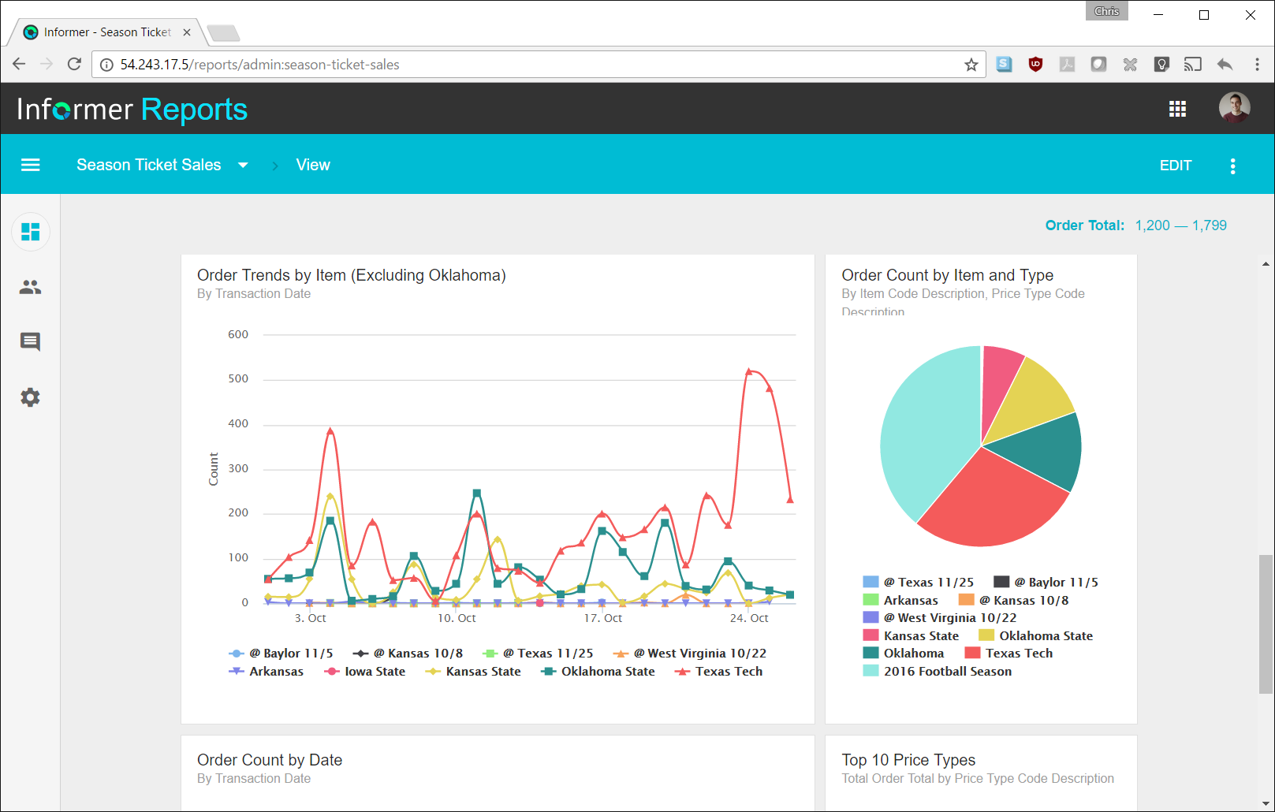
Entrinsik Informer is a web-based reporting and business intelligence application popular in the higher education vertical market. It helps organizations transform real-time data into actionable information by delivering ad-hoc reporting, data analysis, and interactive dashboards.
N/A
Microsoft BI (MSBI)
Score 8.9 out of 10
N/A
Microsoft BI is a business intelligence product used for data analysis and generating reports on server-based data. It features unlimited data analysis capacity with its reporting engine, SQL Server Reporting Services alongside ETL, master data management, and data cleansing.
$14
per month per user
SAS Visual Analytics
Score 7.6 out of 10
Enterprise companies (1,001+ employees)
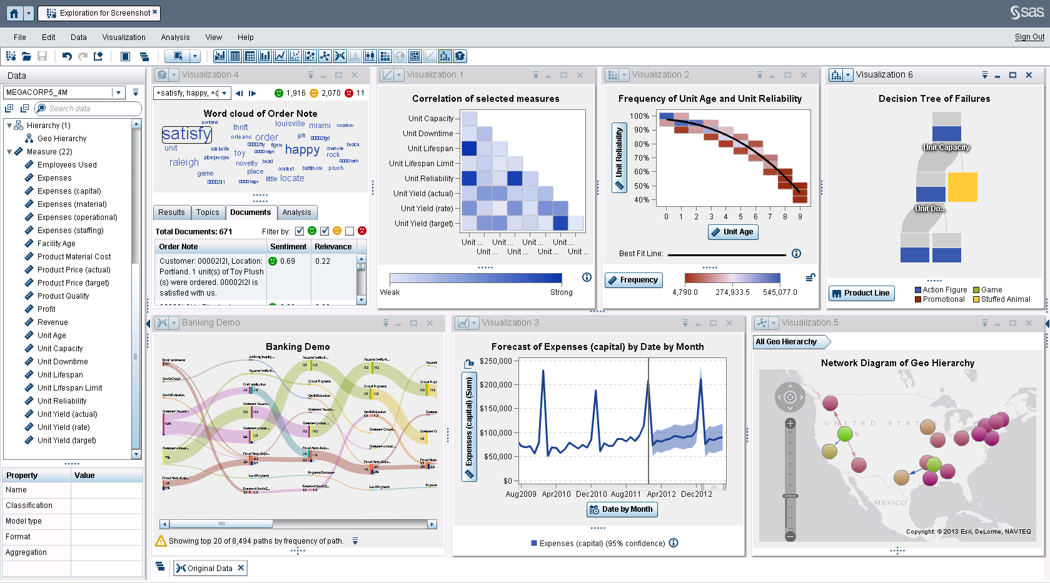
SAS Visual Analytics provides a complete platform for analytics visualization, enabling users to identify patterns and relationships in data that weren't initially evident. Interactive, self-service BI and reporting capabilities are combined with out-of-the-box advanced analytics so everyone can discover insights from any size and type of data, including text.
$0
Annual By Users: 5, 10, 20
Pricing
Entrinsik Informer
Microsoft BI (MSBI)
SAS Visual Analytics
Editions & Modules
No answers on this topic
Power BI Pro
$14
per month per user
Power BI Premium
$24
per month per user
SAS Visual Analytics for SAS Cloud
Annual By Users: 5, 10, 20
Offerings
Pricing Offerings
Entrinsik Informer
Microsoft BI (MSBI)
SAS Visual Analytics
Free Trial
Yes
No
Yes
Free/Freemium Version
No
Yes
No
Premium Consulting/Integration Services
Yes
No
Yes
Entry-level Setup Fee
No setup fee
No setup fee
No setup fee
Additional Details
—
—
SAS Visual Statistics and SAS Office Analytics are also available as add-ons.
It makes creating queries very easy for end users so not only research or technicians can do it. The availability for creating Live reports that are accessible via Excel on the network has given many of our users the ability to get the information they need in a format they can use without needing someone to translate the raw data
Microsoft BI is well suited for Stream analytics, easy data integration, report creation and UI/UX designs (limited but what all available are great ones) Microsoft BI may be less appropriate for handling huge number of datasets and difficult queries. It may also be difficult for a company with heavy data.
I was in a meeting with the client and there I have to show them some analytic data to them. But I was confused about how I will manage to show big data to clients with accuracy. But then the SAS Visual Analytics software helps me in presenting accurate data at the moment and it was very presentable and through that, I got the deal for that business.
Simple user-interface: Informer is relatively easy to learn and end users can begin running reports and creating new reports quickly.
Email "burst" functionality: This feature allows emails to be sent out based on data in the report. So for example, a report could be scheduled that would email all student employment managers listing out the specific employees that report to them that haven't submitted their time sheets. Each manager would only see the rows that correspond to their email address.
Analytics and grouping: Users can quickly drag columns to group and sub-total, and can use the analytics tab to get deeper insights into the data.
Provides the flexibility to the end user to slice and dice the data.
Anyone can make predictive models with the help of in-built algorithms without the need to write a single line of code or knowledge of what's under the hood of algorithms.
The feature to simply ask a question related to data and getting a response in form of text, chart or graph is amazing.
There are a lot of reports that we have in Informer that say they have never been run, even though I know they have been run. So that makes it really difficult to determine which reports can be deleted to keep a tidy report list.
The only other complaint I have about Informer is that there doesn't seem to be a properly detailed error code/message when the student information system can't be accessed. For example, I am currently trying to move Informer to its own standalone server and I get an error message saying that our license isn't valid. Informer Support sent a new license, which prompted the same message, and the only explanation they have given me is that Informer can't reach the student information system. I would think that if that were the case, the error message would say that instead of an invalid license.
The race to perfect gathering of Non-Traditional datasets is on-going; with Microsoft arguably not the leader of the pack in this category.
Licensing options for PowerBI visualizations may be a factor. I.e. if you need to implement B2C PowerBI visualizations, the cost is considerably high especially for startups.
Some clients are still resistant putting their data on the cloud, which restricts lots of functionality to Power BI.
SAS is relatively expensive when compared to other BI tools and requires a large amount of upfront fee which becomes an issue for smaller organizations.
UI for the dashboards looks a little date in comparison to competitors like Tableau and Microstrategy.
Integration with other open source software like Python needs to be built in.
Informer has been handily meeting most of our reporting needs, and we've created a library of hundreds of reports that are used every day. They have a terrific support service to help when you have questions, and I've found them to be great at listening to what customers would like and adding new features. They are a small company that really listens and really cares, and I've been very pleased over the past few years getting to know them.
Microsoft BI is fundamental to our suite of BI applications. That being said, Northcraft Analytics is focused on delighting our customers, so if the underlying factors of our decision change, we would choose to re-write our BI applications on a different stack. Luckily, mathematics are the fundamental IP of our technology... and is portable across all BI platforms for the foreseeable future.
SAS really is the cutting edge in Business Intelligence. That is all they do! They are constantly coming out with new products, product upgrades, and their tech support is second to none. In addition, their support of Education has made our ability to acquire their product possible.
From the perspective of the new user and a seasoned user I would say eight would represent both parties. It presents a 'familiar' interface and easy to navigate display. Tagging is quite nice and allows for organization of reports based on those tags. These have to be monitored like anything else to keep them consistent but provides a better than average means of organizing reports.
The Microsoft BI tools have great usability for both developers and end users alike. For developers familiar with Visual Studio, there is little learning curve. For those not, the single Visual Studio IDE means not having to learn separate tools for each component. For end-users, the web interface for SSRS is simple to navigate with intuitive controls. For ad-hoc analysis, Excel can connect directly to SSAS and provide a pivot table like experience which is familiar to many users. For database development, there is beginning to be some confusion, as there are now three tool choices (VS, SSMS, Azure Data Studio) for developers. I would like to see Azure Data Studio become the superset of SSMS and eventually supplant it.
SAS BI is good for creating reports and dashboards and then sharing it with the users. It also has ability to manage access to the reports and dashboards but somehow with most of the world moving to open source languages R, Python and Julia, SAS BI feels to be archaic in terms of feature set and integrations it allow[s]. Also, comparing it with other Business Intelligence tools like Tableau and Microsoft BI, the functionality of SAS BI is very limited and doesn't justify the pricing.
SQL Server Reporting Services (SSRS) can drag at times. We created two report servers and placed them under an F5 load balancer. This configuration has worked well. We have seen sluggish performance at times due to the Windows Firewall.
I would have given 10 but no one and no system is perfect. The only issue with support is not the staff nor the response but the support Wiki and support pages in general run very slow at times. I believe this has been addressed by the company but the technical speed of the pages have been an issue.
While support from Microsoft isn't necessarily always best of breed, you're also not paying the price for premium support that you would on other platforms. The strength of the stack is in the ecosystem that surrounds it. In contrast to other products, there are hundreds, even thousands of bloggers that post daily as well as vibrant user communities that surround the tool. I've had much better luck finding help with SQL Server related issues than I have with any other product, but that help doesn't always come directly from Microsoft.
When you call tech support, you are immediately routed to a person who can answer your question. Often they can answer on the spot. However, if they cannot, you are given a track number and then followed up with. There have been times when I have had multiple track numbers open and they will actually TRACK YOU DOWN to ensure that your problem has been resolved. Issues do not fall into black holes with SAS. They are also willing to do a WebEx with you to diagnose the problem by seeing your environment, which is always helpful.
I have used on-line training from Microsoft and from Pragmatic Works. I would recommend Pragmatic Works as the best way to get up to speed quickly, and then use the Microsoft on-line training to deep dive into specific features that you need to get depth with.
We bought the product on a Thursday morning, and we were writing reports on Friday afternoon. We did take about a month to manage the Mapping, Linking and Security to allow us to open it up across campus. We are now mapping from as many third-party vendors as we can to enable the creation of more ad-hoc reporting.
We are a consulting firm and as such our best resources are always billing on client projects. Our internal implementation has weaknesses, but that's true for any company like ours. My rating is based on the product's ease of implementation.
I have experience with Advizor AnalystX, and it was just awful. It is advertised as an interactive reporting tool, in which you can use your mouse to select and segment constituents by where they live (by clicking on a map), how much they've given to your institution, when they last gave, etc. In practice, their map feature was unusable; it's a static map image (imagine a paper map hung on your wall), rather than draggable and zoomable Google Maps, and it required hours of work to configure one map region. As far as computing constituents' giving statistics, it required way too much back-end work to build simple giving totals.
We have used the built in ConnectWise Manager reports and custom reports. The reports provide static data. PowerBI shows us live data we can drill down into and easily adjust parameters. It's much more useful than a static PDF report.
I have used Crystal Reports, Jaspersoft and SQL Server Reporting Services (SSRS). I would recommended Business Intelligence over SSRS and Crystal Reports. SSRS is very SQL-centric and Crystal Reports is more of an end-user tool. I would recommend Jaspersoft over Business Intelligence for developing a seamless web-based reporting interface but I highly recommend Business Intelligence for end-user ad-hoc reporting.
We have definitely improved customer service due to better reporting using Informer. All departments are better empowered to help our students in a more timely and accurate manner.
Using Informer has given us the ability to eliminate functionality within our ERP system and offload reporting to a data store instead of the transactional system. This has resulted in successfully upgrading our core systems and improved response times.
As a SaaS provider we see being able to provide self-service BI to our client users as a competitive advantage. In fact the MSSQL enabled BI is a contributing factor to many winning RFPs we have done for prospective client organisations.
However MSSQL BI requires extensive knowledge and skills to design and develop data warehouses & data models as a foundation to support business analysts and users to interrogate data effectively and efficiently. Often times we find having strong in-house MSSQL expertise is a bless.