ER/Studio vs. Microsoft Power BI

Overview
ProductRatingMost Used ByProduct SummaryStarting Price
ER/Studio
Score 9.9 out of 10
N/A
ER/Studio is a database development and management tool from Embarcadero Technologies (acquired by Idera) in California.
$2,687
per year per user
Microsoft Power BI
Score 8.5 out of 10
N/A
Microsoft Power BI is a visualization and data discovery tool from Microsoft. It allows users to convert data into visuals and graphics, visually explore and analyze data, collaborate on interactive dashboards and reports, and scale across their organization with built-in governance and security.
$14
per month (billed annually) per user
Pricing
ER/StudioMicrosoft Power BI
Editions & Modules
Standard
$2,687
per year per user
Professional
$3,693
per year per user
Enterprise
Custom
per year per user
Power BI Pro
$14
per month (billed annually) per user
Power BI Premium
$24
per month (billed annually) per user
Offerings
Pricing Offerings
ER/StudioMicrosoft Power BI
Free Trial
NoYes
Free/Freemium Version
NoYes
Premium Consulting/Integration Services
NoNo
Entry-level Setup FeeNo setup feeNo setup fee
Additional DetailsPricing for new customers only, first year maintenance included. Maintenance includes access to technical support and product updates for the defined period of the agreement.Power BI Desktop is the data exploration and report authoring experience for Power BI, and is available as a free download.
More Pricing Information
Community Pulse
ER/StudioMicrosoft Power BI
Considered Both Products
ER/Studio
Chose ER/Studio
ER Studio Data Architect is a global leader in the data modelling space and most other solutions that have support for third party data models include support for ER Studio Data Architect file formats. Many of the features are a bit more intuitive than the competitors and …
Chose ER/Studio
ER/Studio is the most mature, reach in features and quality and therefore useful. Unfortunately, it lacks compatibility with AWS Redshift.
Chose ER/Studio
ER/Studio was difficult to learn at the beginning, but that was 7 years ago. I have used it across many companies since then, and It is really easy to use. I found it much easier to learn than Erwin as well.
Chose ER/Studio
ER/Studio is effective and serves the purpose of data modeling that we need in our project, so we chose it.
Chose ER/Studio
My first modeling tool was Sybase's Power Designer and it was a fine tool to get the job done. When I changed companies 10 years ago I was introduced to ER\Studio and have been using that ever since. More recently I looked into CA ERwin and found it to be unintuitive but to be …
Microsoft Power BI
Chose Microsoft Power BI
Tableau having pure visuals, we can't make custom visuals. Power BI costs around $10 per month, but Tableau costs around $30-$40 per month, so comparing with Power BI it is costly. Using Power BI is very easy for everyone (technical/non-technical), but tableau is only can …
Chose Microsoft Power BI
Plotly has been used to create time-series charts that we are hosting internally. Sometimes, it hasn't been easy for us to set up a data gateway. (for security) To get an internal report, we used Plotly instead of Power BI. Plotly does require some JavaScript knowledge to …
Chose Microsoft Power BI
Microsoft Power BI has more templates and the control panel for modifying data visualizations is more powerful with more choices of line charts, bar charts, maps/scatter points than Google sheets, which is limited to simple bar charts and pie charts.
Chose Microsoft Power BI
We were able to bundle Power BI with other Microsoft products we rely on heavily. This and the customization options were the main sellers for us.
Chose Microsoft Power BI
All others apps are enablers and Microsoft Power BI is the visual that end user sees which often adds more value to the end user to make strategic decisions from this. All are equally great but Microsoft Power BI is the end result
Chose Microsoft Power BI
Microsoft Power BI vs. Tableau Power BI cheaper and works well with Microsoft tools. Tableau has better visuals but is costly. Microsoft Power BII vs. Looker Looker is good for big data, but Microsoft Power BI is easier to use. Microsoft Power BI vs. Qlik Qlik is fast for big …
Chose Microsoft Power BI
Microsoft Power BI provide a user friendly in many ways to analyse the data and visualization of the data .Stacking makes the works easier easily attach the table ,chart row and column through the various available tool ..it also reduces the work part and manpower mechanically …
Chose Microsoft Power BI
Microsoft Power BI is more flexible and it requires less effort in order to create a working environment. The results have an attractive and customizable display. The model is a star schema therefore it do not require specific database adaptation. Excel and csv files could be …
Chose Microsoft Power BI
Microsoft Power BI is free. If I didn't want to create a custom platform (i.e. my organization insisted on an existing platform that I *had* to use), I'd use Microsoft Power BI. For any start-up or SMB, I'd just use Claude & Grok to build it quickly, also for free. Would …
Chose Microsoft Power BI
Same need to be large scale.
Chose Microsoft Power BI
Microsoft Power BI is easier to learn, a lot of examples on YouTube, internet documentation books helps to the implementation and personalization of the dashboards easier to use than other platforms.
Chose Microsoft Power BI
While excel can be useful for a very quick data dump, Microsoft Power BI is able to bring that data to life, and show trends and the actual story of what is happening. Microsoft Power BI is the ultimate display tool, and allows us to share information quickly to the CORRECT …
Chose Microsoft Power BI
Compared to this tool, Microsoft Power BI doesn't involve heavy coding and provides user friendly interface to visualize data. Microsoft Power BI reports can be shared and published without exposing your source code. Also, the reports are interactive providing drill down …
Chose Microsoft Power BI
Power BI is much simple to use, and more modern than BusinessObjects, which has now been discontinued. It costs much less to license than Tableau which is perhaps more niche and designed better. It is also much more powerful for data analysis than excel, smartsheet, airtable, …
Chose Microsoft Power BI
Some of the strengths are 1. User-Friendliness 2. Self-Service BI (Caters to all levels of the employees 3. Cost-effective. 4. Easy integration with Microsoft Suits. 5. DAX Calculations 6. Familiar Interface like traditional Excel. 7. Easier Self-Service platform for …
Chose Microsoft Power BI
It's got a larger user base and seems better supported. Personally it feels like alot more work getting comparable results from Tableau. Microsoft Power BI will be WAY easier to work with all your various data sources, if you are working in an environment with M365 already. …
Chose Microsoft Power BI
After several years using Google Looker Studio and BigQuery, Microsoft Power BI is a step-up in terms of visualizations. It is also much more powerful, leading to less errors and has a more intuitive interface. Looker studio has a focus on google analytics whereas Microsoft …
Chose Microsoft Power BI
NA - did not use any other software, yet. Happy with the services and features provided by Microsoft Power BI which helps us navigate through the client requests on a daily basis while also providing actionable insights / solutions with maximum efficiency and that too in a …
Chose Microsoft Power BI
It's the most widely used tool in most organizations
Chose Microsoft Power BI
Each has a different function. I think Microsoft Power BI is easier to use than Tableau and cheaper but SQL and databricks have so much more versatility
Chose Microsoft Power BI
We use Microsoft Power BI in addition to other software.
Chose Microsoft Power BI
I prefer Power BI because of its affordability and fewer complicated tools than Tableau. It's easy to use and compatible with other Microsoft products, which are mostly used in the IT industry. It's not limited to only one platform like Looker Studio, which is mostly used in …
Features
ER/StudioMicrosoft Power BI
BI Standard Reporting
Comparison of BI Standard Reporting features of Product A and Product B
ER/Studio
-
Ratings
Microsoft Power BI
8.2
Ratings
0% above category average
Pixel Perfect reports00 Ratings8.10 Ratings
Customizable dashboards00 Ratings8.60 Ratings
Report Formatting Templates00 Ratings7.80 Ratings
Ad-hoc Reporting
Comparison of Ad-hoc Reporting features of Product A and Product B
ER/Studio
-
Ratings
Microsoft Power BI
7.9
Ratings
1% below category average
Drill-down analysis00 Ratings8.30 Ratings
Formatting capabilities00 Ratings7.70 Ratings
Integration with R or other statistical packages00 Ratings7.40 Ratings
Report sharing and collaboration00 Ratings8.20 Ratings
Report Output and Scheduling
Comparison of Report Output and Scheduling features of Product A and Product B
ER/Studio
-
Ratings
Microsoft Power BI
8.0
Ratings
2% below category average
Publish to Web00 Ratings8.10 Ratings
Publish to PDF00 Ratings7.80 Ratings
Report Versioning00 Ratings7.70 Ratings
Report Delivery Scheduling00 Ratings8.30 Ratings
Delivery to Remote Servers00 Ratings7.90 Ratings
Data Discovery and Visualization
Comparison of Data Discovery and Visualization features of Product A and Product B
ER/Studio
-
Ratings
Microsoft Power BI
7.7
Ratings
4% below category average
Pre-built visualization formats (heatmaps, scatter plots etc.)00 Ratings8.30 Ratings
Location Analytics / Geographic Visualization00 Ratings8.10 Ratings
Predictive Analytics00 Ratings7.20 Ratings
Pattern Recognition and Data Mining00 Ratings7.30 Ratings
Access Control and Security
Comparison of Access Control and Security features of Product A and Product B
ER/Studio
-
Ratings
Microsoft Power BI
8.3
Ratings
2% below category average
Multi-User Support (named login)00 Ratings8.70 Ratings
Role-Based Security Model00 Ratings8.20 Ratings
Multiple Access Permission Levels (Create, Read, Delete)00 Ratings8.20 Ratings
Report-Level Access Control00 Ratings8.20 Ratings
Single Sign-On (SSO)00 Ratings8.60 Ratings
Mobile Capabilities
Comparison of Mobile Capabilities features of Product A and Product B
ER/Studio
-
Ratings
Microsoft Power BI
7.9
Ratings
2% above category average
Responsive Design for Web Access00 Ratings7.60 Ratings
Mobile Application00 Ratings7.50 Ratings
Dashboard / Report / Visualization Interactivity on Mobile00 Ratings7.90 Ratings
Application Program Interfaces (APIs) / Embedding
Comparison of Application Program Interfaces (APIs) / Embedding features of Product A and Product B
ER/Studio
-
Ratings
Microsoft Power BI
7.6
Ratings
2% below category average
REST API00 Ratings7.80 Ratings
Javascript API00 Ratings7.40 Ratings
iFrames00 Ratings8.00 Ratings
Java API00 Ratings6.70 Ratings
Themeable User Interface (UI)00 Ratings7.30 Ratings
Customizable Platform (Open Source)00 Ratings8.40 Ratings
Best Alternatives
ER/StudioMicrosoft Power BI
Small Businesses

No answers on this topic

Yellowfin
Yellowfin
Score 8.6 out of 10
Medium-sized Companies

No answers on this topic

Reveal
Reveal
Score 10.0 out of 10
Enterprises
Oracle SQL Developer
Score 8.1 out of 10
Kyvos Semantic Layer
Score 9.5 out of 10
All AlternativesView all alternativesView all alternatives
User Ratings
ER/StudioMicrosoft Power BI
Likelihood to Recommend
8.0
(0 ratings)
8.6
(0 ratings)
Likelihood to Renew
-
(0 ratings)
9.6
(0 ratings)
Usability
-
(0 ratings)
8.3
(0 ratings)
Support Rating
9.0
(0 ratings)
10.0
(0 ratings)
Implementation Rating
-
(0 ratings)
9.0
(0 ratings)
User Testimonials
ER/StudioMicrosoft Power BI
Likelihood to Recommend
ER/Studio is great for providing data model images for teammates to use when they are not data modelers.
Read full review
Microsoft Power BI is great for sales tracking, financial reporting, and real-time operations monitoring. It integrates data from multiple sources, creating interactive dashboards for better decision-making. However, it's less ideal for real-time big data processing, offline access, or when deep customization is needed. It works best for structured reporting but struggles with highly complex data models.
Read full review
Pros
  • ER/Studio is great for dividing logical and physical design. A logical model can be used with different physical platforms.
  • Studio can a useful macro capability that allows me to apply the naming standards across the model with ease and consistency.
  • ER/Studio does a very good job at comparing the model with the actual database and generating DDL scripts for production deployments.
  • ER/Studio has an excellent reporting and model publishing capabilities allowing me to produce models in the HTML format and publish them for the team as needed.
Read full review
  • It is great at taking in large amounts of data and housing it all.
  • Microsoft Power BI is so user friendly and it's dashboards are very easy on the eye.
  • The ease of sharing dashboards makes it great for use across a large company.
Read full review
Cons
  • Relationships are a bit on the weaker side. Many times I found orphaned relationships that I could not get rid of, or additional columns that were automatically created during the push to the physical model that appear to be due to key constraint bugs
  • There are a lot of bugs introduced when merging keys. I tend to model 2 tables for example logically, establish the relationship, and then merge the additional key column that is automatically created when establishing the relationship. This sometimes causes downstream issues with the physical model (creating duplicate columns with _1 appended)
  • Meta-data could be improved. I find it hard to keep descriptions and other meta information clean when copying and pasting from other sources due to formatting tags being introduced on each object (font, size, color, etc.). The attachment feature comes in handy, however I am looking for the ability to cleanly document and map multiple sources to a single target while providing searchability and traceability
Read full review
  • It would be easier for users could Microsoft Power BI and Excel used the same programming languages.
  • Would like to see the online version of Microsoft Power BI be as powerful as the desktop version.
  • Publishing a Microsoft Power BI file online and then having to save the file is somewhat redundant.
  • Would like to export each page or chart as an image.
Read full review
Likelihood to Renew
No answers on this topic
Microsoft Power BI is an excellent and scalable tool. It has a learning curve, but once you get past that, the sky is the limit and you can build from the most simple to the most complex dashboards. I have built everything from simple reports with only a few data points to complex reports with many pages and advanced filtering.
Read full review
Usability
No answers on this topic
Takes a little bit to get used to it. Not natively intuitive but fairly straight forward to pick up. Also docking it a few points because you can create a really clean, simple UI in Claude very quickly that's faster than building all of this yourself in Microsoft Power BI.
Read full review
Support Rating
I can call or email support and both get quick turn around. The only issue is they are on the west coast (US) and have a west coast work schedule and I'm on the East coast.
Read full review
It is a fantastic tool, you can do almost everything related with data and reports, it is a perfect substitutive of Power Point and Excel with a high evolution and flexibility, and also it is very friendly and easy to share. I think all companies should have Power BI (or other BI tool) in their software package and if they are in the MS Suite, for sure Power BI should be the one due to all the benefits of the MS ecosystem.
Read full review
Implementation Rating
No answers on this topic
It was integrated with our erp easily and was accessible on cloud.
Read full review
Alternatives Considered
ER Studio Data Architect is a global leader in the data modelling space and most other solutions that have support for third party data models include support for ER Studio Data Architect file formats. Many of the features are a bit more intuitive than the competitors and several of our vendors were already using Data Architect themselves which helped solidify the choice.
Read full review
All others apps are enablers and Microsoft Power BI is the visual that end user sees which often adds more value to the end user to make strategic decisions from this. All are equally great but Microsoft Power BI is the end result
Read full review
Return on Investment
  • Using ER\Studio to create models and eventually the actual database schema allows for a picture that is understandable to the customer and saves significant time writing DDL to create the database objects (tables, indexes, relationships, constraints...)
  • A nice customer interface tool so you can create a web based interface to the metadata for a particular design.
  • The tool also supports sub-models so you can break a large project into smaller parts, I find this feature very helpful.
Read full review
  • We're still early in the adoption process at this company, but we've illustrated how bad data keeps us from being more productive. ~25% of a team's work week was dedicated to effectively cleaning up entries, but it was always seen as a normal to them.
Read full review
ScreenShots

ER/Studio Screenshots

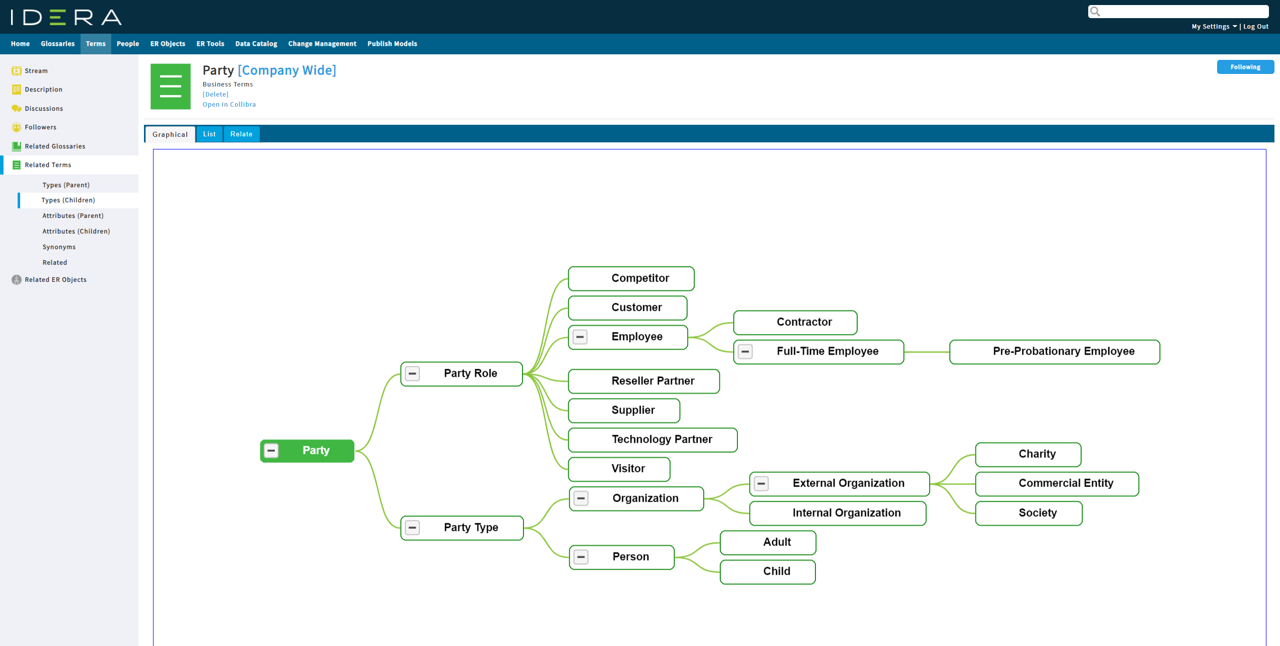
Screenshot of logical data models in ER/Studio Data Architect.Screenshot of data catalog in ER/Studio Data Architect.Screenshot of data glossaries in ER/Studio Data Architect.

Microsoft Power BI Screenshots

Screenshot of Microsoft Power BI - Turns insights into impact for business usersScreenshot of Power BI integrates easily with Microsoft 365Screenshot of Microsoft Power BI - AI-Powered CapabilitiesScreenshot of Microsoft Power BI - Copilot can be used to create reportsScreenshot of Microsoft Power BI - Data HubScreenshot of Microsoft Power BI - Scales as organizational needs grow