TrustRadius: an HG Insights company

Save this comparison

Save this comparison

Add Product

Recommended Comparisons

    Overview
    ProductRatingMost Used ByProduct SummaryStarting Price

    EYardstick

    Score9.8 out of 10
    N/AEYardstick’s Pre-Employment Tests Enable Hiring Teams With Detailed Insights On Candidate’s Knowledge, Skill And Disposition Measured By Online Video Interviews To Take A Justified Decision In Screening Out Misfits, Saving A Lot Of Time And Effort. Be it Coding, Sales Aptitude, Customer Support, Entry Level or any other Role; EYardstick evaluates the skill for almost any role.N/A

    Google Forms

    Score8.4 out of 10
    N/AGoogle Forms is an app for creating forms and surveys, and is part of Google Apps for Work. The product focuses on ease of use; the interface is similar to a document editor, with drop down lists of options and drag and drop question re-ordering. Users can embed images and video into surveys. Users can also program the question flow with custom logic. Google sends users basic summaries of the survey results automatically, or users can export the raw survey results data and analyze it via…N/A
    Pricing
    EYardstickGoogle Forms
    Editions & Modules
    No answers on this topic
    No answers on this topic
    Offerings
    Pricing Offerings
    EYardstickGoogle Forms
    Free Trial
    YesNo
    Free/Freemium Version
    NoNo
    Premium Consulting/Integration Services
    YesNo
    Entry-level Setup Fee$100No setup fee
    Additional Details——
    More Pricing Information
    Community Pulse
    EYardstickGoogle Forms
    Considered Both Products
    EYardstick
    No answer on this topic
    Google
    No answer on this topic
    Key User Insights
    Would buy again
    100%
    Would buy again
    5 Answers
    98%
    Would buy again
    64 Answers
    Delivers good value for the price
    100%
    Delivers good value for the price
    5 Answers
    100%
    Delivers good value for the price
    65 Answers
    Happy with the feature set
    100%
    Happy with the feature set
    5 Answers
    92%
    Happy with the feature set
    60 Answers
    Lived up to sales and marketing promises
    100%
    Lived up to sales and marketing promises
    5 Answers
    100%
    Lived up to sales and marketing promises
    42 Answers
    Implementation went as expected
    100%
    Implementation went as expected
    5 Answers
    96%
    Implementation went as expected
    48 Answers
    Features
    EYardstickGoogle Forms
    Survey Format & Appearance
    Comparison of Survey Format & Appearance features of EYardstick and Google Forms
    Feature
    EYardstick
    -
    Ratings
    Google Forms
    6.7
    123 Ratings
    18% below category average
    Survey templates00 Ratings7.7114 Ratings
    Themes00 Ratings6.2112 Ratings
    Custom logo/branding00 Ratings6.1100 Ratings
    Survey Content
    Comparison of Survey Content features of EYardstick and Google Forms
    Feature
    EYardstick
    -
    Ratings
    Google Forms
    8.0
    121 Ratings
    6% below category average
    Changes to live survey00 Ratings8.9115 Ratings
    Question design help00 Ratings7.398 Ratings
    Multiple question types00 Ratings7.9120 Ratings
    Survey Logic
    Comparison of Survey Logic features of EYardstick and Google Forms
    Feature
    EYardstick
    -
    Ratings
    Google Forms
    7.0
    110 Ratings
    18% below category average
    Survey logic flexibility00 Ratings7.0110 Ratings
    Survey Reporting & Analytics
    Comparison of Survey Reporting & Analytics features of EYardstick and Google Forms
    Feature
    EYardstick
    -
    Ratings
    Google Forms
    8.4
    122 Ratings
    3% above category average
    Response tracking00 Ratings8.3120 Ratings
    Data export00 Ratings8.1116 Ratings
    Standard reports00 Ratings7.9113 Ratings
    Custom reports00 Ratings9.286 Ratings
    Analytics00 Ratings8.594 Ratings
    Survey Administration & Security
    Comparison of Survey Administration & Security features of EYardstick and Google Forms
    Feature
    EYardstick
    -
    Ratings
    Google Forms
    7.9
    116 Ratings
    9% below category average
    Access controls00 Ratings7.8113 Ratings
    Compliance00 Ratings7.990 Ratings
    Survey Distribution
    Comparison of Survey Distribution features of EYardstick and Google Forms
    Feature
    EYardstick
    -
    Ratings
    Google Forms
    7.6
    90 Ratings
    6% below category average
    Vendor-offered crowdsourcing00 Ratings7.842 Ratings
    Respondent restrictions00 Ratings7.588 Ratings
    Best Alternatives
    EYardstickGoogle Forms
    Small Businesses
    Renaissance Accelerated Reader
    Score9.9 out of 10
    Jotform
    Score8.5 out of 10
    Medium-sized Companies
    Renaissance Accelerated Reader
    Score9.9 out of 10
    Qualaroo
    Score7 out of 10
    Enterprises
    Renaissance Accelerated Reader
    Score9.9 out of 10
    QuestionPro
    Score9.2 out of 10
    All AlternativesView all alternativesView all alternatives
    User Ratings
    EYardstickGoogle Forms
    Likelihood to Recommend
    9.8
    (5 ratings)
    9.3
    (127 ratings)
    Likelihood to Renew
    -
    (0 ratings)
    7.0
    (4 ratings)
    Usability
    -
    (0 ratings)
    8.6
    (67 ratings)
    Availability
    -
    (0 ratings)
    10.0
    (2 ratings)
    Performance
    -
    (0 ratings)
    9.0
    (2 ratings)
    Support Rating
    9.8
    (5 ratings)
    9.0
    (49 ratings)
    Implementation Rating
    -
    (0 ratings)
    9.0
    (1 ratings)
    Configurability
    -
    (0 ratings)
    4.0
    (1 ratings)
    Ease of integration
    -
    (0 ratings)
    7.0
    (1 ratings)
    Product Scalability
    -
    (0 ratings)
    9.0
    (2 ratings)
    Vendor post-sale
    -
    (0 ratings)
    10.0
    (1 ratings)
    Vendor pre-sale
    -
    (0 ratings)
    10.0
    (1 ratings)
    User Testimonials
    EYardstickGoogle Forms
    Likelihood to Recommend
    EYardstick
    EYardstick is a neat tool. It's not complicated to use and if your requirement is to do a pre-employment assessment for a wide variety of roles with minimal support then this is the right one for your team.
    Read full review
    Google
    Google Forms is great for simple surveys, such as quick polls, but any logic beyond conditional pages is not supported. Google Forms is best used when the survey participants have and are permitted to use a Google Account to fill out the form; we ran into issues with hospital IT departments. I don't believe there's a better free tool out there than Google Forms, though.
    Incentivized
    Read full review
    Pros
    EYardstick
    • It's very easy to learn and use.
    • Very helpful with selecting the right individual for the position needed.
    • Ready-to-use test saves lots of time.
    Read full review
    Google
    • Live results: When a user completes the form the results are added instantly.
    • Easy to create: Google Forms has a simple interface that allows for a wide range of question types. Google will even try to guess the question type based on the question (but this can be overridden).
    • Answers export to Google Sheets: It is easy to have each response to your form add a row to a Google Sheet, allowing for further analysis or processing.
    • Ability to automatically collect email addresses within a domain: If you have a form that has been shared with users in your domain, you can set it to automatically collect the users' email addresses without them needing to type it in. Makes checking whether all students have completed the form easy.
    Incentivized
    Read full review
    Cons
    EYardstick
    • Wish to have AI-based shortlisting feature.
    • Analytics can be more advanced.
    • Though tool has a lot of reports but to derive the value out of it is time consuming. Hope they improve in this aspect.
    Read full review
    Google
    • Sometimes finding the output -- a Google Sheet with all responses-- is a little difficult. It's also sometimes confusing to figure out how to get back into the Google Form Survey itself.
    • As always, sharing among an institutional Google account and your personal Google account can be frustrating. You have to make a copy and can't share across the two different accounts very easily.
    Incentivized
    Read full review
    Likelihood to Renew
    EYardstick
    No answers on this topic
    Google
    I will definitely renew my use of Google Forms because I really like the ease of use and the number of tools that Google forms provide. I also love that I can administer a test in real-time and get results in a timely manner
    Incentivized
    Read full review
    Usability
    EYardstick
    No answers on this topic
    Google
    Overall ease of use for staff, volunteers, and adult learners, and easy to get reports and to share reports via Sheets. As a free tool, it does more than expected. Easy to change the look and brand it to your organization, or just make it more fun, depending on what you want to use it for.
    Incentivized
    Read full review
    Reliability and Availability
    EYardstick
    No answers on this topic
    Google
    In the years I've used GoogleForms I've never ran into any issues with the reliability or availability. Google is a gigantic company with essentially limitless resources which makes it very easy to trust that I will continue to be able to enjoy the same reliability I've come to know and expect from GoogleForms
    Incentivized
    Read full review
    Performance
    EYardstick
    No answers on this topic
    Google
    One of the things that comes as a benefit of the lack to create complex logic branching and truly custom design is that there isn't lot of room to bog down the software. GoogleForms has always loaded just as fast as my internet service and device would allow it. I'm not sure about front end integrations or integrations into the form itself, as I've never explored it, but on the backend, I've never had any issues with integrations channeling from GoogleForms from the GoogleForms's end of things.
    Incentivized
    Read full review
    Support Rating
    EYardstick
    There are many ways to reach the support team, and they went beyond their routine to support us in both adding technical features and content for tests.
    Read full review
    Google
    We haven't used much official support for Google Forms. However, because it is so widely used, there are a ton of articles and guides available online to help administrators of varying technical abilities to work through problems that arise. Additionally, Google provides an official support forum where there are discussions with other users as well as Google developers that can help address issues if needed.
    Incentivized
    Read full review
    Implementation Rating
    EYardstick
    No answers on this topic
    Google
    Google Forms doesn't really require "implementation": simply log into GDrive and create a survey! You can configure settings per survey to, for example, automatically write responses to a GSheet.
    Incentivized
    Read full review
    Alternatives Considered
    EYardstick
    HirePro was more service oriented than product oriented. EYardstick had a lot of self help and very easy for a novice to pick and start using it. Most of the features are self explanatory. Also our demand was to cater to a wide variety of job roles. EYardstick helped us in assessments for BPO hiring to typing tests to core IT exams with 360 degree proctoring solution.
    Read full review
    Google
    Although both platforms offer similar functionalities, Google Form has a personal advantage and it is the impeccable integration with the different applications of the Google suite, this allows to make use of all of them in a transparent way, which in the work environment allows to perform work efficiently and without affecting the quality of it.
    Incentivized
    Read full review
    Scalability
    EYardstick
    No answers on this topic
    Google
    GoogleForms lacks the ability for complex logic branching and the ability to truly design it in a custom manner. It's pretty obvious when you land on a GoogleForm that it is in fact a GoogleForm. This rating solely reflects the lack of flexibility which in turn makes it something that wouldn't usually be scaled. That being said, if needing to scale a simple solution, GoogleForms would be up for the job.
    Incentivized
    Read full review
    Return on Investment
    EYardstick
    • Saved man-hours spent in interviews.
    • Saved time in coordination and scheduling of telephonic interviews.
    • Employment Pre-Assessment tests cost approximately $3 per test.
    Read full review
    Google
    • High positive impact and return of investment; easy to use and seamlessly integrated with current Google Drive and Suite
    • Ability to create surveys on demand and quickly, saving time and energy
    • Easy to train others in using Google Forms so that there is not a bottleneck of knowledge
    Incentivized
    Read full review
    ScreenShots

    EYardstick Screenshots

    Screenshot of Video Interviews
Video interviews are much faster than traditional telephonic interviews in which; up to 80% of the candidates get rejected. EYardstick does the job of finding the right fit for you so you can only talk to the right candidates in subsequent interview rounds.
1. Know your candidate before he knows you
2. Spend more time with the right candidate – No more wasted phone interviews
3. Create an Engaging Candidate Experience that showcases your brand
4. Make your recruitment team’s life easier
5. Justify the resume of a candidate sent to the Hiring Manager with detailed analysis on various assessed parameters set for the roleScreenshot of Writing Ability Test ?

EYardstick goes a step ahead by adding Artificial Intelligence (AI) element to the evaluation process which automatically evaluates the Writings/Long Answers against 5 proven set criteria. 1. Style 2. Mechanics 3. Grammar 4. Orientation and 5.Usage, which gives an objective score by considering the length of the Writings/Long Answer within the given time, versus the above criteria.Screenshot of EYardstick Coding Tab
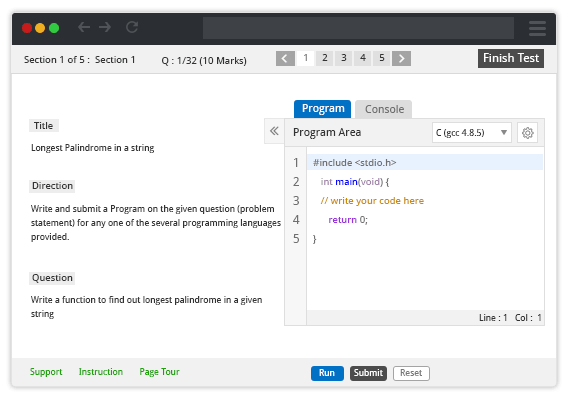
EYardstick is all about innovative ways of improving the candidate selection process, we go a step deep into making questions for the online coding test depending on their need, be it the Algorithm Based questions or Data Structures or Fix the Error kind of questions or case-wise built problem statement questions.