TrustRadius: an HG Insights company

Save this comparison

Save this comparison

Add Product

Recommended Comparisons

    Overview
    ProductRatingMost Used ByProduct SummaryStarting Price

    FigJam

    Score7.9 out of 10
    N/AFigJam is an online interactive whiteboard from Figma headquartered in San Francisco, presently in beta (2021) but available to the public in a free trial. The vendor states that in 2022, FigJam will have plans for $0, $8, and $15 per editor, per month.

    $5

    per month per editor

    OpenText Hightail

    Score9.3 out of 10
    N/AOpenText Hightail is a cloud-based collaboration software for creative content reviews and approvals. With one place for teams to share large, multimedia files, collect precise feedback and approve content, Hightail streamlines the creative process and helps teams keep projects on schedule.

    $0

    100MB per file upload

    Pricing
    FigJamOpenText Hightail
    Editions & Modules
    FigJam Professional
    $36
    per year per editor
    FigJam Organization
    $60
    per year per editor
    Lite
    $0
    100MB per file upload
    Pro
    $15
    per user, per month
    Teams
    $30
    per user/per month
    Business
    Custom
    per user, per month
    Offerings
    Pricing Offerings
    FigJamOpenText Hightail
    Free Trial
    YesYes
    Free/Freemium Version
    YesYes
    Premium Consulting/Integration Services
    NoNo
    Entry-level Setup FeeNo setup feeNo setup fee
    Additional Detailsβ€”Lite: Send large files with anyone. Files are limited to 100MB for each file size uploaded, 2GB storage max. Files expire after 7 days. Pro: Send large files with anyone and set advanced security permissions such as expiration dates and access codes. Files are limited to 25GB for each file size uploaded, with unlimited storage. Teams: Send large files, collaborate in real-time and manage creative projects with your team. The Hightail Teams plan allows you to purchase multiple users online (from 1-30 users per organization) and allows users to send file sizes up to 50GB with unlimited storage. The Teams plan also includes features such as file previews, organization, annotations, version control, discussions, follow-ups, approval routing and more. Business: Create unlimited visual project folders (called a Space) with collaboration and project management features such as approval routing and assigning to-dos, upload unlimited files up to 100GB each, protect them with access codes and manage user permissions., plus intuitive admin controls , detailed activity analysis for your entire company, advanced organization options and priority support.
    More Pricing Information
    Community Pulse
    FigJamOpenText Hightail
    Considered Both Products
    Figma
    No answer on this topic
    OpenText
    No answer on this topic
    Key User Insights
    Would buy again
    83%
    Would buy again
    5 Answers
    No answers on this topic
    Delivers good value for the price
    83%
    Delivers good value for the price
    5 Answers
    No answers on this topic
    Happy with the feature set
    67%
    Happy with the feature set
    4 Answers
    No answers on this topic
    Lived up to sales and marketing promises
    No answers on this topic
    No answers on this topic
    Implementation went as expected
    No answers on this topic
    No answers on this topic
    Best Alternatives
    FigJamOpenText Hightail
    Small Businesses
    Whimsical
    Score9.3 out of 10
    Frame.io
    Score9 out of 10
    Medium-sized Companies
    Whimsical
    Score9.3 out of 10
    No answers on this topic
    Enterprises
    Whimsical
    Score9.3 out of 10
    No answers on this topic
    All AlternativesView all alternativesView all alternatives
    User Ratings
    FigJamOpenText Hightail
    Likelihood to Recommend
    8.0
    (6 ratings)
    9.0
    (8 ratings)
    Usability
    8.6
    (3 ratings)
    -
    (0 ratings)
    User Testimonials
    FigJamOpenText Hightail
    Likelihood to Recommend
    Figma
    If you're working in small product teams, like triads, and already using Figma, this is a no brainer for white boarding, quick/fast sketches, wireframing, collaborative doodling ... it gets less appropriate with large teams, infrequent. IMO, due to the way in which they price, it's better to keep the inner circle small-ish.
    Incentivized
    Read full review
    OpenText
    Hightail is my go-to source when I need to send large files that would never fit as regular attachments. That being said, sometimes there are files that would perfectly fit as attachments but I want the security that Hightail provides when sending sensitive or private material. It's very comforting knowing that the content I'm sending is only being received and viewed by the intended parties. It's also comforting for my clients when it's THEIR content that I'm sending for review.
    Incentivized
    Read full review
    Pros
    Figma
    • One file, auto updated, no need to get latest
    • Easy to preview
    • Lack of client is benefit to some (not me)
    Incentivized
    Read full review
    OpenText
    • Management of content, communication, spaces, and projects in general.
    • Control of processes, tasks and activities between the different members of teams.
    • Collaborative work through different media and channels.
    Incentivized
    Read full review
    Cons
    Figma
    • It misses easy-to-use pre sets of diagrams. The ones presented seem to be not native and hard to use. Miro is a good benchmark.
    • Navegating throught projects in the main page is confusing, specially when people are not admin users.
    • It should suggest ways of organizing the pages designers do, specially when the project is big and have many pages and sections.
    • It could have, for example, a draft version for every page, so that one can hide it when they finish the work, but can open it whenever something needs to be modified, versioning the job.
    Read full review
    OpenText
    • Some of our recipients are not very tech-savvy and can get confused with how to download a file. There is some room for improvement by making it clearer where the user should click to download the file.
    Incentivized
    Read full review
    Usability
    Figma
    I don't use it often, because the organization I work in uses a different environment on a commo basis. This is rather used between the designers, who prototype the solutions in Figma - they just have it as a workbook/notebook for their ideas. However, if those need to be shared with stakeholders or other organization members, the designers are expected to use a different environment.
    Incentivized
    Read full review
    OpenText
    No answers on this topic
    Alternatives Considered
    Figma
    FigJam works best in pair with Figma, as it allows you to keep track of your project in one place, supporting all phases of the process. The functionality is more intuitive, quick, and efficient. Visually, I also prefer it more β€”it’s more enjoyable and playful, making the experience much more engaging.
    Incentivized
    Read full review
    OpenText
    Honestly, once we started using Google Drive more efficiently and saw what improvements OpenText Hightail had made, it was hard to choose. But now that we more consistently use Google Drive, I use it probably 75% more than I use OpenText Hightail for the same tasks. I'm not sure how much longer I'll be a customer at OpenText but it's great to have both options.
    Incentivized
    Read full review
    Return on Investment
    Figma
    • FigJam saves a lot of time ... it's nice to have all my visual notes/sketches within Figma itself where a lot of design work lives
    • The project organization and other features contribute to the ease of answering that age old question ... "where can I find that mockup?"
    • Dev Mode is pretty cool. Not many use it, so some designers may spend unnecessary time spec'ing out things that no one will appreciate, let alone look at.
    Incentivized
    Read full review
    OpenText
    • Hightail simply saves time. We no longer struggle with trying to meet the requirements of OutLook. When we have a file that is too large to send via OutLook we just "hightail it".
    Incentivized
    Read full review
    ScreenShots

    OpenText Hightail Screenshots

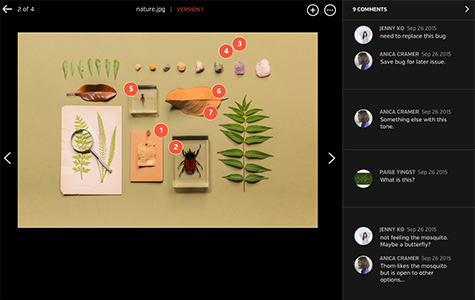
    Screenshot of Improve review process with inline commenting for visual files.Screenshot of Compare each update instantly with visual versions.Screenshot of Bring everyone and everything together in a Space.Screenshot of Improve the audio and video review process with time-stamped commenting.