FollowUp Power CRM for Construction is a CRM system for the construction industry. Features include lead tracking, sales pipeline analysis, closing ratios, quota management, project management, and dashboards. It can integrate with other marketing and accounting products.
N/A
TOPdesk
Score8.4 out of 10
Mid-Size Companies (51-1,000 employees)
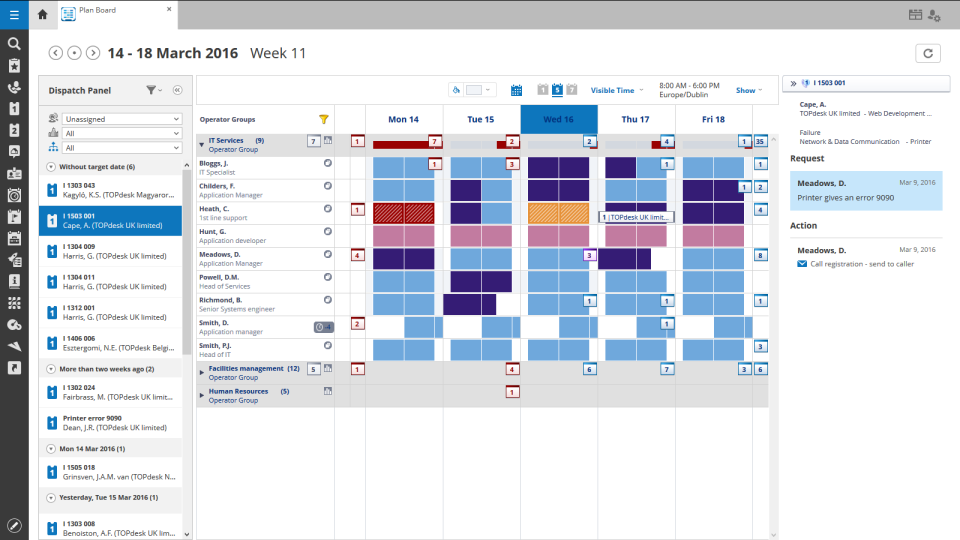
TOPdesk is the flagship highly-modular cloud-based or installed ITSM service desk and asset management solution from the Dutch company of the same name, for enterprise companies.
$76
per month Per agent
Pricing
FollowUp CRM
TOPdesk
Editions & Modules
No answers on this topic
Essential
$76
per month Per agent
Engaged
$109
per month Per agent
Excellent
$155
per month Per agent
Offerings
Pricing Offerings
FollowUp CRM
TOPdesk
Free Trial
No
Yes
Free/Freemium Version
No
No
Premium Consulting/Integration Services
No
Yes
Entry-level Setup Fee
No setup fee
Optional
Additional Details
—
The TOPdesk license model:
- Modular: Organizations purchase only the modules needed
- Saas or On premise
- Supports unlimited number of assets.
- Service agents based.
- Discount available for annual pricing.
One of the best things about FollowUp Power is that we can mark things for follow-up several months down the line, which we frequently have a need for since many of our clients are seasonal. For example, we'll get started working with them while they're here in Florida for the winter, then they'll head back north in the spring and not want to hear from us again until they return in the fall. With FollowUp Power, we can then mark them for follow up in the future rather than to have to somehow remember to contact them in the future.
A de minimis incentive was given to thank the reviewer for their time. The incentive was not used to bias or drive a particular response, nor was the incentive contingent on a positive endorsement. More Info
It is an easy-to-use platform with a lot of capabilities. We use it for knowledge databases and it makes my work as Application Owner way easier and faster. It also provides a clear view of the issues running in our organization. We can clearly see where our colleagues are having problems. It also provides a clear view of my support tickets. Also, the reporting tools and the asset management are very nice.
A de minimis incentive was given to thank the reviewer for their time. The incentive was not used to bias or drive a particular response, nor was the incentive contingent on a positive endorsement. TR verified that a representative sample of customers was invited. More Info
We love the dashboard feature. This is where we spend the majority of our time. The dashboard helps us avoid missing bid dates and deadlines.
The system is very intuitive and a new user will be up to speed within one hour after they start using the system. There is only one place to enter all data. This allows for ease of use and minimizes data entry mistakes.
Every task is date stamped to insure proper work flow and holds the team accountable to each other.
It really needs to have the capability of listing numerous phone #s with a note beside each one ("his cell#", "her work#", "do not call before 9a.m.", etc.).
It really needs to have the capability of listing numerous e-mail addresses ("hers", "his", "her email address at work", etc.).
It would be nice to have a separate general information box where we could put comments in that would show every time we bring up the account (such as "her nickname is Bobbi", "their dogs name is Fido, "their son is currently stationed in France", "husband is going through chemotherapy", etc.), which would help us to remember personal details that are important to our clients.
A de minimis incentive was given to thank the reviewer for their time. The incentive was not used to bias or drive a particular response, nor was the incentive contingent on a positive endorsement. More Info
If I could choose a new ticketing/asset/ITSM tool and a company I would definitely go with TOPdesk. I like the fact that the support team is also in Dutch and the pricing at the time we purchased it was very affordable. It had all the features we needed and since then the product has come a long way and has many built in out-of-box features that require much less config and setup time. However still very customizable so can be adapted to any customer/environment.
A de minimis incentive was given to thank the reviewer for their time. The incentive was not used to bias or drive a particular response, nor was the incentive contingent on a positive endorsement. TR verified that a representative sample of customers was invited. More Info
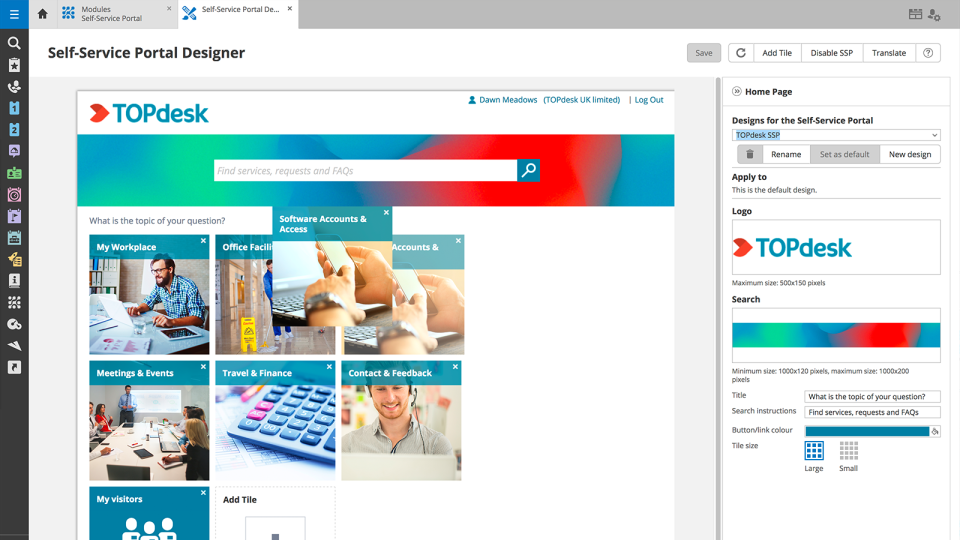
In short, we've been able to remove many pain points, automate multiple things, and empowered the end-user by being able to manage more items via the Self Service Portal. We've been able to do more than we were able to do with our previous ITSM platform. The TOPdesk development team added some things recently that will allow us to make some other things more efficient.
A de minimis incentive was given to thank the reviewer for their time. The incentive was not used to bias or drive a particular response, nor was the incentive contingent on a positive endorsement. TR verified that a representative sample of customers was invited. More Info
Like I said somewhere else in this review: the helpdesk of TOPdesk is top of the bill! In the Netherlands, that is. I can not plea for the helpdesks in other countries, but I guess the TOPdesk organization will make sure the quality of the helpdesk is the same in every country.
A de minimis incentive was given to thank the reviewer for their time. The incentive was not used to bias or drive a particular response, nor was the incentive contingent on a positive endorsement. TR verified that a representative sample of customers was invited. More Info
Although being a SAAS solution, TOPdesk performs pretty fast. One can imagine that any SAAS solution is slow or has hiccups, but we have not experienced such with TOPdesk. Pages load quickly, logging in goes smoothly. We have made reports on premise in the past - that always took some time, as you might expect with such complex tasks. It seems that in the SAAS solution TOPdesk somehow has managed to make it even faster!
A de minimis incentive was given to thank the reviewer for their time. The incentive was not used to bias or drive a particular response, nor was the incentive contingent on a positive endorsement. TR verified that a representative sample of customers was invited. More Info
Most if not nearly all questions are answered within the same or a few days. The helpdesk is very knowledgable about their product and are always willing to help. The only downside is that for more difficult questions it can take a while due to the experts being further removed from the helpdesk. But they are always willing to answer questions, even if they are not directly related to a problem with the service.
A de minimis incentive was given to thank the reviewer for their time. The incentive was not used to bias or drive a particular response, nor was the incentive contingent on a positive endorsement. TR verified that a representative sample of customers was invited. More Info
We had Topdesk in-house here training staff for almost a month (2-3 hour meetings 3x a week.) It was invaluable and we were able to take that training and share with the rest of our IT staff. Once implemented we were able to fly from there. The challenges we found were in how to get started. Once started the knowledge base offered from Topdesk has been invaluable.
A de minimis incentive was given to thank the reviewer for their time. The incentive was not used to bias or drive a particular response, nor was the incentive contingent on a positive endorsement. TR verified that a representative sample of customers was invited. More Info
Online training documentation is easy to access and consume. There is no real challenges with finding information on how to use the product and some really helpful knowledge base items that show us how valuable these options are in our own implementation of it. The online training we've used has been self driven
A de minimis incentive was given to thank the reviewer for their time. The incentive was not used to bias or drive a particular response, nor was the incentive contingent on a positive endorsement. TR verified that a representative sample of customers was invited. More Info
It was a challenge to port over years of the same thing and we ended up keeping old ideas in Topdesk that we will eventually weed out as time passes and we learn how users view categories and flows of tickets. Planning is key but bear in mind that just because you used to do it this way doesn't mean you still have to
A de minimis incentive was given to thank the reviewer for their time. The incentive was not used to bias or drive a particular response, nor was the incentive contingent on a positive endorsement. TR verified that a representative sample of customers was invited. More Info
My company had already implemented FollowUp Power CRM for Construction before I arrived. I have used other CRM programs in the past, and FollowUp Power is much more user friendly, and I have already seen a direct increase in my lead to customer conversion ratio as well as increased sales
Spiceworks is an easier-to-use Help Desk solution but it lacks all other features that Topdesk has. Freshdesk was just too much for our environment. It was cost-prohibitive for our intended use. TOPdesk fit our org size and budget better than the others.
A de minimis incentive was given to thank the reviewer for their time. The incentive was not used to bias or drive a particular response, nor was the incentive contingent on a positive endorsement. TR verified that a representative sample of customers was invited. More Info
TOPdesk is very flexible and scalable. Every department in you organization can you the software. Perhaps some persons need some training, but that can be provided by TOPdesk ot some keyusers.
A de minimis incentive was given to thank the reviewer for their time. The incentive was not used to bias or drive a particular response, nor was the incentive contingent on a positive endorsement. More Info
I have seen a lot better tracking on my jobs when it comes to scheduling and staying on top of my jobs.
The dashboard is part of my daily routine it tells me exactly what I need to follow up on weather it is calling the customer or checking on the customer.
Payments or what the current status of the job is.
A de minimis incentive was given to thank the reviewer for their time. The incentive was not used to bias or drive a particular response, nor was the incentive contingent on a positive endorsement. TR verified that a representative sample of customers was invited. More Info
A good number of incidents can solved more quickly. Those cases can be solved by the customer itself and in TOPdesk it is very easy to send the self-service-solution with your answer.
It is easier to report some things based on categorization and good search filtering
If there are two or more tickets, they are difficult (or impossible) to merge correctly. There is a merge function, but there is for example, only one client possible. A solution where you close one merged ticket and send separate emails to every single customer would be really nice!