Overview
ProductRatingMost Used ByProduct SummaryStarting Price
Forcepoint DLP
Score 8.0 out of 10
N/A
Forcepoint Data Loss Prevention (DLP) protects sensitive data everywhere it resides and moves, across endpoints, cloud apps, web, email, and on-premises environments. It delivers unified policy management and centralized control from a single console.N/A
Insightful
Score 7.1 out of 10
Small Businesses (1-50 employees)
Insightful is workforce analytics software that shows how work actually happens across teams, showing users where time is going, how teams are performing, and where work is breaking down — without relying on manual tracking or guesswork.
$8
per month per seat
WorkTime
Score 9.0 out of 10
N/A
WorkTime is an employee monitoring software designed to analyze employee behavior and help companies boost productivity and performance. The software is compatible with Windows OS and Mac OS and operates both on-premise and in cloud. After installation, the WorkTime agent collects information, analyzes it and provides employers with personalized reports to help them better understand the working habits of their office workers and remote teams. WorkTime analyzes the general trends in attendance…
$4.99
per employee per month
Pricing
Forcepoint Data Loss PreventionInsightfulWorkTime
Editions & Modules
No answers on this topic
Productivity Management
$8
per month per seat
Time Tracking
$10
per month per seat
Automatic Time Mapping Annual
$12
per month per user
Automatic Time Mapping Annual
$12
minimum 250 users
Process Improvement
$15
per month per seat (over 50 users)
Enterprise Solutions
Custom
per employee per month
Enterprise (On-Premise)
Custom
minimum 250 users
WorkTime Corporate
from $13.99
per employee
WorkTime Cloud
from $4.99
per employee per month
Offerings
Pricing Offerings
Forcepoint DLPInsightfulWorkTime
Free Trial
NoYesYes
Free/Freemium Version
NoNoYes
Premium Consulting/Integration Services
NoNoNo
Entry-level Setup FeeNo setup feeNo setup feeNo setup fee
Additional DetailsEach device an employee uses for work counts as one seat. Additionally, users with Admin, Manager and Client access won’t be charged, unless Insightful is used to track their activities as well. Discount of up to 20% is available for annual billing.WorkTime is free for up to 3 employees. Annual discounts – two months free. 30 days FREE fully-featured evaluation.
More Pricing Information
Community Pulse
Forcepoint Data Loss PreventionInsightfulWorkTime
Features
Forcepoint Data Loss PreventionInsightfulWorkTime
Data Preparation
Comparison of Data Preparation features of Product A and Product B
Forcepoint Data Loss Prevention
5.5
2 Ratings
35% below category average
Insightful
-
Ratings
WorkTime
-
Ratings
Data Encryption5.52 Ratings00 Ratings00 Ratings
Best Alternatives
Forcepoint Data Loss PreventionInsightfulWorkTime
Small Businesses
Paubox Email Suite
Paubox Email Suite
Score 9.0 out of 10
Traqq
Traqq
Score 9.1 out of 10
Traqq
Traqq
Score 9.1 out of 10
Medium-sized Companies
Druva Security Cloud
Score 9.4 out of 10
ManageEngine ADAudit Plus
Score 9.0 out of 10
ManageEngine ADAudit Plus
Score 9.0 out of 10
Enterprises
Druva Security Cloud
Score 9.4 out of 10
ManageEngine ADAudit Plus
Score 9.0 out of 10
ManageEngine ADAudit Plus
Score 9.0 out of 10
All AlternativesView all alternativesView all alternativesView all alternatives
User Ratings
Forcepoint Data Loss PreventionInsightfulWorkTime
Likelihood to Recommend
6.6
(35 ratings)
9.0
(1 ratings)
9.0
(4 ratings)
Likelihood to Renew
7.6
(7 ratings)
-
(0 ratings)
-
(0 ratings)
Usability
6.6
(3 ratings)
-
(0 ratings)
-
(0 ratings)
Support Rating
5.3
(12 ratings)
-
(0 ratings)
7.3
(1 ratings)
User Testimonials
Forcepoint Data Loss PreventionInsightfulWorkTime
Likelihood to Recommend
Forcepoint
-Where companies need to secure their attachment, which goes outside, means from their company to outside -Where companies need to ensure their client's personal information -Where companies need DLP. They need to look for Forcepoint only, as they have the upper hand over the rest of their competitors.
Read full review
Insightful.io
As I already mentioned above, Workpuls helped us a lot while working from home and it helped us to track each and every moment of the employees. While tracking the different websites which employees were using and also helped with the productive and unproductive work done by each candidate as per the login on different websites and software.
Read full review
WorkTime
If you're not doing all your work on your computer, you'll find this software pretty useless unless you can login and then logout when you start and end your day. However, I will definitely recommend it to anyone who does an hourly paid job. It's much easier to calculate wages with timely reporting. Great support team software and flexible working hours.
Read full review
Pros
Forcepoint
  • It has predominantly protected us from unauthorized parties and has provided us with better visibility and control over our data.
  • This software has also successfully prevented us from both malicious and accidental tasks, which are quite flexible actions when it comes to the violation of data loss prevention policies.
  • This product has been successful in improving compliance and even mitigating compliance violations, which further facilitated IT security.
  • I think there is room for improvement, as the user interface is slightly rough and difficult to adopt in the beginning. The software also hangs up at a few instances, which leads to some wasting of time and annoyance, but other than that, this software is good. The technical staff should work on the complexities for a better user experience.
Read full review
Insightful.io
  • Analysis of websites.
  • Screenshot of change of window.
  • Evaluation of productive and unproductive work.
Read full review
WorkTime
  • monitoring
  • reporting
  • data exporting
Read full review
Cons
Forcepoint
  • Forcepoint technical support--specially for users who go with essential support--is challenging to get support on time. You need the ticket to be raised long beforehand to get support from TAC. However, in the case of enterprise support, its is not like this technical person will come on a priority basis.
  • However it comes with higher prices, especially for SMB, it is allowed to pay that amount for support only.
Read full review
Insightful.io
  • As of now we haven't feel any missing feature for this particular software.
Read full review
WorkTime
  • Data importing
  • User interface design
  • Creation of explanatory videos
Read full review
Likelihood to Renew
Forcepoint
We have been fairly happy with the product and how it has worked. We have looked at other vendors for url filter and such and have not found one that meets our needs or does what we have been doing with Websense. The product has been fairly stable and we have only had a few issues in the past. We have all seen that it was one of the highest leaders from the Gartner Group Magic Quadrant for Web Gateways.
Read full review
Insightful.io
No answers on this topic
WorkTime
No answers on this topic
Usability
Forcepoint
For us, Forcepoint Data Loss Prevention was difficult to administer, did not work well when it did work, was incredibly expensive for the feature set you get, and was difficult to uninstall when we moved on from the software. Once it was fully set up, it worked occasionally for us.
Read full review
Insightful.io
No answers on this topic
WorkTime
No answers on this topic
Support Rating
Forcepoint
Support from Forcepoint has been lacking. When calling in with a high priority issue we rarely are able to work with a technician immediately. The queue waits are very long and when you get through there are no support engineers available and we need to wait for a call back for hours it seems.
Read full review
Insightful.io
No answers on this topic
WorkTime
WorkTime has very helpful employees. Even the CEO is welcoming and easy to reach. They provide full support via chat and email. Their tech department even created special script to help me fulfill needs of my team. You can also reach then on the phone via their business hours. The downside is the absence of 24/7 support or at least an Irish subsidiary for local users support.
Read full review
Alternatives Considered
Forcepoint
User friendly solution that makes it easy to deploy and manage. Forcepoint Data Loss Prevention very effective to protecting our valuable data on endpoints and where data lives like in the Cloud, server and on-premises disk drives and its valuable to just set policies once and start utilizing Forcepoint Data Loss Prevention solution.
Read full review
Insightful.io
While evaluating different software we checked different software but Workpuls seems user-friendly and cost-efficient, also the customer support is very active and as compared to other software we found it easy.
Read full review
WorkTime
We're using employee monitoring for the first time
Read full review
Return on Investment
Forcepoint
  • The exchange of financial documents with customers creates extreme risk as data loss could result in financial and reputation damage to the customer. The cost of deploying Forcepoint is fractions of pennies compared to the potential financial impact of data loss.
  • There is some administrative overhead associated as false positives are inevitable, requiring a manual review and a potential loss of productivity.
Read full review
Insightful.io
  • Workpuls helped a lot with the positive way only to get the more productivity from employees while working from home.
Read full review
WorkTime
  • The program has helped us detect unused software
  • It assists in business management
Read full review
ScreenShots

Insightful Screenshots

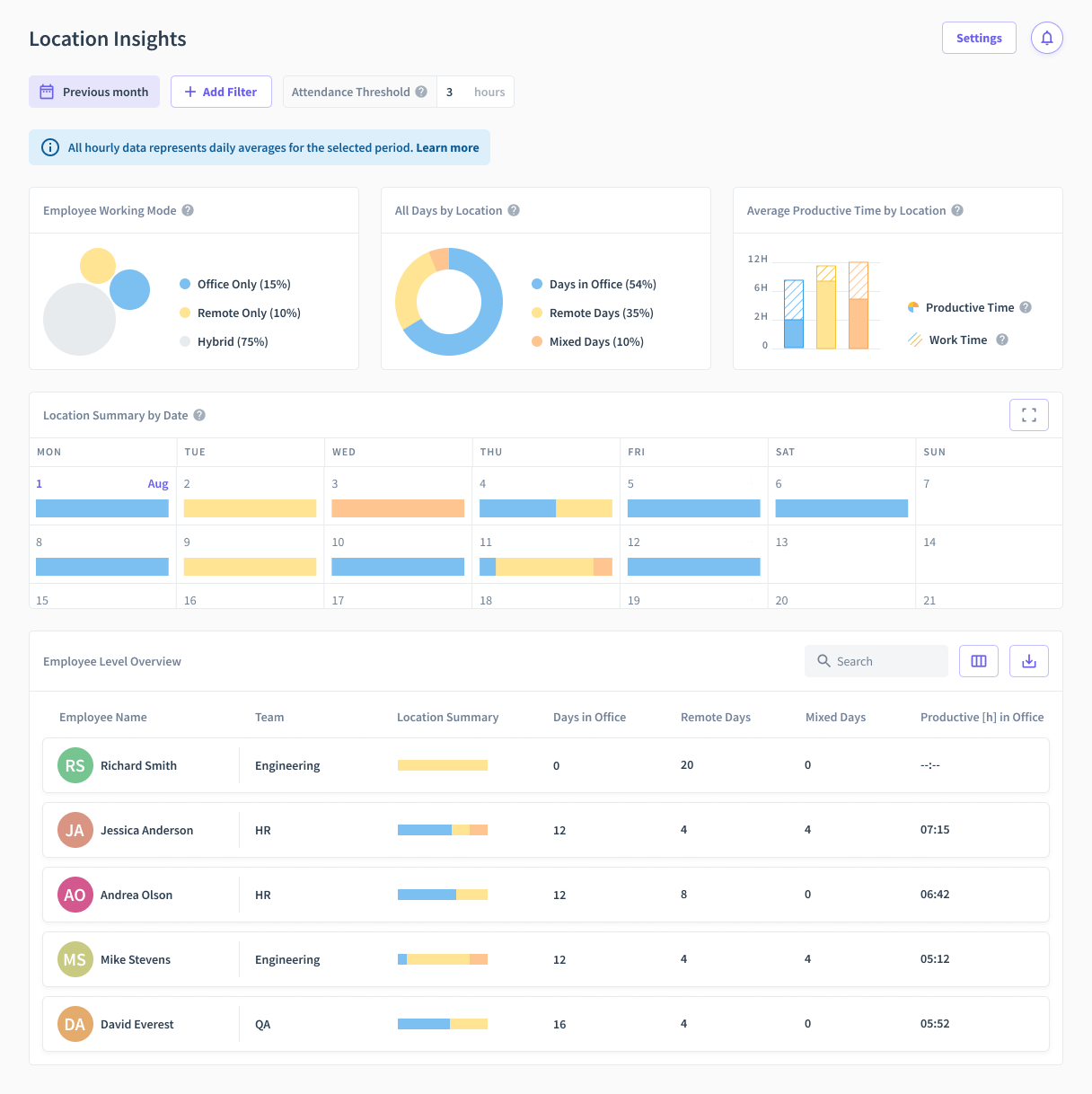
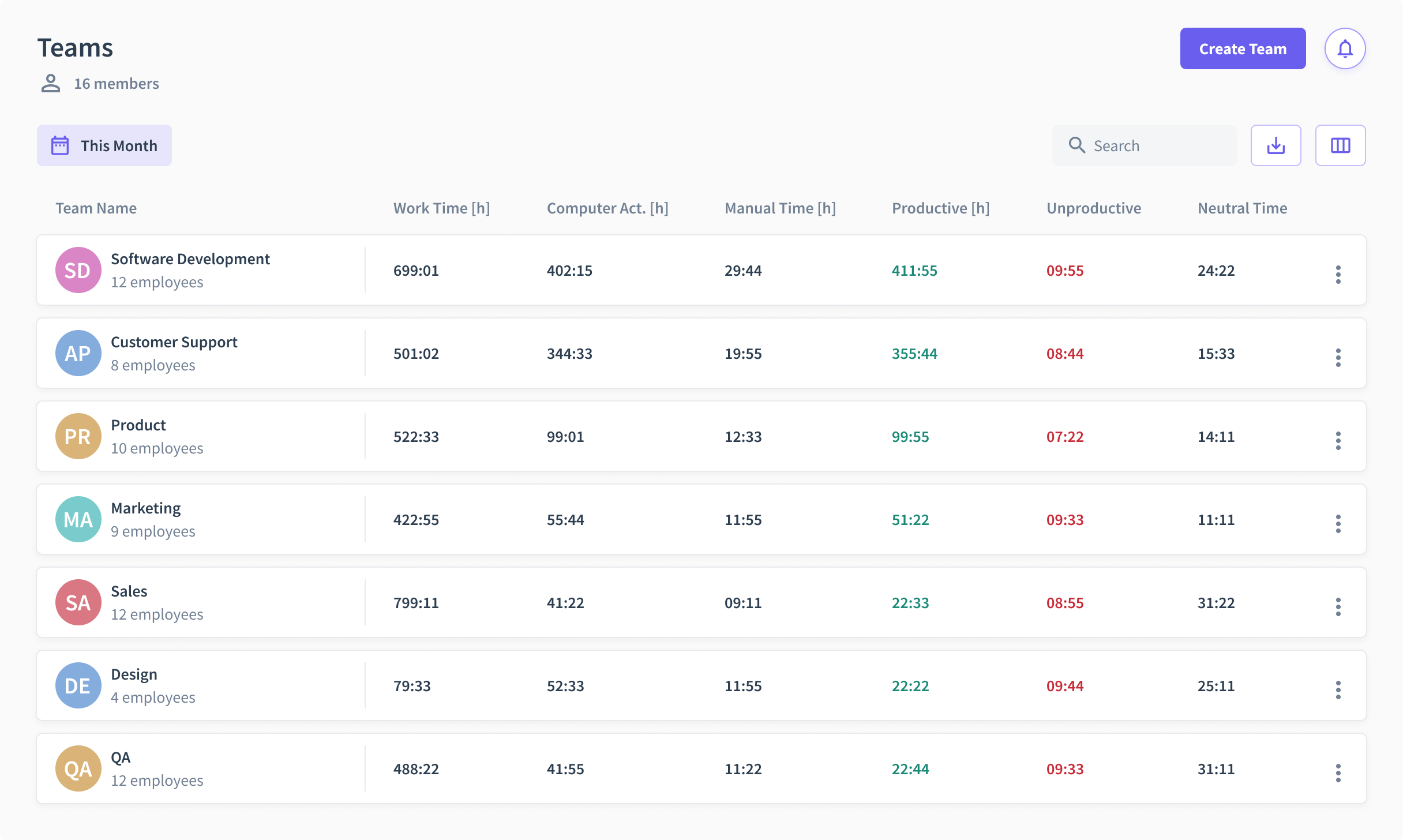
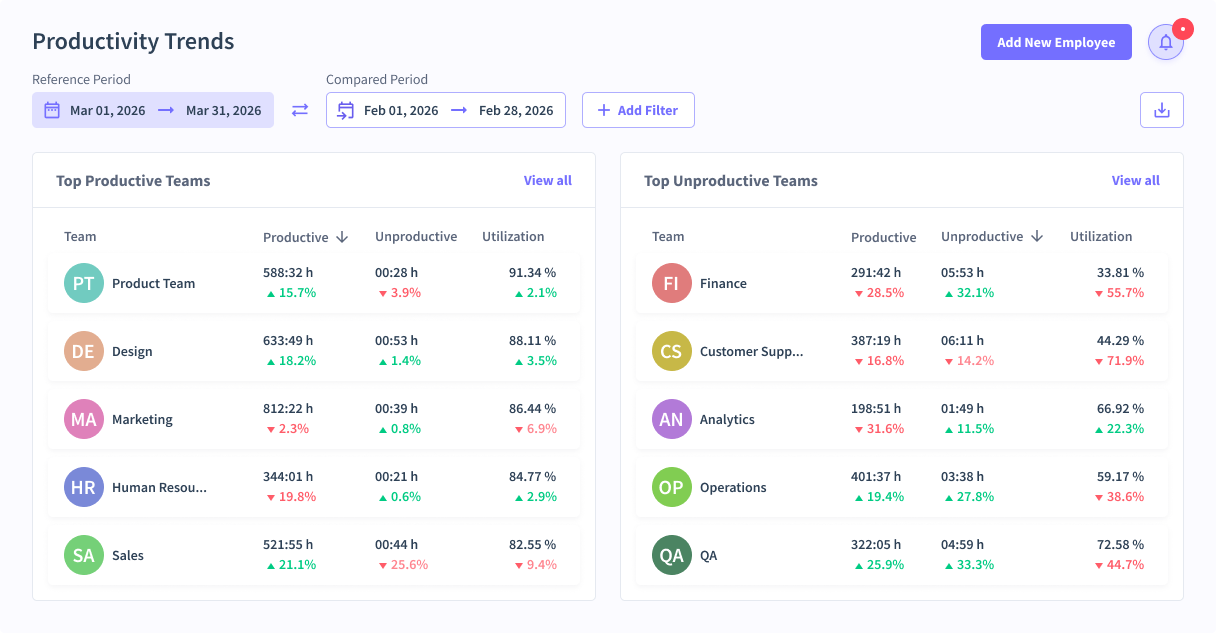
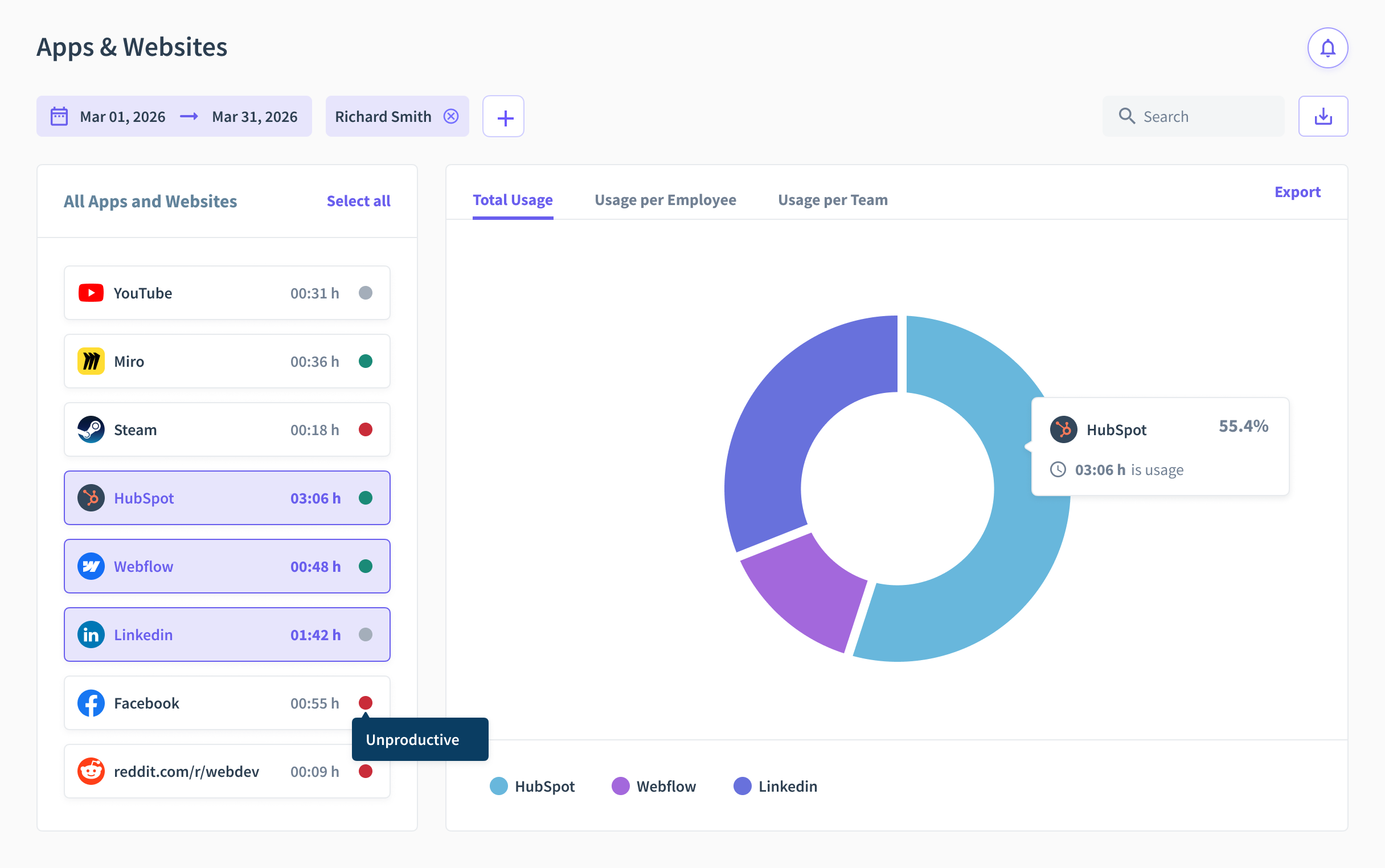
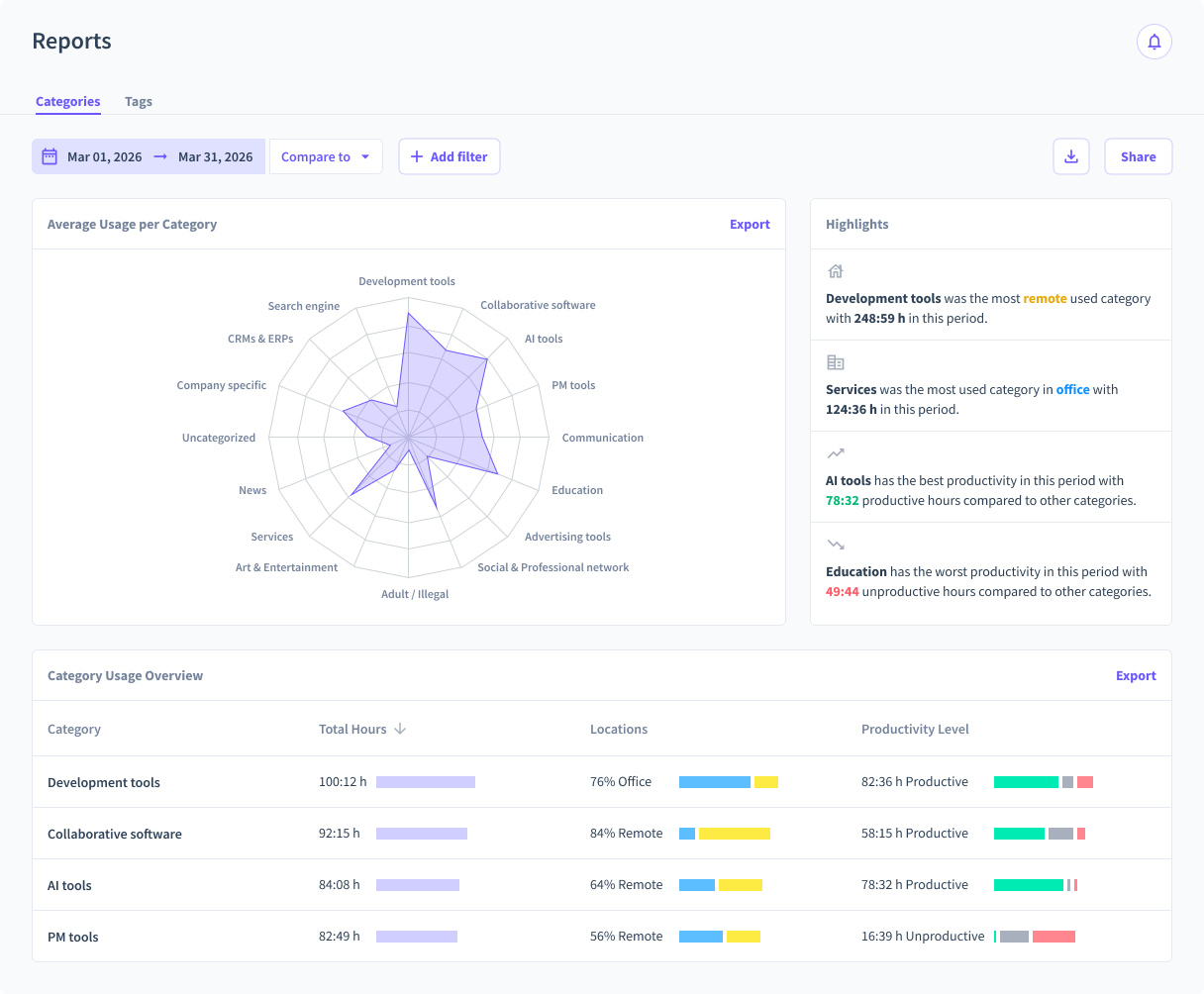
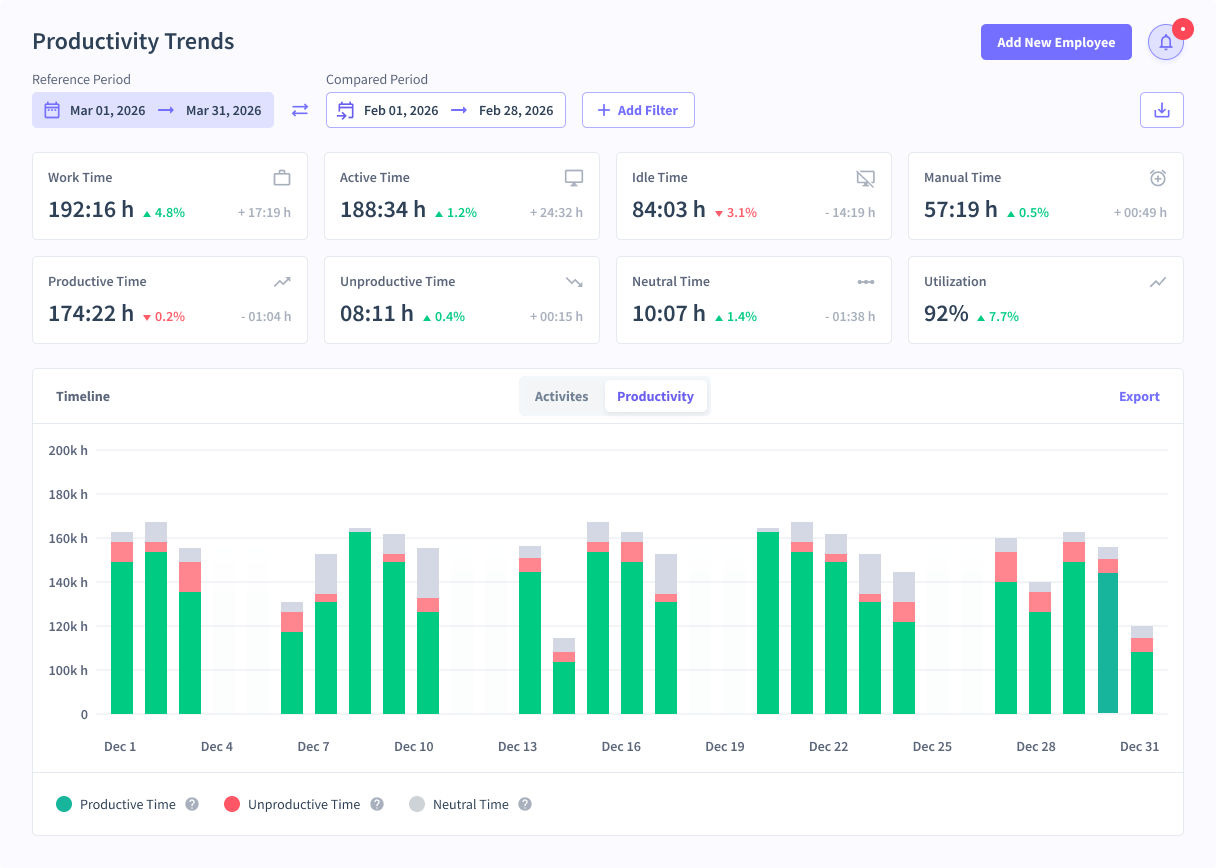
Screenshot of Location Insights ReportScreenshot of Teams OverviewScreenshot of Team Productivity TrendsScreenshot of Apps and WebsitesScreenshot of ReportsScreenshot of Productivity Trends

WorkTime Screenshots

Screenshot of Report "Summary"Screenshot of Report "Employee detailed info"Screenshot of Report "Internet use"Screenshot of Report "Web surfing per hour"