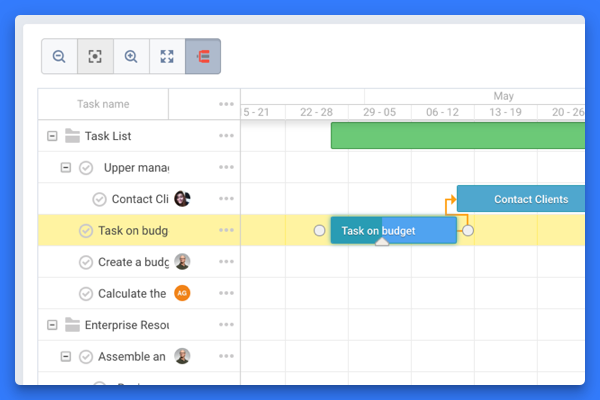
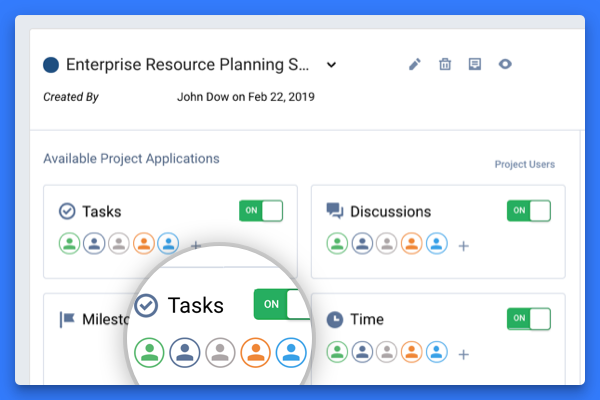
The vendor states Freedcamp helps tens of thousands of teams around the world manage their work. Their free plan contains tasks(in list and kanban view), milestones, discussions, calendar,
time-tracking and password management. On their premium plans, they also offer Gantt charts, Wikis, Issue Tracking, CRM and Invoices+.
$2.49
per month
Workamajig
Score7.6 out of 10
N/A
Workamajig is a project management system with capabilities such as file sharing, resource management, and revenue projection.
$41
per month per user
Pricing
Freedcamp
Workamajig
Editions & Modules
Minimalist
$2.49
per month
Business
$8.99
per month
In-house
$41
per month per user
Agency
$41
per month per user
Enterprise
Contact
per month per user
Offerings
Pricing Offerings
Freedcamp
Workamajig
Free Trial
Yes
No
Free/Freemium Version
Yes
No
Premium Consulting/Integration Services
No
No
Entry-level Setup Fee
No setup fee
No setup fee
Additional Details
—
—
More Pricing Information
Features
Freedcamp
Workamajig
Project Management
Comparison of Project Management features of Freedcamp and Workamajig
Feature
Freedcamp
8.9
4 Ratings
15% above category average
Workamajig
4.9
13 Ratings
44% below category average
Task Management
8.14 Ratings
8.013 Ratings
Gantt Charts
10.02 Ratings
6.16 Ratings
Scheduling
7.33 Ratings
5.011 Ratings
Team Collaboration
7.33 Ratings
5.013 Ratings
Email integration
10.01 Ratings
5.510 Ratings
Mobile Access
10.01 Ratings
1.08 Ratings
Timesheet Tracking
10.02 Ratings
8.011 Ratings
Resource Management
00 Ratings
5.513 Ratings
Workflow Automation
00 Ratings
4.011 Ratings
Support for Agile Methodology
00 Ratings
3.07 Ratings
Support for Waterfall Methodology
00 Ratings
3.07 Ratings
Document Management
00 Ratings
4.013 Ratings
Change request and Case Management
00 Ratings
4.08 Ratings
Budget and Expense Management
00 Ratings
7.010 Ratings
Professional Services Automation
Comparison of Professional Services Automation features of Freedcamp and Workamajig
I have used a number of different Project Management Tools and this is the one I always make the team come back to, it's easy to use, has great support, and can be used by people of various levels of technical ability. When planning a complicated network, that needs to be sold to a customer, all people within the company have needs that have to be addressed, from the obvious technical, but also legal, regulatory, finance, and ordering of equipment and all these have different milestones, that interconnect, this is where Freedcamp shines, it allows all of the company to work together to achieve the technical sale.
If you're looking for a system to help you address accounting that's not suited for marketing agency structures, this is the right tool. It is a bit cumbersome, but it has streamlined our reporting, billing, estimating, and tracking. As for project management, it's great that it integrates with the estimating and finances, but it's just not enjoyable to use. The interface is clunky. So if project management is your main criteria, I'd choose something else. We would never use it to collaborate with clients either because I'd be afraid of making them frustrated by the tool, so we use Basecamp to do that.
A de minimis incentive was given to thank the reviewer for their time. The incentive was not used to bias or drive a particular response, nor was the incentive contingent on a positive endorsement. More Info
The Platinum version has a particularly robust time tracking system, down to a 'timer' function that can be critical for an agency like mine where you want to be accountable for billing a client arruately
The ability to make projects available only to those who are permitted to assign their time to it has apparently been very helpful during our revenue reconciliation meetings where time incurred is reviewed against scope
The mobile app, while I still feel needs some work, is pretty handy for a quick calendar check if I'm in a client meeting and cannot utilize my browser to get information
A de minimis incentive was given to thank the reviewer for their time. The incentive was not used to bias or drive a particular response, nor was the incentive contingent on a positive endorsement. More Info
WMJ's interface is dated. Despite an html5 driven "sheets"-based interface, it takes a lot of time and effort to manage the interface, which could be streamlined considerably. On a UX/UI scale of 1 to 10, with 10 being the best, WMJ would earn a 6 from me.
Despite the amount of documentation available, there is a distinct lack of clarity in that documentation, and it doesn't fully cover everything you would expect. Branching thoughts, for instance, are not addressed. Additionally, because there are two editions of the software online, there are two support sites that aren't sequestered. So information from both commingles, creating confusion.
Support is available on an email and phone basis. They strongly encourage you to use email, however, and they are resistant to phone time. This is likely because the support staff is limited in number, but has a great depth of knowledge. If you want immediate phone support, however, YOU ARE OUT OF LUCK. You are placed in a queue and the odds of same-day help are low. For email, the response is usually within an hour, but when you are stuck with a configuration issue, or need to generate a report and don't know how to do something, waiting is not optimal. That said, the support team is TERRIFIC.
A de minimis incentive was given to thank the reviewer for their time. The incentive was not used to bias or drive a particular response, nor was the incentive contingent on a positive endorsement. More Info
It basically provides everything we need in terms of functionality. No tool is perfect and this one can improve in the visual department and maybe doesn't offer quite as much as the most advanced project management tools out there.
A de minimis incentive was given to thank the reviewer for their time. The incentive was not used to bias or drive a particular response, nor was the incentive contingent on a positive endorsement. More Info
Especially a few years ago when Freedcamp was first starting, I needed support, sometimes, I'd find a bug as a heavy user, Igor and Angel are great people who are quick to reply and help you as well as the other great staff. Freedcamp's support is the best of any software product I use.
Maybe not as good and visually appealing as Jira and Trello. But it offers a much better free tier and better prices for a small organisation as we are. Freedcamp and Kanbanchi is quite similar but Kanbanchi lacks the wide range of functionality in its free tier and makes it difficult to start up in a team.
A de minimis incentive was given to thank the reviewer for their time. The incentive was not used to bias or drive a particular response, nor was the incentive contingent on a positive endorsement. More Info
Workamajig was selected over a decade ago when there were very few project management platforms that has integrations with other platforms, support for Agile, KanBan, etc etc. Most of the other offerings did not offer the type of security available with us hosting an on premises server behind a VPN although now there are plenty of cloud based solutions that have security compliance greater than what we can provide (fedRamp, etc.)
A de minimis incentive was given to thank the reviewer for their time. The incentive was not used to bias or drive a particular response, nor was the incentive contingent on a positive endorsement. More Info
The agency switched to an hourly allocation so our clients were subject to a certain amount of hours each quarter. JIG helped us keep track of who was going over hours or who had some to spare. Once the clients went over we would use JIG to help charge the additional fees for going over. It helped keep clients accountable.
It was used to keep track of time sheets and through those time sheets, the directors were able to make a case for more employees on certain accounts. The corporate team hired 3 additional people that were truly needed and our time sheets helped reflect that.
A de minimis incentive was given to thank the reviewer for their time. The incentive was not used to bias or drive a particular response, nor was the incentive contingent on a positive endorsement. More Info