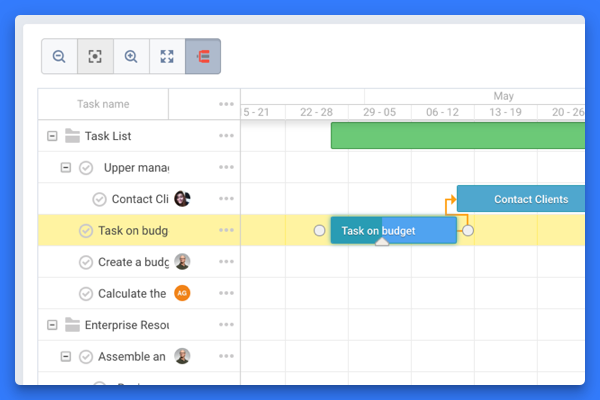
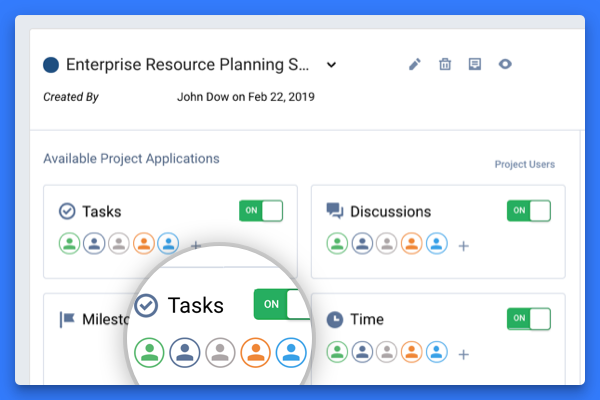
The vendor states Freedcamp helps tens of thousands of teams around the world manage their work. Their free plan contains tasks(in list and kanban view), milestones, discussions, calendar,
time-tracking and password management. On their premium plans, they also offer Gantt charts, Wikis, Issue Tracking, CRM and Invoices+.
$2.49
per month
WORKetc
Score7 out of 10
Small Businesses (1-50 employees)
WORKetc is a cloud-based business management system. With integrated CRM, project management, billing, help desk, reporting, and collaboration, teams can access one system for all relevant information. The system supports popular third-party apps such as Google Workspace, Xero Accounting, Quickbooks Online, Outlook, Dropbox, and Evernote.
$78
per month
Pricing
Freedcamp
WORKetc
Editions & Modules
Minimalist
$2.49
per month
Business
$8.99
per month
Starter Edition
$78
Per Month for up to 2 Users
Team
$195
Per month for up to 3 Users (Each extra user + $49/month)
Foundations
$395
Per month for up to 5 Users (Each extra user + $59/month)
Offerings
Pricing Offerings
Freedcamp
WORKetc
Free Trial
Yes
Yes
Free/Freemium Version
Yes
No
Premium Consulting/Integration Services
No
Yes
Entry-level Setup Fee
No setup fee
No setup fee
Additional Details
—
—
More Pricing Information
Features
Freedcamp
WORKetc
Project Management
Comparison of Project Management features of Freedcamp and WORKetc
Feature
Freedcamp
8.9
4 Ratings
15% above category average
WORKetc
-
Ratings
Task Management
8.14 Ratings
00 Ratings
Gantt Charts
10.02 Ratings
00 Ratings
Scheduling
7.33 Ratings
00 Ratings
Team Collaboration
7.33 Ratings
00 Ratings
Email integration
10.01 Ratings
00 Ratings
Mobile Access
10.01 Ratings
00 Ratings
Timesheet Tracking
10.02 Ratings
00 Ratings
Professional Services Automation
Comparison of Professional Services Automation features of Freedcamp and WORKetc
Feature
Freedcamp
9.1
1 Ratings
17% above category average
WORKetc
-
Ratings
Quotes/estimates
9.11 Ratings
00 Ratings
Invoicing
9.11 Ratings
00 Ratings
Sales Force Automation
Comparison of Sales Force Automation features of Freedcamp and WORKetc
Feature
Freedcamp
-
Ratings
WORKetc
7.9
13 Ratings
1% above category average
Customer data management / contact management
00 Ratings
8.613 Ratings
Workflow management
00 Ratings
8.312 Ratings
Opportunity management
00 Ratings
7.810 Ratings
Integration with email client (e.g., Outlook or Gmail)
00 Ratings
7.913 Ratings
Contract management
00 Ratings
7.31 Ratings
Quote & order management
00 Ratings
8.18 Ratings
Interaction tracking
00 Ratings
7.82 Ratings
Channel / partner relationship management
00 Ratings
7.31 Ratings
Customer Service & Support
Comparison of Customer Service & Support features of Freedcamp and WORKetc
Feature
Freedcamp
-
Ratings
WORKetc
8.3
12 Ratings
8% above category average
Case management
00 Ratings
9.011 Ratings
Call center management
00 Ratings
7.31 Ratings
Help desk management
00 Ratings
8.512 Ratings
Marketing Automation
Comparison of Marketing Automation features of Freedcamp and WORKetc
Feature
Freedcamp
-
Ratings
WORKetc
7.4
11 Ratings
4% below category average
Lead management
00 Ratings
7.710 Ratings
Email marketing
00 Ratings
7.19 Ratings
CRM Project Management
Comparison of CRM Project Management features of Freedcamp and WORKetc
Feature
Freedcamp
-
Ratings
WORKetc
8.1
13 Ratings
5% above category average
Task management
00 Ratings
8.713 Ratings
Billing and invoicing management
00 Ratings
7.810 Ratings
Reporting
00 Ratings
7.912 Ratings
CRM Reporting & Analytics
Comparison of CRM Reporting & Analytics features of Freedcamp and WORKetc
Feature
Freedcamp
-
Ratings
WORKetc
7.3
11 Ratings
5% below category average
Pipeline visualization
00 Ratings
7.59 Ratings
Customizable reports
00 Ratings
7.211 Ratings
Customization
Comparison of Customization features of Freedcamp and WORKetc
Feature
Freedcamp
-
Ratings
WORKetc
8.0
13 Ratings
5% above category average
Custom fields
00 Ratings
8.413 Ratings
Custom objects
00 Ratings
8.22 Ratings
API for custom integration
00 Ratings
7.310 Ratings
Security
Comparison of Security features of Freedcamp and WORKetc
Feature
Freedcamp
-
Ratings
WORKetc
8.9
11 Ratings
6% above category average
Single sign-on capability
00 Ratings
9.11 Ratings
Role-based user permissions
00 Ratings
8.811 Ratings
Social CRM
Comparison of Social CRM features of Freedcamp and WORKetc
Feature
Freedcamp
-
Ratings
WORKetc
7.3
1 Ratings
3% below category average
Social data
00 Ratings
7.31 Ratings
Platform
Comparison of Platform features of Freedcamp and WORKetc
I have used a number of different Project Management Tools and this is the one I always make the team come back to, it's easy to use, has great support, and can be used by people of various levels of technical ability. When planning a complicated network, that needs to be sold to a customer, all people within the company have needs that have to be addressed, from the obvious technical, but also legal, regulatory, finance, and ordering of equipment and all these have different milestones, that interconnect, this is where Freedcamp shines, it allows all of the company to work together to achieve the technical sale.
If you are looking for a way to organize customer data and projects across regions, then WORK[etc] will get the job done. For our company, the country is divided into 3 regions and each region has a team of workers in charge of providing ongoing support services to that region. WORK[etc] has organized our company exponentially and given us a solid database to pull from to ensure we're meeting contractual requirements, providing timely deliverables and staying ahead of the game. Because I only work in a service industry, I don't know if WORK[etc] would be appropriate for product based companies, However, if you were offering anything [product or service] that required online support, the system will function well.
A de minimis incentive was given to thank the reviewer for their time. The incentive was not used to bias or drive a particular response, nor was the incentive contingent on a positive endorsement. More Info
Connecting all the different methods of communicating with our clients into one place is the best part of the application to us. The Google Apps integration lets us update all of our WORK[etc] details directly from our email page which saves a huge amount of time. It lets us move back and forth freely between WORK[etc] tools and our Google Apps email, documents, calendar, etc. with ease.
Breaking work according to what we are doing helps us group and ungroup things as needed. Since we do tech support and so much more having the ability to connect projects, support cases, to dos, documents, discussions, and more all together makes it easy to work with the relationships of all the different activity.
We have found the discussion tool to be vital to moving things through quickly. There are many discussions that are just FYI while others really need a decision or answer form the team members. Discussions allows us to quickly note the people we need to answer us and what is there as an FYI. It keeps all that history so our decision process become documented easily and not lost in email chains.
The one key issue that it doesn't solve is resource utilisation. You are able to add the number of hours that each "to do" will take but you can't allocate that to an employee and then aggregate all that up to show how much capacity you are using or have left.
One if its great benefits is its flexibility but that is also a drawback because there are multiple ways to do the same thing. This means that to ensure consistency across all employees having your own business procedures on how to use WORKetc is vital.
Some of the financial processes don't fully reflect UK practice currently. For instance it doesn't deal with VAT on expenditure well. However we have been assured that this is being resolved.
We, as a company, have put a lot of time and energy into building the system to where it is for us today. With its constant improvements and our continually learning and developing, I couldn't imagine moving away from WORKetc to try a different system out. This really does give us everything that we've wanted/needed in a system without having to utilize 2-3 different products. The part that makes this so unique compared to other systems that we've used in the past is the fact that it has a project management piece built in, and that in itself is a huge driving point in why we will continue to use this.
It basically provides everything we need in terms of functionality. No tool is perfect and this one can improve in the visual department and maybe doesn't offer quite as much as the most advanced project management tools out there.
A de minimis incentive was given to thank the reviewer for their time. The incentive was not used to bias or drive a particular response, nor was the incentive contingent on a positive endorsement. More Info
My staff hates it, our clients require transparency and you manual have to enter notes, billing is horrific, as it does not subtotal by type - so as a T&M shop there is no way to easily see how much was spent to each matter or service type.
A de minimis incentive was given to thank the reviewer for their time. The incentive was not used to bias or drive a particular response, nor was the incentive contingent on a positive endorsement. More Info
WORKetc compares well in regards to speed and reliability to other cloud-based products we use such as Google for Work. Compared to our old in-house based CRM, it is a superstar; faster, more reliable and easily run on a variety of browsers and smart phones. The program loads fast as do data screens for contacts, projects, invoices and more
Especially a few years ago when Freedcamp was first starting, I needed support, sometimes, I'd find a bug as a heavy user, Igor and Angel are great people who are quick to reply and help you as well as the other great staff. Freedcamp's support is the best of any software product I use.
WORKetc offers maybe the best support in the business. Product documentation and training resources are outstanding. Support tickets or inquiries are answered quickly. If you do need to address an issue in person, it is easy to schedule a 15 or 30 minute live call with their fantastic support staff who are fast, friendly and skilled
A de minimis incentive was given to thank the reviewer for their time. The incentive was not used to bias or drive a particular response, nor was the incentive contingent on a positive endorsement. More Info
The implementation of the system was fairly easy. Because of our previous experience with a similar system, we were ready and working on the product as soon as we announced the switch. The system also allowed us to simplify our processes by integrating timesheets and project management directly into our CMS.
Maybe not as good and visually appealing as Jira and Trello. But it offers a much better free tier and better prices for a small organisation as we are. Freedcamp and Kanbanchi is quite similar but Kanbanchi lacks the wide range of functionality in its free tier and makes it difficult to start up in a team.
A de minimis incentive was given to thank the reviewer for their time. The incentive was not used to bias or drive a particular response, nor was the incentive contingent on a positive endorsement. More Info
We needed a CRM that would work with US. We found WORK [etc] was exactly what we needed. being able to customize the CRM around our company and further change as we go has been the best thing about it. We haven't been locked into how it is set up and can change it very quickly.
A de minimis incentive was given to thank the reviewer for their time. The incentive was not used to bias or drive a particular response, nor was the incentive contingent on a positive endorsement. More Info
Setting up project templates is time-consuming - if you want to do it right. Nevertheless, it is well worth it! Routine complex projects that used to require at least six people and at least as many "silos of information" are now done with two or three people, and - at most - 2 or 3 silos of information. And that's only because I haven't fully integrated the program with our Accounting programs (and there is an API for Quickbooks). I'd say the initial investment of perhaps 80 hours on my part was saved five or ten times over during our first six months, with better accuracy, accountability, and documentation. Since then, the ROI is at least 20 or 30 times annually of my time...the one thing I can't buy more of.
A de minimis incentive was given to thank the reviewer for their time. The incentive was not used to bias or drive a particular response, nor was the incentive contingent on a positive endorsement. More Info