GitHub is a platform that hosts public and private code and provides software development and collaboration tools. Features include version control, issue tracking, code review, team management, syntax highlighting, etc. Personal plans ($0-50), Organizational plans ($0-200), and Enterprise plans are available.
$4
per month per user
Snyk
Score 8.8 out of 10
N/A
Snyk’s Developer Security Platform automatically integrates with a developer’s workflow and helps security teams to collaborate with their development teams. It boasts a developer-first approach that ensures organizations can secure all of the critical components of their applications from code to cloud, driving developer productivity, revenue growth, customer satisfaction, cost savings and an improved security posture. The vendor states Snyk is used by 1,200 customers worldwide today, including…
$0
SonarQube
Score 8.2 out of 10
N/A
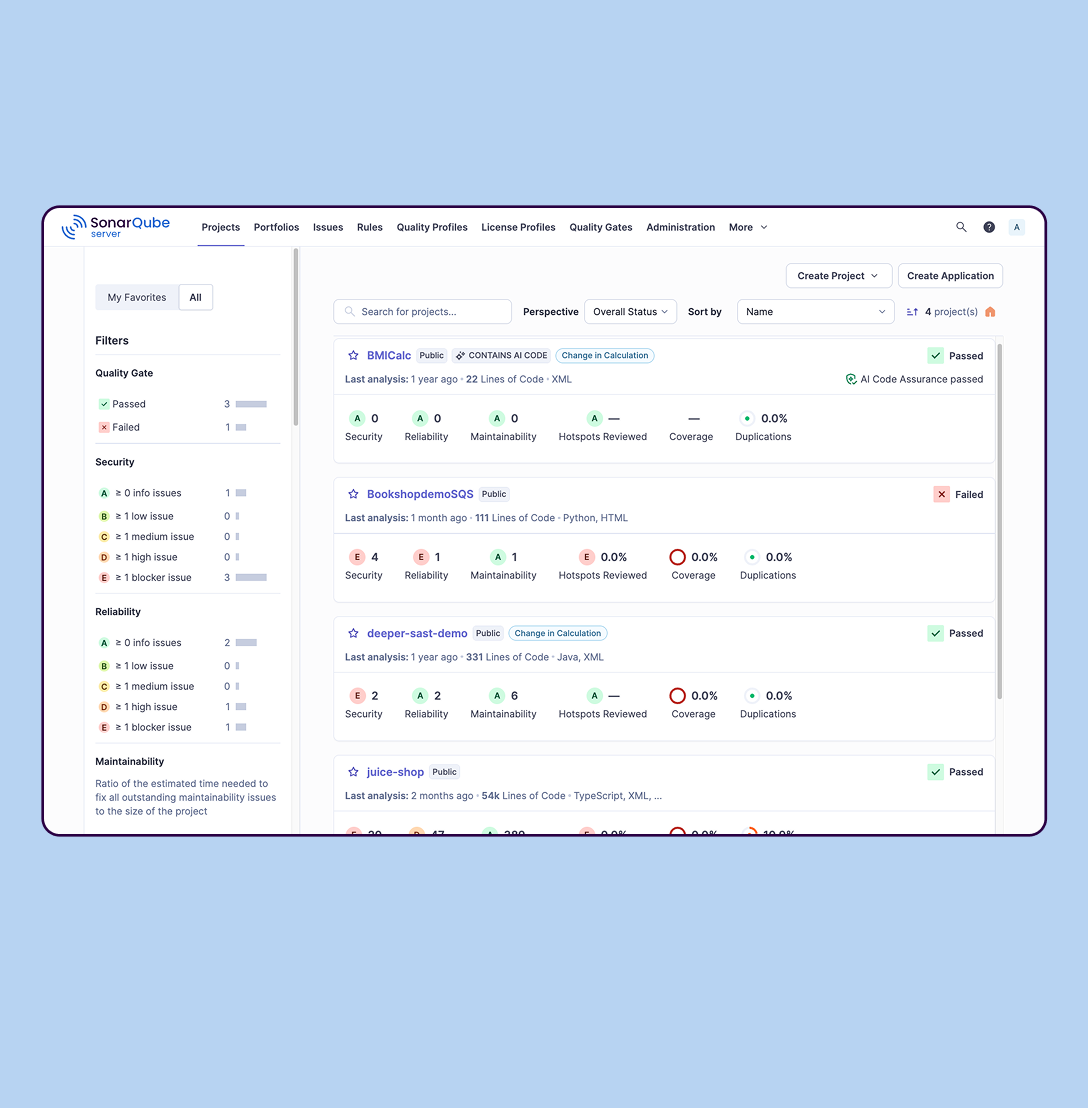
SonarQube is an automated code review solution, serving as the verification layer for code quality and SDLC security. SonarQube is used to ensure that code is secure, reliable, and maintainable. It is available through SaaS or self-managed deployment.
$0
Pricing
GitHub
Snyk
SonarQube
Editions & Modules
Team
$40
per year per user
Enterprise
$210
per year per user
Free
$0
Team (Snyk Open Source or Snyk Container or Snyk Infrastructure as Code)
$23
per month per user
Business (Snyk Open Source or Snyk Container or Snyk Infrastructure as Code)
$42
per month per user
Team (Snyk Open Source + Snyk Container + Snyk Code + Snyk Infrastructure as Code)
$98
per month per user
Business (Snyk Open Source + Snyk Container + Snyk Code + Snyk Infrastructure as Code)
$178
per month per user
Enterprise
Contact Sales
Cloud-based: Free
$0
Self-managed: Developer
Starting at $720 annually
per year per installation
Self-managed: Enterprise
Contact sales for pricing
per year per installation
Cloud-based: Enterprise
Contact sales for pricing
per year per installation
Cloud-based: Teams
Starting at $32 per month
per month per installation
Self-managed: Data Center
Contact sales for pricing
per year per installation
Offerings
Pricing Offerings
GitHub
Snyk
SonarQube
Free Trial
Yes
Yes
Yes
Free/Freemium Version
Yes
Yes
Yes
Premium Consulting/Integration Services
No
No
No
Entry-level Setup Fee
No setup fee
No setup fee
No setup fee
Additional Details
—
Pricing is dependent on the number of developers selected, the number of products selected, and the payment term selected. Please visit the Snyk plans page for an interactive pricing calculator.
I have used GitHub more that fortify so I am more familiar with GitHub for checking for vulnerabilities. I have noticed GitHub is good for checking different packages within your project but as far as checking code Quality and coverage Sonar is the better one in my opinion. …
Getting SonarQube instead of the other tools we tested was an easy choice. Snyk was way too much limited to only Docker images and dependency analysis at that time. And Checkmarx was very hard to adapt to our needs : configuring custom quality gates was way too much of a …
SonarQube deployment worked well with our pipeline and had the right integrations with our IDE as well as it worked well with analyzing .NET frameworks when compared to GitHub and GitLab which has some of the functionality and can do some checks, but SonarQube made more sense …
Verified User
Engineer
Chose SonarQube
Some are still under consideration. Pricing is a big component. Some FOSS products have been considered is at par (at least for our needs) or catching up. Although the amazing support in the community weighs hard on the value. So, if it went away...so would some arguments …
I personally evaluated klocwork in a previous company and it worked well for Static Code Analysis for C++ applications but the Java support was not as good as SonarQube.
Also the overall tooling and integrations provided by SonarQube is stellar and very other competitors can …
GitHub is an easy to go tool when it comes to Version Controlling, CI/CD workflows, Integration with third party softwares. It's effective for any level of CI/CD implementation you would like to. Also the the cost of product is also very competitive and affordable. As of now GitHub lacks capabilities when it comes to detailed project management in comparison to tools like Jira, but overall its value for money.
Scenarios Where Snyk Is Well-Suited CI/CD Pipeline Integration (Node.js, Python, etc.) Container Security Open Source License Compliance Infrastructure as Code (IaC) SecurityScenarios Where Snyk May Be Less Appropriate Scanning Proprietary or Custom Code for Unknown Vulnerabilities Complex Monorepos with Custom Build Tools Organizations Requiring Custom Security Rules Advanced Security Teams Needing Correlation and Deep Triage.
SonarQube is excellent if you start using it at the beginning when developing a new system, in this situation you will be able to fix things before they become spread and expensive to correct. It’s a bit less suitable to use on existing code with bad design as it’s usually too expensive to fix everything and only allows you to ensure the situation doesn’t get worse.
Version control: GitHub provides a powerful and flexible Git-based version control system that allows teams to track changes to their code over time, collaborate on code with others, and maintain a history of their work.
Code review: GitHub's pull request system enables teams to review code changes, discuss suggestions and merge changes in a central location. This makes it easier to catch bugs and ensure that code quality remains high.
Collaboration: GitHub provides a variety of collaboration tools to help teams work together effectively, including issue tracking, project management, and wikis.
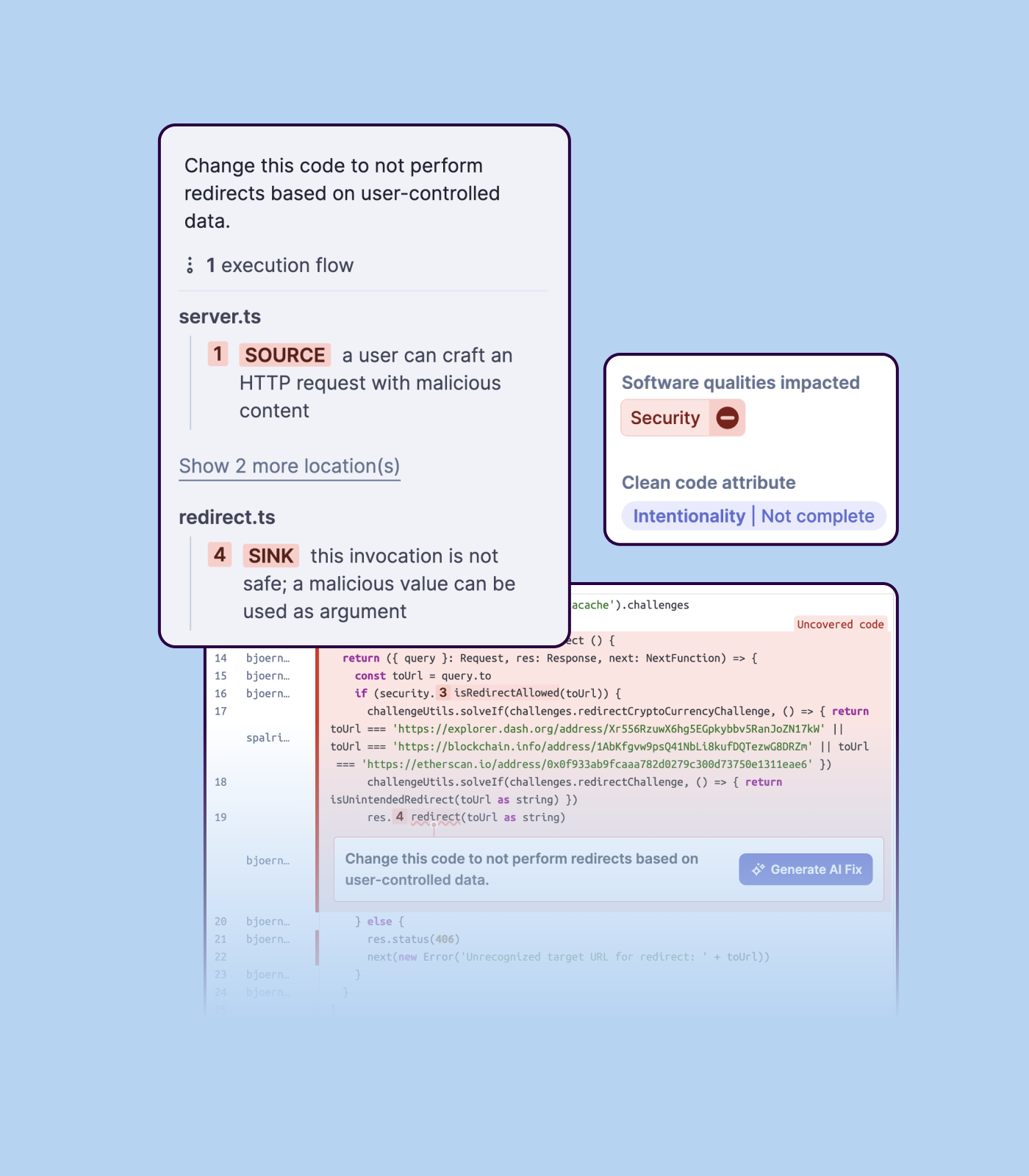
Detecting bugs and vulnerabilities: SonarQube can identify a wide range of bugs and vulnerabilities in code, such as null pointer exceptions, SQL injection, and cross-site scripting (XSS) attacks. It uses static analysis to analyze the code and identify potential issues, and it can also integrate with dynamic analysis tools to provide even more detailed analysis.
Measuring code quality: SonarQube can measure a wide range of code quality metrics, such as cyclomatic complexity, duplicated code, and code coverage. This can help teams understand the quality of their code and identify areas that need improvement.
Providing actionable insights: SonarQube provides detailed information about issues in the code, including the file and line number where the issue occurs and the severity of the issue. This makes it easy for developers to understand and address issues in the code.
Integrating with other tools: SonarQube can be integrated with a wide range of development tools and programming languages, such as Git, Maven, and Java. This allows teams to use SonarQube in their existing development workflow and take advantage of its powerful code analysis capabilities.
Managing technical debt: SonarQube provides metrics and insights on the technical debt on the codebase, enabling teams to better prioritize issues to improve the quality of the code.
Compliance with coding standards: SonarQube can check the code against industry standards like OWASP, CWE and more, making sure the code is compliant with security and coding standards.
Not an easy tool for beginners. Prior command-line experience is expected to get started with GitHub efficiently.
Unlike other source control platforms GitHub is a little confusing. With no proper GUI tool its hard to understand the source code version/history.
Working with larger files can be tricky. For file sizes above 100MB, GitHub expects the developer to use different commands (lfs).
While using the web version of GitHub, it has some restrictions on the number of files that can be uploaded at once. Recommended action is to use the command-line utility to add and push files into the repository.
The tool itself has many capabilities but using them operationally within the platform on a day to day basis for managing vulnerabilities is not a good experience.
Our company was in desparate need of a tool to help us manage vulnerabilities so we could achieve a SOC 2 assurance report without findings.
Importing a new custom quality profile on SonarQube is a bit tricky, it can be made easier
Every second time when we want to rerun the server, we have to restart the whole system, otherwise, the server stops and closes automatically
When we generate a new report a second time and try to access the report, it shows details of the old report only and takes a lot of time to get updated with the details of the new and fresh report generated
GitHub's ease of use and continued investment into the Developer Experience have made it the de facto tool for our engineers to manage software changes. With new features that continue to come out, we have been able to consolidate several other SaaS solutions and reduce the number of tools required for each engineer to perform their job responsibilities.
GitHub is a clean and modern interface. The underlying integrations make it smooth to couple tasks, projects, pull requests and other business functions together. The insights and reporting is really strong and is getting better with every release. GitHub's PR tooling is strong for being web based, i do believe a better code editor would rival having to pull merge conflicts into local IDE.
Developer-Centric Design - Snyk integrates directly into IDEs (like VS Code and IntelliJ), CI/CD pipelines, GitHub/GitLab, and container registries. Clear, Actionable Vulnerability report issues are categorized by severity.
Reports include fix recommendations, pull request suggestions, and links to remediation advice.
There are a ton of resources and tutorials for GitHub online. The sheer number of people who use GitHub ensures that someone has the exact answer you are looking for. The docs on GitHub itself are very thorough as well. You will often find an official doc along with the hundreds of independent tutorials that answers your question, which is unusual for most online services.
We we easily able to integrate the SonarQube steps into our TFS process via the Microsoft Marektplace, we didn't have the need to call SonarQube support. We've used their online documentation and community forum if we ran into any issues.
While I don't have very much experience with these 2 solutions, they're two of the most popular alternatives to GitHub. Bitbucket is from Atlassian, which may make sense for a team that is already using other Atlassian tools like Jira, Confluence, and Trello, as their integration will likely be much tighter. Gitlab on the other hand has a reputation as a very capable GitHub replacement with some features that are not available on GitHub like firewall tools.
Unfortunately, neither cover all of the use cases that we would like so we need to use both but they are both excellent tools as part of our vulnerability management. We find that Snyk helps us better with improving our MTTR of identified vulnerabilities when compared to inspector but that may be more based on how we have implemented both tools
SonarQube is an open-source. It's a scalable product. The costs for this application, for the kind of job it does, are pretty descent. Pipeline scan is more secured in SonarQube. Its a very good tool and its support multiple languages. Its main core competency is of static code analysis and that is why SonarQube exists and it does it exceedingly well. The quality of scan on code convention, best practices, coding standards, unit test coverage etc makes them one of the best competent tool in the market
Team collaboration significantly improved as everything is clearly logged and maintained.
Maintaining a good overview of items will be delivered wrt the roadmap for example.
Knowledge management and tracking. Over time a lot of tickets, issues and comments are logged. GitHub is a great asset to go back and review why x was y.
Positive ROI from the standpoint of flagging several issues that would have otherwise likely been unaddressed and caused more time to be spent closer to launch
Slightly positive ROI from time-saving perspective (it's an automated check which is nice, but depending on the issues it finds, can take developers time to investigate and resolve)