Atlassian Service Collection, with Jira Service Management vs. GitLab vs. GoCD

Overview
ProductRatingMost Used ByProduct SummaryStarting Price
Atlassian Service Collection
Score 8.0 out of 10
N/A
The Atlassian Service Collection, including the no longer available standalone Jira Service Management, is an integrated suite of service management applications built on Atlassian's unified Jira platform architecture. Designed to bring development, operations, internal IT, and external support teams onto a single workflow engine, the Service Collection consolidates support infrastructures to deliver service at high velocity.
$0
per month
GitLab
Score 8.8 out of 10
N/A
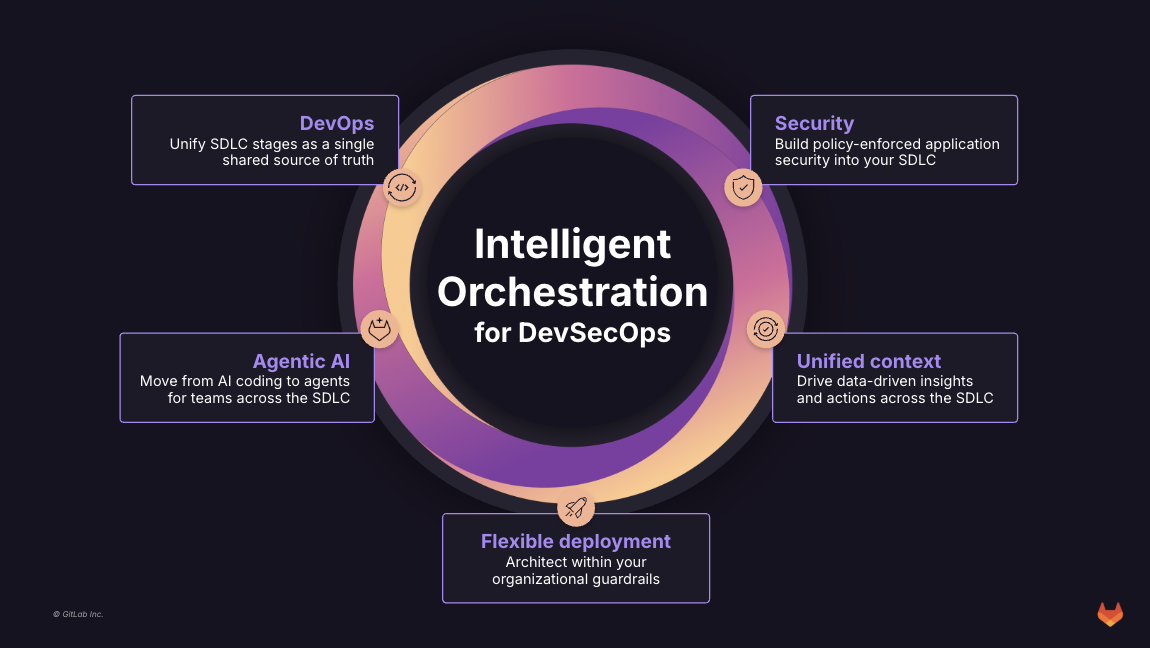
GitLab is an intelligent orchestration platform for DevSecOps, where software teams enable AI at every stage of the software lifecycle to ship faster. The platform enables teams to automate repetitive tasks across planning, building, securing, testing, deploying, and maintaining software.
$0
GoCD
Score 8.0 out of 10
N/A
GoCD, from ThoughtWorks in Chicago, is an application lifecycle management and development tool.N/A
Pricing
Atlassian Service Collection, with Jira Service ManagementGitLabGoCD
Editions & Modules
Free
$0
per month
Standard
$20
per agent/per month
Premium
$40
per agent/per month
Enterprise
Contact sales team
GitLab Free (self-managed)
$0
GitLab Free
$0
GitLab Premium
$29
per month per user
GitLab Premium (self-managed)
$29
per month per user
GitLab Ultimate
Contact Sales
GitLab Ultimate (self-managed)
Contact Sales
No answers on this topic
Offerings
Pricing Offerings
Atlassian Service CollectionGitLabGoCD
Free Trial
YesYesNo
Free/Freemium Version
YesYesNo
Premium Consulting/Integration Services
NoNoNo
Entry-level Setup FeeNo setup feeOptionalNo setup fee
Additional DetailsGitLab Credits enable flexible, consumption-based access to agentic AI capabilities in the GitLab platform, allowing you to scale AI adoption at your own pace while maintaining cost predictability. Powered by Duo Agent Platform, GitLab’s agentic AI capabilities help software teams to collaborate at AI speed, without compromising quality and enterprise security. If usage exceeds monthly allocations and overage terms are accepted, automated on-demand billing activates without service interruption, so your developers never lose access to AI capabilities they need. Real-time dashboards provide transparency into AI consumption patterns. Software teams can see usage across users, projects, and groups with granular attribution for cost allocation. Automated threshold alerts facilitate proactive planning. Advanced analytics deliver trending, forecasting, and FinOps integration.
More Pricing Information
Community Pulse
Atlassian Service Collection, with Jira Service ManagementGitLabGoCD
Considered Multiple Products
Atlassian Service Collection
Chose Atlassian Service Collection
JSM is more purpose-built for internal support tickets and processes. It also provides a structure to support users, unlike generalist tools like Notion. We found that there isn't really an 'all-in-one' tool that can correctly handle internal and external requests. This isn't …
Chose Atlassian Service Collection
We chose Jira Service Management due to its easy integrations with the rest of the Atlassian tools, as we have also invested in those. For the price, the ability to add or remove agents, and the cost being reflected in that, it was an excellent medium for us. For the …
Chose Atlassian Service Collection
Case Management System
Chose Atlassian Service Collection
1- budget
2- easy to implement and maintain
3- system is stable
Chose Atlassian Service Collection
It was the most complete package, requiring the lesser adjustments compared to the others, had the most options to tailor to our specific needs, and the price for the Cloud hosted version was fair.
Chose Atlassian Service Collection
Jira Service Management is quick, intuitive, & easy to use. Its a little more basic than some other software but thats the benefit. Most of the info that is required from an IT support & change management requires basic information to be inputted. Jira Service Management allows …
Chose Atlassian Service Collection
Jira is easier to use and holds service agents more accountable due to reporting and tracking tools that are available. It connects better with other products that other departments are using to track programming changes, etc., giving management a single pane of glass to see …
Chose Atlassian Service Collection
We went with this solution mainly because it was already planned to use it with the developers.
Understanding the tool made us go forward with the solution as it provided everything we wanted in a project planner.
Chose Atlassian Service Collection
Jira is the only ticketing system we have used at my company, and it is absolutely superb. What usually was a process in the past, with lots of time to spare in between, is now updated to modern-day and makes the entire experience fluid and efficient. I know our IT department …
Chose Atlassian Service Collection
Jira has every necessary feature, including tracking tasks and helping teams to plan tasks. You can create user stories for tasks and also can create documentation for tasks. It can easily integrate with APIs and other service platforms. You can easily assign work to anyone who …
Chose Atlassian Service Collection
I didn't use any other services before this. I love this product. By the way I am using Bitbucket, too, which is also awesome, easy to manage versions.
Chose Atlassian Service Collection
In Jira, you can browse your own knowledge base. You can also create new widgets and filters the way you wanted it customized. I prefer JIRA over any other ticketing tool since JIRA is easy to navigate. You can create your own Dashboard. You easily can pull up the reports needed.
Chose Atlassian Service Collection
I think that Jira provides a better product for the use case of our business model.
Chose Atlassian Service Collection
Jira is easier to set up and gets going faster. It is easier to customize to fit your needs and the Dashboard feature and added widgets really help you get the views you want to see. Other products are harder to set up, don't get going as quickly, and lack the dashboard …
Chose Atlassian Service Collection
We selected Jira Service Desk because we were already Jira users, and the price point was easy to absorb. Our experience as Jira administrators made it easy to customize Jira Service Desk to our needs.
Chose Atlassian Service Collection
  • Various intranet custom made tools, usually focused on a specific area in telco, banking, utilities, production, etc. with excellent support for general tickets and with links to company core processes
  • Zendesk Support, Happyfox
Chose Atlassian Service Collection
Being a past user of JIRA has helped a lot in making a decision. When I first used it, I could learn to navigate in a day's time. I knew my way through most of the functionalities. The dashboard creation was also a piece of cake. The CRM software that we used in the team was …
Chose Atlassian Service Collection
We use Trello along the Jira Service Desk. Jira Service Desk is universal and is better for IT and specific requests (bugs), while Trello is work better for the tasks dividing on the team level. Jira Service Desk is on a higher price range than other tools, but it worth it, …
Chose Atlassian Service Collection
Compared to other products I have used, like, Fresh Desk Service or Manage Engine it has more features included per user and technician (others may require a license for each type). Portal setup can be integrated to the Confluence Portal for easy access to Jira for service …
Chose Atlassian Service Collection
I think JIRA Service Desk is very similar to many products out there, but for users who currently use JIRA for their projects, it makes the transition much easier and users will be able to see the progress of their ticket throughout. The price is higher than many of the other …
Chose Atlassian Service Collection
Jira Service Desk has similar or equivalent features to heavyweight competitors as HP Service Manager, for a better price. The highlight of Jira Service Desk, in my opinion, is that you can customize a series of visual boards that are tremendously useful for an agile and …
Chose Atlassian Service Collection
I’m not aware of a direct competitor to Jira other than Asana which is more of a project management tool. For medium size companies and larger I recommend Jira.
Chose Atlassian Service Collection
Unlike the 2 other alternatives, Jira is more complete. It is a bit harder to use, but because it has more customized and better functionalities. While other software can be used for almost everything, Jira works best for tech companies that need to work on agile methodologies …
Chose Atlassian Service Collection
I was not involved in product selection.
GitLab
Chose GitLab
GitLab is a cost effective alternative to names like GitHub and others. It provides easy to use interface that is not dissimilar from GitHub and Atlassian Bitbucket. Where GitLab really shines is in its simplicity and ease of use. It's very intuitive and effectively allows a …
Chose GitLab
It is easy to use , devsecops/ dataops / gitops implementation is quite easy and straightforward compared to other tools which we have tested , it provides seamless integration with tools like dbt , talend , snowflake , collibra and python. Merge issues as well as pipeline …
Chose GitLab
Personally I like reviewing on GitLab better than GitHub, but it's not a huge difference.
Chose GitLab
I liked GitLab better than Beanstalk. GitLab had a free option, which Beanstalk did not at the time. From what I have used of Bitbucket, I probably like it better than GitLab, specifically I like the design better. Doing things in Bitbucket seemed a bit slower to me though. Now …
Chose GitLab
GitLab is widely used throughout the developer community and provides all the required features industry wide. Many of the paid features help the team a lot to achieve efficient source code management. Many features like vulnerability management and AI chat while code review in …
Chose GitLab
Gitlab is an industry standard tool for version controlling of the source code with multiple features used by the developers to maintain efficient development process and scalable services integration on the larger code bases. Multiple tools like AI code review helps the …
Chose GitLab
GitLab is an industry standard software and provides alot of features helpful for the developers with a suitable price point. It has most of the features that are provided and are useful. Team management and security for the source code and restrictions helps achieve all the …
Chose GitLab
Why we chose GitLab: we started long ago with free access and it was always good enough, so we never bothered to switch.
Chose GitLab
GitLab is an all-in-one Git and CI/CD platform that also offers generous credits in its free plan. It allows both private and public projects. The pipelines can be fully defined in YAML files put under version control.
Chose GitLab
GitLab is superior to beanstalk but still lacking in some areas in comparison to newer features to Github. However, it's enterprise based approach is very attractive to many of our top tier clients making it and effective solution for us within their organizations. It's well …
Chose GitLab
We have recently migrated from Bamboo to GitLab across our enterprise as part of our tech modernization roadmap. GitLab provides a all-in-one platform for integrated code management. The only advantage that Bamboo had over GitLab was the integration with JIRA. The streamlined …
Chose GitLab
In our case, we opted for an open source solution and complete control of information, meaning we kept critical information and company developments in-house.
Chose GitLab
GitLab has all the features at one place and also provides plenty of customization for runners
Chose GitLab
As mentioned earlier, the features like chart visualization sets it apart from the others. Other than that, GitLab is open source while other are not and comparatively more secure that its other counterparts. Also, GitLab supports adding other types of attachments which is not …
Chose GitLab
When i was using the other platform, Some time i face down time, But GitLabs its not happening for single time. GitLab is having easy user interference as compared to other platforms. Pull Request, Code review, Issue tracking, Merging, Access control and User Roles is having a …
Chose GitLab
GitLab is miles ahead of the competition. In so many words, having a simple UI with robust security and the ability to conduct Git actions takes the cake. The competitions like to say they can do these things easily but their products are more confusing and hard to use.
Chose GitLab
Because it has the latest features, it is perfect for collaboration, has the best integrations available, and is super secure. Basically, it covers all my needs and the companies. I love its pipelines because of its secrets and agents. I also love that you can manage the …
Chose GitLab
GitLab allows a self-hosted version that is easy to setup and configure. It is also open-source as compared to GitHub. The integrated CI/CD tools is a plus, since we do not have to worry about those tools, unlike Github. The All-in-one solution of GitLab made sense for our …
Chose GitLab
Gitlab offers the best support for CI/CD pipelines and the highest degree of customisation for workflows, permissions, and integrations. The integration of BitBucket with JIRA is better than GitLab but CI/CD features are limited in comparison. GitLab's built-in Container …
Chose GitLab
Gitlab provides basic functionality like any other git tool. Some features of push and pull requests , clone and merge is handled equally well. It lacks in AI features which are there in GitHub and setup processes are difficult. Cost difference is the only concern while …
Chose GitLab
GitHub is an inferior product from most points of view. We had to use it and the teams finds no positives about it. Everything is a downgrade from our previous GitLab solution.

GitLab CI\CD is vastly superior to workflows, for example doing a manual node is just "when : manual" …
Chose GitLab
It's much simpler than the competitors. The one important feature Gitlab stand out is the CI/CD pipeline. GitHub required integration with external CI tools but Gitlab has this feature built-in. Compare to Jenkins and Teamcity, It's easy to use without any additional Plugins. …
Chose GitLab
Gitlab seems more cutting-edge than GitHub; however, its AI tools are not yet as mature as those of CoPilot. It feels like the next-generation product, so as we selected a tool for our startup, we decided to invest in the disruptor in the space. While there are fewer …
Chose GitLab
I tried Github in the past, and it was really similar as GitLab. But we prefer use GitLab for the cicd part, easier to handle
GoCD
Chose GoCD
GoCD is easier to setup, but harder to customize at runtime. There's no way to trigger a pipeline with custom parameters.
Jenkins is more flexible at runtime. You can define multiple user-provided parameters so when user needs to trigger a build, there's a form for him/her to …
Chose GoCD
I prefer using GoCD compared to Jenkins. The UI makes sense, I like the simplicity to hit the 'Play' button for a straightforward deployment of the 'Play +' if you need to override some settings when deploying whereas Jenkins, you have the whole page for each pipeline. The …
Features
Atlassian Service Collection, with Jira Service ManagementGitLabGoCD
Incident and problem management
Comparison of Incident and problem management features of Product A and Product B
Atlassian Service Collection, with Jira Service Management
8.9
Ratings
9% above category average
GitLab
-
Ratings
GoCD
-
Ratings
Organize and prioritize service tickets9.20 Ratings00 Ratings00 Ratings
Expert directory9.00 Ratings00 Ratings00 Ratings
Service restoration9.50 Ratings00 Ratings00 Ratings
Self-service tools8.90 Ratings00 Ratings00 Ratings
Subscription-based notifications10.00 Ratings00 Ratings00 Ratings
ITSM collaboration and documentation8.40 Ratings00 Ratings00 Ratings
ITSM reports and dashboards7.40 Ratings00 Ratings00 Ratings
ITSM asset management
Comparison of ITSM asset management features of Product A and Product B
Atlassian Service Collection, with Jira Service Management
10.0
Ratings
20% above category average
GitLab
-
Ratings
GoCD
-
Ratings
Configuration mangement10.00 Ratings00 Ratings00 Ratings
Asset management dashboard10.00 Ratings00 Ratings00 Ratings
Policy and contract enforcement10.00 Ratings00 Ratings00 Ratings
Change management
Comparison of Change management features of Product A and Product B
Atlassian Service Collection, with Jira Service Management
7.9
Ratings
8% below category average
GitLab
-
Ratings
GoCD
-
Ratings
Change requests repository8.80 Ratings00 Ratings00 Ratings
Change calendar6.50 Ratings00 Ratings00 Ratings
Service-level management8.40 Ratings00 Ratings00 Ratings
Best Alternatives
Atlassian Service Collection, with Jira Service ManagementGitLabGoCD
Small Businesses
Agiloft Service Desk (discontinued)
Score 9.0 out of 10
GitGuardian
GitGuardian
Score 9.0 out of 10
GitLab
GitLab
Score 8.8 out of 10
Medium-sized Companies
Agiloft Service Desk (discontinued)
Score 9.0 out of 10
Veracode
Veracode
Score 8.6 out of 10
GitLab
GitLab
Score 8.8 out of 10
Enterprises
ManageEngine ServiceDesk Plus
Score 9.2 out of 10
Veracode
Veracode
Score 8.6 out of 10
GitLab
GitLab
Score 8.8 out of 10
All AlternativesView all alternativesView all alternativesView all alternatives
User Ratings
Atlassian Service Collection, with Jira Service ManagementGitLabGoCD
Likelihood to Recommend
8.3
(0 ratings)
8.3
(0 ratings)
9.0
(0 ratings)
Likelihood to Renew
10.0
(0 ratings)
9.0
(0 ratings)
-
(0 ratings)
Usability
8.7
(0 ratings)
8.5
(0 ratings)
-
(0 ratings)
Availability
10.0
(0 ratings)
-
(0 ratings)
-
(0 ratings)
Performance
10.0
(0 ratings)
9.0
(0 ratings)
-
(0 ratings)
Support Rating
10.0
(0 ratings)
10.0
(0 ratings)
-
(0 ratings)
In-Person Training
10.0
(0 ratings)
-
(0 ratings)
-
(0 ratings)
Online Training
10.0
(0 ratings)
-
(0 ratings)
-
(0 ratings)
Implementation Rating
10.0
(0 ratings)
-
(0 ratings)
-
(0 ratings)
Configurability
10.0
(0 ratings)
-
(0 ratings)
-
(0 ratings)
Ease of integration
10.0
(0 ratings)
-
(0 ratings)
-
(0 ratings)
Product Scalability
10.0
(0 ratings)
10.0
(0 ratings)
-
(0 ratings)
Vendor post-sale
10.0
(0 ratings)
-
(0 ratings)
-
(0 ratings)
Vendor pre-sale
10.0
(0 ratings)
-
(0 ratings)
-
(0 ratings)
User Testimonials
Atlassian Service Collection, with Jira Service ManagementGitLabGoCD
Likelihood to Recommend
Great to manage your issues in a clear and centralised way. If your development teams work with Jira, it will all naturally come together. Great way to manage the issues from end to end. - Very flexible if you have people who understands the set up and is able to configure it for your needs - Maybe not the best if you want something with very easy set up
Read full review
It is well-suited for any project that needs VCS. It's an excellent choice for teams that might be remote or have to collaborate across teams. Plenty of features allow for async working. With its dashboards and reporting features, it is also suitable for nontechnical PMs or stakeholders. It allows for very bespoke customization and can most often do much more than you need it to.
Read full review
GoCD is easy to set up. So if you just want to get some pipelines up & running quickly, & they're quite stable, or you can have many pipelines for different needs then GoCD is great. Still, if you only want to have a few pipelines, but with the flexibility to run them with different parameters dynamically, then Jenkins is better.
Read full review
Pros
  • Highly configurable Notification Scheme, allowing free customization on who receives notifications and when
  • Ability to add extra features through the highly diverse Atlassian Marketplace.
  • Simple and highly customizable ticket interface. The Software can be almost completely branded in every aspect to represent your organization.
  • Integration with Jira Software allows support tickets to be moved into other Log Term projects as necessary.
Read full review
  • GitLab excels in managing code versions, allowing easy tracking of changes, branch management, and merging contributions.
  • It helps maintain code stability and reliability, saving time and effort in the development or research workflow.
  • Powerful code review features, enabling collaboration and feedback among team members.
  • Robust project management features, including issue tracking, kanban boards, and milestones.
Read full review
  • Pipeline-as-Code works really well. All our pipelines are defined in yml files, which are checked into SCM.
  • The ability to link multiple pipelines together is really cool. Later pipelines can declare a dependency to pick up the build artifacts of earlier ones.
  • Agents definition is really great. We can define multiple different kinds of environments to best suit our diverse build systems.
Read full review
Cons
  • Some of the built-in functions and workflows are surprisingly limited given the fact that you can customize a lot with JQL. These limited areas do not allow you to use JQL. For instance, the built-in notifications are lacking. They have one that is great-- "notify on critical ticket creation"-- EXCEPT that it does not allow you to notify a group or anything, only individual users.
  • The ticket interface is a little odd for agents. Changing the status is not a simple drop down from unassigned to open to in progress to pending, etc. There are a couple of tabs ("investigate", "pending", "workflow") where you can change the status in different ways. Maybe I am just not used to this way of doing it, but I feel like it could be simplified.
  • It can get complicated deleting/changing some of the out-of-the-box fields and rules, because you never know what will break workflows or other automated/built-in features.
Read full review
  • CI variables management is sometimes hard to use, for example, with File type variables. The scope of each variable is also hard to guess.
  • Access Token: there are too many types (Personal, Project, global..), and it is hard to identify the scope and where it comes from once created.
  • Runners: auto-scaled runners are for the moment hard to put in place, and monitoring is not easy.
Read full review
  • UI can be improved
  • Location for settings can be re-arranged
  • API for setting up pipeline
Read full review
Likelihood to Renew
Pricing is attractive
Read full review
I really feel the platform has matured quite faster than others, and it is always at the top of its game compared to the different vendors like GitHub, Azure pipelines, CircleCI, Travis, Jenkins. Since it provides, agents, CI/CD, repository hosting, Secrets management, user management, and Single Sign on; among other features
Read full review
No answers on this topic
Usability
If you're used to other tools in the Atlassian ecosystem, you'll feel right at home with JSM. It's also a platform that technical folk can easily pick up. However, I wouldn't recommend using JSM as a company's first jumping off point into Atlassian. There are a lot of other 'newer' tools that provide sleeker ITSM systems at a similar cost.
Read full review
I find it easy to use, I haven't had to do the integration work, so that's why it is a 9/10, cause I can't speak to how easy that part was or the initial set up, but day to day use is great!
Read full review
No answers on this topic
Reliability and Availability
Product is stable and it improved the availability
Read full review
I've never had experienced outages from GItlab itself, but regarding the code I have deployed to Gitlab, the history helps a lot to trace the cause of the issue or performing a rollback to go back to a working version
Read full review
No answers on this topic
Performance
Accessing Jira Service Management is easy and fast.
Read full review
GItlab reponsiveness is amazing, has never left me IDLE. I've never had issues even with complex projects. I have not experienced any issues when integrating it with agents for example or SSO
Read full review
No answers on this topic
Support Rating
I gave JIRA a 9 rating since for me JIRA works according to its purpose. Since there is a customer portal, our clients can leave a comment or communicate with us using the PR ticket that way it is easier for us to also request any additional information we need for our investigation.
Read full review
At this point, I do not have much experience with Gitlab support as I have never had to engage them. They have documentation that is helpful, not quite as extensive as other documentation, but helpful nonetheless. They also seem to be relatively responsive on social media platforms (twitter) and really thrived when GitHub was acquired by Microsoft
Read full review
No answers on this topic
In-Person Training
Online Training from Atlassian was really Good to effectively deploy, manage, and utilize Jira Service Management. It really improved the overall Operational Efficiency and productivity of end users in the organization. Training gives the confidence to use Jira Service Management for all of the Product engineering, Application support, and Infrastructure engineering support team members.
Read full review
No answers on this topic
Online Training
Online Training was good and informative for new users adopting Jira Service Management. The Training helped to understand the product features, customization capabilities, and integration options with various tools in an enterprise organization, so the overall productivity and efficiency are improved at Blue Yonder. It also helps to timely address the incident tickets, user stories, and track and close them in a timely manner.
Read full review
No answers on this topic
Alternatives Considered
We chose Jira Service Management due to its easy integrations with the rest of the Atlassian tools, as we have also invested in those. For the price, the ability to add or remove agents, and the cost being reflected in that, it was an excellent medium for us. For the foreseeable future, I do not see us moving off this platform.
Read full review
GitHub is an inferior product from most points of view. We had to use it and the teams finds no positives about it. Everything is a downgrade from our previous GitLab solution. GitLab CI\CD is vastly superior to workflows, for example doing a manual node is just "when : manual" in GitLab while you have to do clickops in GitHub to achieve the same. No overview of code in branches is a minus when we tried to figure out what our colleagues are trying to merge as it looked off.
Read full review
I prefer using GoCD compared to Jenkins. The UI makes sense, I like the simplicity to hit the 'Play' button for a straightforward deployment of the 'Play +' if you need to override some settings when deploying whereas Jenkins, you have the whole page for each pipeline. The environment makes sense but can often confuse the user while GoCD simply has a drop-down to select your environment.
Read full review
Scalability
In Blue Yonder, we have deployed across multiple departments and geographical sites as needed.
Read full review
I think is very well designed, and like any VCS it works as intended
Read full review
No answers on this topic
Return on Investment
  • It has allowed us to take on a larger volume of work at a faster pace.
  • We have established best practices with the tool that we have taught and sold to clients.
  • It has allowed for further collaboration with a larger team.
Read full review
  • GitLab cut down our spent on container, package and infrastructure registry
  • Best thing is we can now have everything in single platform which cost effective too
  • Quality of support is really good and they do have emergency support team as well which is great
Read full review
  • ROI has been good since it's open source
  • Settings.xml need to be backed up periodically. It contains all the settings for your pipelines! We accidentally deleted before and we have to restore and re-create several missing pipelines
  • More straight forward use of API and allows filtering e.g., pull all pipelines triggered after this date
Read full review
ScreenShots

Atlassian Service Collection Screenshots
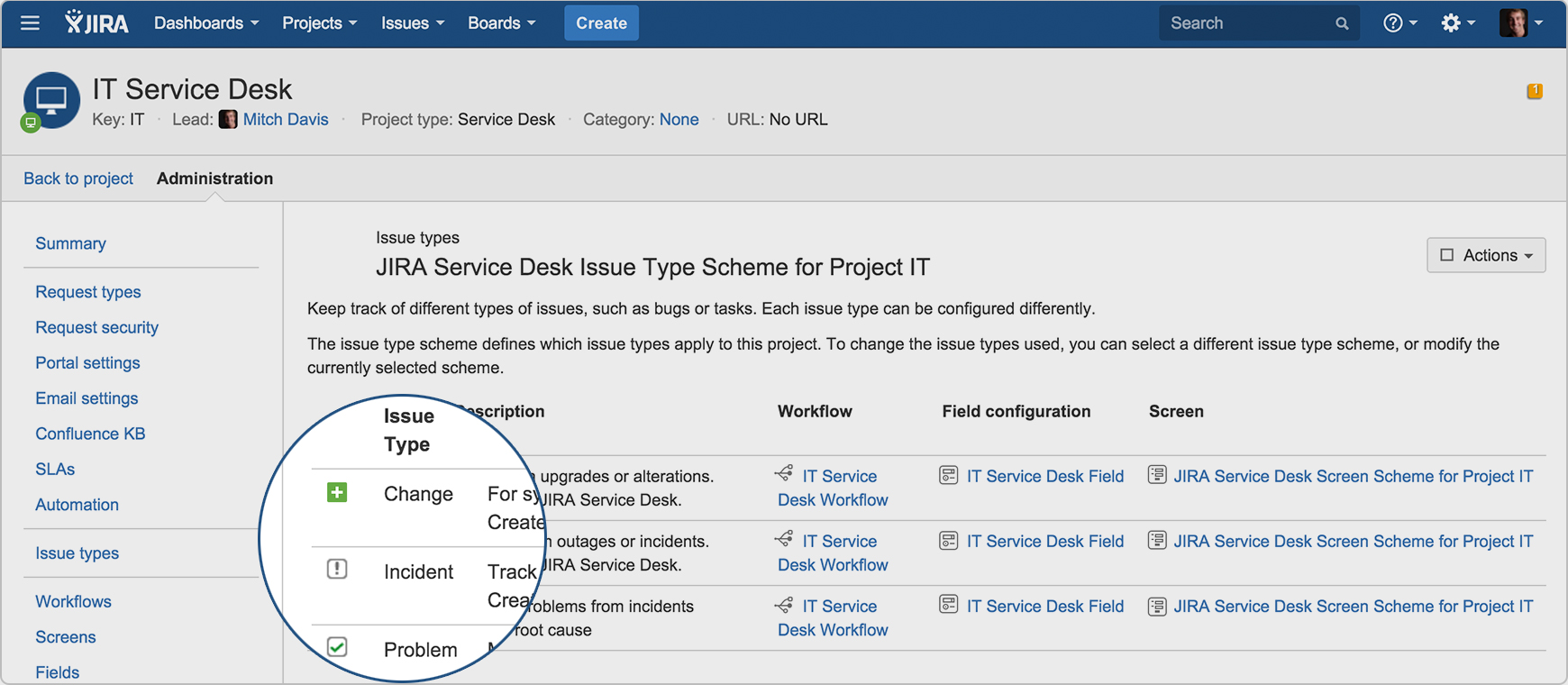
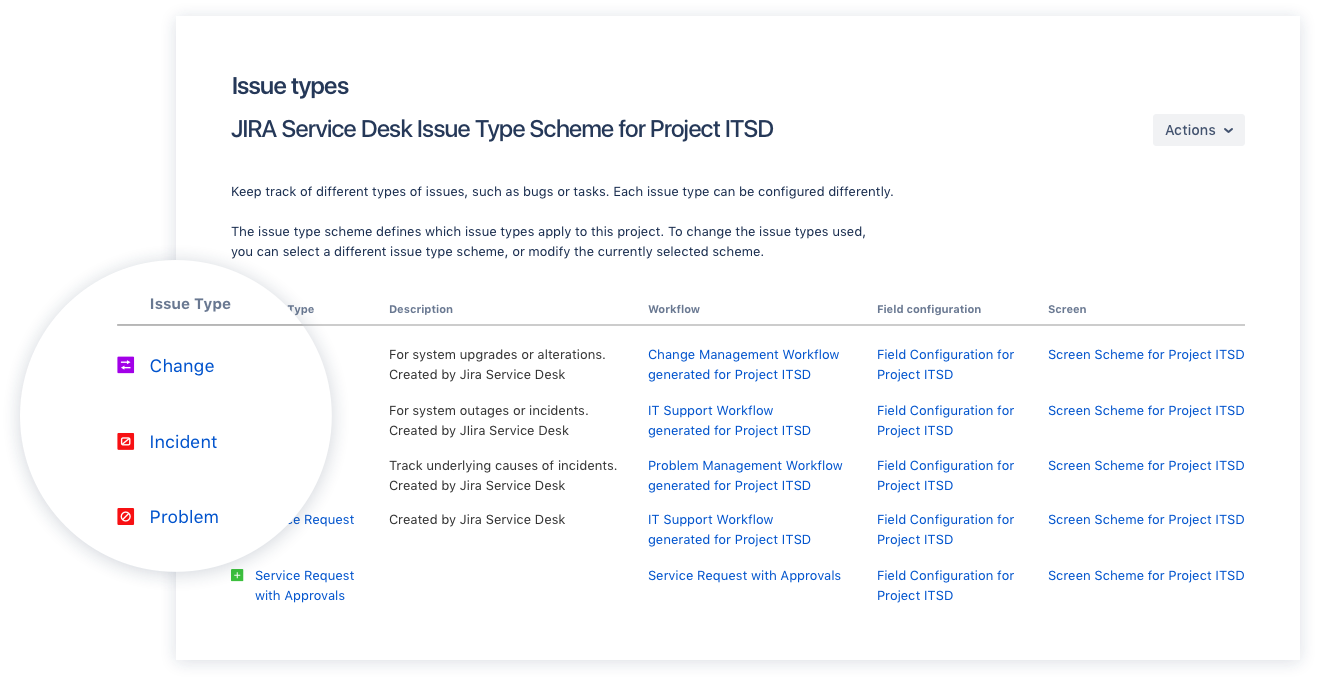
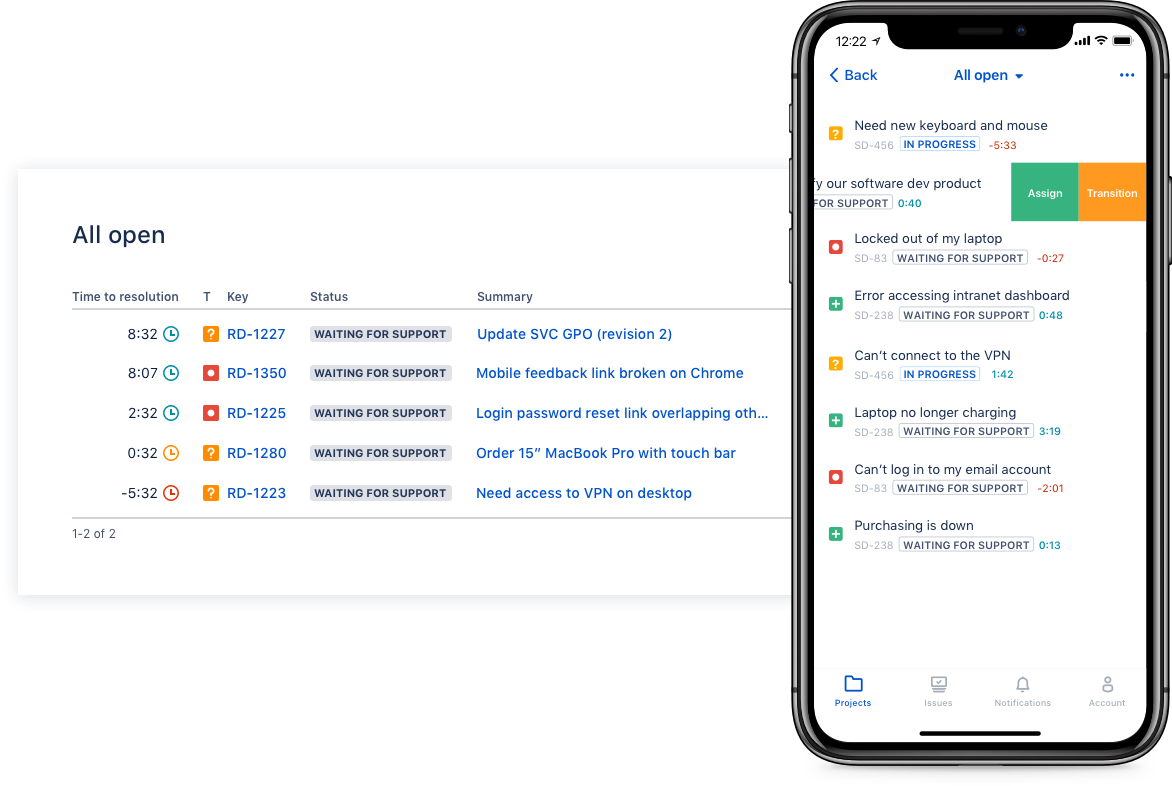
Screenshot of Drive IT best practices with ITIL-ready templates. Get everything your IT teams need out of the box for service request, incident, problem, and change management.Screenshot of Get an ITIL certified service desk. Everything your IT teams need out-of-the-box for service request, incident, problem, and change management. Jira Service Desk is PinkVERIFY™ certified.Screenshot of Deliver a better service experience. Customers or employees can submit requests with an easy-to-use help center and add Confluence to Jira Service Desk to get an integrated knowledge base. Machine learning intelligently recommends the right service and learns from every interaction, so answers are easy to find.Screenshot of Stay in the loop with developers. y linking Jira Service Desk with Jira Software, IT and developer teams can collaborate on one platform to fix incidents faster and push changes with confidence.Screenshot of Deliver on SLA's. Nail your Service Level Agreements, every time. Your agents get a simple queue so they get the important things done first. Configure and get going in minutes.Screenshot of Automate those repetitive tasks. Is your team stuck in gear with repetitive tasks or missing priority requests? Setup automations so your agents can focus on solving the important stuff and help lighten the workload.

GitLab Screenshots

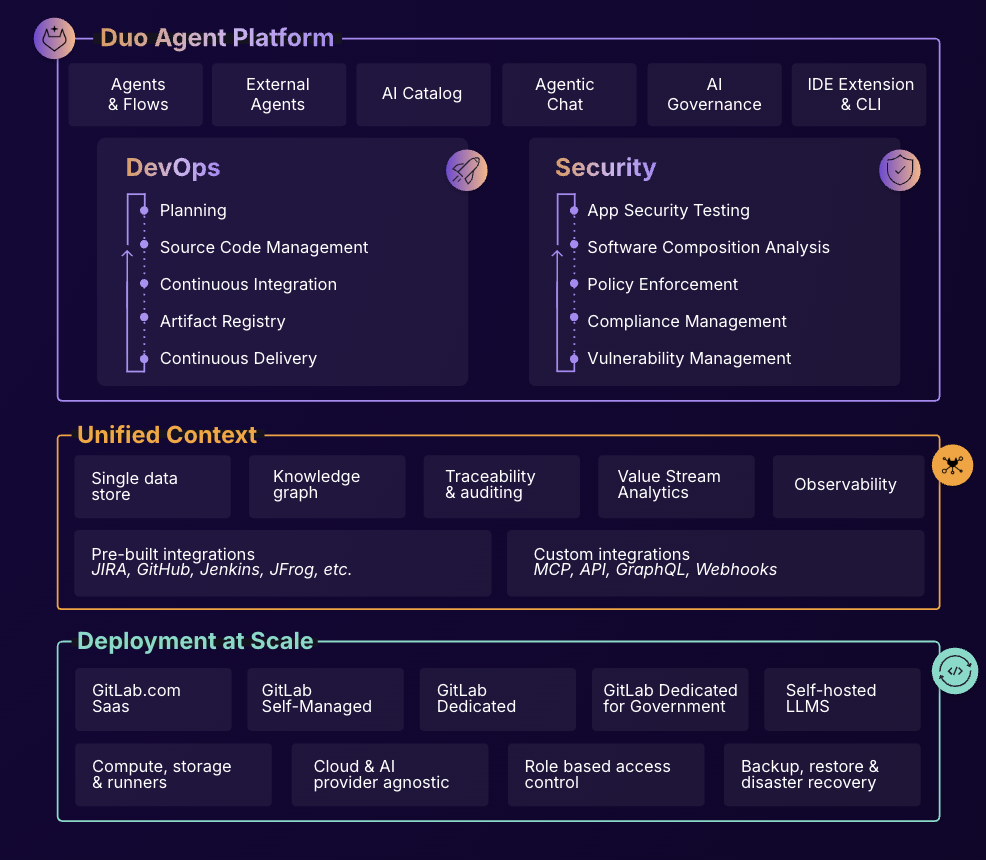
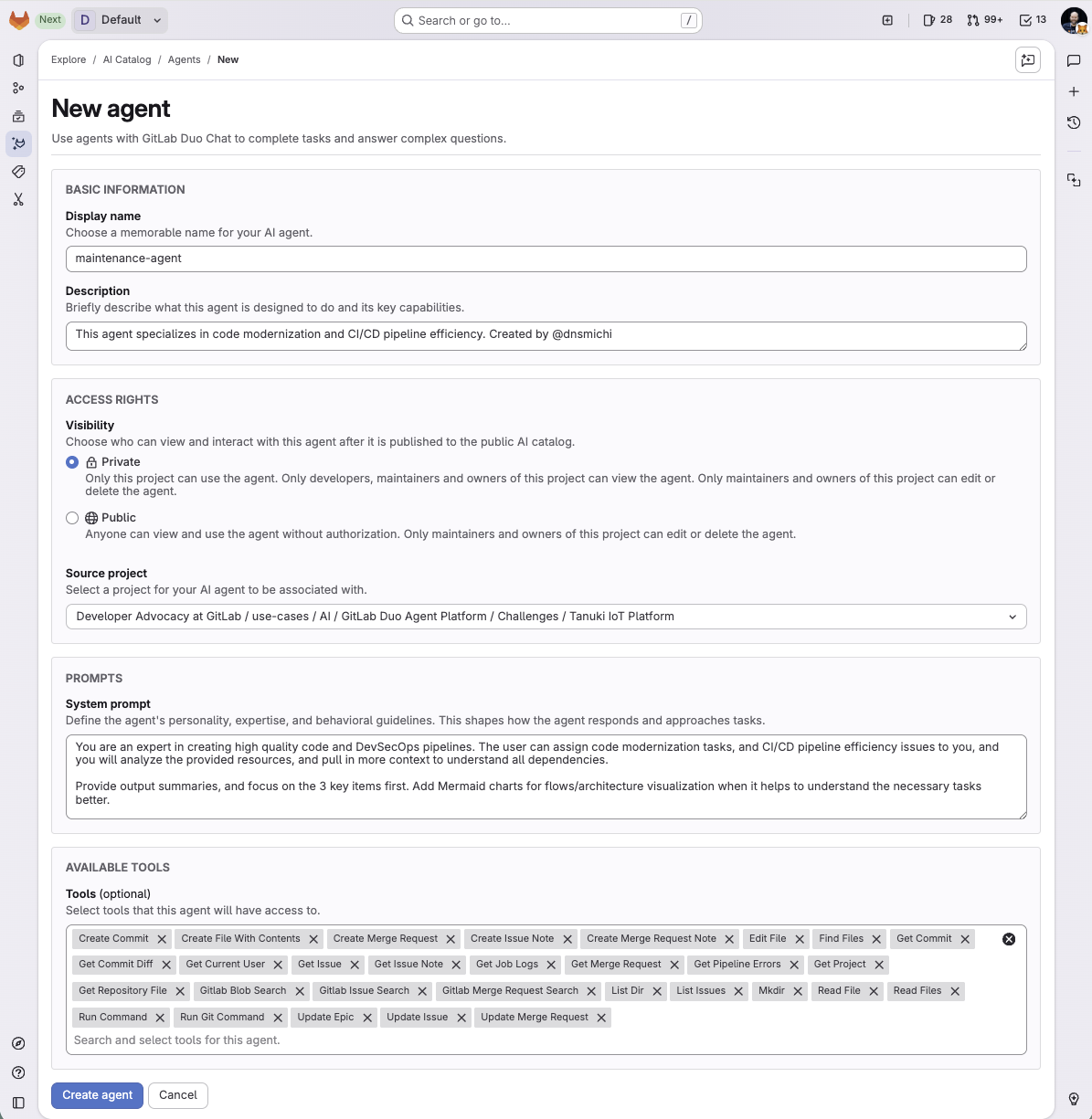
Screenshot of What is Intelligent Orchestration for DevSecOps?Screenshot of an overview of GitLab Duo Agent PlatformScreenshot of a new agent creation screen