Hiver vs. Teamleader

Overview
ProductRatingMost Used ByProduct SummaryStarting Price
Hiver
Score 8.8 out of 10
N/A
Hiver is a customer service platform that brings together communication channels, apps, and data to improve customer support operations. Hiver enables real-time collaboration across every customer communication channel, offering AI and automation to resolve issues and help teams work faster. Hiver states that over 10,000 teams of all shapes and sizes globally from Flexport to Harvard University, Vacasa, and Epic Games rely on Hiver to deliver support that wins and retains customers for…
$24
per month per user
Teamleader
Score 6.0 out of 10
Small Businesses (1-50 employees)
Teamleader is a user-friendly and feature-rich platform which combines CRM, invoicing, and project management into one simple tool. The all-in-one tool aims to help small and medium-sized enterprises organize their sales processes & workflows, communicate effectively & build better relationships with their clients, and improve the productivity & collaboration across their teams. As a platform that provides users with the capability to work smarter, Teamleader offers an online CRM which…
$59
2 users/month
Pricing
HiverTeamleader
Editions & Modules
Lite
$24
per month per user
Growth
$34
per month per user
Pro
$59
per month per user
Elite
Contact Sales
Projects
$59.00
2 users/month
Project Management
$59.00
2 users/month
Support tickets
$59.00
2 users/month
Offerings
Pricing Offerings
HiverTeamleader
Free Trial
YesYes
Free/Freemium Version
YesNo
Premium Consulting/Integration Services
YesNo
Entry-level Setup FeeNo setup fee$29 2 users/month
Additional Details20% discount for annual pricing.extra user is + $12.00/user/month
More Pricing Information
Community Pulse
HiverTeamleader
Features
HiverTeamleader
Incident and problem management
Comparison of Incident and problem management features of Product A and Product B
Hiver
9.0
4 Ratings
9% above category average
Teamleader
-
Ratings
Organize and prioritize service tickets9.04 Ratings00 Ratings
Ticket creation and submission9.04 Ratings00 Ratings
Ticket response9.04 Ratings00 Ratings
Self Help Community
Comparison of Self Help Community features of Product A and Product B
Hiver
8.0
1 Ratings
0% below category average
Teamleader
-
Ratings
External knowledge base8.01 Ratings00 Ratings
Internal knowledge base8.01 Ratings00 Ratings
Multi-Channel Help
Comparison of Multi-Channel Help features of Product A and Product B
Hiver
8.5
4 Ratings
6% above category average
Teamleader
-
Ratings
Customer portal8.01 Ratings00 Ratings
Email support9.04 Ratings00 Ratings
Sales Force Automation
Comparison of Sales Force Automation features of Product A and Product B
Hiver
-
Ratings
Teamleader
8.6
2 Ratings
9% above category average
Customer data management / contact management00 Ratings8.02 Ratings
Workflow management00 Ratings5.01 Ratings
Integration with email client (e.g., Outlook or Gmail)00 Ratings10.02 Ratings
Quote & order management00 Ratings10.01 Ratings
Interaction tracking00 Ratings10.02 Ratings
Customer Service & Support
Comparison of Customer Service & Support features of Product A and Product B
Hiver
-
Ratings
Teamleader
8.3
1 Ratings
8% above category average
Case management00 Ratings10.01 Ratings
Call center management00 Ratings7.01 Ratings
Help desk management00 Ratings8.01 Ratings
Marketing Automation
Comparison of Marketing Automation features of Product A and Product B
Hiver
-
Ratings
Teamleader
10.0
1 Ratings
25% above category average
Lead management00 Ratings10.01 Ratings
CRM Project Management
Comparison of CRM Project Management features of Product A and Product B
Hiver
-
Ratings
Teamleader
9.0
2 Ratings
16% above category average
Task management00 Ratings10.02 Ratings
Billing and invoicing management00 Ratings9.02 Ratings
Reporting00 Ratings8.02 Ratings
Customization
Comparison of Customization features of Product A and Product B
Hiver
-
Ratings
Teamleader
6.5
1 Ratings
17% below category average
Custom fields00 Ratings7.01 Ratings
Custom objects00 Ratings6.01 Ratings
Security
Comparison of Security features of Product A and Product B
Hiver
-
Ratings
Teamleader
9.0
1 Ratings
7% above category average
Single sign-on capability00 Ratings9.01 Ratings
Integrations with 3rd-party Software
Comparison of Integrations with 3rd-party Software features of Product A and Product B
Hiver
-
Ratings
Teamleader
6.0
1 Ratings
22% below category average
Compensation management00 Ratings6.01 Ratings
Platform
Comparison of Platform features of Product A and Product B
Hiver
-
Ratings
Teamleader
10.0
2 Ratings
27% above category average
Mobile access00 Ratings10.02 Ratings
Best Alternatives
HiverTeamleader
Small Businesses
Agiloft Service Desk (discontinued)
Score 9.0 out of 10
Salesmate
Salesmate
Score 10.0 out of 10
Medium-sized Companies
Agiloft Service Desk (discontinued)
Score 9.0 out of 10
Creatio
Creatio
Score 9.0 out of 10
Enterprises
SysAid
SysAid
Score 8.9 out of 10
Creatio
Creatio
Score 9.0 out of 10
All AlternativesView all alternativesView all alternatives
User Ratings
HiverTeamleader
Likelihood to Recommend
8.0
(4 ratings)
10.0
(2 ratings)
Usability
9.0
(2 ratings)
8.0
(1 ratings)
Support Rating
4.0
(1 ratings)
10.0
(1 ratings)
User Testimonials
HiverTeamleader
Likelihood to Recommend
Hiver
One scenario where Hiver works really well is in a shared support or billing inbox or anywhere multiple team members need access to the same messages. For example, when a customer emails about a billing question, we used to reply and manually loop in the billing team or forward the message. That often caused confusion, especially when someone forgot to “reply all” or responded only to the teammate instead of the customer.Now with Hiver, we just assign the conversation to the billing inbox, and whoever is available can respond. Everyone on the team can see the thread, status, and notes, which avoids duplicated efforts and missed replies. We also used to rely on Google Groups, but it wasn’t clear if someone had already replied, and there was no easy way to collaborate behind the scenes. Hiver completely solved that for us.As for situations where Hiver might be less ideal, I’d say if your team isn’t using Gmail or Google Workspace, then it’s probably not a good fit. It’s really designed for teams that live in Gmail so the team doesn't have to learn a new system. I'm sure some businesses will require a more robust ticketing solution but for our use case, this was a perfect option to improve outcomes, client service, and satisfaction.
Read full review
Teamleader
It is great for making proposals, sending invoices and for keeping time. It is also a great CRM tool. I love the business card scanner in the app.
Read full review
Pros
Hiver
  • automation through rules
  • tagging emails, anaylics behind them
  • support, chat always responds right away
Read full review
Teamleader
  • Comply clients data
  • Invoices
  • Track and measure time for projects
Read full review
Cons
Hiver
  • It could be considered expensive, but ultimately worth every penny for those who use shared inboxes/groups to run their business.
Read full review
Teamleader
  • Synching contacts between iPhone and Teamleader could be easier.
  • Integration with Aweber would be great.
Read full review
Usability
Hiver
Easy to use
Read full review
Teamleader
Besides having some tools to improve, it's a simple yet useful tool to organize data in order to improve patients quality and internal development.
Read full review
Support Rating
Hiver
Support is there, can be slow at times.
Read full review
Teamleader
Very effective team. If ANYTHING occurs their assistance is pretty much immediate. They take longer by email but it works everytime.
Read full review
Alternatives Considered
Hiver
True ticketing solutions are certainly more robust in that you can typically manage social media channels and phones, etc. But, in my opinion, when you don't have a team solely responsible for managing a ticketing system they can be complicated to implement. With HIVER, we're already all accustomed to managing our own G-Suite inbox, so it was simply a matter of teaching the team how to utilize the solution.
Read full review
Teamleader
Act-On I used for a client. It is more a marketing automation tool than a CRM solution and it is also more suited for bigger organizations.
Read full review
Return on Investment
Hiver
  • The ROI on showing how many emails are being received and addressed in a timely manner are great for KPIs
  • the ability to search and ensure emails are not being deleted as an automatic report is sent out the following day saying if any emails were deleted by whom
  • the ability to automate who gets assigned what emails from specific vendors per entity
Read full review
Teamleader
  • Positive: invoices are easy to pay thanks to the direct link, invoices are mostly paid timely
  • Positive: it is easy to monitor deals and proposals. When followed up timely, more opportunities become deals.
Read full review
ScreenShots

Hiver Screenshots

Screenshot of Hiver in GmailScreenshot of a view of a shared mailboxScreenshot of the collision alerts feature

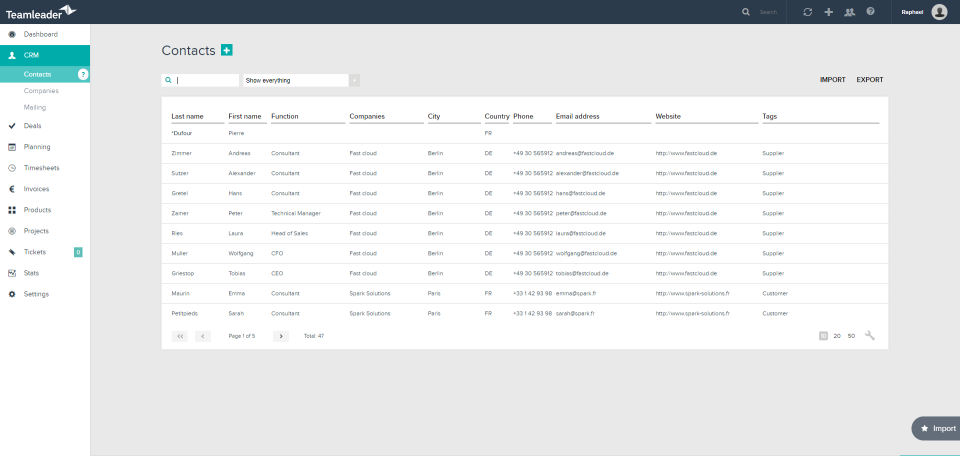
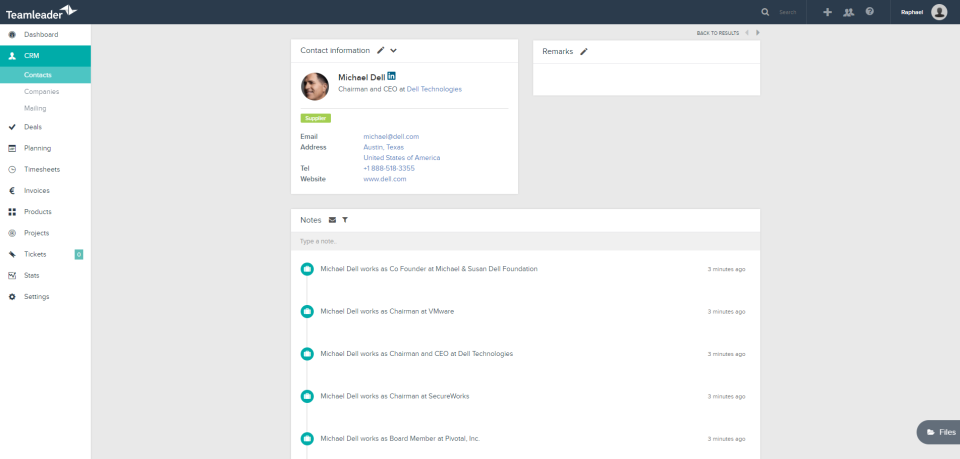
Teamleader Screenshots

Screenshot of DashboardScreenshot of ContactsScreenshot of ContactScreenshot of Add SegmentScreenshot of CalendarScreenshot of Invoices