Overview
ProductRatingMost Used ByProduct SummaryStarting Price
HotGloo
Score 8.0 out of 10
Small Businesses (1-50 employees)
HotGloo is an online wireframing and prototyping tool. This solution has been designed for all those engaged in the concept, design and development of web or app projects: project managers, information architects, usability experts, freelancers, concept people, digital agencies, web companies, publishers, web designers, web developers and many more. The vendor’s value proposition is that this solution makes it easy to wireframe web and mobile sites and to collaborate with others due to the…
$13
up to 4 users, 2 active projects, unlimited reviewers
monday.com
Score 8.3 out of 10
Mid-Size Companies (51-1,000 employees)
monday.com Work OS is an open platform designed so that anyone can create the tools they need to run all aspects of their work. It includes ready-made templates or the ability to customize any work solution ranging from sales pipelines to marketing campaigns, CRMs, and project tracking.
$12
per month per user
Pricing
HotGloomonday.com
Editions & Modules
Group
$13
up to 4 users, 2 active projects, unlimited reviewers
Team
$27
up to 10 users / 6 active projects / unlimited reviewers
Agency
$54
up to 20 users / 15 active projects / unlimited reviewers
Enterprise
150 +
More users and projects, priority support. Get in touch for an individual quote.
Basic
$12
per month per user
Standard
$14
per month per user
Pro
$24
per month per user
Enterprise
Contact Sales
Contact us
Offerings
Pricing Offerings
HotGloomonday.com
Free Trial
YesYes
Free/Freemium Version
NoYes
Premium Consulting/Integration Services
NoNo
Entry-level Setup FeeNo setup feeOptional
Additional DetailsThe billing period starts on the day you upgrade from the free trial to a paying plan. If you pay by credit card the service is billed in advance on a monthly basis and is non-refundable. There will be no refunds or credits for partial months of service, upgrade/downgrade refunds, or refunds for months unused with an open account. If you do choose to cancel your account in the future, you will never be charged again, but you are responsible for charges already incurred up until your cancellation. For monthly recurring payments we accept Visa, MasterCard and American Express through our online payment system. You can also prepay any account for 12 months with credit card. In certain cases we also take money transfers – please contact us beforehand if you want to use this option.An 18% discount is available for annual billing.
More Pricing Information
Community Pulse
HotGloomonday.com
Considered Both Products
HotGloo
Chose HotGloo
HotGloo was extremely intuitive to use, particular for users who were not from a UX background. The wide-ranging widget library and elements available meant little domain knowledge was required to get up and running with the product. The product was supported by a great online …
Chose HotGloo
Being able to export the finished wireframe to HTML was a huge time saver for me and my team. Getting to that next step quickly and seamlessly was a massive help. Not only that, but other tools that do this, we have not as much luck. HotGloo's functionality was a step above the …
Chose HotGloo
HotGloo is tailored to this use case and therefore considers the right user needs. I think one strength is that it focuses on the main aspect. There are other tools, that have more extensive features. However, those are then more complex and not so well made for the specific …
monday.com
Chose monday.com
monday.com feels like it offers a lower barrier to entry as well as more versatility, extensibility without becoming too complex. Atlassian is geared more for larger companies requiring a greater degree of granular controls.

Both platforms have a number of integrations (though, …
Chose monday.com
I used Pipedrive in my previous roles, so I did not evaluate monday.com as an alternative to Pipedrive. Similarly, Salesforce is not positioned as an alternative to monday.com for us. We currently use both Salesforce and monday.com, as they serve different purposes and …
Chose monday.com
monday.com does more than just a single function like other tools.
Chose monday.com
Planner is very hard to figure out. Insightly is a good resource to keeping track of customers and their info but for tasks, monday.com is far superior
Chose monday.com
Workfront offered a more intuitive user interface, which made team adoption easier. It also included additional products that aligned well with the needs of our Dev, Work Management, and Service teams.
Chose monday.com
Atlassian Jira, Jira Service Management and Jira Work Management
Chose monday.com
I actually found clickup easier to use and they had better features for recurring tasks
Chose monday.com
Cost is a big factor as the alternatives stacked up poorly in user costs and built in features. Also, the business was already using a different facet of monday.com so it was a quick setup and we already had experience and people were Jo knew the platform. Less complex and also …
Chose monday.com
monday is more capable and comprehensive when it comes to project and task management as well as the CRM side. However, Odoo is better suited for managing other areas that monday doesn’t cover, such as employee management, payroll, and invoicing. If one were to prioritize cost …
Chose monday.com
Very similar feature-function-wise wise but the UI is the ultimate differentiator that makes adoption so much easier on monday.com.
Chose monday.com
We have not used anything like Monday.com before. We used to do all of what I described on Google Sheets and share them with the company. It was very time consuming and cumbersome to remake new sheets every year, Monday.com gives us the freedom to add on year by year and not …
Chose monday.com
monday.com is far superior to Microsoft Planner and Basecamp, and arguably superior to Trello and Slack Lists as well. Asana (for work management and Zendesk (for request management) put it to shame. My main monday-using client selected it primarily because of its slightly …
Chose monday.com
We have only ever tried one other software that was designed to work similarly to monday.com. I will not name the company but our experience with it was just short of harrowing. The company was friendly and supportive but the product they designed was not user friendly. It did …
Chose monday.com
monday.com is the sweet spot of rich feature set and simplicity
Chose monday.com
I think trello was nice so self-use, but not for a team
Chose monday.com
monday.com is so much better and cheaper. We moved from Zendesk because, in our experience, their customer service was terrible, they kept raising prices, and there was limited functionality relevant to our organization. The tools within monday.com allow us to use it as more …
Chose monday.com
It's been a while since trying Asana, so it's hard to say. I think they are very similar from what I remember, but maybe monday.com has more reporting and customization possibilities?
Chose monday.com
monday.com offer much of the standard tools and seems to be ever evolving. They seem to take feedback and constantly upgrade the tools. If all the tools are there, the differentiating factor might be the cost, any integrations you may need, and the visual "chemistry". To me, …
Chose monday.com
We chose to move from Zoho to monday.com when our company started growing exponentially. Overall, our team was thankful for the change because we were growing at far to fast of a speed for Zoho's tools to keep up with us. monday.com is a better, beefier platform with far better …
Chose monday.com
We decided to go with monday.com because they offered a free tier for nonprofits and because they are easier to use and offered additional features that we could not find on the other choices. Hands down, there was no better choice for us than monday.com.
Chose monday.com
When I arrived at my org, I was initially disappointed to hear that we used something other than Asana for project management. Fast forward just a few months, and I became a complete monday.com convert. While its organization is similar to Asana's, it's user interface, …
Chose monday.com
We use Jira, Confluence, Miro and the full Salesforce stack and it's very reliable as are the other softwares.
Features
HotGloomonday.com
Project Management
Comparison of Project Management features of Product A and Product B
HotGloo
-
Ratings
monday.com
8.2
Ratings
6% above category average
Task Management00 Ratings9.20 Ratings
Resource Management00 Ratings8.20 Ratings
Gantt Charts00 Ratings8.20 Ratings
Scheduling00 Ratings8.50 Ratings
Workflow Automation00 Ratings8.60 Ratings
Team Collaboration00 Ratings9.30 Ratings
Support for Agile Methodology00 Ratings8.20 Ratings
Support for Waterfall Methodology00 Ratings7.00 Ratings
Document Management00 Ratings7.90 Ratings
Email integration00 Ratings7.70 Ratings
Mobile Access00 Ratings7.80 Ratings
Timesheet Tracking00 Ratings7.70 Ratings
Change request and Case Management00 Ratings9.00 Ratings
Budget and Expense Management00 Ratings8.00 Ratings
Professional Services Automation
Comparison of Professional Services Automation features of Product A and Product B
HotGloo
-
Ratings
monday.com
7.9
Ratings
2% above category average
Quotes/estimates00 Ratings7.90 Ratings
Project & financial reporting00 Ratings8.10 Ratings
Integration with accounting software00 Ratings7.80 Ratings
Best Alternatives
HotGloomonday.com
Small Businesses
OmniGraffle
OmniGraffle
Score 9.8 out of 10
Stackby
Stackby
Score 8.9 out of 10
Medium-sized Companies
OmniGraffle
OmniGraffle
Score 9.8 out of 10
InEight
InEight
Score 8.2 out of 10
Enterprises
OmniGraffle
OmniGraffle
Score 9.8 out of 10
InEight
InEight
Score 8.2 out of 10
All AlternativesView all alternativesView all alternatives
User Ratings
HotGloomonday.com
Likelihood to Recommend
7.8
(0 ratings)
8.6
(0 ratings)
Likelihood to Renew
-
(0 ratings)
9.1
(0 ratings)
Usability
-
(0 ratings)
8.6
(0 ratings)
Availability
-
(0 ratings)
8.2
(0 ratings)
Performance
-
(0 ratings)
8.6
(0 ratings)
Support Rating
-
(0 ratings)
8.1
(0 ratings)
In-Person Training
-
(0 ratings)
9.1
(0 ratings)
Online Training
-
(0 ratings)
9.1
(0 ratings)
Implementation Rating
-
(0 ratings)
9.1
(0 ratings)
Configurability
-
(0 ratings)
8.2
(0 ratings)
Ease of integration
-
(0 ratings)
9.0
(0 ratings)
Product Scalability
-
(0 ratings)
6.9
(0 ratings)
Vendor post-sale
-
(0 ratings)
9.0
(0 ratings)
Vendor pre-sale
-
(0 ratings)
9.0
(0 ratings)
User Testimonials
HotGloomonday.com
Likelihood to Recommend
HotGloo is well suited to a dispersed team of users who are looking to collaboratively wireframe and prototype their latest web solutions. It's extremely intuitive and comes with a large widget library meaning the newest user can be up and running very quickly. In browser access means it's extremely accessible whether you're working in a room together or across the country at home.
Read full review
The platform is very well suited for our nonprofit programs that serve low-income clients who need diapers, wipes, and period products. It has helped us run our programs, capturing information and allowing us to view the data for reporting purposes. The ability to filter data is very helpful by allowing us to categorize information to get a better picture of the progress of our programs.
Read full review
Pros
  • Elements Library
  • Symbols Library
  • Interface supports workflow
Read full review
  • I like summary of subitems, especially with subitasks as subitems and add item tracking for each subtask it can show total tracked in parent item. Similar with other columns, like numbers, status, date.
  • Dashboard features, Many kinds of dashboard view available, we can utilize on the basis of requirements.
  • monday.com workform is very powerful, easily share form link when submitted it will create line item in board with provided data.
  • monday.com automation is very helpful in order to automate steps with specific rules and easy setup.
  • monday.com also provides integrations in order to automate processes if need to integrate multiple app together. or need to transfer data between multiple apps.
Read full review
Cons
  • logical structure of interface objects
  • preview view does not scale frame on small screens
  • Tool ribbon
Read full review
  • The desktop app for Mac seems to have a few issues with visual glitches appearing on screen, it only seems to go away when I close the tool and reopen it
  • Subtasks don't show on the individual users to-do list, only main level tasks
Read full review
Likelihood to Renew
No answers on this topic
Teams involved in content creation, such as marketing or editorial teams, could use monday.com to manage the entire content lifecycle. Boards might track content ideas, assignments, drafts, reviews, approvals, and publication schedules, helping teams collaborate and keep content production on track.
Read full review
Usability
No answers on this topic
It's really about ease of use. I use Click-Up as well, which I really enjoy, but monday.com is a lot less complex to use. Its structure is a bit easier to understand and I got accustomed to the functionality very quickly. I have not explored enough of its functionality to comment any further but it's a really great tool for tracking progress and for capturing absolutely everything I need to save, including ideas, brain-dump, insights, continuous improvement on tasks and processes. I am lucky to be able to use monday.com as a member of my client's team.
Read full review
Reliability and Availability
No answers on this topic
There have only been 2 instances in the past year where monday.com was down.
Read full review
Performance
No answers on this topic
Everything performs fairly well. Every now and then there are user errors where an employee will not click "ok" on a note they've created and simply exit out (I do wish that something was in place to prevent this, such as a pop "are you finished?")
Read full review
Support Rating
No answers on this topic
monday.com only really care about accounts that have 20 seats or more. While this is great for monday.com, it pushes smaller organisations to evaluate alternatives. We rate monday.com highly in our organisation because key staff have already got good experience with the application and we know we will get to 20+ seats one day. But, till then the billing model and lack of permanent enterprise features is a dread.
Read full review
Online Training
No answers on this topic
To have someone walk you thru the features and capabilities of Monday.com is priceless. Someone also coming along later in the contract to see if you are maximizing the program to suit your company needs is beyond helpful. The staff that have provided this training are fun, creative and very patient.
Read full review
Implementation Rating
No answers on this topic
We signed up for the accounts. Created the accounts. Ran the trial version and tested it live while we were running multiple projects and found that it was fitting our needs perfectly. When the trial ended and we were asked to purchase the full version, we did. We have found other ways to use it and it's a breeze.
Read full review
Alternatives Considered
HotGloo is tailored to this use case and therefore considers the right user needs. I think one strength is that it focuses on the main aspect. There are other tools, that have more extensive features. However, those are then more complex and not so well made for the specific work I use it for. Thus, I like HotGloo also because of the element and symbols library. Which has the right depth and detail - no more, no less then needed.
Read full review
monday.com feels like it offers a lower barrier to entry as well as more versatility, extensibility without becoming too complex. Atlassian is geared more for larger companies requiring a greater degree of granular controls. Both platforms have a number of integrations (though, Atlassian may have "more" because of it's marketplace and longer tenure), but monday.com may be easier to configure, though with potentially more limited functionality. monday.com definitely lends itself well to getting a business off the ground with simpler automations and the ability to grow you to the point of "graduating" to a more specialized tools.
Read full review
Scalability
No answers on this topic
For it to work across multiple departments and sites, I would like to see improvements made with integrations and automation. For this question, I am acknowledging not only the addition of internal triggers/automation, but also an expansion on external ones.
Read full review
Return on Investment
  • Build more wireframes quicker and deliver to client and provide options.
Read full review
  • By using monday.com as an enablement tool for templated onboarding plans, we have been able to begin calculating the number of manager hours saved through our work (not defined yet).
  • monday.com's reporting tools also allow us to more easily report on the productivity and output of our team since we keep up with all projects and subitems in monday.com.
Read full review
ScreenShots

HotGloo Screenshots

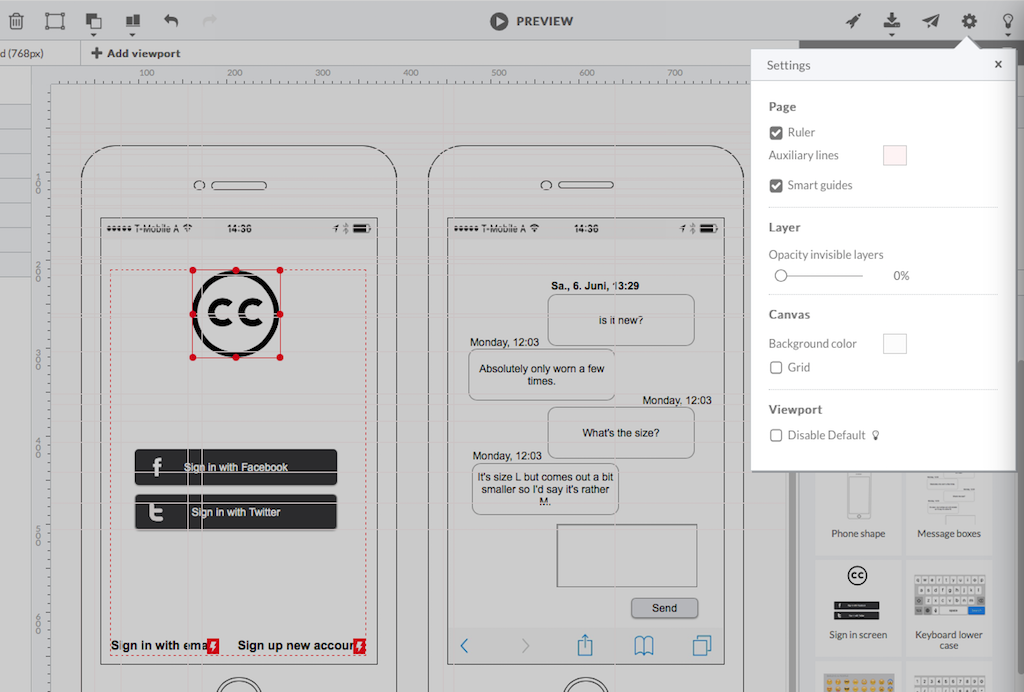
Screenshot of HotGloo 24/7 run & test anywhere.Screenshot of Responsive wireframing with different viewports.Screenshot of Create mobile app wireframesScreenshot of From desktop over tablet to mobile.

monday.com Screenshots

Screenshot of Work OSScreenshot of Ready-Made TemplatesScreenshot of MobileScreenshot of Visual BoardsScreenshot of Real-time NotificationsScreenshot of Automations