TrustRadius: an HG Insights company

Save this comparison

Save this comparison

Add Product

Recommended Comparisons

    Overview
    ProductRatingMost Used ByProduct SummaryStarting Price

    IFS Applications

    Score7.6 out of 10
    N/AIFS Applications is presented by the vendor as an agile application suite that offers enterprise resource planning (ERP), enterprise asset management (EAM) and enterprise project management, handling 4 core processes: Service & Asset Management Full Enterprise Asset Management (EAM), Maintenance Repair and Overhaul (MRO) and Field Service Management (FSM) Manufacturing Enterprise Resource Planning (ERP) with support for process manufacturing, discrete manufacturing…N/A

    SharePoint

    Score7.9 out of 10
    N/AMicrosoft's SharePoint is an Intranet solution that enables users to share and manage content, knowledge, and applications to empower teamwork, quickly find information, and collaborate across the organization.

    $5

    Per User Per Month

    Pricing
    IFS ApplicationsSharePoint
    Editions & Modules
    No answers on this topic
    Plan 1
    $5.00
    Per User Per Month
    Plan 2
    $10.00
    Per User Per Month
    Office 365 E3
    $20.00
    Per User Per Month
    Offerings
    Pricing Offerings
    IFS ApplicationsSharePoint
    Free Trial
    NoYes
    Free/Freemium Version
    NoNo
    Premium Consulting/Integration Services
    NoNo
    Entry-level Setup FeeNo setup feeNo setup fee
    Additional Details——
    More Pricing Information
    Community Pulse
    IFS ApplicationsSharePoint
    Considered Both Products
    IFS
    Chose IFS Applications
    Microsoft AX, QAD (in continuation of our previous ERP), Sage X3 was an out of the box ERP that was part of initial RFP.

    We have chosen IFS based on the compromise between costs & budget, functionality, technical features, and feedback from similar customers that gave their …
    Incentivized
    Microsoft
    No answer on this topic
    Key User Insights
    Would buy again
    No answers on this topic
    89%
    Would buy again
    51 Answers
    Delivers good value for the price
    No answers on this topic
    96%
    Delivers good value for the price
    45 Answers
    Happy with the feature set
    No answers on this topic
    95%
    Happy with the feature set
    54 Answers
    Lived up to sales and marketing promises
    No answers on this topic
    96%
    Lived up to sales and marketing promises
    27 Answers
    Implementation went as expected
    No answers on this topic
    97%
    Implementation went as expected
    37 Answers
    Features
    IFS ApplicationsSharePoint
    Payroll Management
    Comparison of Payroll Management features of IFS Applications and Microsoft SharePoint
    Feature
    IFS Applications
    4.7
    3 Ratings
    46% below category average
    Microsoft SharePoint
    -
    Ratings
    Pay calculation8.03 Ratings00 Ratings
    Benefit plan administration7.43 Ratings00 Ratings
    Direct deposit files6.43 Ratings00 Ratings
    Customization
    Comparison of Customization features of IFS Applications and Microsoft SharePoint
    Feature
    IFS Applications
    8.7
    5 Ratings
    14% above category average
    Microsoft SharePoint
    -
    Ratings
    API for custom integration8.75 Ratings00 Ratings
    Plug-ins8.75 Ratings00 Ratings
    Security
    Comparison of Security features of IFS Applications and Microsoft SharePoint
    Feature
    IFS Applications
    9.9
    5 Ratings
    16% above category average
    Microsoft SharePoint
    -
    Ratings
    Single sign-on capability10.05 Ratings00 Ratings
    Role-based user permissions9.85 Ratings00 Ratings
    Reporting & Analytics
    Comparison of Reporting & Analytics features of IFS Applications and Microsoft SharePoint
    Feature
    IFS Applications
    8.8
    5 Ratings
    15% above category average
    Microsoft SharePoint
    -
    Ratings
    Dashboards8.55 Ratings00 Ratings
    Standard reports8.35 Ratings00 Ratings
    Custom reports9.55 Ratings00 Ratings
    General Ledger and Configurable Accounting
    Comparison of General Ledger and Configurable Accounting features of IFS Applications and Microsoft SharePoint
    Feature
    IFS Applications
    7.5
    5 Ratings
    3% below category average
    Microsoft SharePoint
    -
    Ratings
    Accounts payable9.55 Ratings00 Ratings
    Accounts receivable9.55 Ratings00 Ratings
    Global Financial Support9.04 Ratings00 Ratings
    Primary and Secondary Ledgers9.34 Ratings00 Ratings
    Journals and Reconciliations9.04 Ratings00 Ratings
    Configurable Accounting8.84 Ratings00 Ratings
    Standardized Processes9.04 Ratings00 Ratings
    Inventory Management
    Comparison of Inventory Management features of IFS Applications and Microsoft SharePoint
    Feature
    IFS Applications
    9.1
    5 Ratings
    13% above category average
    Microsoft SharePoint
    -
    Ratings
    Inventory tracking9.35 Ratings00 Ratings
    Automatic reordering9.55 Ratings00 Ratings
    Location management9.55 Ratings00 Ratings
    Order Management
    Comparison of Order Management features of IFS Applications and Microsoft SharePoint
    Feature
    IFS Applications
    6.3
    5 Ratings
    23% below category average
    Microsoft SharePoint
    -
    Ratings
    Pricing9.05 Ratings00 Ratings
    Order entry8.25 Ratings00 Ratings
    Credit card processing8.74 Ratings00 Ratings
    Cost of goods sold8.35 Ratings00 Ratings
    Order Orchestration7.84 Ratings00 Ratings
    Subledger and Financial Process
    Comparison of Subledger and Financial Process features of IFS Applications and Microsoft SharePoint
    Feature
    IFS Applications
    3.9
    4 Ratings
    64% below category average
    Microsoft SharePoint
    -
    Ratings
    Billing Management8.34 Ratings00 Ratings
    Cash and Asset Management8.84 Ratings00 Ratings
    Travel & Expense Management8.84 Ratings00 Ratings
    Budgetary Control & Encumbrance Accounting7.84 Ratings00 Ratings
    Period Close9.34 Ratings00 Ratings
    Project Financial Management
    Comparison of Project Financial Management features of IFS Applications and Microsoft SharePoint
    Feature
    IFS Applications
    2.7
    1 Ratings
    95% below category average
    Microsoft SharePoint
    -
    Ratings
    Budgeting and Forecasting3.01 Ratings00 Ratings
    Project Costing6.01 Ratings00 Ratings
    Cost Capture5.01 Ratings00 Ratings
    Capital Project Management2.01 Ratings00 Ratings
    Customer Contract Compliance2.01 Ratings00 Ratings
    Project Revenue Recognition2.01 Ratings00 Ratings
    Project Execution Management
    Comparison of Project Execution Management features of IFS Applications and Microsoft SharePoint
    Feature
    IFS Applications
    3.5
    4 Ratings
    67% below category average
    Microsoft SharePoint
    -
    Ratings
    Project Planning and Scheduling9.54 Ratings00 Ratings
    Task Insight for Project Managers8.54 Ratings00 Ratings
    Project Mobile Functionality7.54 Ratings00 Ratings
    Definable Resource Pools8.54 Ratings00 Ratings
    Grants Management
    Comparison of Grants Management features of IFS Applications and Microsoft SharePoint
    Feature
    IFS Applications
    9.3
    2 Ratings
    21% above category average
    Microsoft SharePoint
    -
    Ratings
    Award Lifecycle Management9.32 Ratings00 Ratings
    Procurement
    Comparison of Procurement features of IFS Applications and Microsoft SharePoint
    Feature
    IFS Applications
    3.5
    4 Ratings
    68% below category average
    Microsoft SharePoint
    -
    Ratings
    Bids Analyzed and Compared9.33 Ratings00 Ratings
    Contract Authoring8.33 Ratings00 Ratings
    Contract Repository8.33 Ratings00 Ratings
    Requisitions-to-Purchase Orders Integrated9.24 Ratings00 Ratings
    Supplier Management9.24 Ratings00 Ratings
    Risk Management
    Comparison of Risk Management features of IFS Applications and Microsoft SharePoint
    Feature
    IFS Applications
    5.0
    4 Ratings
    30% below category average
    Microsoft SharePoint
    -
    Ratings
    Risk Repository8.54 Ratings00 Ratings
    Control Management8.74 Ratings00 Ratings
    Control Efficiency Assessments8.54 Ratings00 Ratings
    Issue Detection7.54 Ratings00 Ratings
    Remediation and Certification8.04 Ratings00 Ratings
    Logistics
    Comparison of Logistics features of IFS Applications and Microsoft SharePoint
    Feature
    IFS Applications
    7.8
    4 Ratings
    11% above category average
    Microsoft SharePoint
    -
    Ratings
    Transportation Planning and Optimization8.32 Ratings00 Ratings
    Transportation Execution Management9.02 Ratings00 Ratings
    Trade and Customs Management8.02 Ratings00 Ratings
    Fulfillment Management7.73 Ratings00 Ratings
    Warehouse Workforce Management8.54 Ratings00 Ratings
    Manufacturing
    Comparison of Manufacturing features of IFS Applications and Microsoft SharePoint
    Feature
    IFS Applications
    6.8
    4 Ratings
    10% below category average
    Microsoft SharePoint
    -
    Ratings
    Production Process Design9.33 Ratings00 Ratings
    Production Management9.04 Ratings00 Ratings
    Configuration Management8.84 Ratings00 Ratings
    Work Execution9.34 Ratings00 Ratings
    Manufacturing Costs9.54 Ratings00 Ratings
    Supply Chain
    Comparison of Supply Chain features of IFS Applications and Microsoft SharePoint
    Feature
    IFS Applications
    9.1
    4 Ratings
    21% above category average
    Microsoft SharePoint
    -
    Ratings
    Forecasting8.84 Ratings00 Ratings
    Inventory Planning9.54 Ratings00 Ratings
    Performance Monitoring9.03 Ratings00 Ratings
    Product Lifecycle Management
    Comparison of Product Lifecycle Management features of IFS Applications and Microsoft SharePoint
    Feature
    IFS Applications
    4.8
    4 Ratings
    42% below category average
    Microsoft SharePoint
    -
    Ratings
    Proposal Management8.33 Ratings00 Ratings
    Product Master Data Management8.83 Ratings00 Ratings
    Best Alternatives
    IFS ApplicationsSharePoint
    Small Businesses
    Zoho One
    Score9.2 out of 10
    HCL Connections
    Score9 out of 10
    Medium-sized Companies
    Zoho One
    Score9.2 out of 10
    HCL Connections
    Score9 out of 10
    Enterprises
    Microsoft Dynamics AX (discontinued)
    Score4.8 out of 10
    HCL Connections
    Score9 out of 10
    All AlternativesView all alternativesView all alternatives
    User Ratings
    IFS ApplicationsSharePoint
    Likelihood to Recommend
    8.5
    (5 ratings)
    8.1
    (271 ratings)
    Likelihood to Renew
    -
    (0 ratings)
    9.8
    (26 ratings)
    Usability
    8.5
    (4 ratings)
    8.2
    (31 ratings)
    Support Rating
    1.0
    (1 ratings)
    8.8
    (13 ratings)
    In-Person Training
    -
    (0 ratings)
    4.5
    (1 ratings)
    Online Training
    -
    (0 ratings)
    6.4
    (1 ratings)
    Implementation Rating
    -
    (0 ratings)
    6.0
    (5 ratings)
    Data Sharing and Collaboration
    -
    (0 ratings)
    9.2
    (51 ratings)
    Data Sources
    -
    (0 ratings)
    7.6
    (50 ratings)
    User Testimonials
    IFS ApplicationsSharePoint
    Likelihood to Recommend
    IFS
    Order to cash processes and scenario are implemented natively in IFS. An HR module exists for career management also (objectives, comportments, training, mobility) but may be improved in terms of workflow validation (e.g. training to validate by a manager) or reporting.
    Incentivized
    Read full review
    Microsoft
    It's Microsoft, so it rarely goes down or unnecessarily limits access. It works, though page load times can be long if you have lots of data. I feel like the Mac vs. PC divide has started to show up for MS products, but SharePoint works well with both.
    Read full review
    Pros
    IFS
    • It supports the web version in most later versions.
    • It provides various mobile versions of the applications as mobile apps to cater various areas.
    • IFS Applications allows easy configurations of the application without going for costly customization.
    • It covers almost every areas of an industrial company so any other third party applications are minimum.
    • It allows safer and easier built-in options for integrations capabilities.
    Incentivized
    Read full review
    Microsoft
    • We track employees' performance sheets, which are accessible to the employee, his manager, and HR, and this helps with transparency.
    • We maintain technical process documents and SOPs, which help us quickly provide relevant documents during audits.
    • We maintain incident documents change request forms in SharePoint, which helps us in tracking the changes.
    Incentivized
    Read full review
    Cons
    IFS
    • Handling massive volumes of data can be improved.
    Incentivized
    Read full review
    Microsoft
    • Windows Explorer users have some difficulty having to constantly UPLOAD / DOWNLOAD files. Specifically on the DOWNLOAD when they are used to Drag & Drop in & out of LOCAL folders via Window's explorer.
    • Microsoft SharePoint supports multiple "library" types. When implementing our "image" library the search function is done via "tags" and boolean logic. This is challenging to most end users. I'd like our users to be able to search our Microsoft SharePoint image library without having to enter KEYWORD or other BOOLEAN logic.
    • Microsoft SharePoint can also be an internal website for each department or company wide communication tool but I believe these features are geared for much larger organizations. Since we are a SMB we really aren't using these features. So maybe something more useful to SMBs would be nice.
    Incentivized
    Read full review
    Likelihood to Renew
    IFS
    No answers on this topic
    Microsoft
    It's integral to our business. It's already included with most of the Office 365 licensing we buy, so the cost is effectively zero. It stores our files, it is the foundation for custom applications, and Microsoft only continues to enhance its functionality and its connections to other Microsoft tools. SharePoint just keeps getting better and better.
    Incentivized
    Read full review
    Usability
    IFS
    The system is very difficult to use, overly complex, and difficult to learn. It also has limitations that are hard to overcome.
    Read full review
    Microsoft
    No usability issues reported. Individual teams also have allocated areas which replace legacy shared drives on local LANs. Access to Sharepoint resources is fully integrated with corporate Active Directory with additional two-factor authentication required for administrative users. Users have access to Microsoft Services Hub which allows you to create, manage, and track support requests while staying current on Microsoft technologies with access to select self-paced learning paths
    Incentivized
    Read full review
    Support Rating
    IFS
    We have been unable to get answers to our questions, solutions to our problems, and they don't seem interested in working in the construction industry.
    Read full review
    Microsoft
    Support for SharePoint is quite good. Microsoft provides good support. Microsoft offers
    • Quick turnaround time for issues
    • A range of support services
    • Access to a network of resources
    • Escalation of issues
    • Ongoing development and commitment to produce enhancement
    The majority of support is required for initial installation. Once complete and the system is operating we have had very few support issues.
    Incentivized
    Read full review
    In-Person Training
    IFS
    No answers on this topic
    Microsoft
    The face to face training I received was on SharePoint Administration. It was rushed as there was a lot of information to cover and the application of the labs weren't that great either. I like to be able to relate what I am learning to what I am currently doing.
    Read full review
    Online Training
    IFS
    No answers on this topic
    Microsoft
    I like to learn at my own pace and online training allows for that. Additionally, you can skip through pieces of content that you already know or are already comfortable with. Microsoft actually offers great videos on their website for basic fundamental SharePoint Training. I have used these training videos in some of my own training sessions with end users.
    Read full review
    Implementation Rating
    IFS
    No answers on this topic
    Microsoft
    Planning to the last detail would be advised. SharePoint is a very large application that takes a lot of finesse to get operational
    Read full review
    Alternatives Considered
    IFS
    IFS Applications is based on Agile Technology which allows organizations to reconfigure user interface as per user requirements and make it user-friendly. Other applications are lagging on many fronts like User Interface, Online help document availability, Implementation methodology, and post-implementation expenses.
    Read full review
    Microsoft
    The reasons for selecting MS SharePoint are: SharePoint provides ease of use and web design assistance and support SharePoint helps you schedule your content for publishing. enables users to share documents with external parties and offers a better internal structure of the content and better indexing and searching capabilities.
    Incentivized
    Read full review
    Return on Investment
    IFS
    • Reporting is now centralized and managed. Previously, reports were outside the information systems and there was a risk of incoherence.
    • Accounting controls are now in place on the overall processes, including production, which helped the company to reduce closing periods or to produce more easily official mandatory accounting files yearly.
    • Interfaces between the CRM forecast tool and IFS helped to keep the tools in sync, and to decrease the processing times prior to production launch.
    Incentivized
    Read full review
    Microsoft
    • It comes with Office 365. It won't cost you any additional charges.
    • It will help you to streamline your communication and work as a central hub for all tasks, files[,] and events[.]
    • Setting it up will need a bit [of] planning. If you jump blindly it will become a confusing place for your team members and make them frustrated[.]
    Incentivized
    Read full review
    ScreenShots

    IFS Applications Screenshots

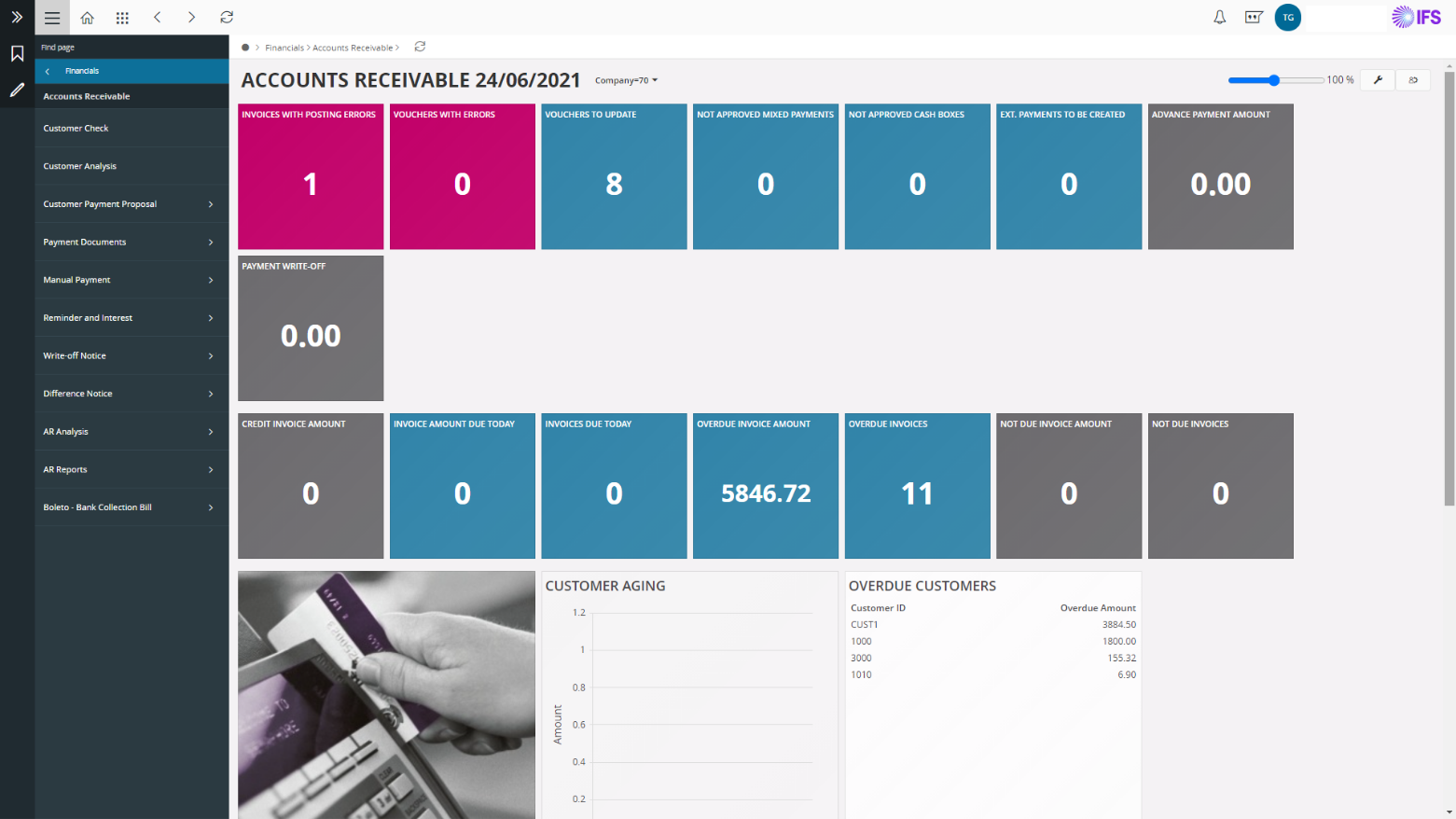
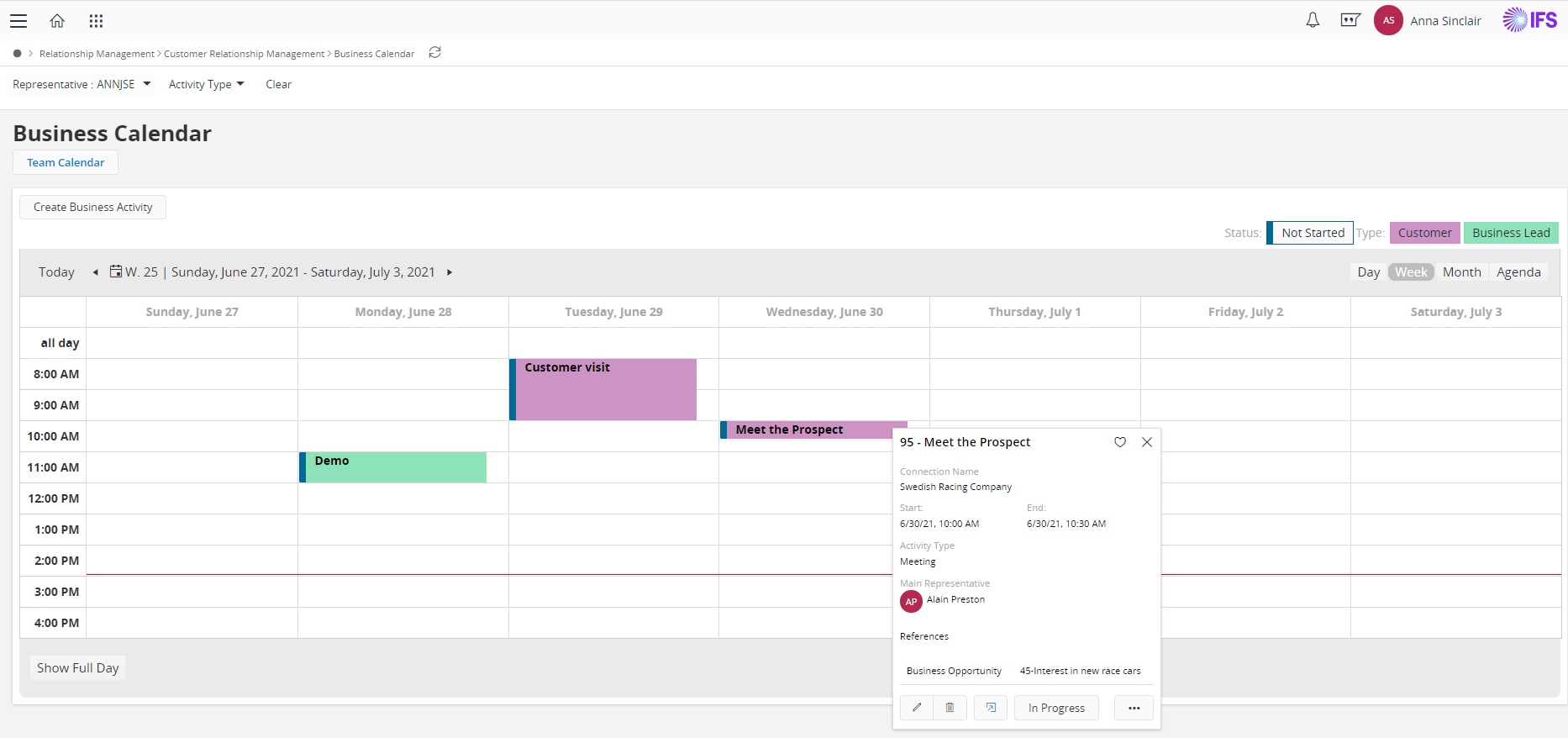
    Product screenshotProduct screenshotProduct screenshotProduct screenshotProduct screenshot