InEight vs. KYRO

Overview
ProductRatingMost Used ByProduct SummaryStarting Price
InEight
Score 9.5 out of 10
N/A
InEight's modular project controls software connects complex project data to improve visibility and delivery in capital construction.N/A
KYRO
Score 8.9 out of 10
N/A
KYRO is a unified construction management software that helps businesses bridge office teams with field crews on construction sites. Field crew members can utilize the voice notes functionality to record the day's updates in any language and share it instantly with reporting managers. The platform enables administrators to generate daily reports regarding expenditures, and invoices generated. Managers can use the optical character recognition (OCR) functionality to…
$95
per month per user
Pricing
InEightKYRO
Editions & Modules
No answers on this topic
GROWTH
$95
per month per user
Offerings
Pricing Offerings
InEightKYRO
Free Trial
NoNo
Free/Freemium Version
NoNo
Premium Consulting/Integration Services
NoYes
Entry-level Setup FeeNo setup feeNo setup fee
Additional DetailsInEight offers a modular, integrated project controls platform. Because the InEight platform covers the entire construction lifecycle, customers purchase the software based on their specific needs – purchasing stand-alone products, a bundle of products, or the entire platform. As a result, the pricing will vary depending on the specific product, number of users and length of contract. Once InEight has identified the highest impact areas, they offer potential customers a custom proposal. The options they consider include: Per user pricing: typically annual subscriptions. Revenue-based: using a percentage of the customer’s revenue. Project-based: software use dedicated to a specific project or program of work.**Kyro charges by the license or by the number of projects executed per year. Both pricing models require a minimum commitment of 50 (either licenses per month or projects per year). 20% discount for annual pricing.
More Pricing Information
Community Pulse
InEightKYRO
Features
InEightKYRO
Reporting & Analytics
Comparison of Reporting & Analytics features of Product A and Product B
InEight
7.1
23 Ratings
10% below category average
KYRO
5.5
2 Ratings
35% below category average
Dashboards7.120 Ratings5.62 Ratings
Standard reports7.022 Ratings5.62 Ratings
Custom reports6.622 Ratings5.62 Ratings
Data exportability7.722 Ratings5.22 Ratings
Construction Project & Field Management
Comparison of Construction Project & Field Management features of Product A and Product B
InEight
6.7
26 Ratings
12% below category average
KYRO
7.1
2 Ratings
6% below category average
Plan distribution & viewing6.122 Ratings7.42 Ratings
Plan markups & sharing7.021 Ratings8.32 Ratings
Issue tracking & punchlists7.521 Ratings5.92 Ratings
Photo documentation6.920 Ratings6.82 Ratings
Jobsite reports7.116 Ratings8.32 Ratings
Document sharing6.026 Ratings8.32 Ratings
RFI tools6.620 Ratings00 Ratings
Collaboration & approvals7.124 Ratings7.82 Ratings
As-built drawings6.721 Ratings6.41 Ratings
Mobile app7.319 Ratings8.32 Ratings
Submittal design and management6.518 Ratings00 Ratings
Checklists6.518 Ratings6.52 Ratings
Meeting Minutes6.916 Ratings00 Ratings
Specifications6.217 Ratings6.52 Ratings
Change orders6.518 Ratings5.22 Ratings
Estimating
Comparison of Estimating features of Product A and Product B
InEight
7.0
23 Ratings
11% below category average
KYRO
-
Ratings
Takeoff tools6.310 Ratings00 Ratings
Job costing7.221 Ratings00 Ratings
Cost databases6.911 Ratings00 Ratings
Cost calculator7.122 Ratings00 Ratings
Bid creation7.521 Ratings00 Ratings
Human Resource Management
Comparison of Human Resource Management features of Product A and Product B
InEight
-
Ratings
KYRO
5.9
2 Ratings
22% below category average
Organization and location management00 Ratings5.92 Ratings
Payroll Management
Comparison of Payroll Management features of Product A and Product B
InEight
-
Ratings
KYRO
5.9
2 Ratings
18% below category average
Support for external payroll vendors00 Ratings5.92 Ratings
Best Alternatives
InEightKYRO
Small Businesses
FollowUp CRM
FollowUp CRM
Score 10.0 out of 10
FollowUp CRM
FollowUp CRM
Score 10.0 out of 10
Medium-sized Companies
Revit
Revit
Score 9.1 out of 10
InEight
InEight
Score 9.5 out of 10
Enterprises
Revit
Revit
Score 9.1 out of 10
InEight
InEight
Score 9.5 out of 10
All AlternativesView all alternativesView all alternatives
User Ratings
InEightKYRO
Likelihood to Recommend
9.6
(36 ratings)
8.9
(3 ratings)
Likelihood to Renew
9.1
(2 ratings)
-
(0 ratings)
Usability
9.1
(3 ratings)
-
(0 ratings)
Support Rating
6.9
(32 ratings)
-
(0 ratings)
Implementation Rating
9.1
(2 ratings)
-
(0 ratings)
Ease of integration
8.0
(9 ratings)
-
(0 ratings)
Product Scalability
7.0
(20 ratings)
-
(0 ratings)
User Testimonials
InEightKYRO
Likelihood to Recommend
InEight
It's definitely a good tool for progress tracking, as well as time tracking. The ability to forecast quantities provide an even better scenario, closer to the reality, supporting even change management. The change management is also a good method, besides the fact of rework if you think in the whole process of issue creation, promoting to PCO, promote to CCO, execute the issue, move to change in controls, and so on... just now I think having all in a single place would minimize the manual work and maybe increase the engagement on it. About a negative point, I'd use a feature that appears to be in all modules. It's pretty much a cosmetic, but it impact in the productivity, a lot. For all fields you will fill with information, whenever your mouse hover over it, a tooltip appears, impeding you to continue, so you have to walk around, click in a place that's not being covered by that tooltip, go back to your keyboard and continue... again, it's a cosmetic, but having this in a Monday, with a full job to plan, claim quantities, and whatever else, it's annoying.
Read full review
Kyro
I find KYRO to be an exceptionally well-designed product, ideally suited for both large and relatively smaller teams. Its ability to facilitate collaboration among multiple stakeholders on documents and plans is particularly impressive, making it an indispensable tool in managing diverse and complex construction projects. I appreciate KYRO's effectiveness in scenarios that demand meticulous tracking of labor hours and monitoring project progress to adhere to budget constraints. I perceive KYRO to be less suited for smaller residential projects that don't necessitate its extensive range of features. In such cases, simpler tools may suffice for effective management, making KYRO's advanced capabilities somewhat excessive for these smaller-scale projects.
Read full review
Pros
InEight
  • Tagging segments of work.
  • User defined views and descriptions for all screens.
  • Customizable ribbons to provide an efficient use of the software.
  • Multiple layers/dependents to allow for an extreme drill down of the work and the ability to roll up to a more useful level for upper management review.
  • You can bid the work as you would build it, in detail.
Read full review
Kyro
  • Document Management: As a project manager, I've found KYRO's document management feature to be a game-changer. The ability to organize all project-related documents in one centralized location simplifies the workflow significantly. Their search functionality works well, allowing for quick and easy retrieval of documents from an extensive archive. This feature not only saves time but also enhances the overall efficiency of document handling in our projects
  • Time Management: The timesheet feature of KYRO has been instrumental in streamlining the process of recording and approving work hours. This functionality has been pivotal in efficiently tracking the hours logged by my crew, greatly aiding in effective time management and workforce coordination.
Read full review
Cons
InEight
  • Provide a simpler version (cliff notes) of the knowledge database
  • Offer versions of InEight for smaller companies, i.e. less than 20 emplyees, under $5M in revenue
  • When an estimate is complete, offer a dialog box to ask if the job was won, lost, or still in progress. We tend to leave most of our estimates in the bidding column. This is a user error, but the prompt would be helpful.
Read full review
Kyro
No answers on this topic
Likelihood to Renew
InEight
Some features with InEight's TeamBinder are worthy of single use, however the review feature and subsequent revision and version numbering could be improved. We will be aiming to roll out the package to encompass our internal documentation in the near future and will be in a better position to judge the usability after that point in time.
Read full review
Kyro
No answers on this topic
Usability
InEight
I would give it an 8 out of 10 because the software can be a bit cumbersome to new users. It also takes a long time to set up the library and input all of your companies needs so that the software will provide the level of service required to estimate projects. However, once the software is set up it is a powerful tool. We only use a portion of what the software is capable of delivering
Read full review
Kyro
No answers on this topic
Support Rating
InEight
We are new to the use of the system, and so far, we have not reached out for any support. The only support we have requested so far is the development of a training program that involves other staff - some are to learn the use of the program, and some are for informational purposes in understanding the capabilities of InEight.
Read full review
Kyro
No answers on this topic
Implementation Rating
InEight
Since the original inception, I have been required to overhaul the system so that it is more user friendly and combines both aspects of our business, documentation and drawings. Being able to control revision and version numbering has been a key struggle that only staff training has been able to mark this as complete.
Read full review
Kyro
No answers on this topic
Alternatives Considered
InEight
We looked at HCSS and Bid 2 Win but chose Ineight due to the fact that it seemed more user friendly, plus I had used it at a former company when it was available from the Grantlun Corporation and was very familiar with it in its ease of use and reliability.
Read full review
Kyro
No answers on this topic
Scalability
InEight
InEight is a good system that has scaled nicely as the company has grown. the tools are still readily available and applicable for our larger scope of work. It has kept up with the growth of the company very nicely
Read full review
Kyro
No answers on this topic
Return on Investment
InEight
  • the positive impact is that it has helped us better gauge staffing and staff jobs appropriately
  • negative impact is that it takes a lot of time for new users to learn the software
  • the positive impact is that many of our clients use it, making collaboration easier with them
  • positive impact is that we can see our percent complete easier
  • positive impact is that it is easier to share documents to our team internally
Read full review
Kyro
  • KYRO has led to a significant reduction in man-hours. The platform has been instrumental in tracking progress across various projects, and it has also streamlined administrative tasks, eliminating the need for manual approvals
  • I've found KYRO extremely effective in reducing errors during report submissions for both daily logs and forms. Its system maintains a record of previous entries, which serves as a reference for future submissions.
Read full review
ScreenShots

InEight Screenshots

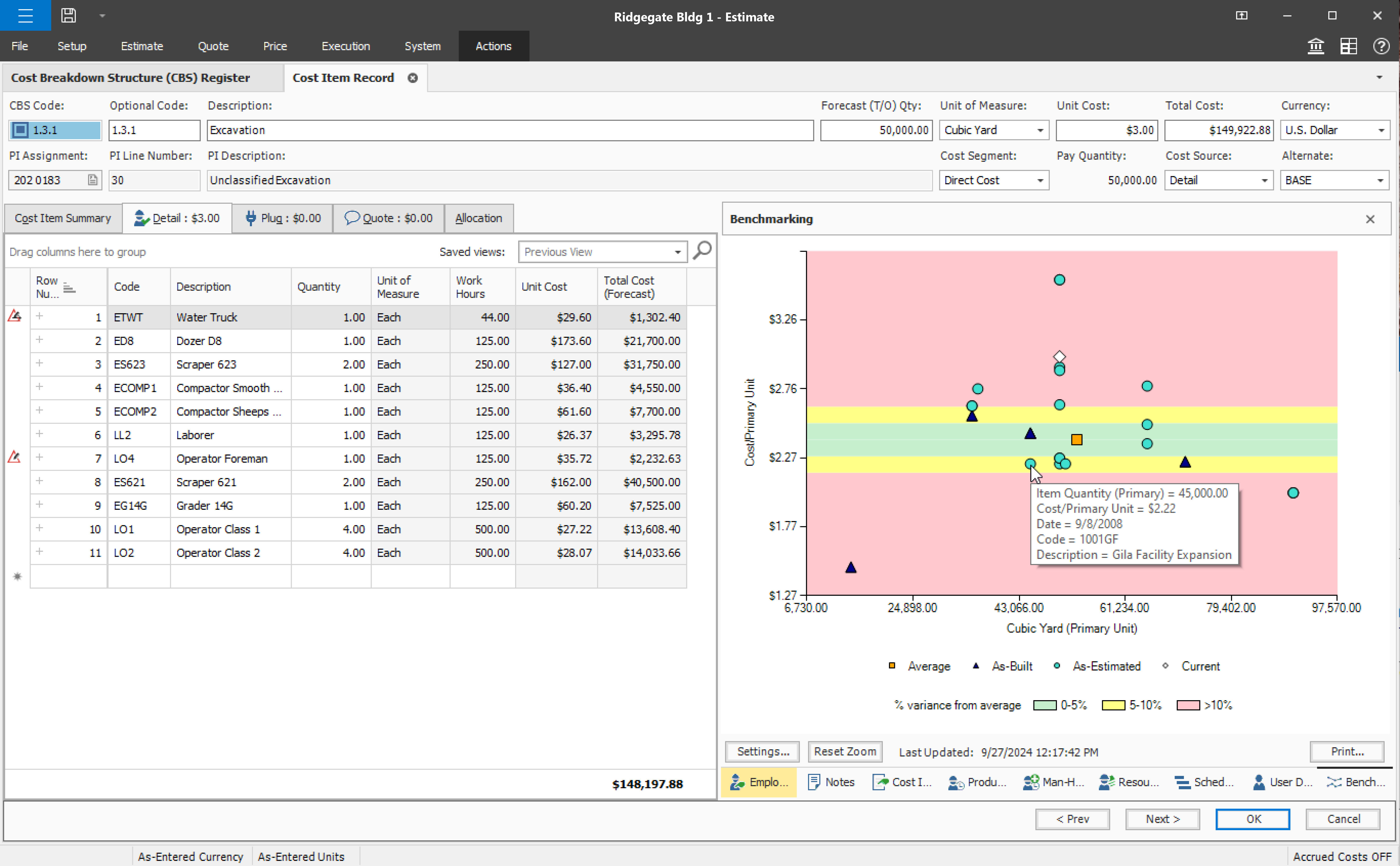
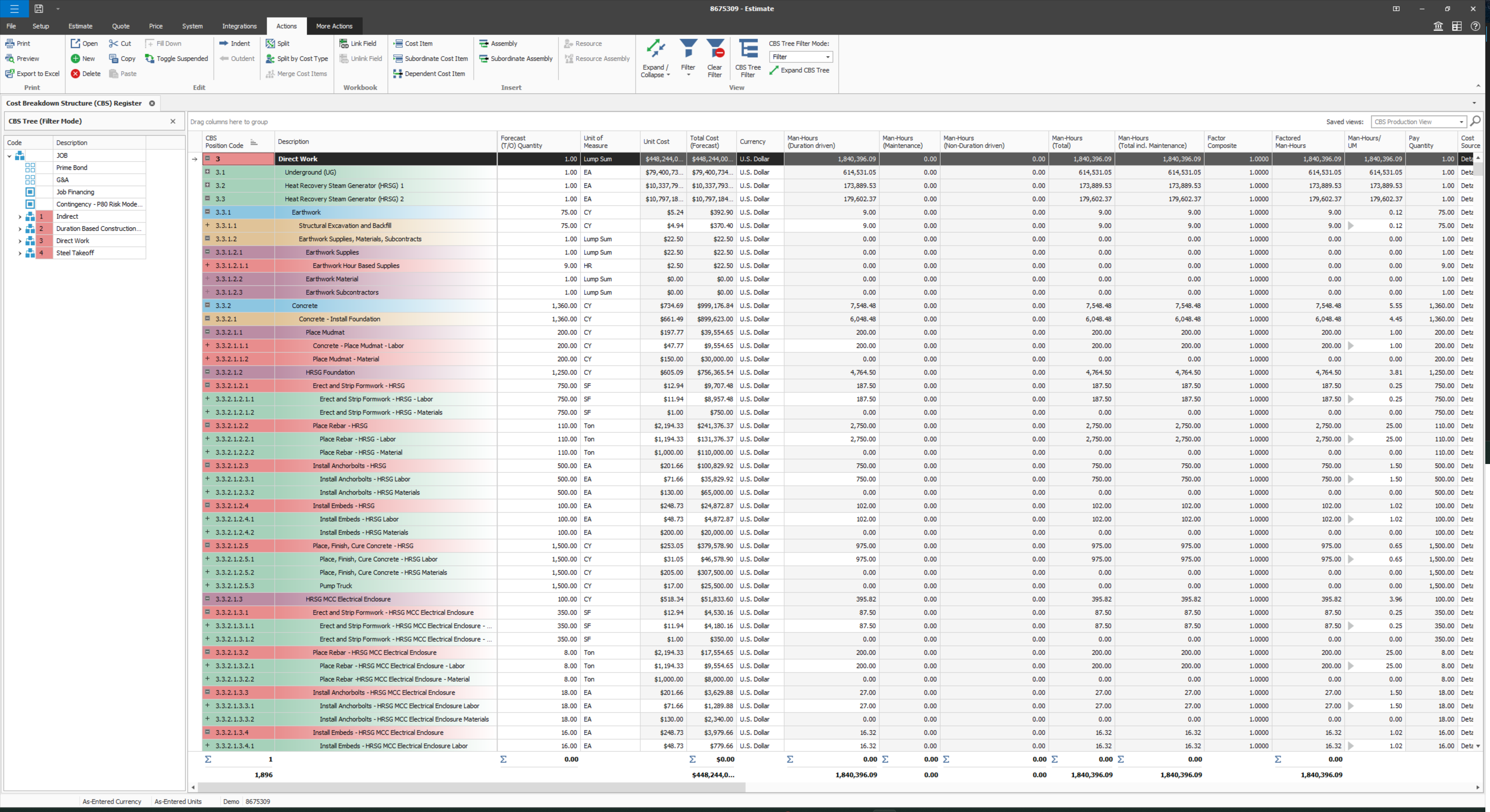
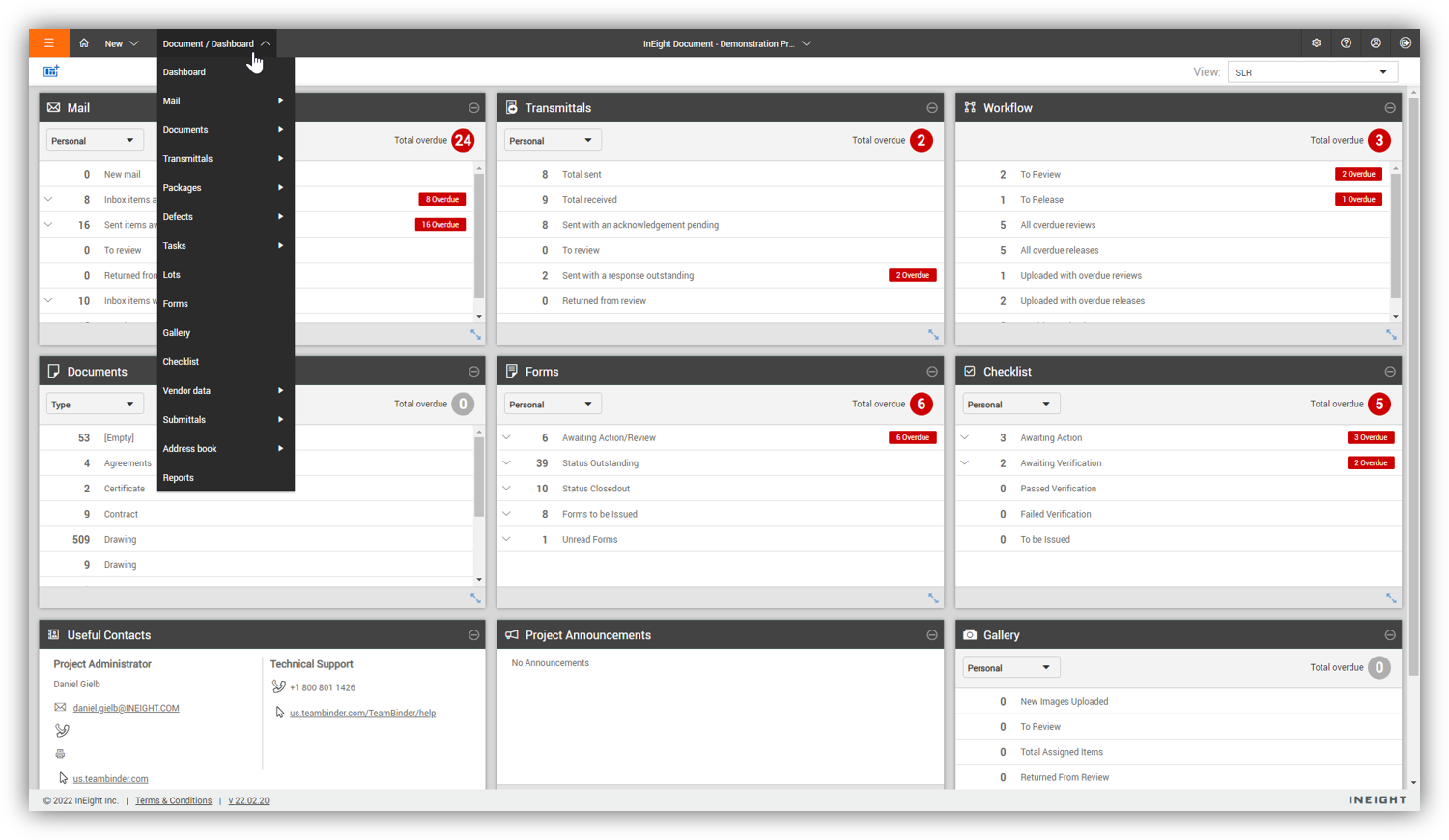
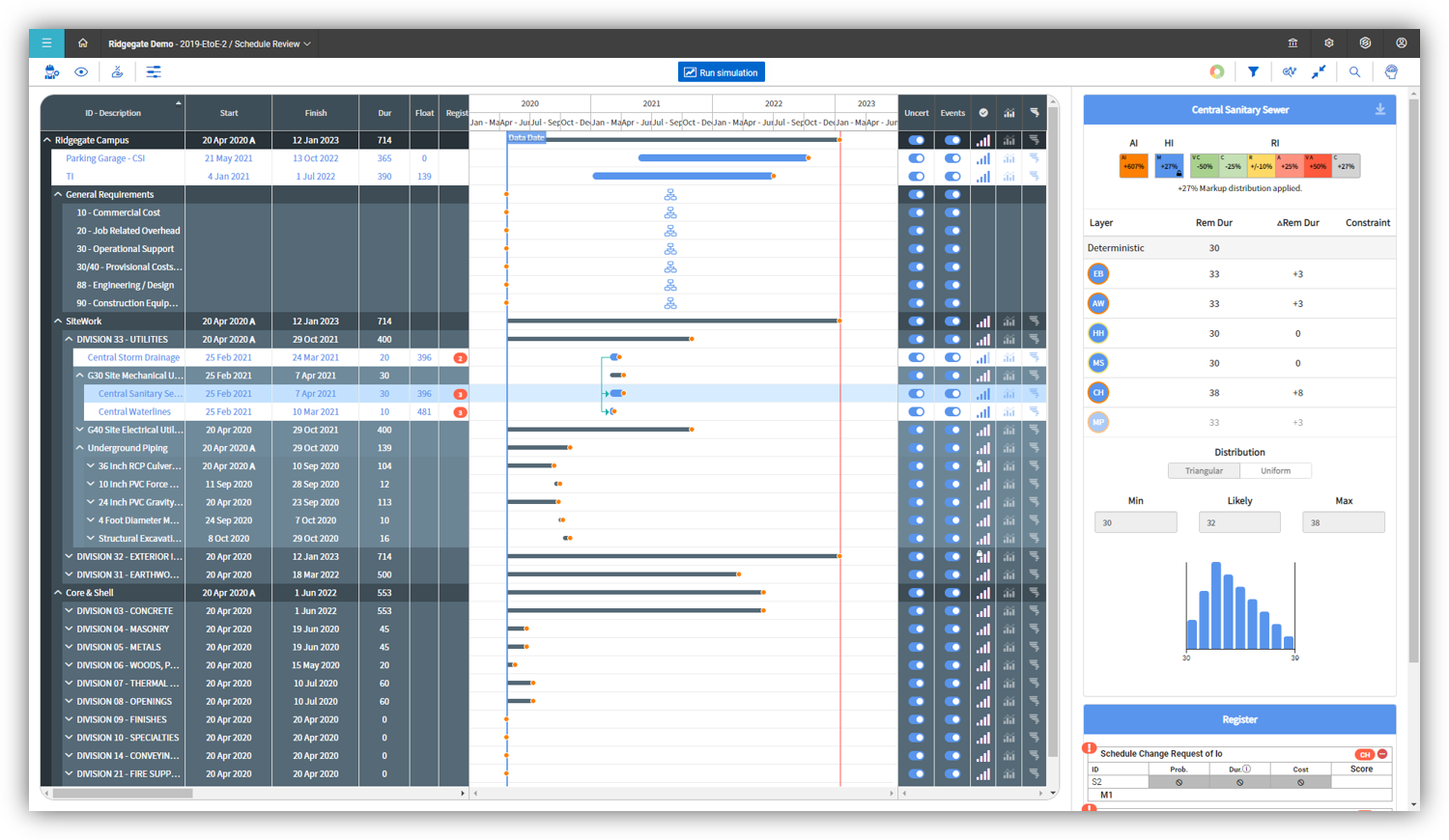
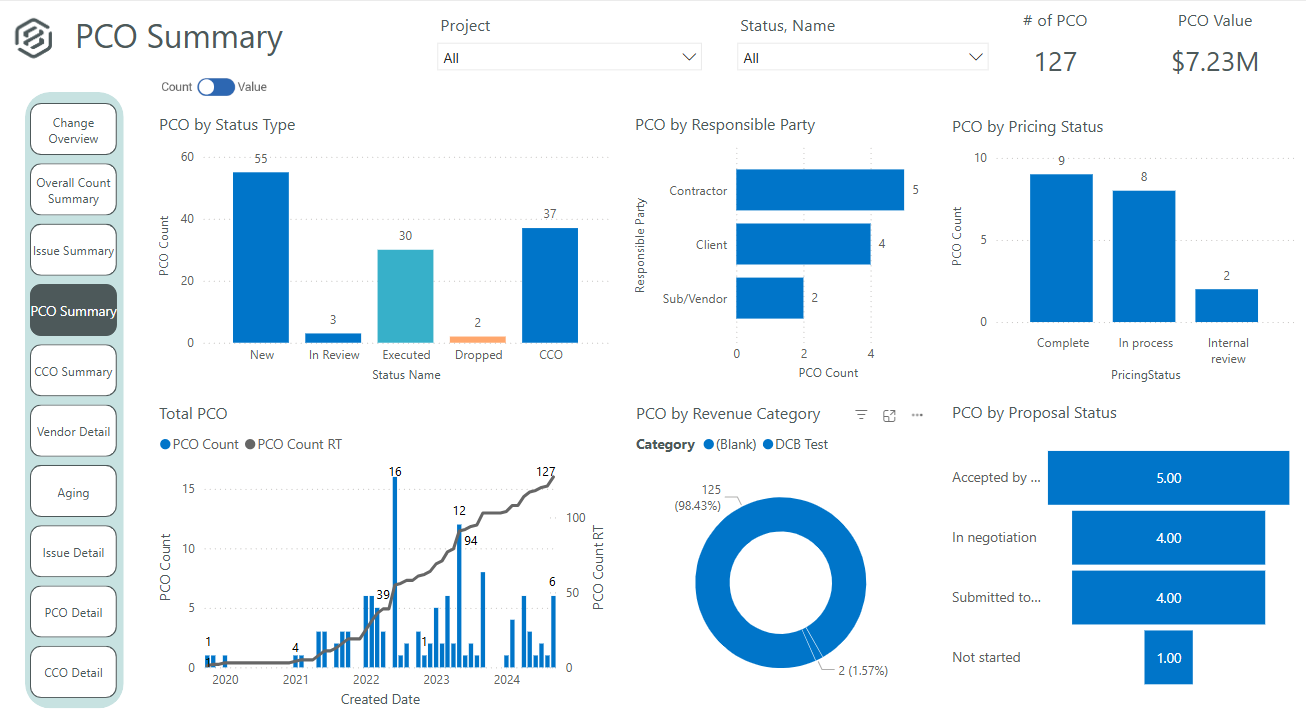
Screenshot of InEight Estimate’s Benchmarking feature, which allows users to compare high, low, and average costs, as well as productivity rates from past projects, to visually assess whether current estimates fall within a realistic range. With historical performance data at their fingertips, estimators can bid more strategically and deliver more reliable, data-driven estimates.Screenshot of InEight Estimate’s CBS Register, which provides a user-specific view of an estimate, allowing users to create unlimited WBS structures and custom rollups. With parametric cost item assemblies, estimators can generate more accurate, reliable, and data-driven estimates.Screenshot of InEight Document’s Dashboard, that delivers a centralized, visual view of project information across all modules. Interactive dashboard tiles make it easy to track document activity and maintain visibility into project performance.Screenshot of InEight Document’s Gallery, which offers a comprehensive visual library of all project-related files—including drawings, photos, and documents—so teams can quickly access and manage the content they need from one intuitive location.Screenshot of InEight Schedule’s Risk Management feature, which enables project teams to evaluate schedules through a risk-adjusted lens. By visualizing scenarios with varying confidence levels, teams can anticipate potential impacts and plan with greater certainty.Screenshot of InEight Change’s PCO Summary dashboard that delivers a visual summary of all potential change orders. This helps project teams evaluate impacts, track approvals, and manage changes proactively for better cost and scope control.

KYRO Screenshots

Screenshot of the Kyro home  pageScreenshot of a timesheetScreenshot of task detailsScreenshot of the Projects home page