Intelliverse Email Tracker vs. Salesflare

Overview
ProductRatingMost Used ByProduct SummaryStarting Price
Intelliverse Email Tracker
Score 8.0 out of 10
N/A
Intelliverse Email Tracker enables users to see when an email has been opened, where it was opened and on what device. Users receive real-time notifications when emails are opened. The vendor’s value proposition is that their solution provides insider info on the best time to engage with a prospect to help companies generate more deals.N/A
Salesflare
Score 9.5 out of 10
Small Businesses (1-50 employees)
Salesflare headquartered in Antwerp offers their small business intelligent CRM, providing automated event tracking and related features designed to aid the operations of SMBs.
$39
per month per user
Pricing
Intelliverse Email TrackerSalesflare
Editions & Modules
No answers on this topic
Growth
$39
per month per user
Pro
$64
per month per user
Enterprise
$124
per month per user
Offerings
Pricing Offerings
Intelliverse Email TrackerSalesflare
Free Trial
NoYes
Free/Freemium Version
YesNo
Premium Consulting/Integration Services
NoYes
Entry-level Setup FeeNo setup feeNo setup fee
Additional DetailsIntelliverse Email Tracker for Gmail and Outlook is completely for free!Discount available for annual billing.
More Pricing Information
Community Pulse
Intelliverse Email TrackerSalesflare
Features
Intelliverse Email TrackerSalesflare
Sales Force Automation
Comparison of Sales Force Automation features of Product A and Product B
Intelliverse Email Tracker
-
Ratings
Salesflare
8.4
17 Ratings
8% above category average
Customer data management / contact management00 Ratings9.516 Ratings
Workflow management00 Ratings9.017 Ratings
Territory management00 Ratings5.12 Ratings
Opportunity management00 Ratings9.017 Ratings
Integration with email client (e.g., Outlook or Gmail)00 Ratings10.017 Ratings
Contract management00 Ratings10.01 Ratings
Quote & order management00 Ratings6.12 Ratings
Interaction tracking00 Ratings8.315 Ratings
Channel / partner relationship management00 Ratings8.910 Ratings
Customer Service & Support
Comparison of Customer Service & Support features of Product A and Product B
Intelliverse Email Tracker
-
Ratings
Salesflare
8.3
1 Ratings
8% above category average
Case management00 Ratings9.01 Ratings
Call center management00 Ratings7.01 Ratings
Help desk management00 Ratings9.01 Ratings
Marketing Automation
Comparison of Marketing Automation features of Product A and Product B
Intelliverse Email Tracker
-
Ratings
Salesflare
9.7
15 Ratings
23% above category average
Lead management00 Ratings9.515 Ratings
Email marketing00 Ratings10.014 Ratings
CRM Project Management
Comparison of CRM Project Management features of Product A and Product B
Intelliverse Email Tracker
-
Ratings
Salesflare
8.2
15 Ratings
7% above category average
Task management00 Ratings8.515 Ratings
Billing and invoicing management00 Ratings8.01 Ratings
Reporting00 Ratings8.215 Ratings
CRM Reporting & Analytics
Comparison of CRM Reporting & Analytics features of Product A and Product B
Intelliverse Email Tracker
-
Ratings
Salesflare
9.2
16 Ratings
19% above category average
Forecasting00 Ratings8.513 Ratings
Pipeline visualization00 Ratings10.016 Ratings
Customizable reports00 Ratings9.014 Ratings
Customization
Comparison of Customization features of Product A and Product B
Intelliverse Email Tracker
-
Ratings
Salesflare
8.9
15 Ratings
15% above category average
Custom fields00 Ratings10.015 Ratings
Custom objects00 Ratings10.02 Ratings
API for custom integration00 Ratings6.812 Ratings
Security
Comparison of Security features of Product A and Product B
Intelliverse Email Tracker
-
Ratings
Salesflare
8.1
14 Ratings
3% below category average
Single sign-on capability00 Ratings7.910 Ratings
Role-based user permissions00 Ratings8.213 Ratings
Social CRM
Comparison of Social CRM features of Product A and Product B
Intelliverse Email Tracker
-
Ratings
Salesflare
6.8
10 Ratings
9% below category average
Social data00 Ratings6.810 Ratings
Social engagement00 Ratings6.810 Ratings
Integrations with 3rd-party Software
Comparison of Integrations with 3rd-party Software features of Product A and Product B
Intelliverse Email Tracker
-
Ratings
Salesflare
8.4
11 Ratings
12% above category average
Marketing automation00 Ratings7.811 Ratings
Compensation management00 Ratings9.01 Ratings
Platform
Comparison of Platform features of Product A and Product B
Intelliverse Email Tracker
-
Ratings
Salesflare
8.9
15 Ratings
17% above category average
Mobile access00 Ratings8.915 Ratings
Best Alternatives
Intelliverse Email TrackerSalesflare
Small Businesses
Mailtrack
Mailtrack
Score 9.2 out of 10
Salesmate
Salesmate
Score 10.0 out of 10
Medium-sized Companies
Mailtrack
Mailtrack
Score 9.2 out of 10
Creatio
Creatio
Score 9.1 out of 10
Enterprises
Groove, a Clari company
Score 6.9 out of 10
Creatio
Creatio
Score 9.1 out of 10
All AlternativesView all alternativesView all alternatives
User Ratings
Intelliverse Email TrackerSalesflare
Likelihood to Recommend
-
(0 ratings)
9.1
(16 ratings)
Usability
-
(0 ratings)
8.8
(14 ratings)
Support Rating
-
(0 ratings)
9.0
(9 ratings)
User Testimonials
Intelliverse Email TrackerSalesflare
Likelihood to Recommend
Intelliverse
No answers on this topic
Salesflare
If a client or friend of mine was in search of a quality tool that is a robust CRM and has a great team behind it, I would highly recommend SalesFlare. The team has consistently updated the application; it is a robust and useful tool, and most importantly, the team behind SalesFlare is easy to work with when needed.
Read full review
Pros
Intelliverse
No answers on this topic
Salesflare
  • Organization of our clients as well lead and opportunity tracking and management.
  • Pipeline management and a significant amount of depth when it comes to monitoring sales and other opportunities.
  • It provides an overview of the sales process and custom fields for individual accounts (such as branding).
Read full review
Cons
Intelliverse
No answers on this topic
Salesflare
  • Salesflare automatically captures and organises data about leads so it can effectively surface the ones that require your attention. It also provides you with the tools to do just that. What it doesn't cover as much right now is feeding top of the funnel: I would for example happily pay extra to have a website visitor identification functionality into the mix.
Read full review
Usability
Intelliverse
No answers on this topic
Salesflare
The pipeline, which is the core of the platform, is very clear and full of features. On top of that Salesflare added automations, integrations, plugins and emails. You can easily get your leads there from any platform and nurture your leads until you get the deal done. I think any business can benefit from using this sales CRM.
Read full review
Support Rating
Intelliverse
No answers on this topic
Salesflare
Hit them on Chat support, and you are gonna get a response within a few minutes (if not in a few hours, during weekends) But they are gonna keep following with you till they make sure that your query has been resolved. Keep it up!
Read full review
Alternatives Considered
Intelliverse
No answers on this topic
Salesflare
Pipedrive was another option but I chose Salesflare for the seamless integration into my regular everyday workflow as well as its ability to integrate with just about any app you can think of. It plays nice with all of my other apps and makes using a CRM actually fun. I love the fact it works inside my Gsuite account and automatically pulls data from Gsuite into Salesflare.
Read full review
Return on Investment
Intelliverse
No answers on this topic
Salesflare
  • As a start up, Salesflare was perfect for me. It was easy to get up and running; easy for me to import my contacts, and easy to earn the features.
  • I like the price point - lots of features for a reasonable price.
Read full review
ScreenShots

Intelliverse Email Tracker Screenshots
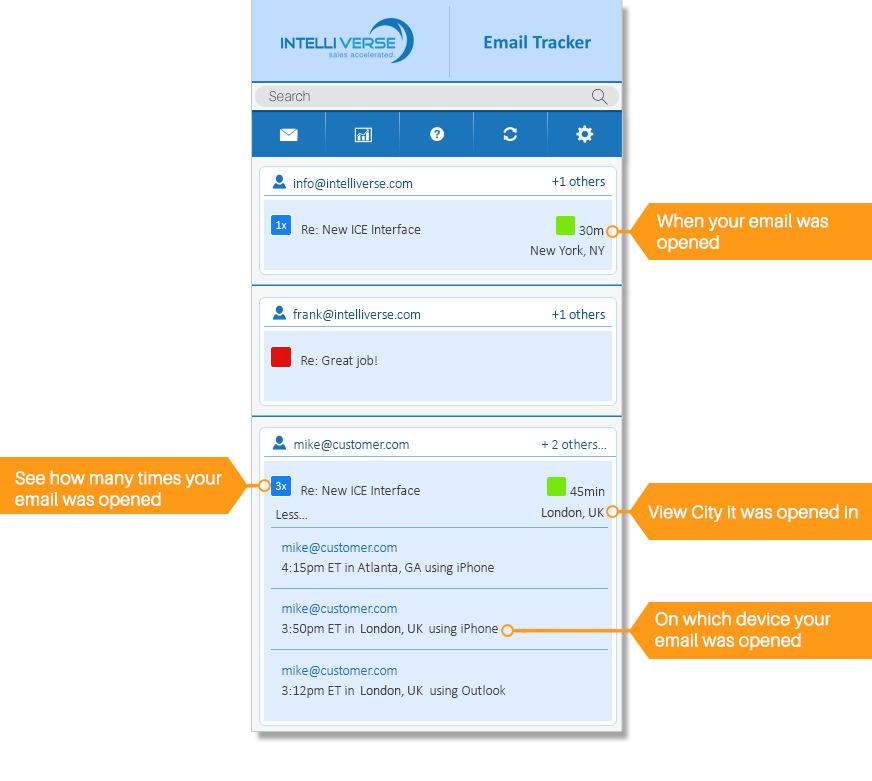
Screenshot of Free Email Tracker OverviewScreenshot of Free Email Tracker Demo

Salesflare Screenshots

Screenshot of the visual, drag-and-drop sales pipeline used to track leads.Screenshot of the centralized dashboard to visualize conversations with leads.Screenshot of an example of the sales reporting.Screenshot of where to send email sequences or automated email campaigns from within a CRM.Screenshot of how a connected CRM can be used from within an email inbox, to stop switching tabs.Screenshot of where to add and track leads straight from LinkedIn, with a built-in email finder.