CostX is a construction and estimation software offering from Exactal Technologies Pty Ltd.
N/A
ProContractor
Score2.6 out of 10
N/A
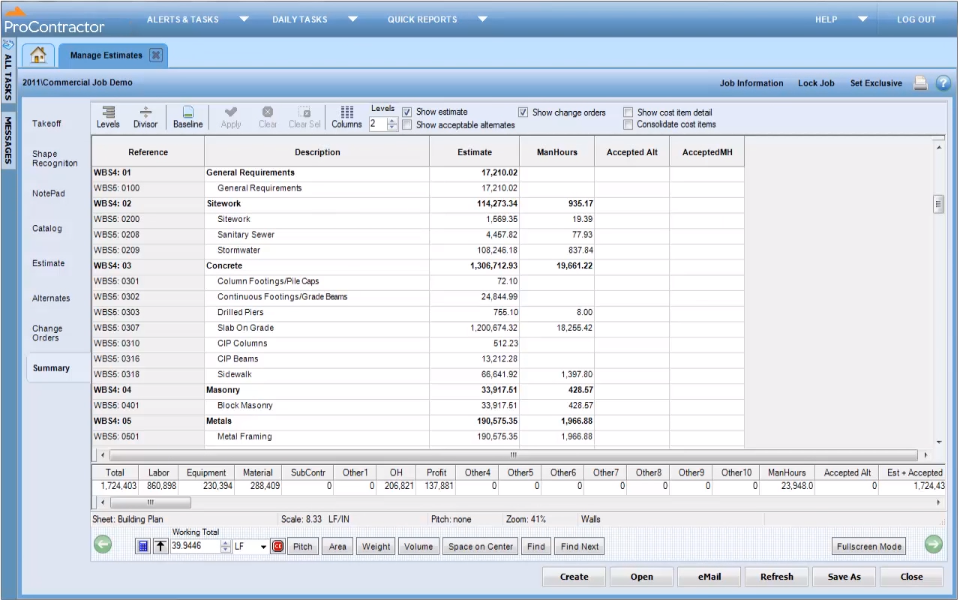
ProContractor is a Cloud-Based Solution for Estimating, Project Management, and Accounting. Designed to improve visibility and profitability across construction businesses, ProContractor™ by Viewpoint is a cloud-based software solution for estimating, project management, and accounting. The user can manage the entire project lifecycle from bid to cash in a single solution. Built to be flexible and scalable, ProContractor allows users to go all-in-one, or build a complete solution…
N/A
Pricing
iTWO costX
ProContractor
Editions & Modules
No answers on this topic
No answers on this topic
Offerings
Pricing Offerings
iTWO costX
ProContractor
Free Trial
No
No
Free/Freemium Version
No
No
Premium Consulting/Integration Services
Yes
No
Entry-level Setup Fee
No setup fee
No setup fee
Additional Details
Pricing is determined by a number of factors. For example, would you want to use BIM or just 2D? Do you need estimating spreadsheets and report generation? Would you want to buy 100 copies or just one? If you send in a sales enquiry to sales.int@rib-software.com, we’ll be able to send you through a quote that will meet your requirements.
Easy to use, one-stop for all construction-related tasks. The best thing is the split-screen, during the Bill of Quantity verification users can see for what part of the design Bill of Quantity is generated. Auto-updating of Design is another good feature.
A de minimis incentive was given to thank the reviewer for their time. The incentive was not used to bias or drive a particular response, nor was the incentive contingent on a positive endorsement. More Info
It is appropriate for the size and scale of my company - 150 projects a year that has a lot going on a multiple lines with each project. However there are many features and things that go unused with the software, because of how tinkery it can be. For example - our company needs a positive pay file, however we had to employ an outside service provide to create the file within the system. Same with a Backlog - the system kind of has a report but then again it has to be manipulated in order for it be of use. It gets the job done and has the reports needed to submit for certified payroll to the state, which was why we purchased Viewpoint ProContractor, however its ease of use is one of its biggest downfalls.
A de minimis incentive was given to thank the reviewer for their time. The incentive was not used to bias or drive a particular response, nor was the incentive contingent on a positive endorsement. More Info
Allows multiple users to work on the same estimate at once. This is huge!! Not only can we team up on a project that has a quick deadline but we can also simultaneously collaborate on database updates.
Performs your takeoff on CAD drawings or vector PDFs. Your typical takeoff software does takeoff on an unintelligent PDF. I say unintelligent because the process you go through is simply to trace the boundaries of your shape. This is time-consuming and can lead to mistakes. With CostX your cursor will stick to the line lines and takeoff the exact measurement. This has cut our takeoff time by 75%. The best part is that this is done in the same software as your estimating software. There are a few software's that have takeoff and estimating in one but CostX is the only one the provides CAD smart takeoff.
CostX is a lot like Excel. You have the flexibility to set up your workbooks the way your project team thinks. For example, ours is set up to evaluate labor in two ways; productivity (man-hours per widget) or crew hours (3 guys for two days for a given activity).
Reports are very flexible and the report writers is much easier than Crystal reports.
If you subscribe to the full version of CostX this provides the most powerful feature of them all......Auto-Revisioning. This function will compare two sets of drawings, identify the changes on a color coded drawing, ask for you to approve the changes and then update your estimate and takeoff. You can even use this to produce custom print outs for RFI's show your design team what changed.
Your estimating workbooks are live-linked to your takeoff. As you make adjustments to your takeoff your estimate updates accordingly. The workbook has color coded text to hep your team understand whats behind your estimate; Black = manually input, Blue = rates linked to database, and Green = quantity linked to take-off.
Full integrated subcontractor comparison. We use to do this in excel to compare multiple bidders across every division.
This is also color coded for a streamlined review process; green = quote, blue = estimate, purple = plug, and orange = other.
Built in error checking notifies you if you forgot to normalize an item on your subcontractor comparison.
In the near future the software will be available online allowing you to use remotely.
A de minimis incentive was given to thank the reviewer for their time. The incentive was not used to bias or drive a particular response, nor was the incentive contingent on a positive endorsement. More Info
A de minimis incentive was given to thank the reviewer for their time. The incentive was not used to bias or drive a particular response, nor was the incentive contingent on a positive endorsement. More Info
A de minimis incentive was given to thank the reviewer for their time. The incentive was not used to bias or drive a particular response, nor was the incentive contingent on a positive endorsement. More Info
A de minimis incentive was given to thank the reviewer for their time. The incentive was not used to bias or drive a particular response, nor was the incentive contingent on a positive endorsement. More Info
I give Viewpoint ProContractor a 10 out of 10. This system is user friendly to help keep me organized on a daily basis. I can find everything I need daily with this system. I am able to look up our subcontactors, vendors and clients I need to find quickly. I am able to see bills that I need to pay as well as invoices that I need to send out.
When something isn't working, you can contact support who will gladly remote into your system and try and work out a solution. Though several of the issues we encountered, they were not able to fix and had to submit for further review. While some were eventually rectified in updates, it takes time for these to be addressed and implemented.
A de minimis incentive was given to thank the reviewer for their time. The incentive was not used to bias or drive a particular response, nor was the incentive contingent on a positive endorsement. More Info
A de minimis incentive was given to thank the reviewer for their time. The incentive was not used to bias or drive a particular response, nor was the incentive contingent on a positive endorsement. More Info
Procore beats Viewpoint hands down but can integrate well with Viewpoint Vista accounting software. I think that if the Viewpoint software was more flexible if they were more interested in patches, updates, and hearing customer feedback in the way the Procore does, that they would actually have the opportunity to corner the market.
A de minimis incentive was given to thank the reviewer for their time. The incentive was not used to bias or drive a particular response, nor was the incentive contingent on a positive endorsement. More Info
Easy to Collaborate Between the Team members. Saves a lot of work
Integrate with multiple types of data drawing which saves efforts in converting the design.
Bill of Quantity export can be done based on the Design section and can share with contractors for Quotes. Instead of just downloading the whole report and then editing for the required pack.
A de minimis incentive was given to thank the reviewer for their time. The incentive was not used to bias or drive a particular response, nor was the incentive contingent on a positive endorsement. More Info
Overall it allowed us to go electronic for certified payroll allowing us to be more accurate in reporting which was a giant win for the company
It's viewable pay estimates with dates and records of payment are crucial to a company like ours that relies on a general contractor and the state for payment of EADA quantites
Negatively training is not the easiest for the company and therefore onboarding new employees with no experience with the software is time consuming and difficult.
A de minimis incentive was given to thank the reviewer for their time. The incentive was not used to bias or drive a particular response, nor was the incentive contingent on a positive endorsement. More Info