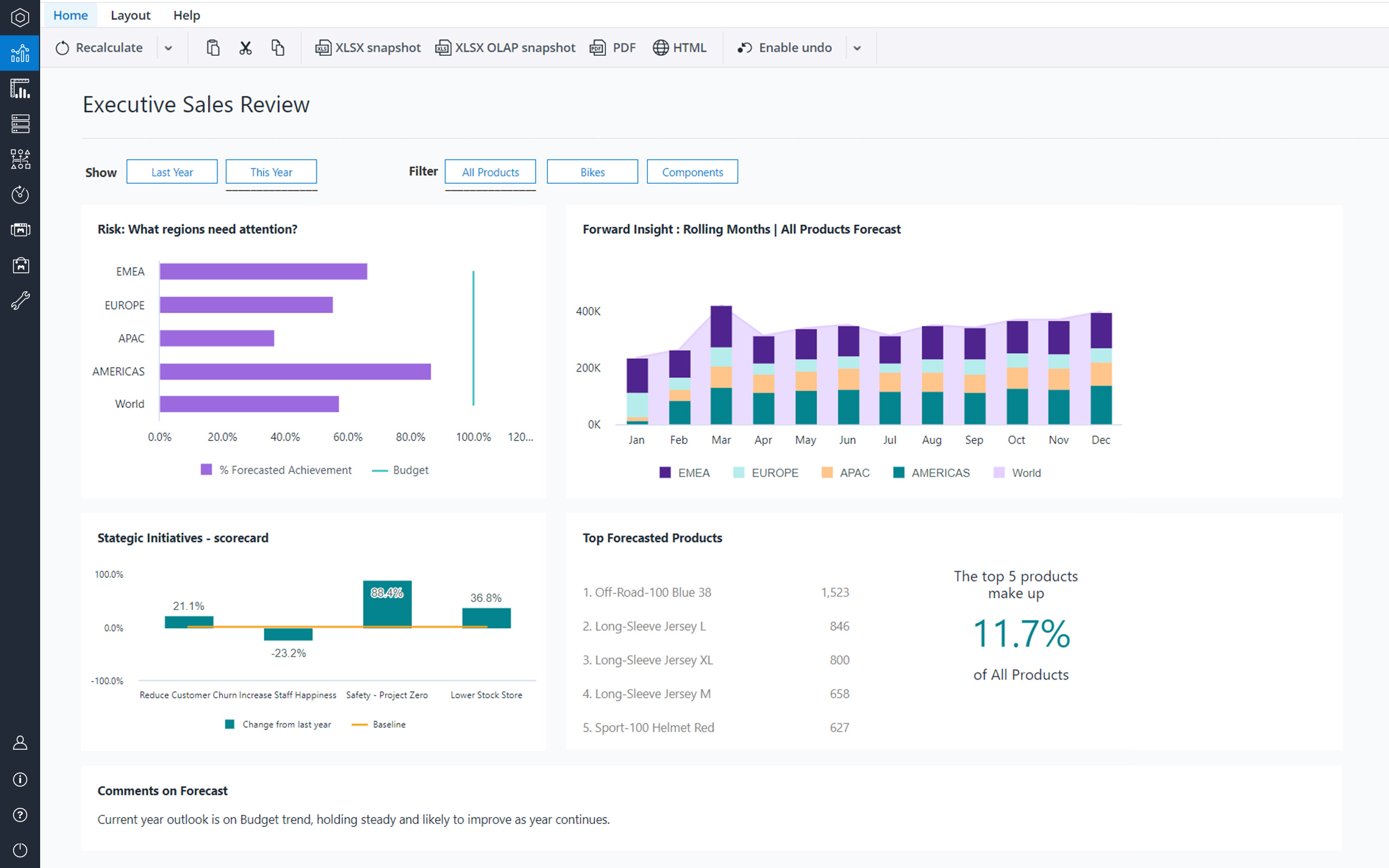
Jedox is a Business Intelligence and Corporate Performance Management solution. According to the vendor, their solution’s unified planning, analysis and reporting empowers decision makers from finance, sales, purchasing and marketing. Additionally, the vendor says this solution helps business users work smarter, streamline business collaboration, and make insight-based decisions with confidence. The vendor also says 1,900 organizations in 127 countries are using Jedox for real-time planning…
N/A
Jirav
Score10 out of 10
Mid-Size Companies (51-1,000 employees)
Jirav, headquartered in San Francisco, aims to deliver smarter financials and faster insights, helping to understand where a business has been and predict where it will go. The system joins cloud-based Accounting, HR, CRM and billing data to automatically surface an interconnected model that is unique to a business. The solution helps eradicate spreadsheet errors, produce monthly reports that occur in real-time, and connected data enables teams to collaborate on multiple scenarios – bookings,…
$10,000
per year
Pricing
Jedox
Jirav
Editions & Modules
No answers on this topic
Starter
$10,000
per year
Pro
$15,000
per year
Enterprise
Contact Sales
Offerings
Pricing Offerings
Jedox
Jirav
Free Trial
Yes
Yes
Free/Freemium Version
Yes
No
Premium Consulting/Integration Services
Yes
No
Entry-level Setup Fee
No setup fee
No setup fee
Additional Details
—
—
More Pricing Information
Features
Jedox
Jirav
BI Standard Reporting
Comparison of BI Standard Reporting features of Jedox and Jirav
Feature
Jedox
9.1
4 Ratings
19% above category average
Jirav
-
Ratings
Pixel Perfect reports
9.14 Ratings
00 Ratings
Customizable dashboards
9.14 Ratings
00 Ratings
Report Formatting Templates
9.14 Ratings
00 Ratings
Ad-hoc Reporting
Comparison of Ad-hoc Reporting features of Jedox and Jirav
Feature
Jedox
8.3
3 Ratings
7% above category average
Jirav
-
Ratings
Drill-down analysis
8.23 Ratings
00 Ratings
Formatting capabilities
8.23 Ratings
00 Ratings
Integration with R or other statistical packages
8.53 Ratings
00 Ratings
Report sharing and collaboration
8.53 Ratings
00 Ratings
Report Output and Scheduling
Comparison of Report Output and Scheduling features of Jedox and Jirav
Feature
Jedox
7.9
3 Ratings
0% below category average
Jirav
-
Ratings
Publish to Web
8.53 Ratings
00 Ratings
Publish to PDF
7.93 Ratings
00 Ratings
Report Versioning
7.03 Ratings
00 Ratings
Report Delivery Scheduling
8.23 Ratings
00 Ratings
Data Discovery and Visualization
Comparison of Data Discovery and Visualization features of Jedox and Jirav
Best suited for financial consolidation and / or as a highly customized and compact EPM / BI solution (up to 100 CCU) with individual workflows, planning and reporting functionalities, with moderate number of users (no restrictions for any industry, all industries are covered well). It also has advanced reporting & data analysis requirements and provides an integration and reporting layer of imported data from different external systems (via ETL). It can help with migrating your legacy Excel-based business models to the Web. It is not well suited for Enterprise BI applications with expecting >500 CCU (users at the same time working with the system) - this may cause serious performance issues, as all data is kept in RAM. Jedox is also less suited for applications with heavy document management requirements (document management is not an out of the box functionality in Jedox and rather requires custom development through custom widgets etc.).
I feel that Jirav would be best suited for companies with less than 75 employees that need a more robust software than Fathom (Quickbooks Onlne integrated FP&A tool based in Australia) that is very customizable, with simple revenue modeling, few personnel changes every month, few departments, no multi currency, and need collaboration only with top-level personnel. I think Jirav is a product that is being highly recommended in the accounting industry for outsourced accounting firms, but accounting only looks at historical information and there needs to more finance industry influence, approval, and input so they can improve their product.
A de minimis incentive was given to thank the reviewer for their time. The incentive was not used to bias or drive a particular response, nor was the incentive contingent on a positive endorsement. More Info
Jirav integrates well with Quickbooks Online (QBO), and I like how you can easily customize the reporting presentation by combining GL accounts and showing more or less details as needed for managerial reporting
I like that Jirav is browser-based and that I can easily share reports with internal and external parties for comments
I feel more confident using Jirav than I do with Excel because there is more data validation, and some notifications will appear if there are errors in the model
The sales capacity model and ramping employees schedule that their implementation / professional services team built for us works well overall (with some limitations)
Ideally, having a direct integration into Jirav would be great for all our data. However, some of our software didn't have a direct integration, so I was glad that Jirav offered the ability to use a connected Google Sheet that lets me input data that can be imported directly into the system
Diversity. Jedox can be applied to many different use cases from small to large deployments and from budgeting to enterprise class BI solutions. But rarely is one tool able to fulfill all of these requirements in one organisation. This value proposition can be complicated for prospective users.
Awareness. Jedox punches above its weight in capability and scalability, but not enough people have heard about it and therefore procurement processes can be drawn out as a result.
At times, I feel that Jirav is too customizable. It would be great if they could tailor the system to be more industry-specific. For example, if the system could provide standard formulas for SaaS industry metrics already within the system, then that would have saved me a ton of time with having to create the metrics myself. The formula creation for metrics is quite tedious as well because you can only do simple calculations, such as A + B or A x C. You cannot do A + B + C or A x B x C.
I struggle with the way they have their staff planning set up because I have to reimport an Excel every month with all the changes (new hires, terminations, pay changes), and the changes appear to be retroactive on reports, which doesn't make sense if someone receives a raise or pay change during the year. It would be much easier for planning for bookings if they could add a column for quota by salesperson.
If there are notifications of errors in the model, then the notifications will continue to present themselves after I resolve the issue. It would be nice if I could clear out notifications I know are not relevant anymore. I also still find errors in the system that I would have expected the system to notify me about, such as Assumptions that are set up but they are not included in any formulas, so I should delete that assumption to prevent anyone from thinking changing that assumption will impact the model.
There is some functionality for sharing reports and information, but there is not enough granularity in security settings to allow me to share certain information easily. For example, if I want to share information with managers to manage their departments' budget, but also not see their boss' compensation, then it takes some work to set that up. Or, if I want to share a report with a recruiter of planned headcount and salary, then I need to export it to Excel first and delete Actual headcount and salary, so they don't see current employees' compensation (including the person's boss' salary).
Customer and vendor names do not import, only the totals, so if you look at Actuals vs Plan, the actuals will show a total figure and the plan will show detail, creating the need for an external and manual reconciliation
There is no multi-currency available
Scenario analysis can be difficult to do quickly. For example, if I want to see the plan with planned hires and without planned hires, then I would need to create two separate plans, individually select and delete the planned hires in one plan and keep then in another plan, which is time-consuming
Using Google Sign-In causes the system to time-out frequently for me, so I get kicked out of the system and have to log back in. If I have multiple tabs of Jirav open, then re-logging in sometimes doesn't bring me back to where I was originally at.
You can export reports to Excel, but there are no formulas of the calculations, which makes it more difficult to understand how calculations are being performed unless you look in the browser and dig into the calculations. This also might make it more difficult if you decide to go to another software in the future since you may need to start from scratch in the next software
Seasonality has been difficult to model. For example, the way our model is set up, I can use an assumption for Q1, Q2, Q3 and Q4. However, if I update Q3 for this year, then it also updates Q3 of all subsequent years, which I don't want. A more complex model and additional maintenance would be needed to accomplish more accurate seasonality planning
To me Jedox deserves 10/10 because it is a consistent one-in-all platform with a modern look and feel. It is intuitive to use and allows you to make intuitive applications integrating traditional business intelligence with performance management functionality. It certainly has a short learning curve, especially for those that are familiar with MS Excel. An example: I've lost count but Jedox it is available in more than 25 languages. Another: Jedox does not require programming skills... it is developed to be used by the business.
Jedox has very few bugs. Reports are available through an Excel add-in, the web and/or mobile device (IOS/Android). In my opinion, availability also means high performance, not having to wait for the system to give you the required reports, analysis, dashboards instantly.
Jedox support in general is a professional and fast responding team. An easy-to-use ticketing system is in place. Bug-related questions are solved fast (responses come usually in a few hours after the question), but some questions / tickets, that are not Jedox-related bugs (for example some advanced questions about Jedox functionality), may be forwarded to Application Management team for further processing and then it may take several days or even weeks to get a response here -> there is room for improvement here.
The implementation of SSO, SAML Authentication, HTTPS, Server splitting (Frontend / Backend servers) could be more standardized and made more user friendly to set up (e.g. via setup guide). Otherwise the implementation of Jedox is quick and simple when compared to other similar technologies.
Calumo is similar product to Jedox. I have used it extensively in my previous role. It was a major contender when we evaluated a BI platform for NIDA. Calumo is a great product as well and it was a very close call. Where we found Jedox to be a better fit for NIDA was the ability to prepare dynamic reports with ease without the need to learn MDX which was used extensively by Calumo to make dynamic reports which expand or shrink based on the underlying data. Another major benefit we saw in Jedox was the whole ETL process could be managed within Jedox instead of doing it in SQL server which negates having a dedicated SQL specialist role when the scale expands.
A de minimis incentive was given to thank the reviewer for their time. The incentive was not used to bias or drive a particular response, nor was the incentive contingent on a positive endorsement. More Info
Fathom was the cheapest and most basic as an add-on directly to QuickBooks Online Plus, but you lose functionality with Fathom if you use QuickBooks Online Advanced (QBOA). The main loss of functionality for me was the lack of multiple department reporting, which was absolutely necessary for my analysis. Jirav was half the price of Moscaic.tech, but I've heard Mosaic has standard metrics for the SaaS-industry, which is appealing after going through the tedious process of setting up metrics in Jirav. QBOA has additional reporting than QBO Plus, but not enough robust features for planning and modeling. PlaceCPM is Salesforce-based and a I felt having a strong Salesforce admin that can great reports made their unnecessary, and I feel like most of the time you need a Salesforce admin just to run Salesforce. Cube, Vena and OnPlan are spreadsheet-based, but I don't want to use spreadsheets. Prophix, Board and Anaplan seem outdated. Workday was more than what I needed
Scalability is often another word for speed. Given enough data, enough users or enough calculations, the tool becomes slower and slower. You will find that Jedox has a very high performance that can even be increased by the use of grafical cards. Other thaen that it does not only offer BI (looking back based on historical ERP data) but also allows you to look forward through integrated budgetting, planning, forecasting, workflow and collaboration. Not easy to find a tool that can support so much business functionality. So, also pretty scalable in that respect.
Financial budgeting and Forecasting are done in a centralized fashion in Jedox now instead of a decentralized excel based approach. A lot of cost savings and improved reliability
Easy to use self-help Dashboards and detailed reports
A de minimis incentive was given to thank the reviewer for their time. The incentive was not used to bias or drive a particular response, nor was the incentive contingent on a positive endorsement. More Info