Chose Solid Edge
Solid Edge was excellent at sheetmetal and fabrication design as well as having a good Teamcenter integration

| Product | Rating | Most Used By | Product Summary | Starting Price |
|---|---|---|---|---|
 LightningCAD | N/A | Integrating CAD functionality with CPQ (Configure, Price, Quote) system logic, LightningCAD is a configurable solution designed for design and product configuration organizations. LightningCAD codifies business rules into a platform that facilitates standardized design and enforces end-to-end process specifications, allowing CAD Designers to focus on complex modeling tasks while sales teams perform on-site configuration or clients utilize self-service design… | N/A | |
 Solid Edge | N/A | Solid Edge is a software solutions for product development — 3D design, simulation, manufacturing, data management, and cloud collaboration. Solid Edge aims to combine the speed and simplicity of direct modeling with the flexibility and control of parametric design. | $110 per month | |
 Tacton Design Automation | N/A | Tacton Design Automation provides constraint-based and parametric engineer-to-order automation inside SolidWorks, PTC CREO and Autodesk Inventor. With needs-driven design, CAD engineers can configure designs of complex products – including feedback on incompatible choices - and automatically generate complete 2D drawings, 3D models and quote documents. The configurator-powered Tacton Design Automation is designed to propose a solution that's not just buildable, but optimal for the… | N/A |
| LightningCAD | Designcenter Solid Edge | Tacton Design Automation | ||||||||||||||||||||||
|---|---|---|---|---|---|---|---|---|---|---|---|---|---|---|---|---|---|---|---|---|---|---|---|---|
| Editions & Modules | No answers on this topic |
| No answers on this topic | |||||||||||||||||||||
| Offerings |
| |||||||||||||||||||||||
| Entry-level Setup Fee | Required | No setup fee | No setup fee | |||||||||||||||||||||
| Additional Details | The price is dependant on the amount of customization required per application. The development is based on an iterative process, and there are two options for pricing. The first is a revenue-sharing structure, where users pay a percentage of their revenue from using the software per month. The second option is customization plus licensing. The user pays the customization fee upfront as development is happening and then simply pays a monthly licensing fee. | — | — | |||||||||||||||||||||
| More Pricing Information | ||||||||||||||||||||||||
| LightningCAD | Designcenter Solid Edge | Tacton Design Automation | |
|---|---|---|---|
| Considered Multiple Products |  LightningCAD No answer on this topic |  Solid Edge  Alan Urbina Profesor Chose Solid Edge I have used several programs to model but the one that I liked the most is Solid Edge. With this program you can do anything you need, you can also make assemblies very easily and make plans. Something that it does not have in comparison to others are the commands, if it had …  David Breitstein Owner Chose Solid Edge It's actually simple Solid Works wins the popularity contest, AutoCad has so many years of user base Solid Edge wins the functionality portion of any comparison ($ to performance) to any product. eventually, companies realize this after the barrage of marketing. As the owner of …  Scott Rodgers Mechanical Engineer Chose Solid Edge Solid Edge and SolidWorks can be very similar in the resulting output of parts, assemblies, and drawings. The difference lies in what goes into getting those results. SolidWorks is held back by slower editing as the parts gain more and more features, and becomes dangerous when …  John T. Winter Senior Mechanical Engineer Chose Solid Edge I've used both SOLIDWORKS and Solid Edge. I prefer Solid Edge over SOLIDWORKS due to the ease of use. They are pretty similar, but the performance is the same as long as you have a good workstation. The price is less since Siemens owns the Parasolid kernel. It may just be a …  Alex Smith, MBA CAD & Motion Media Design Instructor Chose Solid Edge Synchronous technology stands above the rest by a large margin. Having the ability to perform direct or parametric modeling in the same application is a huge benefit. |  Tacton Design Automation  Chris Price Design Automation Developer / Implementer Chose Tacton Design Automation My company initially purchased DriveWorks and I was trained. However, a year later we found Tacton Design Automation. Based on the same points mentioned in this review we left DriveWorks for Tacton. Briefly those points are: Tacton, at the time, was the only design …  Travis Kenworthy P.E. Principal Mechanical Engineer Chose Tacton Design Automation Drive Works is the main competitor for the TactonWorks module of Tacton. We actually discovered DriveWorks and purchased it before we discovered Tacton and started to use it. Once we discovered Tacton we liked it so much better we dropped using DriveWorks and switched to … |
| LightningCAD | Designcenter Solid Edge | Tacton Design Automation | |
|---|---|---|---|
| Small Businesses |  Onshape Score 6.4 out of 10 | Onshape Score 6.4 out of 10 | Onshape Score 6.4 out of 10 |
| Medium-sized Companies | Onshape Score 6.4 out of 10 | Onshape Score 6.4 out of 10 | Onshape Score 6.4 out of 10 |
| Enterprises |  Rhino Score 8.4 out of 10 | Rhino Score 8.4 out of 10 | Rhino Score 8.4 out of 10 |
| All Alternatives | View all alternatives | View all alternatives | View all alternatives |
| LightningCAD | Designcenter Solid Edge | Tacton Design Automation | |
|---|---|---|---|
| Likelihood to Recommend | - (0 ratings) | 8.1 (0 ratings) | 10.0 (0 ratings) |
| Usability | - (0 ratings) | 5.3 (0 ratings) | - (0 ratings) |
| Support Rating | - (0 ratings) | 10.0 (0 ratings) | - (0 ratings) |
| LightningCAD | Designcenter Solid Edge | Tacton Design Automation | |
|---|---|---|---|
| Likelihood to Recommend | No answers on this topic |
|
Travis Kenworthy P.E. Principal Mechanical Engineer |
| Pros | No answers on this topic |
David Breitstein Owner |
Travis Kenworthy P.E. Principal Mechanical Engineer |
| Cons | No answers on this topic |
|
Chris Price Design Automation Developer / Implementer |
| Usability | No answers on this topic |
| No answers on this topic |
| Support Rating | No answers on this topic |
David Breitstein Owner | No answers on this topic |
| Alternatives Considered | No answers on this topic |
|
Chris Price Design Automation Developer / Implementer |
| Return on Investment | No answers on this topic |
|
Chris Price Design Automation Developer / Implementer |
| ScreenShots | LightningCAD Screenshots     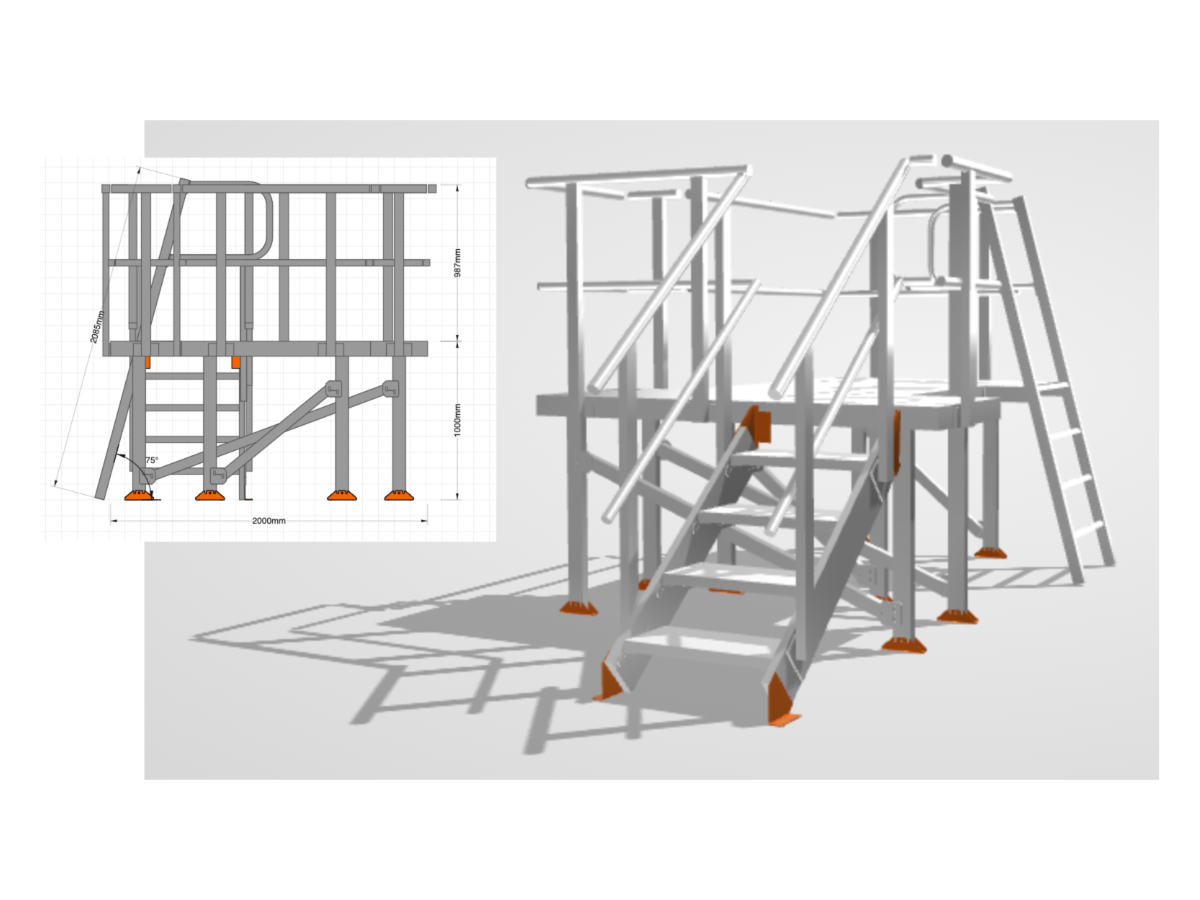 |