Microsoft Defender for Endpoint (formerly Microsoft Defender ATP) is a holistic, cloud delivered endpoint security solution that includes risk-based vulnerability management and assessment, attack surface reduction, behavioral based and cloud-powered next generation protection, endpoint detection and response (EDR), automatic investigation and remediation, managed hunting services, rich APIs, and unified security management.
$2.50
per user/per month
TOPdesk
Score8.4 out of 10
Mid-Size Companies (51-1,000 employees)
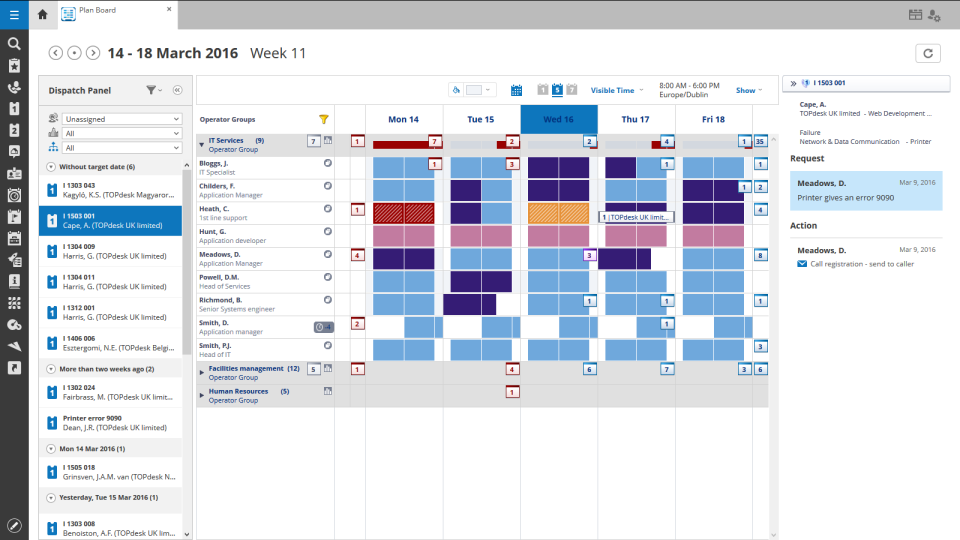
TOPdesk is the flagship highly-modular cloud-based or installed ITSM service desk and asset management solution from the Dutch company of the same name, for enterprise companies.
$76
per month Per agent
Pricing
Microsoft Defender for Endpoint
TOPdesk
Editions & Modules
Academic
$2.50
per user/per month
Standalone
$5.20
per user/per month
Essential
$76
per month Per agent
Engaged
$109
per month Per agent
Excellent
$155
per month Per agent
Offerings
Pricing Offerings
Microsoft Defender for Endpoint
TOPdesk
Free Trial
Yes
Yes
Free/Freemium Version
No
No
Premium Consulting/Integration Services
No
Yes
Entry-level Setup Fee
No setup fee
Optional
Additional Details
—
The TOPdesk license model:
- Modular: Organizations purchase only the modules needed
- Saas or On premise
- Supports unlimited number of assets.
- Service agents based.
- Discount available for annual pricing.
If you have multiple endpoints in your environment, if you're looking to understand what your environment looks like, if you're trying to identify the health of your environment, or identify any risks or vulnerabilities in your environment pertaining to your endpoints and devices.
A de minimis incentive was given to thank the reviewer for their time. The incentive was not used to bias or drive a particular response, nor was the incentive contingent on a positive endorsement. TR verified that a representative sample of customers was invited. More Info
It is an easy-to-use platform with a lot of capabilities. We use it for knowledge databases and it makes my work as Application Owner way easier and faster. It also provides a clear view of the issues running in our organization. We can clearly see where our colleagues are having problems. It also provides a clear view of my support tickets. Also, the reporting tools and the asset management are very nice.
A de minimis incentive was given to thank the reviewer for their time. The incentive was not used to bias or drive a particular response, nor was the incentive contingent on a positive endorsement. TR verified that a representative sample of customers was invited. More Info
The big thing for us is on endpoint, it kind of integrates with everything else that we already have because we use Microsoft completely. And so that helps us with being able to integrate, and send things over to Azure Sentinel as we need to as well.
A de minimis incentive was given to thank the reviewer for their time. The incentive was not used to bias or drive a particular response, nor was the incentive contingent on a positive endorsement. More Info
I'd say building out summaries and log reviews for analysts reviewing incidents. So, pivoting from the alerts themselves to actually getting the detail underneath. Trying to understand what caused an alert, where they went from there, et cetera, et cetera. And then trying to get into deeper log review to take that investigation further can be a pain point.
A de minimis incentive was given to thank the reviewer for their time. The incentive was not used to bias or drive a particular response, nor was the incentive contingent on a positive endorsement. More Info
Cost add-ons for Security features is nickel and diming the process to keep pace with cybercrime. Limited Education budgets require us to be more pro-active in finding cost-effective measures to protect our devices, staff and students. Defender is a strong, well-featured product that is pricing itself out of the education market
A de minimis incentive was given to thank the reviewer for their time. The incentive was not used to bias or drive a particular response, nor was the incentive contingent on a positive endorsement. TR verified that a representative sample of customers was invited. More Info
If I could choose a new ticketing/asset/ITSM tool and a company I would definitely go with TOPdesk. I like the fact that the support team is also in Dutch and the pricing at the time we purchased it was very affordable. It had all the features we needed and since then the product has come a long way and has many built in out-of-box features that require much less config and setup time. However still very customizable so can be adapted to any customer/environment.
A de minimis incentive was given to thank the reviewer for their time. The incentive was not used to bias or drive a particular response, nor was the incentive contingent on a positive endorsement. TR verified that a representative sample of customers was invited. More Info
Because it's hard to find things sometimes. I can find things now because I know where they are. But you have to work with it a little while to figure out how. I'd basically say it was a security tool designed by developers. So you have to get that mindset to find things. So a new hire, a new person in the SOC would have a difficult time. I know that's sitting in here, or that screen is in here somewhere. So it's gotten better.
A de minimis incentive was given to thank the reviewer for their time. The incentive was not used to bias or drive a particular response, nor was the incentive contingent on a positive endorsement. More Info
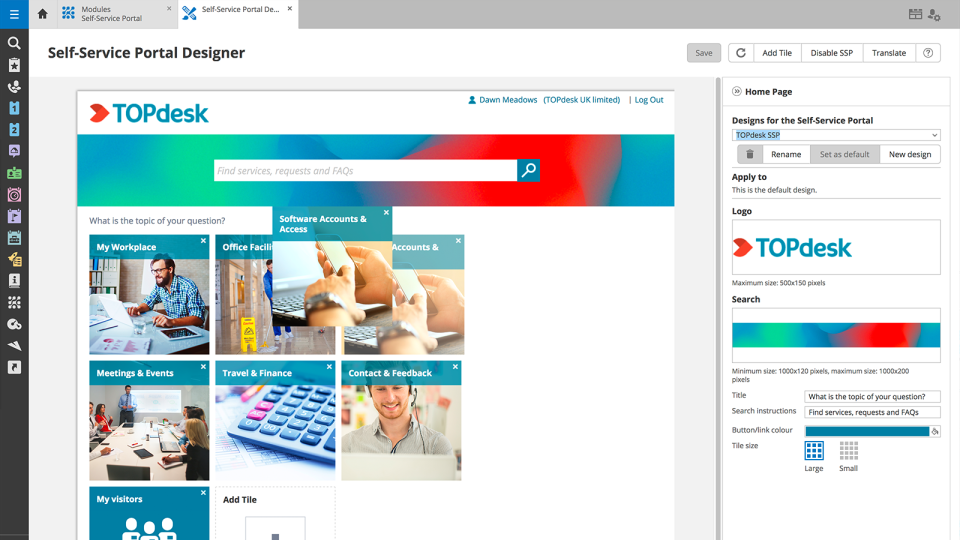
In short, we've been able to remove many pain points, automate multiple things, and empowered the end-user by being able to manage more items via the Self Service Portal. We've been able to do more than we were able to do with our previous ITSM platform. The TOPdesk development team added some things recently that will allow us to make some other things more efficient.
A de minimis incentive was given to thank the reviewer for their time. The incentive was not used to bias or drive a particular response, nor was the incentive contingent on a positive endorsement. TR verified that a representative sample of customers was invited. More Info
Microsoft Defender for Endpoint chugs along just fine no matter what we throw at it and what systems it's running on. It doesn't take up a lot of resources either, so that's welcomed.
A de minimis incentive was given to thank the reviewer for their time. The incentive was not used to bias or drive a particular response, nor was the incentive contingent on a positive endorsement. More Info
Like I said somewhere else in this review: the helpdesk of TOPdesk is top of the bill! In the Netherlands, that is. I can not plea for the helpdesks in other countries, but I guess the TOPdesk organization will make sure the quality of the helpdesk is the same in every country.
A de minimis incentive was given to thank the reviewer for their time. The incentive was not used to bias or drive a particular response, nor was the incentive contingent on a positive endorsement. TR verified that a representative sample of customers was invited. More Info
A de minimis incentive was given to thank the reviewer for their time. The incentive was not used to bias or drive a particular response, nor was the incentive contingent on a positive endorsement. More Info
Although being a SAAS solution, TOPdesk performs pretty fast. One can imagine that any SAAS solution is slow or has hiccups, but we have not experienced such with TOPdesk. Pages load quickly, logging in goes smoothly. We have made reports on premise in the past - that always took some time, as you might expect with such complex tasks. It seems that in the SAAS solution TOPdesk somehow has managed to make it even faster!
A de minimis incentive was given to thank the reviewer for their time. The incentive was not used to bias or drive a particular response, nor was the incentive contingent on a positive endorsement. TR verified that a representative sample of customers was invited. More Info
The first time I tried to onboard my macOS endpoints to MDE I struggled for quite a bit. I had to reach out to Microsoft's MDE support team. The tech was very helpful in walking me through the steps during a screen share session
A de minimis incentive was given to thank the reviewer for their time. The incentive was not used to bias or drive a particular response, nor was the incentive contingent on a positive endorsement. More Info
Most if not nearly all questions are answered within the same or a few days. The helpdesk is very knowledgable about their product and are always willing to help. The only downside is that for more difficult questions it can take a while due to the experts being further removed from the helpdesk. But they are always willing to answer questions, even if they are not directly related to a problem with the service.
A de minimis incentive was given to thank the reviewer for their time. The incentive was not used to bias or drive a particular response, nor was the incentive contingent on a positive endorsement. TR verified that a representative sample of customers was invited. More Info
We had Topdesk in-house here training staff for almost a month (2-3 hour meetings 3x a week.) It was invaluable and we were able to take that training and share with the rest of our IT staff. Once implemented we were able to fly from there. The challenges we found were in how to get started. Once started the knowledge base offered from Topdesk has been invaluable.
A de minimis incentive was given to thank the reviewer for their time. The incentive was not used to bias or drive a particular response, nor was the incentive contingent on a positive endorsement. TR verified that a representative sample of customers was invited. More Info
Online training documentation is easy to access and consume. There is no real challenges with finding information on how to use the product and some really helpful knowledge base items that show us how valuable these options are in our own implementation of it. The online training we've used has been self driven
A de minimis incentive was given to thank the reviewer for their time. The incentive was not used to bias or drive a particular response, nor was the incentive contingent on a positive endorsement. TR verified that a representative sample of customers was invited. More Info
Deployment was handled by our team here and everything went pretty smoothly. We did have a few hiccups in our test group, but that only took a bit to get ironed out.
A de minimis incentive was given to thank the reviewer for their time. The incentive was not used to bias or drive a particular response, nor was the incentive contingent on a positive endorsement. More Info
It was a challenge to port over years of the same thing and we ended up keeping old ideas in Topdesk that we will eventually weed out as time passes and we learn how users view categories and flows of tickets. Planning is key but bear in mind that just because you used to do it this way doesn't mean you still have to
A de minimis incentive was given to thank the reviewer for their time. The incentive was not used to bias or drive a particular response, nor was the incentive contingent on a positive endorsement. TR verified that a representative sample of customers was invited. More Info
Particularly, we're evaluating Symantec Endpoint Protection, the commercial version. We've looked at eSet, a couple of the others, and it's much too heavy or difficult to manage, things like that. Ease of use, ease of integration. It's already there. It's super easy to update it with the regular OS updates and everything. So we can manage it whether we're using SCCM or Intune or Dato, it's very easy to deploy updates and manage things.
A de minimis incentive was given to thank the reviewer for their time. The incentive was not used to bias or drive a particular response, nor was the incentive contingent on a positive endorsement. More Info
Spiceworks is an easier-to-use Help Desk solution but it lacks all other features that Topdesk has. Freshdesk was just too much for our environment. It was cost-prohibitive for our intended use. TOPdesk fit our org size and budget better than the others.
A de minimis incentive was given to thank the reviewer for their time. The incentive was not used to bias or drive a particular response, nor was the incentive contingent on a positive endorsement. TR verified that a representative sample of customers was invited. More Info
A de minimis incentive was given to thank the reviewer for their time. The incentive was not used to bias or drive a particular response, nor was the incentive contingent on a positive endorsement. More Info
TOPdesk is very flexible and scalable. Every department in you organization can you the software. Perhaps some persons need some training, but that can be provided by TOPdesk ot some keyusers.
A de minimis incentive was given to thank the reviewer for their time. The incentive was not used to bias or drive a particular response, nor was the incentive contingent on a positive endorsement. More Info
I think the positive impact overall is that we do a lot of sitting in front of assessors- federal assessors, government assessors. And it really comes down to when the assessor has to think about another product that you're bringing in that's not Microsoft, it creates a lot of confusion, more paperwork, more explanation. But the positive impact is that they know it, everybody kind of knows Microsoft. And so when you tell them you have this endpoint for Microsoft Defender for Endpoint, they're like, okay. The questions go away, and it makes the overhead a lot less during an assessment.
A de minimis incentive was given to thank the reviewer for their time. The incentive was not used to bias or drive a particular response, nor was the incentive contingent on a positive endorsement. More Info
A good number of incidents can solved more quickly. Those cases can be solved by the customer itself and in TOPdesk it is very easy to send the self-service-solution with your answer.
It is easier to report some things based on categorization and good search filtering
If there are two or more tickets, they are difficult (or impossible) to merge correctly. There is a merge function, but there is for example, only one client possible. A solution where you close one merged ticket and send separate emails to every single customer would be really nice!