Microsoft To Do replaces the former Wunderlist task management tool.
N/A
Xero
Score8.4 out of 10
N/A
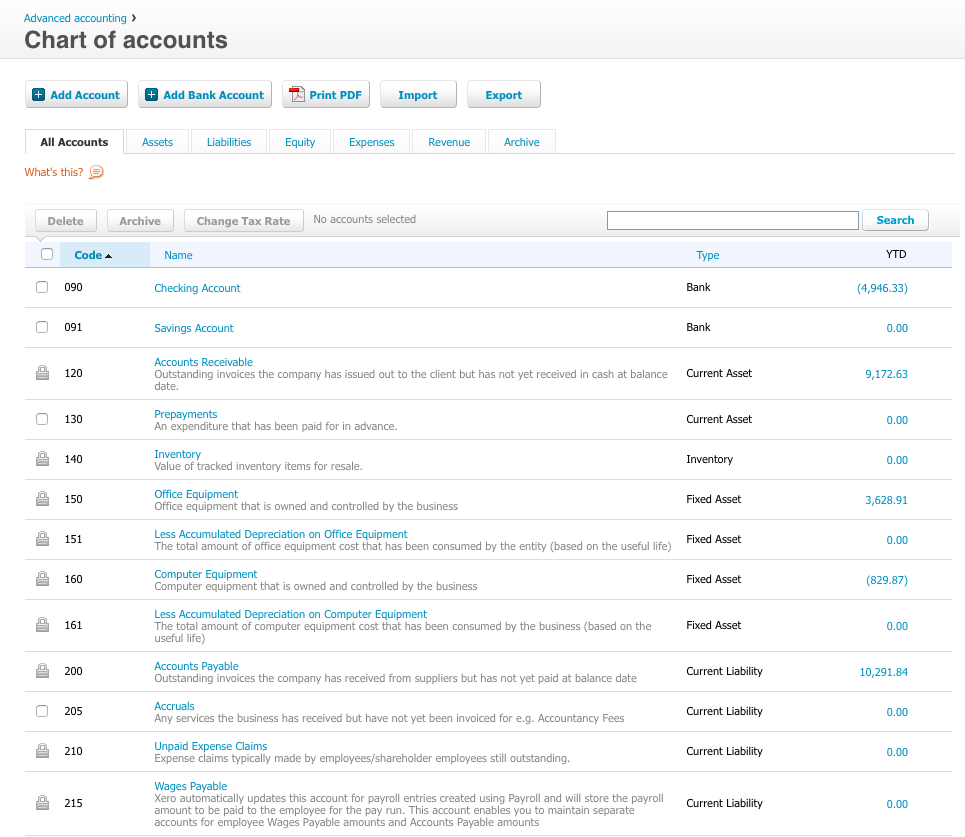
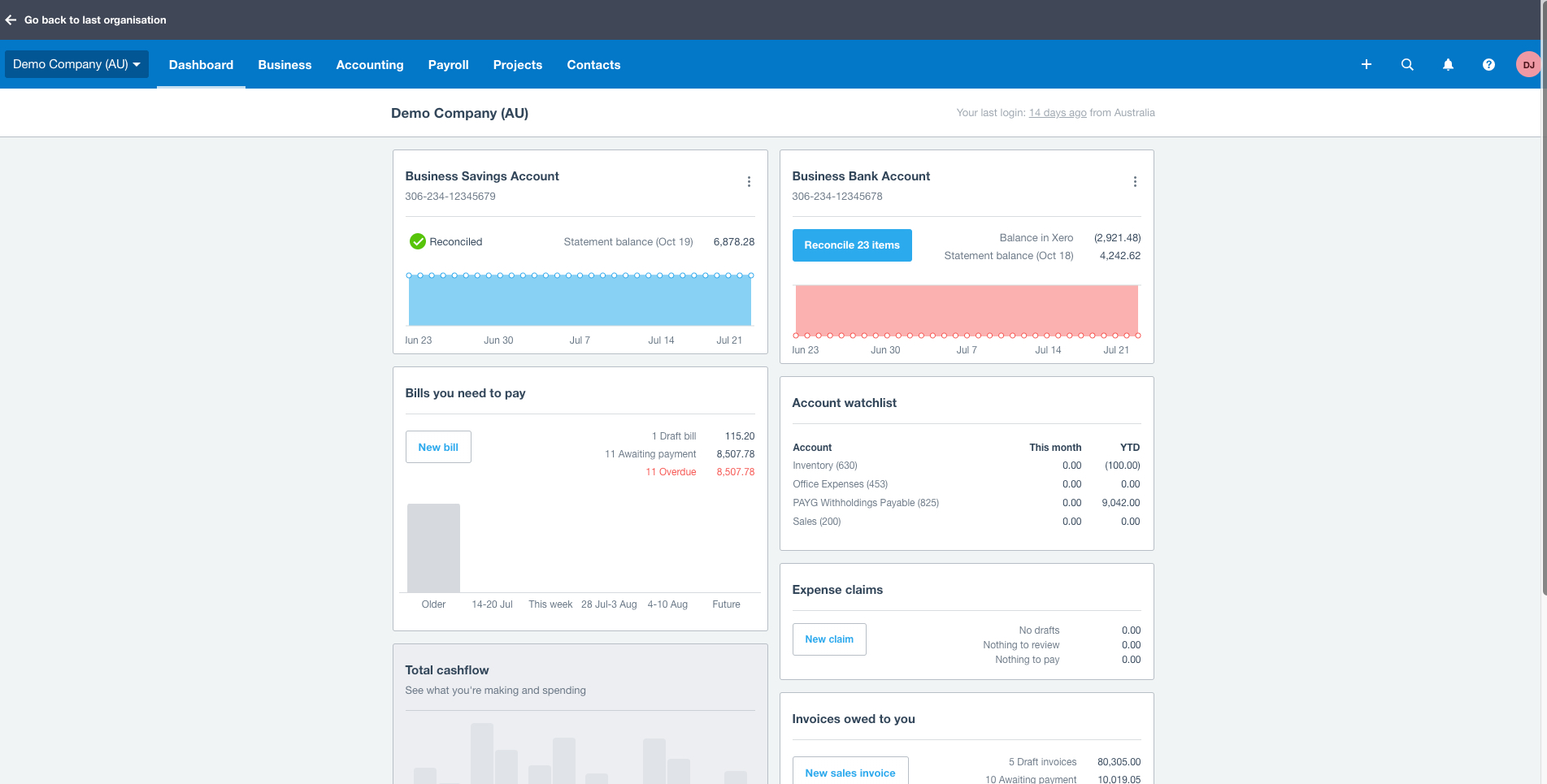
Xero is an online accounting software product for small businesses and personal finance. Its features beyond general ledger and double-bookkeeping include quotable invoicing, bank reconciliation, purchase order and expense management, and tax management. Third party apps can extend its features further.
$13
per month
Pricing
Microsoft To Do
Xero
Editions & Modules
No answers on this topic
Early
$13
per month
Growing
$37
per month
Established
$70
per month
Offerings
Pricing Offerings
Microsoft To Do
Xero
Free Trial
No
Yes
Free/Freemium Version
No
No
Premium Consulting/Integration Services
No
No
Entry-level Setup Fee
No setup fee
No setup fee
Additional Details
—
Prices in table are in USD and just apply to the US - other markets & prices are listed below:
Canada - Starter $18 CAD/month, Standard $45 CAD/month, Premium 5 $58 CAD/month
UK - Starter £14/month, Standard £28/month, Premium £36/month
AU - Starter $29 AUD/month, Standard $59 AUD/month, Premium 5 $76 AUD/month
NZ - Starter $31 NZD/month, Standard $66 NZD/month, Premium $84 NZD/month
I think Microsoft To Do is helpful for people who don't need a lot of customization in a task manager. I prefer using 3rd party task managers that allow me to create projects with tasks and subtasks. But for a team that already uses Microsoft products and doesn't want to learn or invest capital in another task manager, Microsoft To Do covers the basics and syncs with your calendar.
A de minimis incentive was given to thank the reviewer for their time. The incentive was not used to bias or drive a particular response, nor was the incentive contingent on a positive endorsement. More Info
The only time I wouldn't be suggesting it is to consultants or solopreneurs. I think it's too overwhelming unless you are experienced or have a background related to finance. So it's not that the product isn't powerful, it's that it can be too powerful. For all other size businesses it really is what you need to use to make life simple to track everything in your business. It definitely saves me time by having it all in one place and not multiple spreadsheets etc
A de minimis incentive was given to thank the reviewer for their time. The incentive was not used to bias or drive a particular response, nor was the incentive contingent on a positive endorsement. TR verified that a representative sample of customers was invited. More Info
Wunderlist is what you need for your to do lists. It's really simple to use.
Allows you to set due date to your lists, share them with your team and/or create a folder to divide and organize all your list set
Also, Wunderlist is compatible with all platform and devices. So you can always be updated on your list or work on them from wherever you are and with all the devices you have.
A de minimis incentive was given to thank the reviewer for their time. The incentive was not used to bias or drive a particular response, nor was the incentive contingent on a positive endorsement. More Info
The bank feed integration makes reconciling transactions easy
Once you load a template for your invoices, every client gets a professional looking invoice
Bill paying and tracking of payments is also easy; you load your bill into Xero, pay it through the bank, and when the transaction is completed it comes through on bank feeds. If you need to query when a bill was paid, it is all there in Xero
A de minimis incentive was given to thank the reviewer for their time. The incentive was not used to bias or drive a particular response, nor was the incentive contingent on a positive endorsement. More Info
A de minimis incentive was given to thank the reviewer for their time. The incentive was not used to bias or drive a particular response, nor was the incentive contingent on a positive endorsement. More Info
Having different email addresses for different parts of a customer's business (eg invoices and statements to different places)
Easily seeing the text of emails that have been sent through Xero
More easily archiving old pay items. Our HR software updates rates when awards are updated which means a lot of old pay rates are in the system and they have multiple clicks to archive each one. Clicking the ones to archive in bulk and then just click archive for all would be much more efficient.
A de minimis incentive was given to thank the reviewer for their time. The incentive was not used to bias or drive a particular response, nor was the incentive contingent on a positive endorsement. TR verified that a representative sample of customers was invited. More Info
A de minimis incentive was given to thank the reviewer for their time. The incentive was not used to bias or drive a particular response, nor was the incentive contingent on a positive endorsement. More Info
In addition to the matters covered in this review, my reason for renewing this product is that Xero's functionality and the constant updates that the company provides, makes the software even more business friendly. The software therefore builds a brand loyalty among customers.
User friendly, easy to configure, and VERY simplistic. I particularly use heavily the phone app feature. While others in the room are on social media, I am reviewing my tasks and this triggers other tasks I know I need to get done. I like the sense of accomplishment of moving things to the completed pile as well.
A de minimis incentive was given to thank the reviewer for their time. The incentive was not used to bias or drive a particular response, nor was the incentive contingent on a positive endorsement. More Info
As a standalone software, it allows users to fulfill most of the basic functions (e.g. transaction input and report generation) simply and conveniently. It also allows for multiple APIs to help augment various tasks that accounting-adjacent (e.g. claims processing). The cloud based model and portability to mobile devices allows tasks to be carried out in a more convenient way.
We have been actively using and 100% Xero based for our ecommerce accounting practice for over 4 years. There has on been one real outage for more than 5 minutes. Xero was open and transparent about the outage, what they were doing to resolve the issue, and provided 15 minute updates. Showing how they care about their customers and partners. Plus, showing that their customers care too, were understanding, and went surfing or in our case took a nap. Couldn't run our business without Xero as a partner.
On a good day, things worked but after upgrades, things began to slow and or not work at all at times. I coined the moving circle while I waited as the "Xero Wheel of Death". Sometimes it never stopped and force quitting was necessary.
A de minimis incentive was given to thank the reviewer for their time. The incentive was not used to bias or drive a particular response, nor was the incentive contingent on a positive endorsement. TR verified that a representative sample of customers was invited. More Info
I have not had an issue where I needed to reach out to Wunderlist, but I know their contact and online chat is easy to access and feel confident that they would be helpful. My only worry is Wunderlist is becoming Microsoft to-do in May 2020, and I believe the app will become worse after that.
A de minimis incentive was given to thank the reviewer for their time. The incentive was not used to bias or drive a particular response, nor was the incentive contingent on a positive endorsement. More Info
Always respond and keep issues open until you are satisfied with the result. Generally good responses, in the past, I had some support responses that were really basic and really annoying. They type where "have your tried restarting your computer" style of answers. Well, of course, I went through all the basics before contacting them. Duh, but I suppose not everyone does. Otherwise, it would be a 10. The last year has shown a marked improvement in the support responses however.
A de minimis incentive was given to thank the reviewer for their time. The incentive was not used to bias or drive a particular response, nor was the incentive contingent on a positive endorsement. More Info
All of Xero's training is online and available for anyone (business owner or accountants) to learn and become experts in their system. There is a range of content from product training to real world webinars from their partners. Xero is beautiful accounting software and their training is the same.
A de minimis incentive was given to thank the reviewer for their time. The incentive was not used to bias or drive a particular response, nor was the incentive contingent on a positive endorsement. More Info
If it can be done, time the implementation near a new fiscal year so you can start clean. Otherwise, you have to go back and do historical data from the beginning of the fiscal year, which can be brain draining.
A de minimis incentive was given to thank the reviewer for their time. The incentive was not used to bias or drive a particular response, nor was the incentive contingent on a positive endorsement. TR verified that a representative sample of customers was invited. More Info
It's a small tool compared to bigger project management software, but we found that they work perfectly together. It helps you declutter the larger PM tools, keep your smaller tasks in-line and make sure they get completed. When you're working in a creative agency, ideas and tasks are flying around, so having a tool like this that keeps you accountable and reminds you of your tasks is a must!
A de minimis incentive was given to thank the reviewer for their time. The incentive was not used to bias or drive a particular response, nor was the incentive contingent on a positive endorsement. More Info
Each of the products I listed had their own list of drawbacks, but the one thing they all had in common, which was right on top of that list of drawbacks, was ease of use. I struggled to get myself accustomed to each system and struggled, but when it came to getting a client to even try and use it was when the true struggle started. Just found it easier to make use of Xero from the very beginning.
I have yet to fully stress test the product given the size of the company where I am using it. I am sure as we scale to more customers, more vendors and more reporting requirements, I will have a better understanding of what it is capable of in terms of bandwidth and processing
A de minimis incentive was given to thank the reviewer for their time. The incentive was not used to bias or drive a particular response, nor was the incentive contingent on a positive endorsement. More Info
A de minimis incentive was given to thank the reviewer for their time. The incentive was not used to bias or drive a particular response, nor was the incentive contingent on a positive endorsement. More Info
Xero is a basic accounting system that performs basic accounting tasks easily and accurately. For that, it provides a positive impact on our day to day accounting operations.
Because of Xero's basic structure, I feel it lacks some of the sophistication that some users want and need. The ability to create unique custom reports would enhance the impact Xero would have on meeting business objectives by providing current and useful accounting information.
In my opinion, Xero's lack of focus on their customers - their users - is a real issue with me. In my opinion, those of us that are in the trenches that work with the system on a daily basis have to deal with the shortcomings of the system with the knowledge that Xero support refuses to address the operational issues that make their user's lives difficult. I feel if Xero would focus on truly making their software better from a users point of view, it has the potential to be a great system.