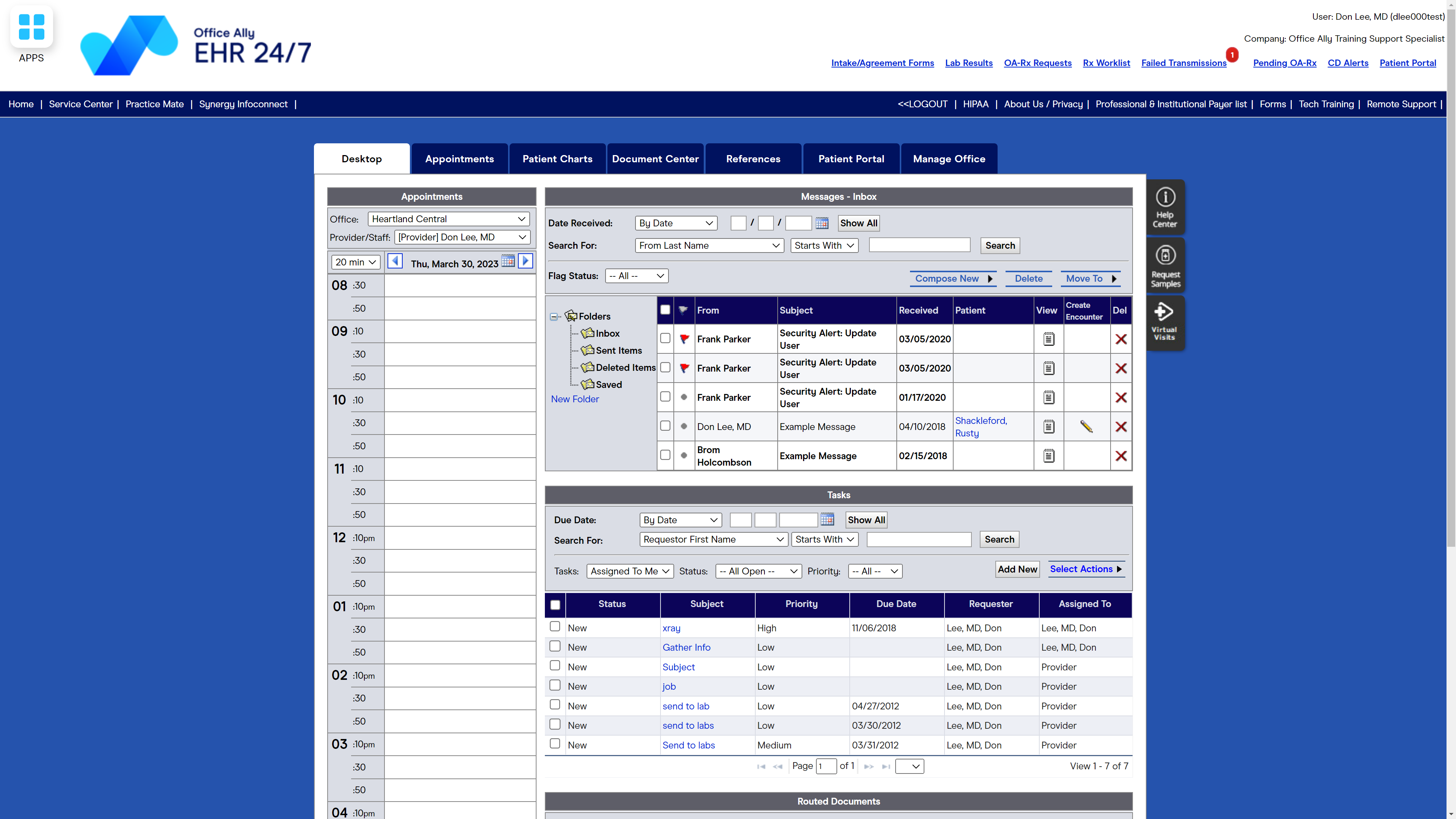
Office Ally in Vancouver, Washington offers their suite of interactive asp internet based solutions allowing for patient care from the point of contact in the physician's office to receiving payment from the insurance companies and providing overall care management from the IPAs and Health Plans. For $29.95 per month/provider, Office Ally offers EHR 24/7, an Electronic Health Records Program designed to allow healthcare providers to spend more time with patients and less time on paperwork.
$39.95
per month
Tebra Billing & Payments
Score9 out of 10
N/A
Tebra Practice Management (formerly Kareo) provides cloud-based management and billing solutions for small medical offices. Some key features include: Patient Management, Scheduler & Patient Reminders, Insurance Billing & Reporting, and Patient Billing & Collections.
$74.50
per provider
Pricing
EHR 24/7
Tebra Billing & Payments
Editions & Modules
No answers on this topic
Non-Physician Provider (Low-Volume)
$74.50
per provider
Low-Volume Provider
$149
per provider
Physician Provider
$299
per provider
Offerings
Pricing Offerings
EHR 24/7
Tebra Billing & Payments
Free Trial
No
No
Free/Freemium Version
No
No
Premium Consulting/Integration Services
No
No
Entry-level Setup Fee
No setup fee
No setup fee
Additional Details
—
—
More Pricing Information
Features
EHR 24/7
Tebra Billing & Payments
Billing and Claims Management
Comparison of Billing and Claims Management features of EHR 24/7 by Office Ally and Tebra Billing & Payments
Feature
EHR 24/7 by Office Ally
9.0
2 Ratings
18% above category average
Tebra Billing & Payments
-
Ratings
Real-time eligibility verification
9.01 Ratings
00 Ratings
Claims management
9.01 Ratings
00 Ratings
Coding
9.01 Ratings
00 Ratings
Patient billing
9.01 Ratings
00 Ratings
Financial Reporting
9.02 Ratings
00 Ratings
Patient Scheduling
Comparison of Patient Scheduling features of EHR 24/7 by Office Ally and Tebra Billing & Payments
Feature
EHR 24/7 by Office Ally
9.0
2 Ratings
16% above category average
Tebra Billing & Payments
-
Ratings
Rule-based scheduling
9.02 Ratings
00 Ratings
Automated appointment reminders
9.02 Ratings
00 Ratings
Automated patient check-in
9.01 Ratings
00 Ratings
Multi-location support
9.01 Ratings
00 Ratings
Calendar interface
9.01 Ratings
00 Ratings
Electronic Medical Records
Comparison of Electronic Medical Records features of EHR 24/7 by Office Ally and Tebra Billing & Payments
Feature
EHR 24/7 by Office Ally
8.4
1 Ratings
15% above category average
Tebra Billing & Payments
-
Ratings
Charting / document management
8.01 Ratings
00 Ratings
Templates
8.01 Ratings
00 Ratings
Patient portal
8.01 Ratings
00 Ratings
Mobile/tablet support
9.01 Ratings
00 Ratings
Fax integration
8.01 Ratings
00 Ratings
Integration with other EMR and PM systems
9.01 Ratings
00 Ratings
Workflow automation
8.01 Ratings
00 Ratings
Speech recognition
9.01 Ratings
00 Ratings
Customization
8.01 Ratings
00 Ratings
E-prescribing
9.01 Ratings
00 Ratings
Medical Security and Privacy
Comparison of Medical Security and Privacy features of EHR 24/7 by Office Ally and Tebra Billing & Payments
Feature
EHR 24/7 by Office Ally
9.3
2 Ratings
11% above category average
Tebra Billing & Payments
-
Ratings
HIPAA compliance
10.02 Ratings
00 Ratings
Role-based permission levels
9.02 Ratings
00 Ratings
Data backups and redundancy
9.01 Ratings
00 Ratings
Local mode / networking failsafe
9.01 Ratings
00 Ratings
Workflow and Scale
Comparison of Workflow and Scale features of EHR 24/7 by Office Ally and Tebra Billing & Payments
Smaller doctor or dental offices would be fine using Office Ally for patient visits and appointments; it's easy to use and learn, and I'm able to handle most needs with it. For a larger practice, there are better, more technologically advanced software products that would offer more streamlined and professional statements, schedules, and accounting needs.
A de minimis incentive was given to thank the reviewer for their time. The incentive was not used to bias or drive a particular response, nor was the incentive contingent on a positive endorsement. More Info
In my experience, problems with them adding incorrect fees to pad their bills coupled with their unethical business practices such as locking you out from accessing your EMR at the drop of a hat prevent me from recommending Kareo to any practice. Reliability is paramount. Kareo's use of unethical business practices (locking you out from your EMR or disabling your EMR all together) can result in a physician being sanctioned by the medical board (inappropriate medical record keeping) or financially destroy a small practice leaving them with NO ACCESS to their ERAs/patient billing accounts etc leads me to NOT reccomend their products or doing business with them.
A de minimis incentive was given to thank the reviewer for their time. The incentive was not used to bias or drive a particular response, nor was the incentive contingent on a positive endorsement. More Info
Kareo stays up to date on insurance changes which allow for smooth transitions.
Kareo asks for feedback and has a place to go and request changes or additions that would make our job easier.
I love that you can submit a help ticket or call, if you prefer, with any questions or problems that you may have. They are always very prompt with their follow up.
There needs to be a way to print patient visit summaries for a date range vs printing one summary for each appointment, one at a time.
It would be helpful if the top row of the calendar, showing doctors/practitioners names, would remain on the screen when scrolling to the end of the day. Appointments get scheduled under the wrong doctor at times because the names disappear and columns get confused.
There should be a way to view/print/download what has been paid, per patient, to the office in one place vs searching for payments under the Accounting Tab and payments tracked under Patient visits.
A de minimis incentive was given to thank the reviewer for their time. The incentive was not used to bias or drive a particular response, nor was the incentive contingent on a positive endorsement. More Info
Where to start...for one, during my start-up with a "success coach" and trust me, I use that term broadly, I had to f/u on every single issue that came up. I was told she was taking care of my electronic lab enrollment, after waiting 3 months and reaching out to my success coach, Kayli, countless times, I only was told when contacted by management that my Quest lab access had been denied after 2 weeks because I was never told to independently create my own account with Kareo- after asking/emailing/calling multiple times trying to figure out the process. So needless to say, I have NO electronic lab access 4 months after signing with Kareo and they are now just starting the process.
Prescriptions- I had reached out to Kareo, no exaggeration, over 10 times to figure out why I wasn't receiving prescription refills. Spent countless hours on the phone with "support line" that could never give me an answer- to any question. And never f/u either until I directly insisted to my salesperson to have management contact me directly. I had a patient go to the hospital due to not having their medications because apparently their pharmacy had sent refill prescriptions over 3 times which I never received. Only after talking to management, did they look into further and then inform me that I had 3 locations in the system (?? I have ONE location). They were all prior addresses of offices, one from over 4 years ago. To date, again, 4 months after paying a year up front, I can't receive refill requests. And the solution proposed to me by management was to call my prior EHR and request they delete my prior addresses. And I cannot contact my prior EHR because I was in a large group that restricted the account to only 2 individuals in a group of 18 doctors to even have access to talk to them. So I can't resolve the issue, Kareo after 4 months instructs me to call them myself, and the prior EHR doesn't even recognize I had an account with them because it was under a group practice name.
Online booking- I thought this would be an amazingly efficient add-on. What they don't tell you is you can only designate "increments" of appointment times. Kareo will tell you it syncs with your existing schedule so that online bookings are only in vacant time slots. I had new patients selecting a time increment of 15 minutes, existing patients selecting 45 minutes (with a deductible) and any increment over 15 minutes (which the patient can select at their own will, being if you choose 15 min increments, it will offer appointment length for 15 min, 30 min, 45 min, 60 min etc with no outline of the appropriate time length) will over-book your schedule. So if you have a 10-10:15 slot, the patient can select a 45 minute appointment that starts at 10 (Because that 15 minute slot is open). But then will overbook the patients at 10:15 and 10:30.
It created utter chaos in my practice. My office manager spent more time calling patients to inform them they had booked an inappropriate time increment, they can't book a new appointment for 15 minutes, we don't accept their insurance...the list goes on.
There is no way to restrict the increments or who can book an appointment.
Messaging- I can't view what incoming messages from patients are sent to whom. And neither can my office manager. And the patient gets to select who to sent the message to, either the "provider" or "location." And 9 times out of 10 they send to the "provider." So as a physician, I am inundated with patient messages simply wanting to book a new appointment or reschedule. As a physician, obviously prioritizing my time is important and my office manager can't view these messages.
The list goes on, unfortunately. "A/R" reports only allow them to calculate a theoretical A/R based on your self-pay rates to patients, not individual contracted rates with insurances. So my A/R has an inflated number, which I can't even quantify by how much, because the A/R is based as if every insurance patient paid as a self-pay patient. Seriously, no one thought this through?
Can't send multiple controlled scripts at once electronically. Have to enter, go to separate site, enter code, be redirected back to KAreo then re-enter another med, be redirected to separate site, enter code, be redirected...Any other EHR I've ever used (and I've used around 6 between residency and private practice) you could enter multiple Rx, but then check the meds you wanted to send and then enter ONE code for, say, 2 controlled scripts. Kareo, you must enter separate codes one by one.
I could go on but will choose to hope for all reading, you get the general point...
Kareo Medical Billing is very user friendly and the support they provide allows users to get their questions answered quickly and efficiently. The wait time to receive help is usually pretty good and most of the time we can ger our questions answered. We have found that is the tech help is unable to answer our question, they will attempt to find a colleague who is able to help!
A de minimis incentive was given to thank the reviewer for their time. The incentive was not used to bias or drive a particular response, nor was the incentive contingent on a positive endorsement. More Info
I haven't had to call too many times to get help with Office Ally but when I have had to call, I haven't always had the best customer service. It seems that I am bugging the person I reach when I call for technical support because I'm usually reminded that there are videos to watch for technical support help. On the flip side, there have been times that I called for help and was treated how you assume you'll be treated when you call for help - with grace, dignity, professionalism, and respect.
A de minimis incentive was given to thank the reviewer for their time. The incentive was not used to bias or drive a particular response, nor was the incentive contingent on a positive endorsement. More Info
I used to use Best Notes. Best Notes was difficult to navigate and very inflexible. We used it in the early time of EHR/EMR, so that the software was not very useful. When I changed to Office Ally, we are so delighted to change it because again it is easily to navigate the software. There is minimum of learning curve than other software.
A de minimis incentive was given to thank the reviewer for their time. The incentive was not used to bias or drive a particular response, nor was the incentive contingent on a positive endorsement. More Info
We have used several Practice Management programs which our doctors have chosen. Kareo is far above those in ease of use, efficiency and reporting. Training takes very little time as the program is intuitive. Licensing cost is reasonable. Our doctors enjoy the integration with the Kareo EHR and our staff appreciates the integration from the EHR to the practice management. It makes their job easier.
A de minimis incentive was given to thank the reviewer for their time. The incentive was not used to bias or drive a particular response, nor was the incentive contingent on a positive endorsement. More Info
A de minimis incentive was given to thank the reviewer for their time. The incentive was not used to bias or drive a particular response, nor was the incentive contingent on a positive endorsement. More Info
A de minimis incentive was given to thank the reviewer for their time. The incentive was not used to bias or drive a particular response, nor was the incentive contingent on a positive endorsement. More Info