Patch My PC Patch Management vs. Qualys TruRisk Platform vs. ReputationStacker

Overview
ProductRatingMost Used ByProduct SummaryStarting Price
Patch My PC Patch Management
Score 7.1 out of 10
Enterprise companies (1,001+ employees)
Software that extends Microsoft Configuration Manager to deploy and patch third-party applications. It is designed to handle the tedious task of packaging, testing, troubleshooting, and deploying applications in the environment. The software automates the creation and patching of third-party applications. Optionally, users can configure automatic deployment rules for complete automation and control over third-party patch management in the enterprise.
$1
per year per seat
Qualys TruRisk Platform
Score 6.0 out of 10
N/A
Qualys TruRisk Platform (formerly Qualys Cloud Platform, or Qualysguard), from San Francisco-based Qualys, is network security and vulnerability management software featuring app scanning and security, network device mapping and detection, vulnerability prioritization schedule and remediation, and other features to provide vulnerability management and network attack surface reduction.N/A
ReputationStacker
Score 10.0 out of 10
N/A
ReputationStacker's review management software helps businesses get more reviews, rank higher in local search, and win customers automatically. It is offered as a completely hands-off online reputation management system. ReputationStacker’s reporting suite turns qualitative feedback from reviews and NPS surveys into quantified, actionable data which can be used to improve a business, driving more positive reviews and better…
$79
per month
Pricing
Patch My PC Patch ManagementQualys TruRisk PlatformReputationStacker
Editions & Modules
Basic
$1
per year per seat
Enterprise
$2
per year per seat
Intune Essentials
$3.25
per year per seat
Enterprise Plus
$3.50
per year per seat
No answers on this topic
Lite
$79
per month
Standard
$99
per month per location
Professional
$124
per month per location
Offerings
Pricing Offerings
Patch My PC Patch ManagementQualys TruRisk PlatformReputationStacker
Free Trial
YesNoYes
Free/Freemium Version
NoNoNo
Premium Consulting/Integration Services
NoNoNo
Entry-level Setup FeeNo setup feeNo setup feeRequired
Additional DetailsDiscount available for annual billing.
More Pricing Information
Features
Patch My PC Patch ManagementQualys TruRisk PlatformReputationStacker
Threat Intelligence
Comparison of Threat Intelligence features of Product A and Product B
Patch My PC Patch Management
10.0
1 Ratings
22% above category average
Qualys TruRisk Platform
8.7
7 Ratings
8% above category average
ReputationStacker
-
Ratings
Vulnerability Classification10.01 Ratings8.87 Ratings00 Ratings
Network Analytics00 Ratings8.96 Ratings00 Ratings
Threat Recognition00 Ratings8.37 Ratings00 Ratings
Automated Alerts and Reporting00 Ratings9.07 Ratings00 Ratings
Threat Analysis00 Ratings8.27 Ratings00 Ratings
Threat Intelligence Reporting00 Ratings8.97 Ratings00 Ratings
Automated Threat Identification00 Ratings8.77 Ratings00 Ratings
Vulnerability Management Tools
Comparison of Vulnerability Management Tools features of Product A and Product B
Patch My PC Patch Management
10.0
1 Ratings
19% above category average
Qualys TruRisk Platform
8.5
9 Ratings
3% above category average
ReputationStacker
-
Ratings
Vulnerability Intelligence10.01 Ratings8.67 Ratings00 Ratings
IT Asset Realization00 Ratings8.89 Ratings00 Ratings
Authentication00 Ratings7.96 Ratings00 Ratings
Configuration Monitoring00 Ratings8.57 Ratings00 Ratings
Web Scanning00 Ratings8.88 Ratings00 Ratings
Best Alternatives
Patch My PC Patch ManagementQualys TruRisk PlatformReputationStacker
Small Businesses
Action1
Action1
Score 9.5 out of 10
Action1
Action1
Score 9.5 out of 10
Yext
Yext
Score 7.9 out of 10
Medium-sized Companies
Action1
Action1
Score 9.5 out of 10
Action1
Action1
Score 9.5 out of 10
Yext
Yext
Score 7.9 out of 10
Enterprises
CrowdStrike Falcon
CrowdStrike Falcon
Score 9.1 out of 10
CrowdStrike Falcon
CrowdStrike Falcon
Score 9.1 out of 10
Yext
Yext
Score 7.9 out of 10
All AlternativesView all alternativesView all alternativesView all alternatives
User Ratings
Patch My PC Patch ManagementQualys TruRisk PlatformReputationStacker
Likelihood to Recommend
10.0
(1 ratings)
8.6
(25 ratings)
-
(0 ratings)
Likelihood to Renew
10.0
(1 ratings)
-
(0 ratings)
-
(0 ratings)
Usability
-
(0 ratings)
2.0
(1 ratings)
-
(0 ratings)
Support Rating
-
(0 ratings)
5.0
(7 ratings)
-
(0 ratings)
Implementation Rating
10.0
(1 ratings)
-
(0 ratings)
-
(0 ratings)
User Testimonials
Patch My PC Patch ManagementQualys TruRisk PlatformReputationStacker
Likelihood to Recommend
Patch My PC
I highly recommend Patch My PC to businesses of all types and sizes. The tool is highly customizable and can meet the needs of any organization. It is easy to implement with Configuration Manager (SCCM) and Intune and can be set up within a matter of minutes.
Read full review
Qualys
Qualys Cloud Platform is well suited for organizations that need additional tools to secure and bolster their security from end to end. The automated, real-time threat protection is very quick to notify an admin of potential vulnerabilities and risks, as well as recommending quick fixes to resolve/close the gap before an incident occurs. QCP excels at portraying all of these in a single pane of glass, and find that the Qualys reports are more detailed than competitor product lines. One of our big issues with QCP is that you do have to pay for each scanner, which can quickly add up to large costs. For this reason, I would rate Qualys at a ~7 due to great features and functionality, but overall value could be better for a large organization. I would also say that QCP may make more sense for smaller organizations due to this pricing model.
Read full review
ReputationStacker
ReputationStacker is extremely well designed for multi-location practices that care about improving and protecting their online reputation and visibility in local search engine results (which is extremely important for our business). It makes it easy to consistently generate reviews for each location and address issues that patients have before they become bigger problems. If you’re looking for an all-in-one marketing platform, this isn’t that. It's just focused on online reputation and reviews and it does that really well (instead of trying to do everything).
Read full review
Pros
Patch My PC
  • Great customer support
  • Automation of application creation and updates
  • Easy to integrate and manage
Read full review
Qualys
  • It really does well at vulnerability scanning, which it is well known for. It's accuracy at finding vulnerabilities is top notch, more so than a lot of other vulnerability tools out there. In an organization/company you want this kind of accuracy at finding vulnerabilities in your network/endpoints
  • It is very good at managing endpoints on a consistent basis, meaning you can add endpoints to Qualys and have the platform scan/track/protect for vulnerabilities on an ongoing basis, without user intervention
  • It does really well at separating out and identifying what levels of criticality each vulnerability should fall into. This way, an organization/company can attack the more critical vulnerabilities first
Read full review
ReputationStacker
  • Online reputation management for multiple locations of our business
  • Review generation for all of our clinics (with a focus on Google reviews)
  • Responding to reviews at scale
  • Review and reputation reporting
Read full review
Cons
Patch My PC
  • SAS solution
  • Be able to select a specific application version for deployment
Read full review
Qualys
  • This program is really complicated, the multiple functions that are presented to us are not very clear and in some cases, it is a matter of intuition to execute a function, it is not very informative.
  • The interface of this program can be a real problem; for our taste, this program looks a bit messy, and the interface does not help or guide you to find the options you need.
Read full review
ReputationStacker
  • Adding additional locations of our business wasn't obvious at first, but when I figured out how to do it it was easy after that.
Read full review
Likelihood to Renew
Patch My PC
I consider Patch My PC a necessary tool for any environment I manage. I cannot imagine managing an environment without it, as the time and effort it saves is invaluable.
Read full review
Qualys
No answers on this topic
ReputationStacker
No answers on this topic
Usability
Patch My PC
No answers on this topic
Qualys
Again, the usability of Qualys has been a pinpoint for this entire review. It was easily the worst thing about the product and because of this, I would not recommend Qualys to anybody in my field. This should be something that Qualys strives to improve if they wish to stay in business.
Read full review
ReputationStacker
We had our marketing person set it up, and now it automatically gets us Google reviews. It couldn't be easier.
Read full review
Support Rating
Patch My PC
No answers on this topic
Qualys
They had a support page within the WAS to report any concerns or seek help. But the UI of that is not smooth. Regardless support staff were pretty responsive and helpful. They scheduled calls to understand and address our problems. Email support is good as well.
Read full review
ReputationStacker
I had a question about how to add new locations and the support team got back to me immediately and showed me how to do it.
Read full review
Implementation Rating
Patch My PC
The implementation is super easy, specially if you're just Integrating it with Intune.
Read full review
Qualys
No answers on this topic
ReputationStacker
No answers on this topic
Alternatives Considered
Patch My PC
Patch My PC is a tool developed and maintained by experienced systems administrators, who have a deep understanding of the workings of Configuration Manager (SCCM) and Intune. They know what it takes to successfully deploy applications to end-users, making the tool an ideal choice for managing software updates and deployments.
Read full review
Qualys
As described before Qualys is used to scan periodically the environment in order to check if there are some packages (Linux) or Applications (Windows) outdated, generating reports to the Service Owners, fulfilling what's is expected from us, attending all our expectations regarding the tool. That's why we'd choose Qualys to our organization.
Read full review
ReputationStacker
ReputationStacker is all about on reviews and customer experience. It's not trying to be more than that and add a bunch of other features that we either wouldn't use or are already part of the other tools that we use
Read full review
Return on Investment
Patch My PC
  • Saves countless hours on manually packaging applications
  • Saves countless hours on investigating what applications in your environment needs updated
  • saves you 1-3 headcounts in your department
Read full review
Qualys
  • Big time-saving tool vs. having to comb through several system reports which ultimately can still have you missing unapproved software.
  • Quick snapshot via the dashboard provided a nice summary of where you're assets meet or do not meet your organization's policy requirements.
Read full review
ReputationStacker
  • We pay $99 per month per location and our clicks and calls on our Google Business profiles have gone up a lot since we started using ReputationStacker. One additional new patient per month more than covers the cost of it, and it helps us get way more than one new patient each month at each location. I'd estimate we get a minimum of 5 or 6 new patients a month per location because of ReputationStacker.
Read full review
ScreenShots

Patch My PC Patch Management Screenshots

Screenshot of The general tab is where you can configure the license key and other general settings including the WSUS Code Signing certificate for third-party software updates.Screenshot of You can enable different third-party products to publish to WSUS and sync into Configuration Manager in the updates tab. You can also right-click on all products, vendors, or specific products to enable custom right-click actions.Screenshot of Enable products for application creation and management using the ConfigMgr Apps tab in the Publisher. This feature will automatically package third-party applications and keep them up to date. You can deploy these applications using task sequences or collection deployments in Configuration Manager.Screenshot of The CVE import wizard in the Patch My PC Publisher can evaluate CVE in a file and let you know which ones are either in the Patch My PC catalog or already published to WSUS.Screenshot of The sync schedule controls how often the Publisher will download the catalog and publish new third-party updates and applications to ConfigMgr or Intune.Screenshot of The alerts tab will automatically send you email, Microsoft Teams, or Slack alerts when new updates or applications are created. These alerts will also include details like severity level, classification level, and CVE's.

ReputationStacker Screenshots

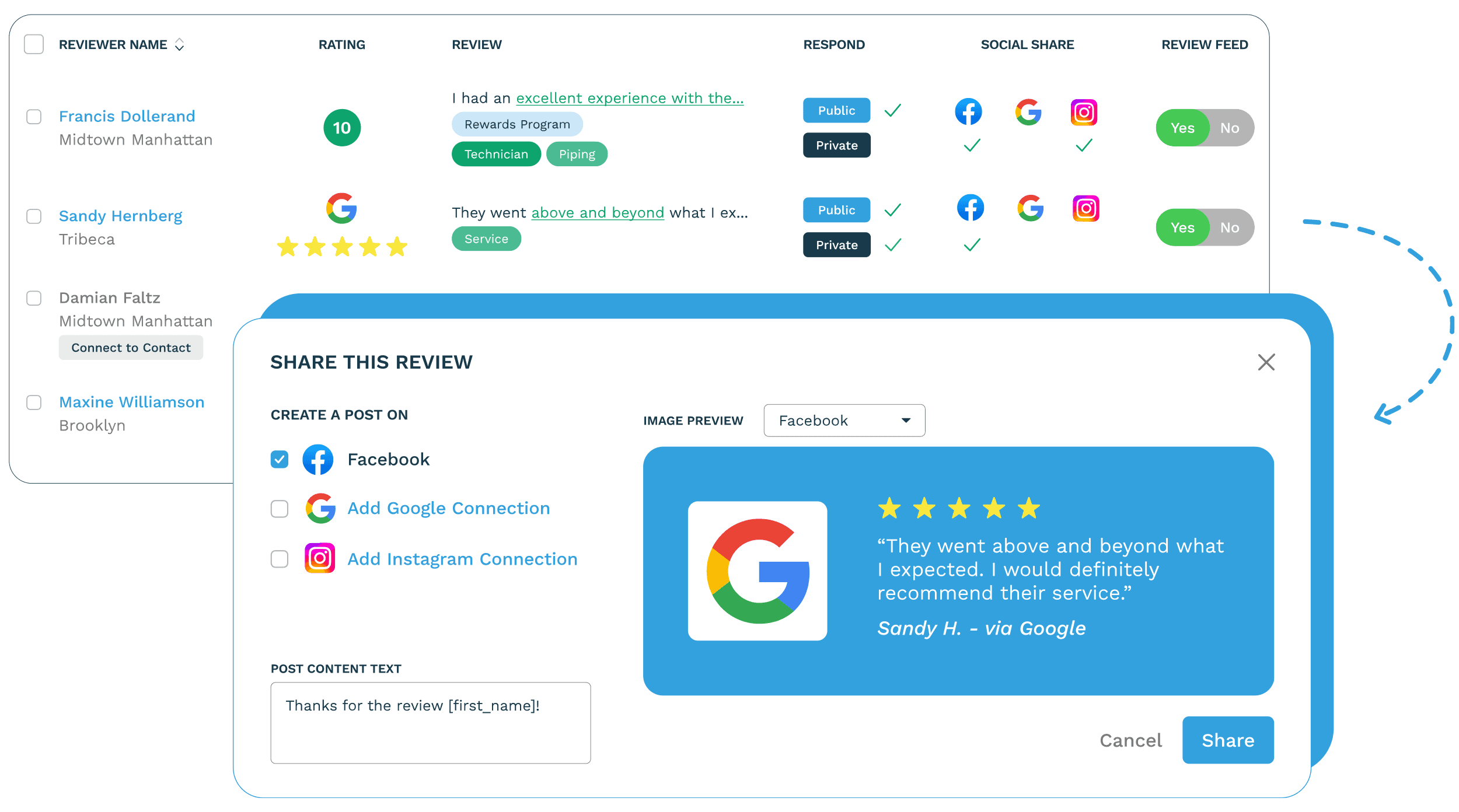
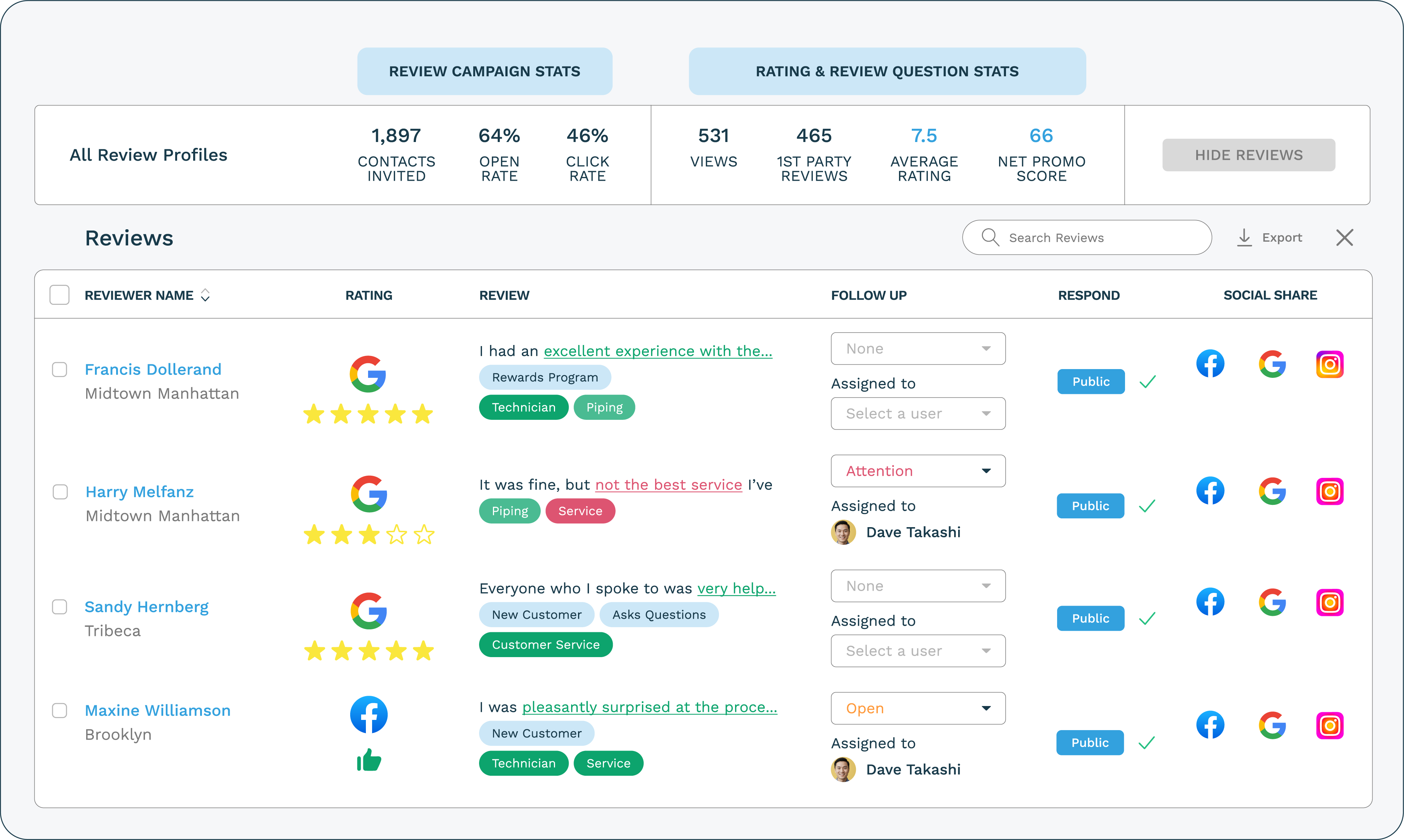
Screenshot of ReputationStacker's review management interface, which helps businesses of all sizes get more reviews, respond to them, share them on social media & their own websites, and manage their entire online reputation from a single dashboard.Screenshot of ReputationStacker's review monitoring dashboard. It monitors reviews from over 100 review sites, from Google to industry-specific review sites (like Avvo for lawyers and Healthgrades for doctors).

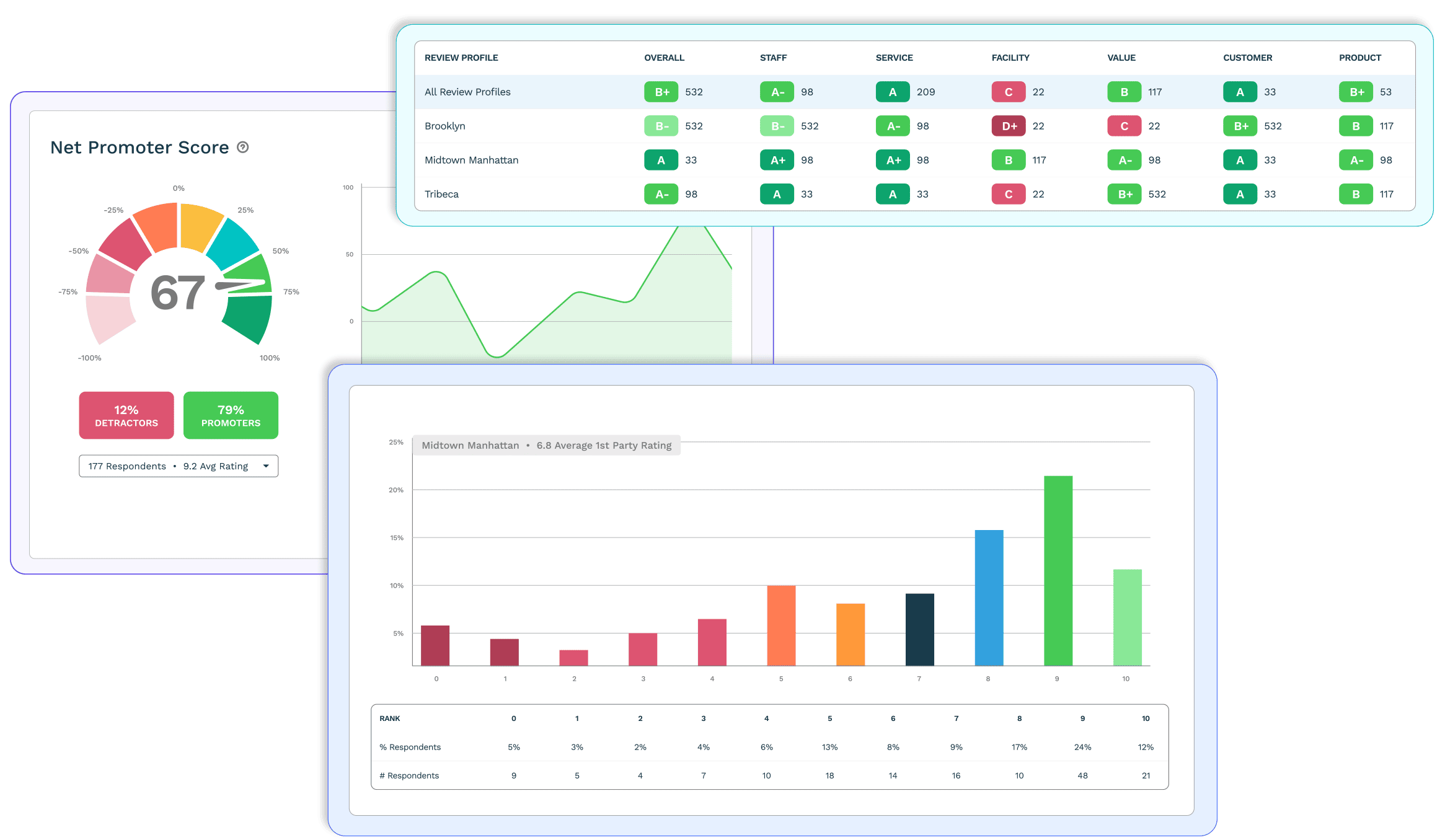
The user can respond to reviews directly from the ReputationStacker dashboard, and assign reviews to teammates for follow-up, share reviews as posts on social media pages, and share reviews on a company's website via the Review Feed widget.Screenshot of ReputationStacker's reports. These help to turn the qualitative feedback from online reviews and customer feedback into quantified data.

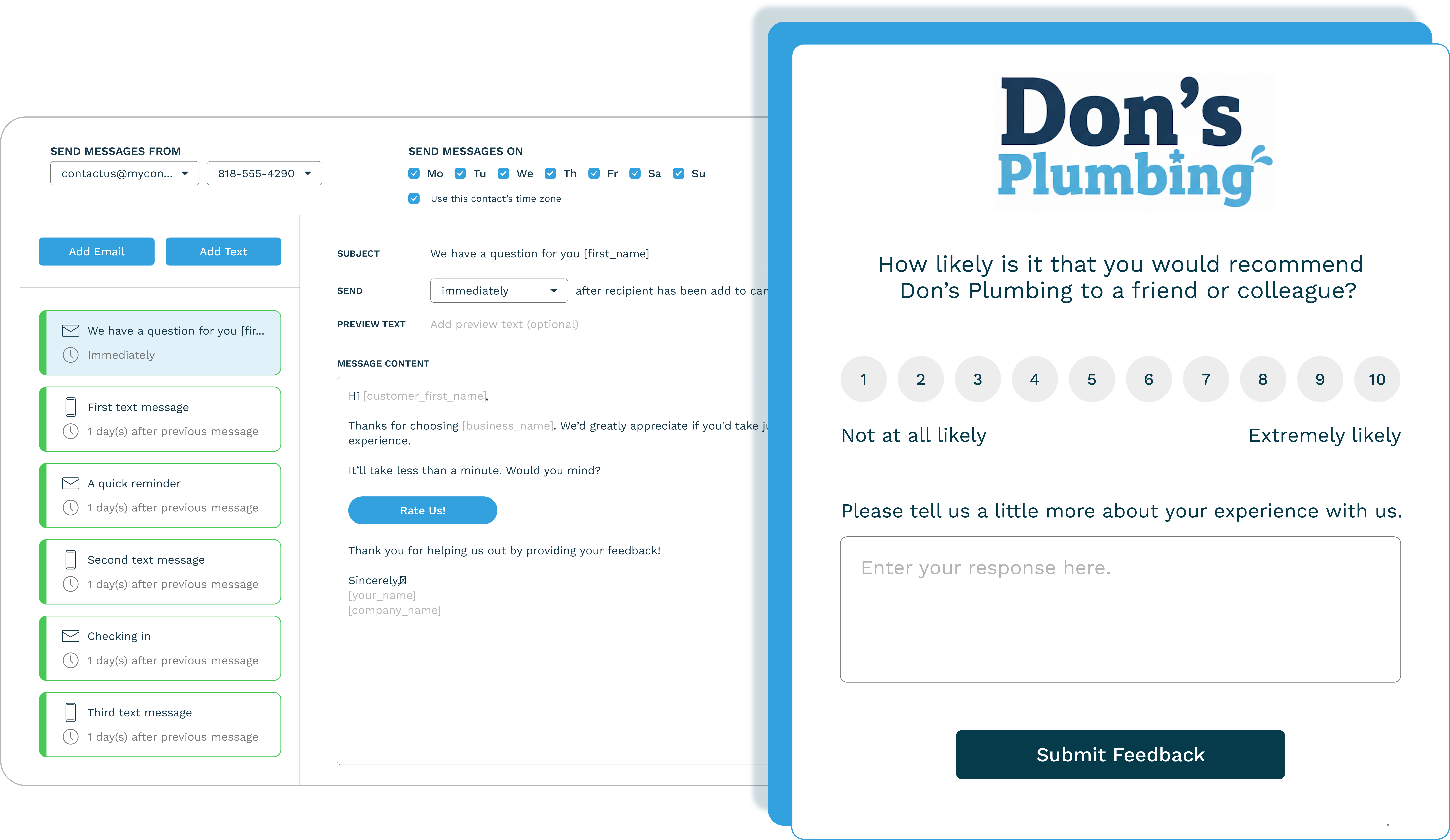
ReputationStacker works for single-location SMBs, but for multi-location online reputation management, the system is not only designed for automatic review generation, but also to run apples-to-apples comparisons of a business's locations to discover what customers really care about, including what's being done right, to where improvements can be made.Screenshot of ReputationStacker’s automated review generation, which requires no manual follow-up. The system lets you set your ideal timing and delivery method (email, text message, or both) so each review request feels natural.

Review request templates in ReputationStacker are also customizable. So if you want to sound more casual or more formal you can customize them to fit your brand.

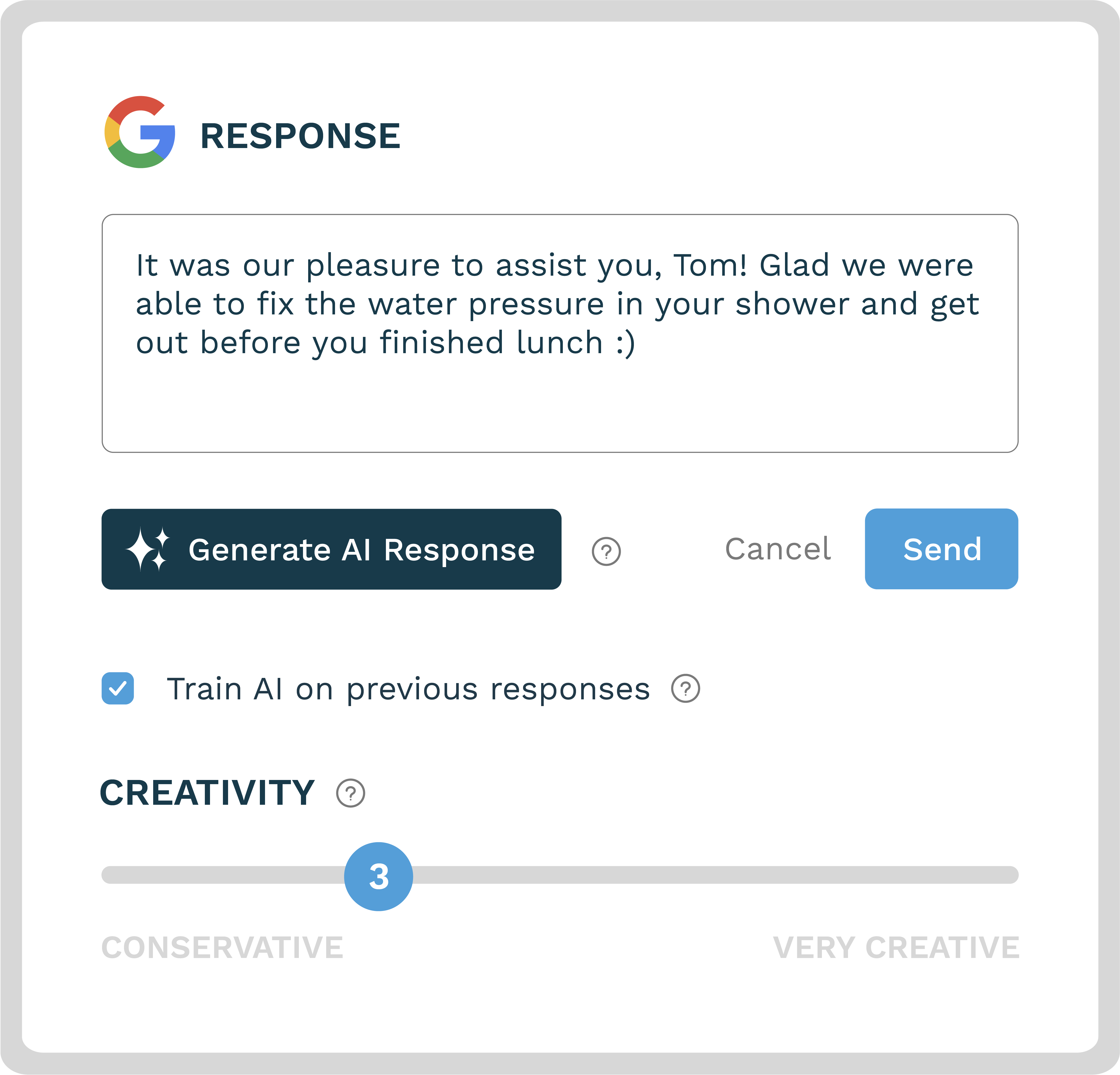
ReputationStacker's review request forms are on-brand and customizable so you can collect more customer feedback on the frontend, or streamline things and send customers directly to the review sites that are most important (Google, of course, but also niche and industry specific review sites).Screenshot of ReputationStacker's AI review responses stand out for a few reasons: 

1) Their prompting allows you to dial-in your brand voice so responses sound like they're coming from you and not some generic review response generator.

2) You can train the system on your previous responses so AI-generated review responses sound just like how you've replied to reviews in the past. 

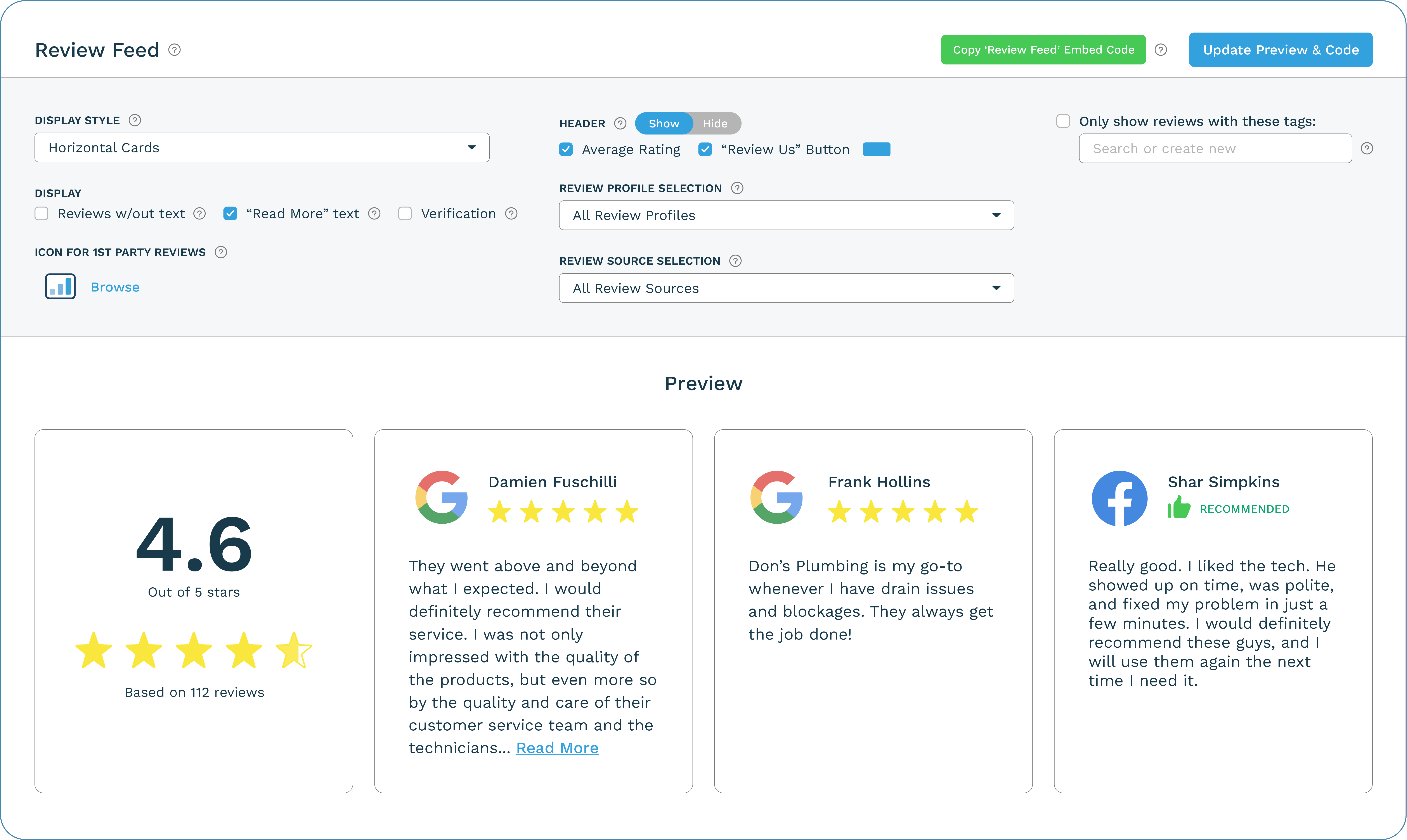
3) You can set the threshold at which the system automatically responds to reviews (for example: "Only auto-respond to 5-star reviews") and when to let you approve, re-generate or edit the response before you send it.Screenshot of ReputationStacker's review widgets can showcase reviews on a company website. You can choose which reviews you want to show (for example, you can create a Google review widget that only displays Google reviews that mention a specific service), and every time a new review comes in that meets your criteria, the system will automatically add it to the widget.

The widget can be customized with a few clicks. Copy the embed code and paste it on a website wherever the review should appear.

You can even add multiple review widgets on your site to highlight specific services or locations.