Pentaho is a suite of open source business intelligence and analytics products, now offered and supported by Hitachi Data Systems since the June 2015 acquisition.
N/A
Workday Adaptive Planning
Score7.8 out of 10
Mid-Size Companies (51-1,000 employees)
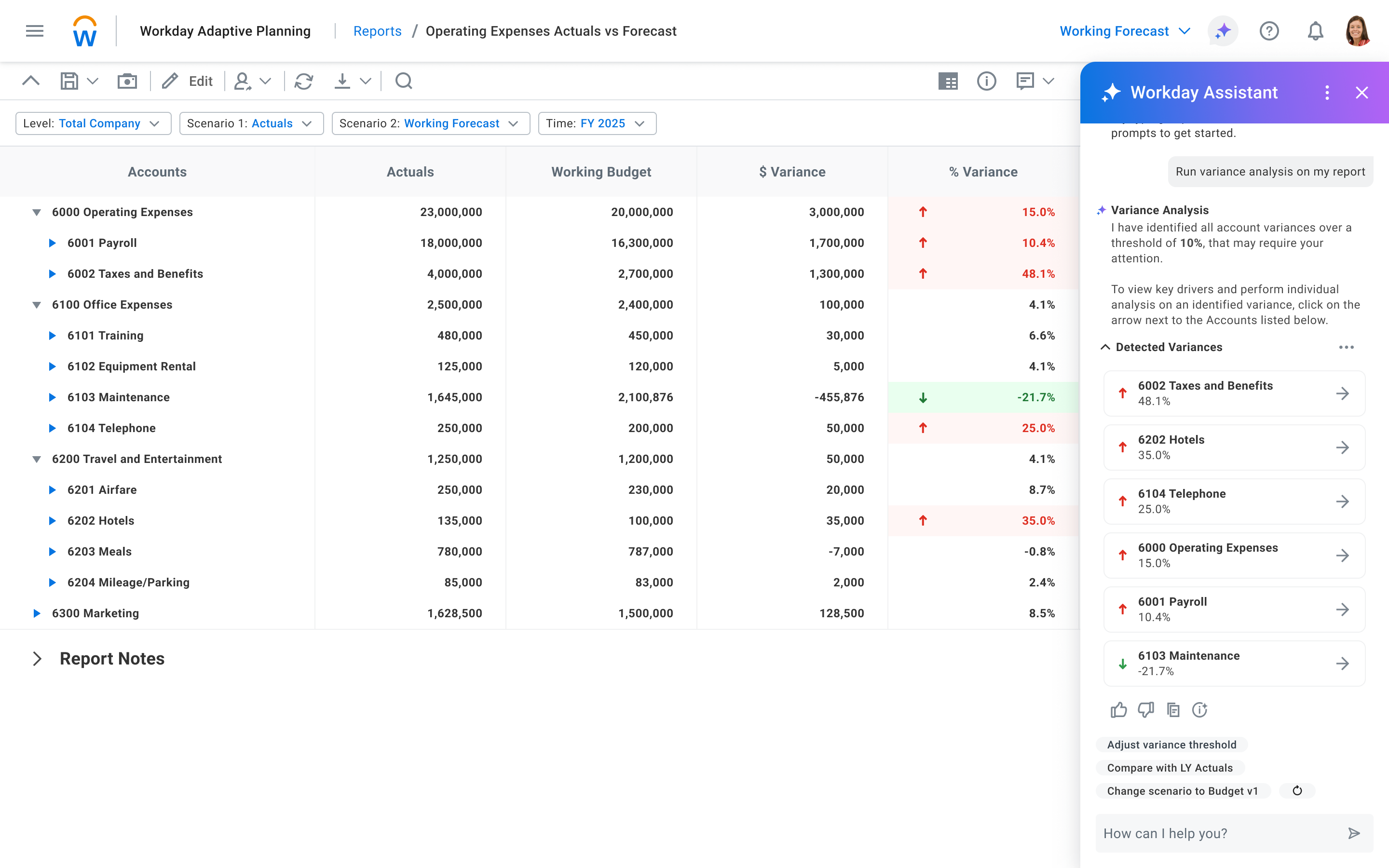
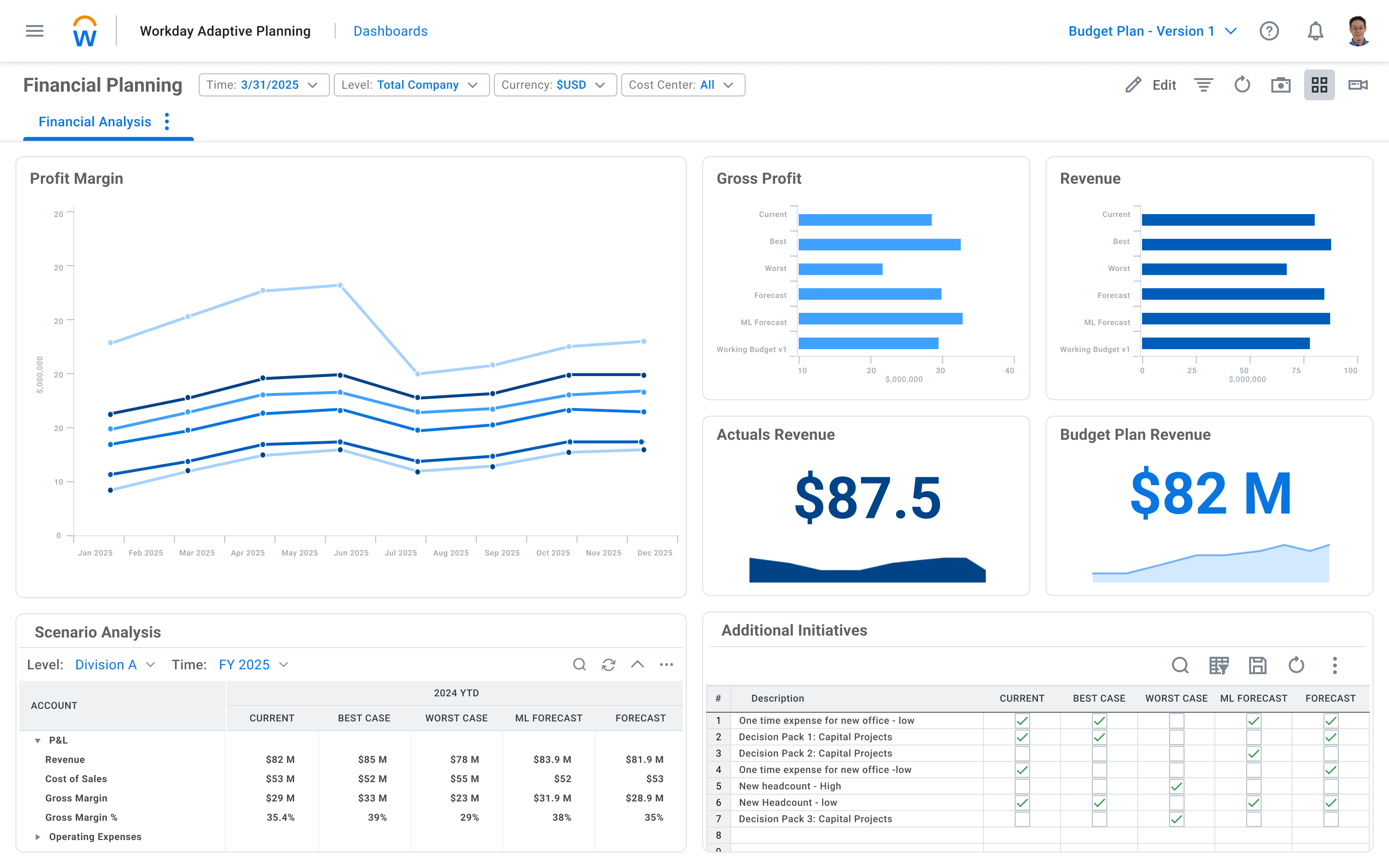
Workday Adaptive Planning streamlines planning workflows, using AI and real-time data integration to improve collaboration and provide predictive forecasts for better strategic analysis.
Pentaho is very well suited to perform data extraction & data mining from various cloud storage & transform that data using various available data models. However, the software struggles when it comes to visualizing the extracted data in an appealing manner & can be difficult for end-users to get an understanding of data tables created using those models.
A de minimis incentive was given to thank the reviewer for their time. The incentive was not used to bias or drive a particular response, nor was the incentive contingent on a positive endorsement. More Info
It's well suited to any business where you have defined inputs, a layer of structured calculations and a defined output. In other words, any business situation! We use it in a law firm setting where it enables us to import staff plans, assign targets to each individual, thereby generating a revenue forecast linked to business capacity. From there, global assumptions determine staff and direct costs, with the user overlaying discretionary costs to arrive at a final P&L forecast. This is then summarised using the reporting and dashboarding layer to provide outputs to senior leaders for sign off.
A de minimis incentive was given to thank the reviewer for their time. The incentive was not used to bias or drive a particular response, nor was the incentive contingent on a positive endorsement. More Info
It helps create dynamic plans for finances, operations and various functional units in an organization all under one platform
It helps in scenario modeling to help analyze various business events and report by any number of business dimensions including channel, customer or product
It can be integrated with any system including ERP, BI or CRM
A de minimis incentive was given to thank the reviewer for their time. The incentive was not used to bias or drive a particular response, nor was the incentive contingent on a positive endorsement. TR verified that a representative sample of customers was invited. More Info
I think the relative obscurity of the tool is a downside, not as many developers, consultants or peers you can tap into.
Lack of a solid user community held us back, looking at Power BI and Qlik, they have huge user communities that help each other out. Would have liked that here.
Smaller company means smaller sales force, and the lack of a local presence made it hard to only interact online with the account rep. Other companies have someone local who often stops by with pre-sales developers to just pitch in free of charge when they have time.
A de minimis incentive was given to thank the reviewer for their time. The incentive was not used to bias or drive a particular response, nor was the incentive contingent on a positive endorsement. TR verified that a representative sample of customers was invited. More Info
Expense reporting aspects are repetitive and hard to fully optimize.
Finance tracking is limited to basic reports with multiple levels or drill-down...hard to fully grasp without exporting data and massaging in something else (like Excel).
A de minimis incentive was given to thank the reviewer for their time. The incentive was not used to bias or drive a particular response, nor was the incentive contingent on a positive endorsement. More Info
I will use Pentaho until I find a better tool with a better, easier to use report designer client. For now, Pentaho has been the most powerful reporting tool for our clients because of its ability to connect to Odoo, integrate in Odoo (reports are accessible in Odoo) and the flexibility in report design and parameter integration
A de minimis incentive was given to thank the reviewer for their time. The incentive was not used to bias or drive a particular response, nor was the incentive contingent on a positive endorsement. More Info
For one we're in way too deep to not move forward with Adaptive. We're integrated with Workday, we do a ton of reporting with Adaptive, and it's working very well for planning and forecasting. No reason to look back or change course.
The Pentaho tools are designed so you can start playing around on your own. Of course, you will need guidance at some point, but the training teams are good at guiding new users, and the online documentation is usually pretty up-to-date.
Some of the tools, such as the Pentaho Data Integration tool and the Pentaho Server, are pretty self-explanatory. The other tools maybe are not so quickly and obvious to use, but again, with some documentation and some customer support, you can find your way around them.
A de minimis incentive was given to thank the reviewer for their time. The incentive was not used to bias or drive a particular response, nor was the incentive contingent on a positive endorsement. More Info
It is an easy transition for Excel users, with more built-in analytical tools and no need to build formulas. It also has built-in reporting and integration with Microsoft Office products such as Excel and PowerPoint. For non-Finance users, there's an initial learning curve to get used to the tool.
A de minimis incentive was given to thank the reviewer for their time. The incentive was not used to bias or drive a particular response, nor was the incentive contingent on a positive endorsement. More Info
There haven't been any lately. The only one issue I can think of is when there was an update in Adaptive that altered our reports. Before I realized there was an issue, Adaptive reached out to let me know, so that it could be fixed.
All aspects of Adaptive Insights perform well. One area that I wish was quicker was integration. When importing data from Intacct our accounting ERP platform, it can sometimes take 4 hours for the import to process. The earlier imports are done, the quicker they complete. My estimate for a quick upload is about two hours.
They were responsive to our questions when we raised issues. They gave us workarounds when required. They were quite knowledgeable when it came to issue analysis and providing fixes. They were forthright in informing us if a bug was not due for release soon.
A de minimis incentive was given to thank the reviewer for their time. The incentive was not used to bias or drive a particular response, nor was the incentive contingent on a positive endorsement. More Info
Whenever we have had any questions, issues, or concerns, the support has been quick and thorough. [This] allow[s] us to be able to fully resolve any issues, or be connected with the right group quickly to attain the result we were after; be it from simple formatting to adding new detailed reporting.
A de minimis incentive was given to thank the reviewer for their time. The incentive was not used to bias or drive a particular response, nor was the incentive contingent on a positive endorsement. More Info
This was extremely helpful so that they could walk you through the model and teach you more about the complexity of various areas. It is most helpful when it is specific to your organization's model. The larger in-person trainings were helpful but they tended to be more generic and entry level. The trainings that are more tailored to your specific needs are the most helpful.
A de minimis incentive was given to thank the reviewer for their time. The incentive was not used to bias or drive a particular response, nor was the incentive contingent on a positive endorsement. More Info
Course Taken: DI1000 Pentaho Data Integration Fundamentals Setup A week before your class started, the instructor will start sending out class material and lab setup instructions. This is helpful so that you understand how the environment is laid out and can start reviewing the content. Ultimately it saved about a 1/2 day trying to setup with 10 other people online which was great! The Course The 3-day course was laid out like many other technical classes with 15-30 minutes instruction and 15-60 minutes of lab exercises. The instructor was very knowledgeable with the functionality from version to version and answered questions as we went along. I was amazed at some of the functionality that was available that I was not using at the time and quickly implemented changes to many existing transformations and jobs. The novice users seemed to catch on quickly and more experienced users explained how some of the functionality was used in their home environments. Towards the end there was enough time so that we were able to ask very directed questions about our own environments. Overall, I really found the class to be informative and deliver enough information to be dangerous. My skills improved and I was able to design better and efficient transformations for the HIE. Course Description: https://training.pentaho.com/instructor-led-training/pentaho-data-integration-fundamentals-di1000
They often times tended to be way too generic or entry level. They would also become sales pitches to upgrade or get new Adaptive Planning products. The questions in the training would be very niche and specific to other organizations. They were rarely helpful to the group at large.
A de minimis incentive was given to thank the reviewer for their time. The incentive was not used to bias or drive a particular response, nor was the incentive contingent on a positive endorsement. More Info
Get the right people in before starting implementation. Start small and build as you go approach is time consuming and involves lot of rework. Evangalize within the organization the capabilities and limitations equally so that correct delivery expectations are set. Set expectations with the Customer that the tool cannot replace proprietary software in terms of stability/usability and that timelines could change given the new ness of the product.
A de minimis incentive was given to thank the reviewer for their time. The incentive was not used to bias or drive a particular response, nor was the incentive contingent on a positive endorsement. More Info
Trust the expertise of very strong 3rd party implementers. Having deployed Adaptive at a separate company before, I thought I knew it all (hubris, I know). Fortunately, I began to (very quickly) trust the judgment of our Carlson implementation team, and they provided invaluable insights and best-in-class processes that have benefitted me and my team greatly.
A de minimis incentive was given to thank the reviewer for their time. The incentive was not used to bias or drive a particular response, nor was the incentive contingent on a positive endorsement. More Info
Since the Pentaho platform offers a range of broad functionality across data preparation and advanced analytics, it also can be easily integrated to support many data sources and machine-learning frameworks. Based on that fact, we selected Pentaho to be used in our internal department. It also supports many of our BI use cases as required by company management or the business user. Last but not least, the Pentaho license is cheaper than their competitor.
A de minimis incentive was given to thank the reviewer for their time. The incentive was not used to bias or drive a particular response, nor was the incentive contingent on a positive endorsement. More Info
Workday became our choice because it is fully web-based and easily integrates with other systems. The learning curve for Workday was shorter than that of Dynamics. The reporting tools in Workday are more user-friendly than that of Dynamics. However Workday did not have Check Printing tools which are available in Dynamics. The organization started a project to digitize all financial transactions so it was not a priority feature. When it comes to scaling up the functionalities of Workday it was much easier than Dynamics.
A de minimis incentive was given to thank the reviewer for their time. The incentive was not used to bias or drive a particular response, nor was the incentive contingent on a positive endorsement. TR verified that a representative sample of customers was invited. More Info
A de minimis incentive was given to thank the reviewer for their time. The incentive was not used to bias or drive a particular response, nor was the incentive contingent on a positive endorsement. More Info
We went from 2 users to 70+ users over a 2 year period of time. The application scaled wonderfully. 65 of those users were non-finance users so they were able to quickly learn the software and prepare budgets quickly and efficiently. That is the power of Adaptive and its ability to scale
A de minimis incentive was given to thank the reviewer for their time. The incentive was not used to bias or drive a particular response, nor was the incentive contingent on a positive endorsement. More Info
A de minimis incentive was given to thank the reviewer for their time. The incentive was not used to bias or drive a particular response, nor was the incentive contingent on a positive endorsement. More Info
It's facilitated a better financial literacy and management by the non-financial managers in the company, giving them a much better ability to see what they're spending, control it, and plan better in the future.
It's hard to quantify the ease of model and version management, but we could never do what we're doing now with our current staff. It would take a small army to replicate anything close to what Adaptive pulls off using Excel, if it's even possible.
A de minimis incentive was given to thank the reviewer for their time. The incentive was not used to bias or drive a particular response, nor was the incentive contingent on a positive endorsement. More Info