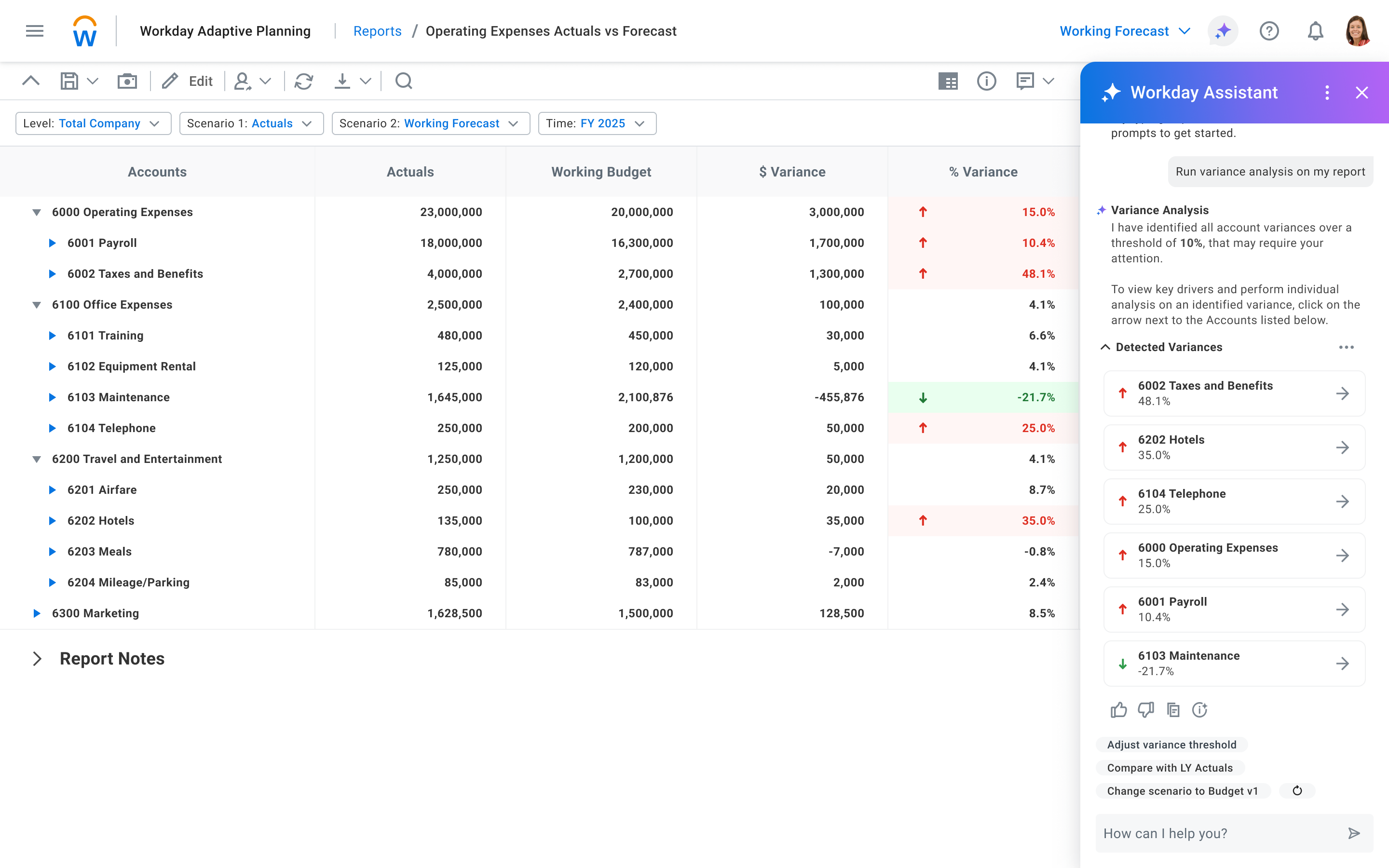
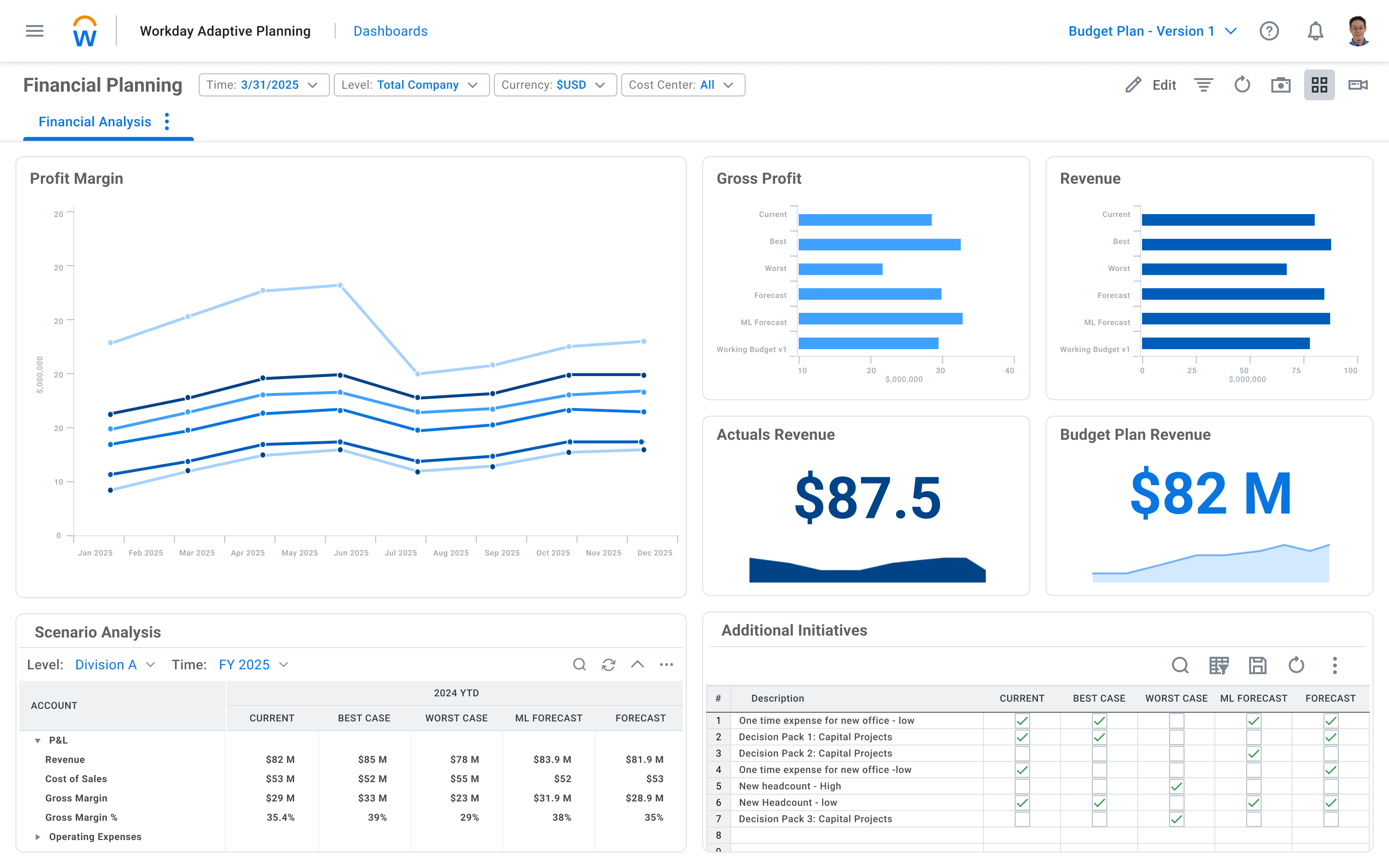
Workday Adaptive Planning streamlines planning workflows, using AI and real-time data integration to improve collaboration and provide predictive forecasts for better strategic analysis.
N/A
Pricing
Workday Adaptive Planning
Editions & Modules
No answers on this topic
Offerings
Pricing Offerings
Workday Adaptive Planning
Free Trial
Yes
Free/Freemium Version
No
Premium Consulting/Integration Services
Yes
Entry-level Setup Fee
Optional
Additional Details
—
More Pricing Information
Community Pulse
Workday Adaptive Planning
Considered Both Products
Workday
Verified User
Chose Workday Adaptive Planning
I have had experience with other Workday products and they were have easy to use and scalable so this was just a natural fit.
A de minimis incentive was given to thank the reviewer for their time. The incentive was not used to bias or drive a particular response, nor was the incentive contingent on a positive endorsement. More Info
CFO in Finance and Accounting at Browne Jacobson (Legal Services, 1001-5000 employees)
Chose Workday Adaptive Planning
Compared to Vena, Adaptive Planning appeared to be better at scaling with us as a business. Vena uses Microsoft Dynamics as its platform and are somewhat limited in its roadmap due to what's available from Microsoft. Vena is much more linked to an Excel solution than Adaptive …
A de minimis incentive was given to thank the reviewer for their time. The incentive was not used to bias or drive a particular response, nor was the incentive contingent on a positive endorsement. More Info
Verified User
Chose Workday Adaptive Planning
While we have looked at various other platforms and even tried them out in the past, we eventually selected Workday Adaptive Planning to help with our headcount planning as we have a lot of entities especially international ones and we felt that Workday was the best suited for …
A de minimis incentive was given to thank the reviewer for their time. The incentive was not used to bias or drive a particular response, nor was the incentive contingent on a positive endorsement. TR verified that a representative sample of customers was invited. More Info
Director of Multimedia Technology in Information Technology at Woodruff Arts Center/Atlanta Symphony Orchestra (Performing Arts, 1001-5000 employees)
Chose Workday Adaptive Planning
For best-in-class capabilities, you'll very likely need to split the various HR and financial systems into separate systems rather than using a consolidated platform like Workday. However, a consolidated platform provides benefits by being a single location for employees and a …
A de minimis incentive was given to thank the reviewer for their time. The incentive was not used to bias or drive a particular response, nor was the incentive contingent on a positive endorsement. More Info
A de minimis incentive was given to thank the reviewer for their time. The incentive was not used to bias or drive a particular response, nor was the incentive contingent on a positive endorsement. More Info
Verified User
Chose Workday Adaptive Planning
Time saving, centralised reports, visibility into metrics and numbers.
A de minimis incentive was given to thank the reviewer for their time. The incentive was not used to bias or drive a particular response, nor was the incentive contingent on a positive endorsement. TR verified that a representative sample of customers was invited. More Info
Lab Tech 2 in Manufacturing at Integrated DNA technologies (Biotechnology, 51-200 employees)
Chose Workday Adaptive Planning
Workday Adaptive Planning is similar to payroll and workforce management by implementing constant and new changes to finances, workplace changes and the people changing in rolls and employment. Both tools are very useful and practical in a company setting and mainly in …
A de minimis incentive was given to thank the reviewer for their time. The incentive was not used to bias or drive a particular response, nor was the incentive contingent on a positive endorsement. TR verified that a representative sample of customers was invited. More Info
Senior Workday Analyst in Finance and Accounting at Altru Health System (Hospital & Health Care, 1001-5000 employees)
Chose Workday Adaptive Planning
Like I said in a previous question, the fact that there was downtime that was needed to update all the data that was entered in a day was not ideal. This caused for hours lost on the data update and didn't allow our leaders to see the affects immediately like Workday Adaptive …
A de minimis incentive was given to thank the reviewer for their time. The incentive was not used to bias or drive a particular response, nor was the incentive contingent on a positive endorsement. More Info
A de minimis incentive was given to thank the reviewer for their time. The incentive was not used to bias or drive a particular response, nor was the incentive contingent on a positive endorsement. More Info
Verified User
Chose Workday Adaptive Planning
Workday has been the only platform product I have used for FP&A.
A de minimis incentive was given to thank the reviewer for their time. The incentive was not used to bias or drive a particular response, nor was the incentive contingent on a positive endorsement. More Info
Verified User
Chose Workday Adaptive Planning
Overall being familiar with the Workday Adaptive Planning tool's flexibility and ease of use our finance and ops team saw this as the easiest and most robust tool that they could admin and maintain without outside IT resources.
A de minimis incentive was given to thank the reviewer for their time. The incentive was not used to bias or drive a particular response, nor was the incentive contingent on a positive endorsement. TR verified that a representative sample of customers was invited. More Info
Verified User
Chose Workday Adaptive Planning
In my opinion, Spreadsheet Server is not even in the same game as Workday Adaptive Planning. While it is flexible in Excel, it still requires a lot of back and forth for analysis.
A de minimis incentive was given to thank the reviewer for their time. The incentive was not used to bias or drive a particular response, nor was the incentive contingent on a positive endorsement. More Info
Verified User
Chose Workday Adaptive Planning
Workday Adaptive Planning is less expensive than Oracle, and the integration is continuous.
A de minimis incentive was given to thank the reviewer for their time. The incentive was not used to bias or drive a particular response, nor was the incentive contingent on a positive endorsement. More Info
A de minimis incentive was given to thank the reviewer for their time. The incentive was not used to bias or drive a particular response, nor was the incentive contingent on a positive endorsement. More Info
A de minimis incentive was given to thank the reviewer for their time. The incentive was not used to bias or drive a particular response, nor was the incentive contingent on a positive endorsement. More Info
Verified User
Chose Workday Adaptive Planning
I choose to use Adaptive instead of Netsuite any opportunity that I get.
A de minimis incentive was given to thank the reviewer for their time. The incentive was not used to bias or drive a particular response, nor was the incentive contingent on a positive endorsement. TR verified that a representative sample of customers was invited. More Info
Verified User
Chose Workday Adaptive Planning
Our previous platform was patchwork tools and unintegrated. We were clunky and poorly organized. The system was slow and
difficult to use, and it was either overhaul it or start over. We evaluated our
options holistically and went with Workday. It works better and faster, and …
A de minimis incentive was given to thank the reviewer for their time. The incentive was not used to bias or drive a particular response, nor was the incentive contingent on a positive endorsement. More Info
A de minimis incentive was given to thank the reviewer for their time. The incentive was not used to bias or drive a particular response, nor was the incentive contingent on a positive endorsement. More Info
Decision Anlayst Associate consultant in Corporate at ZS Associates (Pharmaceuticals, 10,001+ employees)
Chose Workday Adaptive Planning
Workday provides adaptive and intuitive planning that does not has disruptions when there is any change in system or migrations of servers, users or systems. Workday integrates with CRM, ERP and other database engines to source data and provides insights that can be exported to …
A de minimis incentive was given to thank the reviewer for their time. The incentive was not used to bias or drive a particular response, nor was the incentive contingent on a positive endorsement. TR verified that a representative sample of customers was invited. More Info
A de minimis incentive was given to thank the reviewer for their time. The incentive was not used to bias or drive a particular response, nor was the incentive contingent on a positive endorsement. TR verified that a representative sample of customers was invited. More Info
Verified User
Chose Workday Adaptive Planning
It doesn't have the same standard fulfillment modeling as the true workforce planning products, it equals the other core HCM systems and beats them on ease of use.
A de minimis incentive was given to thank the reviewer for their time. The incentive was not used to bias or drive a particular response, nor was the incentive contingent on a positive endorsement. More Info
A de minimis incentive was given to thank the reviewer for their time. The incentive was not used to bias or drive a particular response, nor was the incentive contingent on a positive endorsement. More Info
Verified User
Chose Workday Adaptive Planning
Workday Adaptive Planning is not as robust as SAP Ariba, but it is certainly better than BadgePass. The trouble with BadgePass is that it can be a but clunky in some modules that seem like clear bolt ons to the main product UI. Whereas, Ariba was clearly built to satisfy …
A de minimis incentive was given to thank the reviewer for their time. The incentive was not used to bias or drive a particular response, nor was the incentive contingent on a positive endorsement. More Info
Manager Information Technology Support in Information Technology at Compassion International (Non-profit Organization Management, 1001-5000 employees)
Chose Workday Adaptive Planning
Workday became our choice because it is fully web-based and easily integrates with other systems. The learning curve for Workday was shorter than that of Dynamics. The reporting tools in Workday are more user-friendly than that of Dynamics. However Workday did not have Check …
A de minimis incentive was given to thank the reviewer for their time. The incentive was not used to bias or drive a particular response, nor was the incentive contingent on a positive endorsement. TR verified that a representative sample of customers was invited. More Info
It's well suited to any business where you have defined inputs, a layer of structured calculations and a defined output. In other words, any business situation! We use it in a law firm setting where it enables us to import staff plans, assign targets to each individual, thereby generating a revenue forecast linked to business capacity. From there, global assumptions determine staff and direct costs, with the user overlaying discretionary costs to arrive at a final P&L forecast. This is then summarised using the reporting and dashboarding layer to provide outputs to senior leaders for sign off.
A de minimis incentive was given to thank the reviewer for their time. The incentive was not used to bias or drive a particular response, nor was the incentive contingent on a positive endorsement. More Info
It helps create dynamic plans for finances, operations and various functional units in an organization all under one platform
It helps in scenario modeling to help analyze various business events and report by any number of business dimensions including channel, customer or product
It can be integrated with any system including ERP, BI or CRM
A de minimis incentive was given to thank the reviewer for their time. The incentive was not used to bias or drive a particular response, nor was the incentive contingent on a positive endorsement. TR verified that a representative sample of customers was invited. More Info
Expense reporting aspects are repetitive and hard to fully optimize.
Finance tracking is limited to basic reports with multiple levels or drill-down...hard to fully grasp without exporting data and massaging in something else (like Excel).
A de minimis incentive was given to thank the reviewer for their time. The incentive was not used to bias or drive a particular response, nor was the incentive contingent on a positive endorsement. More Info
For one we're in way too deep to not move forward with Adaptive. We're integrated with Workday, we do a ton of reporting with Adaptive, and it's working very well for planning and forecasting. No reason to look back or change course.
It is an easy transition for Excel users, with more built-in analytical tools and no need to build formulas. It also has built-in reporting and integration with Microsoft Office products such as Excel and PowerPoint. For non-Finance users, there's an initial learning curve to get used to the tool.
A de minimis incentive was given to thank the reviewer for their time. The incentive was not used to bias or drive a particular response, nor was the incentive contingent on a positive endorsement. More Info
There haven't been any lately. The only one issue I can think of is when there was an update in Adaptive that altered our reports. Before I realized there was an issue, Adaptive reached out to let me know, so that it could be fixed.
All aspects of Adaptive Insights perform well. One area that I wish was quicker was integration. When importing data from Intacct our accounting ERP platform, it can sometimes take 4 hours for the import to process. The earlier imports are done, the quicker they complete. My estimate for a quick upload is about two hours.
Whenever we have had any questions, issues, or concerns, the support has been quick and thorough. [This] allow[s] us to be able to fully resolve any issues, or be connected with the right group quickly to attain the result we were after; be it from simple formatting to adding new detailed reporting.
A de minimis incentive was given to thank the reviewer for their time. The incentive was not used to bias or drive a particular response, nor was the incentive contingent on a positive endorsement. More Info
This was extremely helpful so that they could walk you through the model and teach you more about the complexity of various areas. It is most helpful when it is specific to your organization's model. The larger in-person trainings were helpful but they tended to be more generic and entry level. The trainings that are more tailored to your specific needs are the most helpful.
A de minimis incentive was given to thank the reviewer for their time. The incentive was not used to bias or drive a particular response, nor was the incentive contingent on a positive endorsement. More Info
They often times tended to be way too generic or entry level. They would also become sales pitches to upgrade or get new Adaptive Planning products. The questions in the training would be very niche and specific to other organizations. They were rarely helpful to the group at large.
A de minimis incentive was given to thank the reviewer for their time. The incentive was not used to bias or drive a particular response, nor was the incentive contingent on a positive endorsement. More Info
Trust the expertise of very strong 3rd party implementers. Having deployed Adaptive at a separate company before, I thought I knew it all (hubris, I know). Fortunately, I began to (very quickly) trust the judgment of our Carlson implementation team, and they provided invaluable insights and best-in-class processes that have benefitted me and my team greatly.
A de minimis incentive was given to thank the reviewer for their time. The incentive was not used to bias or drive a particular response, nor was the incentive contingent on a positive endorsement. More Info
Workday became our choice because it is fully web-based and easily integrates with other systems. The learning curve for Workday was shorter than that of Dynamics. The reporting tools in Workday are more user-friendly than that of Dynamics. However Workday did not have Check Printing tools which are available in Dynamics. The organization started a project to digitize all financial transactions so it was not a priority feature. When it comes to scaling up the functionalities of Workday it was much easier than Dynamics.
A de minimis incentive was given to thank the reviewer for their time. The incentive was not used to bias or drive a particular response, nor was the incentive contingent on a positive endorsement. TR verified that a representative sample of customers was invited. More Info
A de minimis incentive was given to thank the reviewer for their time. The incentive was not used to bias or drive a particular response, nor was the incentive contingent on a positive endorsement. More Info
We went from 2 users to 70+ users over a 2 year period of time. The application scaled wonderfully. 65 of those users were non-finance users so they were able to quickly learn the software and prepare budgets quickly and efficiently. That is the power of Adaptive and its ability to scale
A de minimis incentive was given to thank the reviewer for their time. The incentive was not used to bias or drive a particular response, nor was the incentive contingent on a positive endorsement. More Info
It's facilitated a better financial literacy and management by the non-financial managers in the company, giving them a much better ability to see what they're spending, control it, and plan better in the future.
It's hard to quantify the ease of model and version management, but we could never do what we're doing now with our current staff. It would take a small army to replicate anything close to what Adaptive pulls off using Excel, if it's even possible.
A de minimis incentive was given to thank the reviewer for their time. The incentive was not used to bias or drive a particular response, nor was the incentive contingent on a positive endorsement. More Info