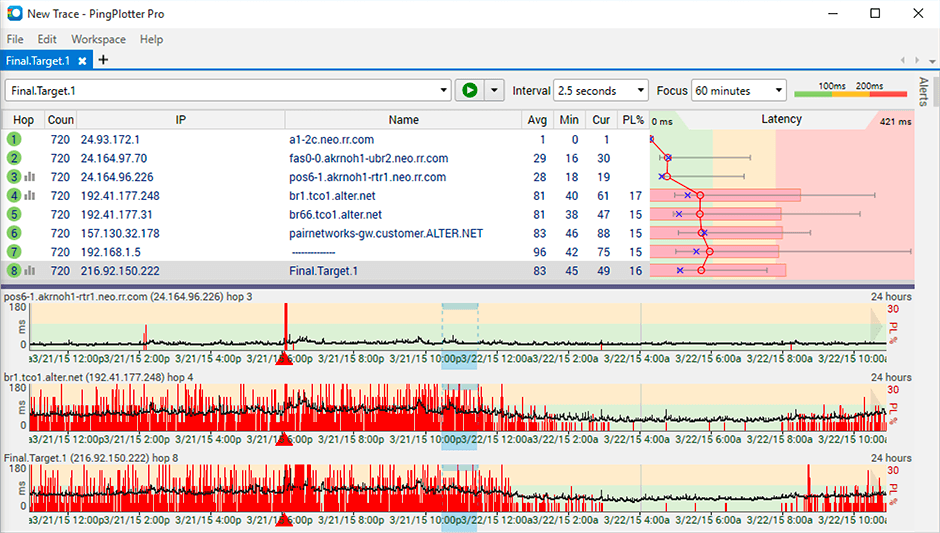
PingPlotter is a graphical traceroute and ping tool that visualizes network performance in a way that makes identifying the source of problems quicker and easier for everyone from online gamers and video streamers to VoIP admins and IT pros. Features for remote deployment, network monitoring, scripting, and a web interface are included along with several additional capabilities.
$0
per user
SolarWinds IP Address Manager (IPAM)
Score7.6 out of 10
N/A
Austin-based SolarWinds offers Internet Protocal address management (IPAM) networking service.
N/A
Pricing
PingPlotter
SolarWinds IP Address Manager (IPAM)
Editions & Modules
PingPlotter Free
$0.00
per user
PingPlotter Free
$0.00
per user
PingPlotter Standard
$6.99
per user per month
PingPlotter Professional
$29.00
per user per month
PingPlotter Standard
$39.99
per user
PingPlotter Professional
$349.00
per user
No answers on this topic
Offerings
Pricing Offerings
PingPlotter
SolarWinds IP Address Manager (IPAM)
Free Trial
Yes
Yes
Free/Freemium Version
Yes
No
Premium Consulting/Integration Services
No
No
Entry-level Setup Fee
No setup fee
Optional
Additional Details
—
SolarWinds professional support is included to help customers on active maintenance 7 days a week, 365 days a year.
This tool is best suited to get a quick read on basic network access across multiple hops. It provides immediate, very valuable feedback. If you know your stuff, there are other tools that handle the rest you need: packet capture, port scans, etc. We are all looking for that multi-tool, but this is perfect for the basic need of knowing where in the network a problem might be.
SolarWinds IP Address Manager is very useful the bigger and more complex the environment. Smaller organizations will have to consider the cost as it provides little benefit over monitoring maybe 2-3 servers. But I have over 24 DHCP servers with on average 15 subnets each so tracking and monitoring all that was very time-consuming. As a result, it was generally ignored until there was an issue. With SolarWinds IP Address Manager, I was able to set alerts to monitor scope utilization and duplicate IP addresses.
A de minimis incentive was given to thank the reviewer for their time. The incentive was not used to bias or drive a particular response, nor was the incentive contingent on a positive endorsement. TR verified that a representative sample of customers was invited. More Info
With IPAM automated address scanning, we can be confident that we are looking at an up-to-date, accurate snapshot of our network.
The built-in alerts are a great safety net. We know that even if we aren't paying close attention to our IP address space, IPAM is. If a range is nearly full, IPAM lets us know before it becomes a real problem.
IPAM's event logging gives us insight into any and all changes made by our network engineers.
A de minimis incentive was given to thank the reviewer for their time. The incentive was not used to bias or drive a particular response, nor was the incentive contingent on a positive endorsement. More Info
Being able to export data would have been helpful for a larger analysis.
It is a robust program and probably more than we needed for a small business; some options that were better aligned with our budget would have been good.
As a non-technical person in the networking space, I found the data helpful for communicating, but not always easy to understand.
The user experience is not as intuitive as other products. We have to be more restrictive around level 1 help desk access compared to NCM or NPM in SolarWinds.
Making and enforcing changes, not just monitoring, has been hit or miss in some instances.
A de minimis incentive was given to thank the reviewer for their time. The incentive was not used to bias or drive a particular response, nor was the incentive contingent on a positive endorsement. More Info
We are heavily invested in SolarWinds. We currently own Network Performance Monitor, Netflow Traffic Analyzer, User Device Tracker, Server Application Monitor and Network Configuration Manager. We have NOC mode setup for deskside support for monitoring any down devices that may effect our network across the globe. This application gives us the information we need when we need it.
A de minimis incentive was given to thank the reviewer for their time. The incentive was not used to bias or drive a particular response, nor was the incentive contingent on a positive endorsement. More Info
I installed it and it just started working. I realized I could then tweak it to show what I needed but didn't have to spend a long time configuring it before use, editing YAML files etc. Maybe that's fine for a network professional, but I only need this software if something goes wrong, and then need it to work quickly out of the box.
A de minimis incentive was given to thank the reviewer for their time. The incentive was not used to bias or drive a particular response, nor was the incentive contingent on a positive endorsement. More Info
SolarWinds IPAM is like what SolarWinds itself says, i.e. easy to use and simple. SolarWinds has really made their orion and non-orion platform products so simple that any newbie can give a try and make the best use out of it. I learned SolarWinds IPAM by myself in a POC environment, and not just IPAM but other modules and now I own 6 certifications. You see how easy to use this product is.
A de minimis incentive was given to thank the reviewer for their time. The incentive was not used to bias or drive a particular response, nor was the incentive contingent on a positive endorsement. More Info
A de minimis incentive was given to thank the reviewer for their time. The incentive was not used to bias or drive a particular response, nor was the incentive contingent on a positive endorsement. More Info
We do not integrate IPAM into other systems other than the standard Orion integration. The performance is reasonable, however, we are running all the SolarWinds applications on a very large server.
A de minimis incentive was given to thank the reviewer for their time. The incentive was not used to bias or drive a particular response, nor was the incentive contingent on a positive endorsement. TR verified that a representative sample of customers was invited. More Info
I have not had much contact with the PingPlotter support, only one time have I went to them and it was a positive experience. The questions I had were answered quickly and professionally. I have no issue with the experience I had with the Support team. This was from before and after the purchase of the product.
A de minimis incentive was given to thank the reviewer for their time. The incentive was not used to bias or drive a particular response, nor was the incentive contingent on a positive endorsement. More Info
I have not contacted customer support and therefore have no experience in this area. I know we have some issues with our VAR support at this time for Orion, but I don't know if the IPAM falls into the same support structure. Perhaps others in the organization may know more regarding the support area.
A de minimis incentive was given to thank the reviewer for their time. The incentive was not used to bias or drive a particular response, nor was the incentive contingent on a positive endorsement. More Info
I used Ping.app and UptimeLog.app on the Mac. These both provided different aspects. These two had a menubar to show me green or red for multiple connections. UptimeLog showed me very clearly when my connectivity was on or off and for exactly how long
SolarWinds IP Address Manager was cheaper than both alternatives and far easier to manage. Device42 interface is years behind what Solarwinds offers. It is very outdated; BT Diamond required remote management and we constantly had to message support, it reached a point where it was better not to have the product at all.
A de minimis incentive was given to thank the reviewer for their time. The incentive was not used to bias or drive a particular response, nor was the incentive contingent on a positive endorsement. TR verified that a representative sample of customers was invited. More Info
We have not experienced any scalability issues with this product. However, SolarWinds needs to allow users to scale horizontally without any license restrictions. For example, we would like to separate Netflow and Orion onto different platforms but are unable to due to license restrictions.
A de minimis incentive was given to thank the reviewer for their time. The incentive was not used to bias or drive a particular response, nor was the incentive contingent on a positive endorsement. TR verified that a representative sample of customers was invited. More Info
A de minimis incentive was given to thank the reviewer for their time. The incentive was not used to bias or drive a particular response, nor was the incentive contingent on a positive endorsement. More Info
IPAM has saved countless hours of running scripts and gathering data to compile reports to plan re-subnetting globally.
IPAM has reduced helpdesk incidents by immediately spotting bad DNSR and IP conflicts.
IPAM has helped eliminate blocks on projects whereas there is not currently enough address space requiring major changes to accommodate more IP'ed servers, gear, etc.
A de minimis incentive was given to thank the reviewer for their time. The incentive was not used to bias or drive a particular response, nor was the incentive contingent on a positive endorsement. More Info