TrustRadius: an HG Insights company

Save this comparison

Save this comparison

Add Product

Recommended Comparisons

    Overview
    ProductRatingMost Used ByProduct SummaryStarting Price

    MethodCRM

    Score9.1 out of 10
    N/AMethod:crm is a QuickBooks-integrated, cloud-based CRM platform.

    $35

    per month per user

    Predicte.com

    N/A
    Small Businesses (1-50 employees)
    Predicte offers real-time predicive insights from product, sales, and client data. By unifying disparate data sources within its Data Platform (Analytics), Predicte empowers distributors, wholesalers and manufacturers to forecast sales with greater accuracy, detect churn risks before they escalate, and deliver tailored recommendations. The platform’s analytics framework helps teams optimize product usage, enhance sales performance, and continuously improve client outcomes through its…N/A
    Pricing
    MethodCRMPredicte.com
    Editions & Modules
    CRM Quick Start
    $35
    per month per user
    CRM Pro
    $59
    per month per user
    CRM Enterprise
    $97
    per month per user
    CRM Multi-Entity
    Custom Quote
    No answers on this topic
    Offerings
    Pricing Offerings
    MethodCRMPredicte.com
    Free Trial
    YesNo
    Free/Freemium Version
    NoNo
    Premium Consulting/Integration Services
    YesNo
    Entry-level Setup FeeNo setup feeRequired
    Additional DetailsDiscount available for annual billing.—
    More Pricing Information
    Community Pulse
    MethodCRMPredicte.com
    Considered Both Products
    Method Integration Inc.
    No answer on this topic
    Predicte.com
    No answer on this topic
    Key User Insights
    Would buy again
    100%
    Would buy again
    19 Answers
    No answers on this topic
    Delivers good value for the price
    100%
    Delivers good value for the price
    17 Answers
    No answers on this topic
    Happy with the feature set
    100%
    Happy with the feature set
    19 Answers
    No answers on this topic
    Lived up to sales and marketing promises
    100%
    Lived up to sales and marketing promises
    15 Answers
    No answers on this topic
    Implementation went as expected
    100%
    Implementation went as expected
    16 Answers
    No answers on this topic
    Features
    MethodCRMPredicte.com
    Sales Force Automation
    Comparison of Sales Force Automation features of MethodCRM and Predicte.com
    Feature
    MethodCRM
    8.0
    22 Ratings
    2% above category average
    Predicte.com
    -
    Ratings
    Customer data management / contact management8.322 Ratings00 Ratings
    Workflow management8.320 Ratings00 Ratings
    Territory management1.81 Ratings00 Ratings
    Opportunity management8.320 Ratings00 Ratings
    Integration with email client (e.g., Outlook or Gmail)8.920 Ratings00 Ratings
    Contract management8.711 Ratings00 Ratings
    Quote & order management9.118 Ratings00 Ratings
    Interaction tracking9.019 Ratings00 Ratings
    Channel / partner relationship management10.012 Ratings00 Ratings
    Customer Service & Support
    Comparison of Customer Service & Support features of MethodCRM and Predicte.com
    Feature
    MethodCRM
    10.0
    2 Ratings
    26% above category average
    Predicte.com
    -
    Ratings
    Case management10.01 Ratings00 Ratings
    Call center management9.92 Ratings00 Ratings
    Help desk management10.01 Ratings00 Ratings
    Marketing Automation
    Comparison of Marketing Automation features of MethodCRM and Predicte.com
    Feature
    MethodCRM
    8.9
    19 Ratings
    14% above category average
    Predicte.com
    -
    Ratings
    Lead management8.817 Ratings00 Ratings
    Email marketing9.014 Ratings00 Ratings
    CRM Project Management
    Comparison of CRM Project Management features of MethodCRM and Predicte.com
    Feature
    MethodCRM
    7.5
    20 Ratings
    3% below category average
    Predicte.com
    -
    Ratings
    Task management9.118 Ratings00 Ratings
    Billing and invoicing management10.015 Ratings00 Ratings
    Reporting3.417 Ratings00 Ratings
    CRM Reporting & Analytics
    Comparison of CRM Reporting & Analytics features of MethodCRM and Predicte.com
    Feature
    MethodCRM
    7.7
    18 Ratings
    1% above category average
    Predicte.com
    -
    Ratings
    Forecasting8.09 Ratings00 Ratings
    Pipeline visualization9.017 Ratings00 Ratings
    Customizable reports6.017 Ratings00 Ratings
    Customization
    Comparison of Customization features of MethodCRM and Predicte.com
    Feature
    MethodCRM
    7.5
    19 Ratings
    2% below category average
    Predicte.com
    -
    Ratings
    Custom fields6.419 Ratings00 Ratings
    Custom objects6.418 Ratings00 Ratings
    Scripting environment9.212 Ratings00 Ratings
    API for custom integration8.014 Ratings00 Ratings
    Security
    Comparison of Security features of MethodCRM and Predicte.com
    Feature
    MethodCRM
    8.2
    19 Ratings
    2% below category average
    Predicte.com
    -
    Ratings
    Single sign-on capability8.117 Ratings00 Ratings
    Role-based user permissions8.319 Ratings00 Ratings
    Integrations with 3rd-party Software
    Comparison of Integrations with 3rd-party Software features of MethodCRM and Predicte.com
    Feature
    MethodCRM
    10.0
    2 Ratings
    28% above category average
    Predicte.com
    -
    Ratings
    Marketing automation10.02 Ratings00 Ratings
    Compensation management10.02 Ratings00 Ratings
    Platform
    Comparison of Platform features of MethodCRM and Predicte.com
    Feature
    MethodCRM
    7.4
    15 Ratings
    3% below category average
    Predicte.com
    -
    Ratings
    Mobile access7.415 Ratings00 Ratings
    Best Alternatives
    MethodCRMPredicte.com
    Small Businesses
    Salesflare
    Score10 out of 10
    No answers on this topic
    Medium-sized Companies
    Kintone
    Score9.7 out of 10
    No answers on this topic
    Enterprises
    Oracle Sales
    Score8.9 out of 10
    No answers on this topic
    All AlternativesView all alternativesView all alternatives
    User Ratings
    MethodCRMPredicte.com
    Likelihood to Recommend
    8.3
    (24 ratings)
    -
    (0 ratings)
    Likelihood to Renew
    10.0
    (3 ratings)
    -
    (0 ratings)
    Usability
    9.0
    (18 ratings)
    -
    (0 ratings)
    Support Rating
    10.0
    (19 ratings)
    -
    (0 ratings)
    Implementation Rating
    9.0
    (1 ratings)
    -
    (0 ratings)
    Ease of integration
    9.0
    (1 ratings)
    -
    (0 ratings)
    User Testimonials
    MethodCRMPredicte.com
    Likelihood to Recommend
    Method Integration Inc.
    Method[:CRM] is well suited when you have a large company that needs to keep track of customers. It also connects with Quickbooks and that has really been nice for our organization. Our company is small so this really helps us stay on track and build our data base of customers.
    Incentivized
    Read full review
    Predicte.com
    No answers on this topic
    Pros
    Method Integration Inc.
    • The customization team is brilliant!
    • The various integrations, QBO & Gmail, help me keep track of all customer interactions.
    • The more organized I am, the more time I have to take care of my clients!
    • I have nothing but praise for the support team and the rest of the crew at Method.
    Incentivized
    Read full review
    Predicte.com
    No answers on this topic
    Cons
    Method Integration Inc.
    • It would be great if we could attach files to a lead or account in general and not just in an activity or opportunity.
    • All custom fields do not show up as options for a view when searching for leads or customers within certain parameters.
    Read full review
    Predicte.com
    No answers on this topic
    Likelihood to Renew
    Method Integration Inc.
    The things Method does well - QuickBooks data integration and extreme customization - it does very, very well. If you are looking for a CRM product or any business process automation software that integrates with QuickBooks, you have to look at Method CRM
    Read full review
    Predicte.com
    No answers on this topic
    Usability
    Method Integration Inc.
    Method has a great overall "usability". Once we started using the software; it did not take long before we were able to start editing our own web lead forms, email templates, etc. I think there is a learning curve however the learning curve is not bad. Anyone looking for a cloud CRM should start here
    Incentivized
    Read full review
    Predicte.com
    No answers on this topic
    Support Rating
    Method Integration Inc.
    The Customer Support of this app is fantastic. If you ever have any questions they are there to answer you or fix whatever issue that you are having. The FAQ pages are also extremely helpful when you want to learn about the more in-depth qualities this program has to offer.
    Incentivized
    Read full review
    Predicte.com
    No answers on this topic
    Implementation Rating
    Method Integration Inc.
    Be available to learn! There is a huge learning curve to this program. You have to be willing to take it all in. Be available to the Method expert and be patient.
    Read full review
    Predicte.com
    No answers on this topic
    Alternatives Considered
    Method Integration Inc.
    We chose Method:CRM for the QuickBooks integration. It was important for us to have integrations that allowed us to view payments, organize our contacts, and manage our sales force. There were some learning curves, however, such as creating activities, leads, customers and making sure our payments were being logged appropriately. I do wish that payments would be added to the calendar automatically so that the sales rep could view and make a phone call letting them know their invoice is due.
    Read full review
    Predicte.com
    No answers on this topic
    Return on Investment
    Method Integration Inc.
    • Method:CRM has probably saved me about 6-10 hours per week over the past few years.
    • It has likely saved our company several hundred hours in the last 10 years.
    • It has specifically saved us countless hours with better data management vs. having separate spreadsheets for keeping track of things.
    Incentivized
    Read full review
    Predicte.com
    No answers on this topic
    ScreenShots

    MethodCRM Screenshots

    Screenshot of a shared customer list.Screenshot of a customer profile.Screenshot of activity logging.Screenshot of a workflow visualization.Screenshot of the automated sales process.Screenshot of a testimonial.

    Predicte.com Screenshots

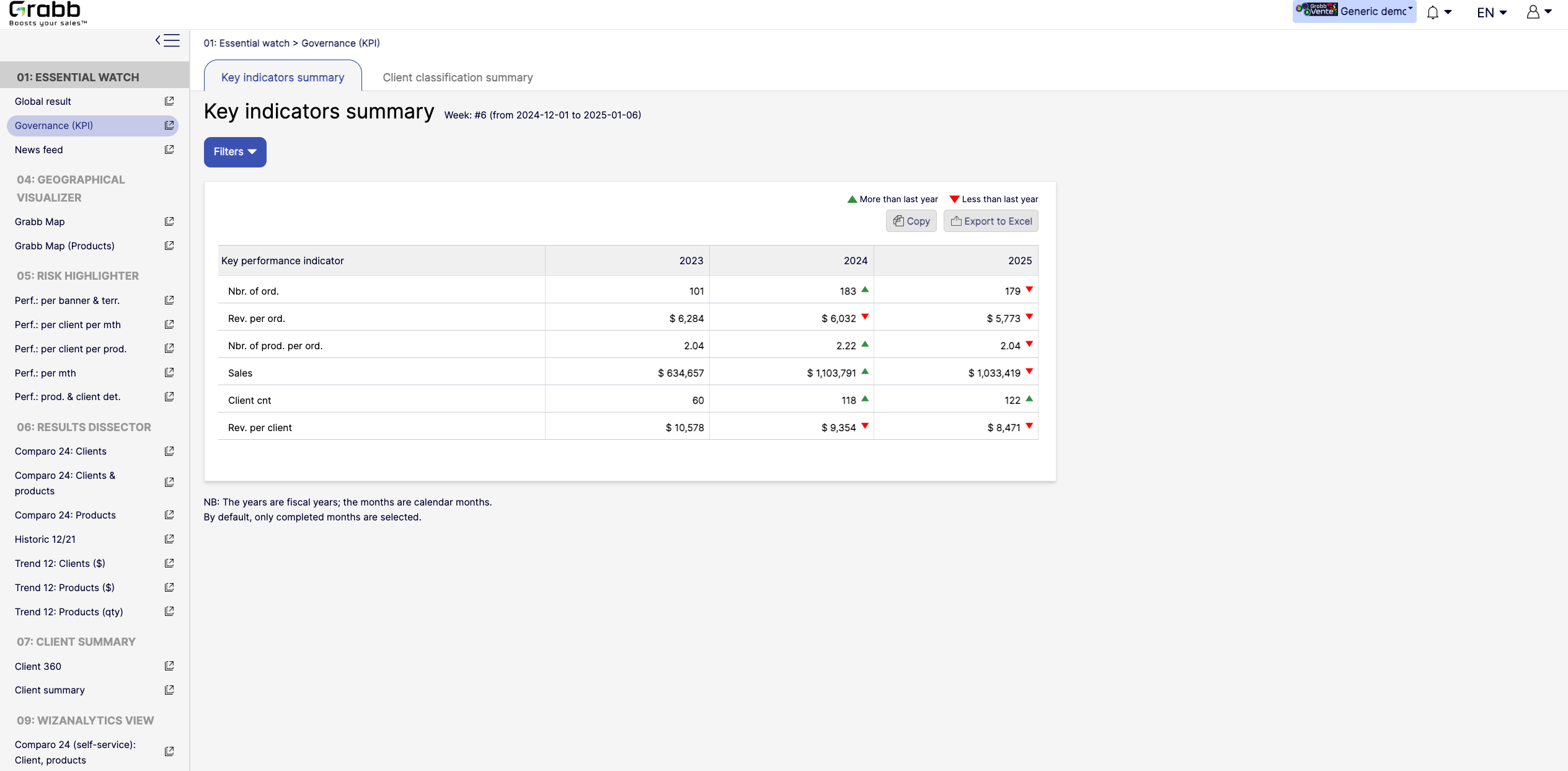
    Screenshot of the dashboard for executives and managers, with various performance metrics:

High‐Level KPIs: Summarizes top metrics (e.g., total sales, revenue per client, average products per order) all in one table, making it easier to spot whether the company is trending up or down.
Year‐to‐Year Comparison: Displays data for each fiscal year, with green/red arrows to show improvement or decline since the previous year.
Immediate Visibility of Trends: Simplifies strategic decision‐making by illustrating whether overall performance is improving or if corrective measures are needed.
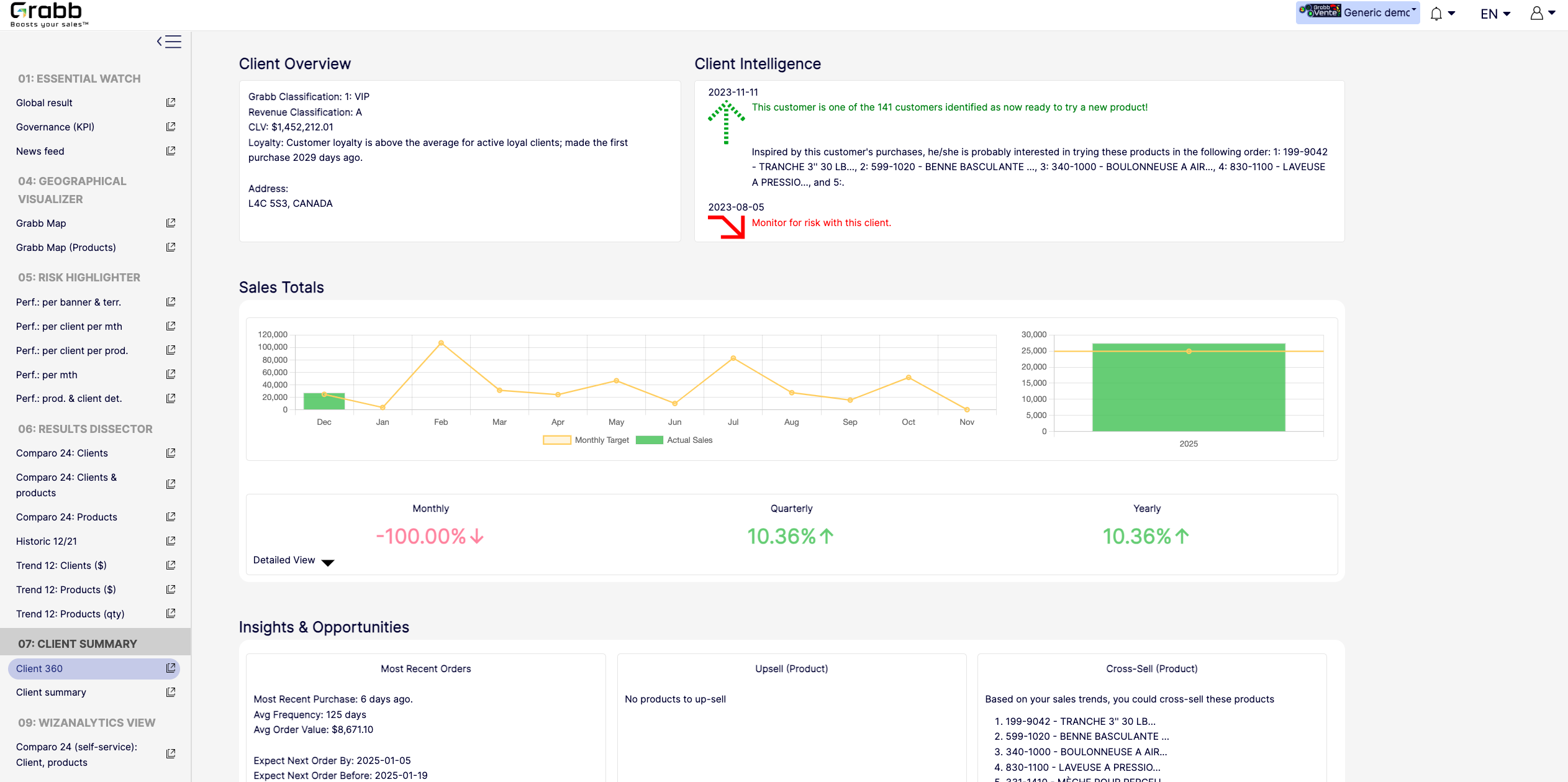
It’s a quick, executive‐friendly scoreboard of the organization’s health, ensuring leaders have the clarity to plan next steps.Screenshot of an at‐a‐glance understanding of a single client’s status, loyalty level, buying behavior, and next best actions that includes data about up‐selling, cross‐selling, and churn risk is often siloed or not immediately visible. This provides:

A Centralized Client Snapshot: Shows the client’s classification (e.g., VIP), revenue category, and CLV, ensuring everyone quickly sees the client’s overall value.
Predictive Intelligence: Highlights whether the client is “ready to try a new product,” or if there’s any “monitor for risk” alert, taking the guesswork out of deciding the next sales move.
Sales Trend & Graphs: Displays monthly, quarterly, and yearly sales to pinpoint performance patterns and quickly identify dips/spikes.
Upsell/Cross‐Sell Suggestions: Automatically suggests which products the client is most likely to buy next, helping reps act on potential revenue opportunities immediately.
Insights & Opportunities: Offers quick reference points such as “Most Recent Purchase,” average order value, frequency, and predicted next order date so you can plan proactive outreach.
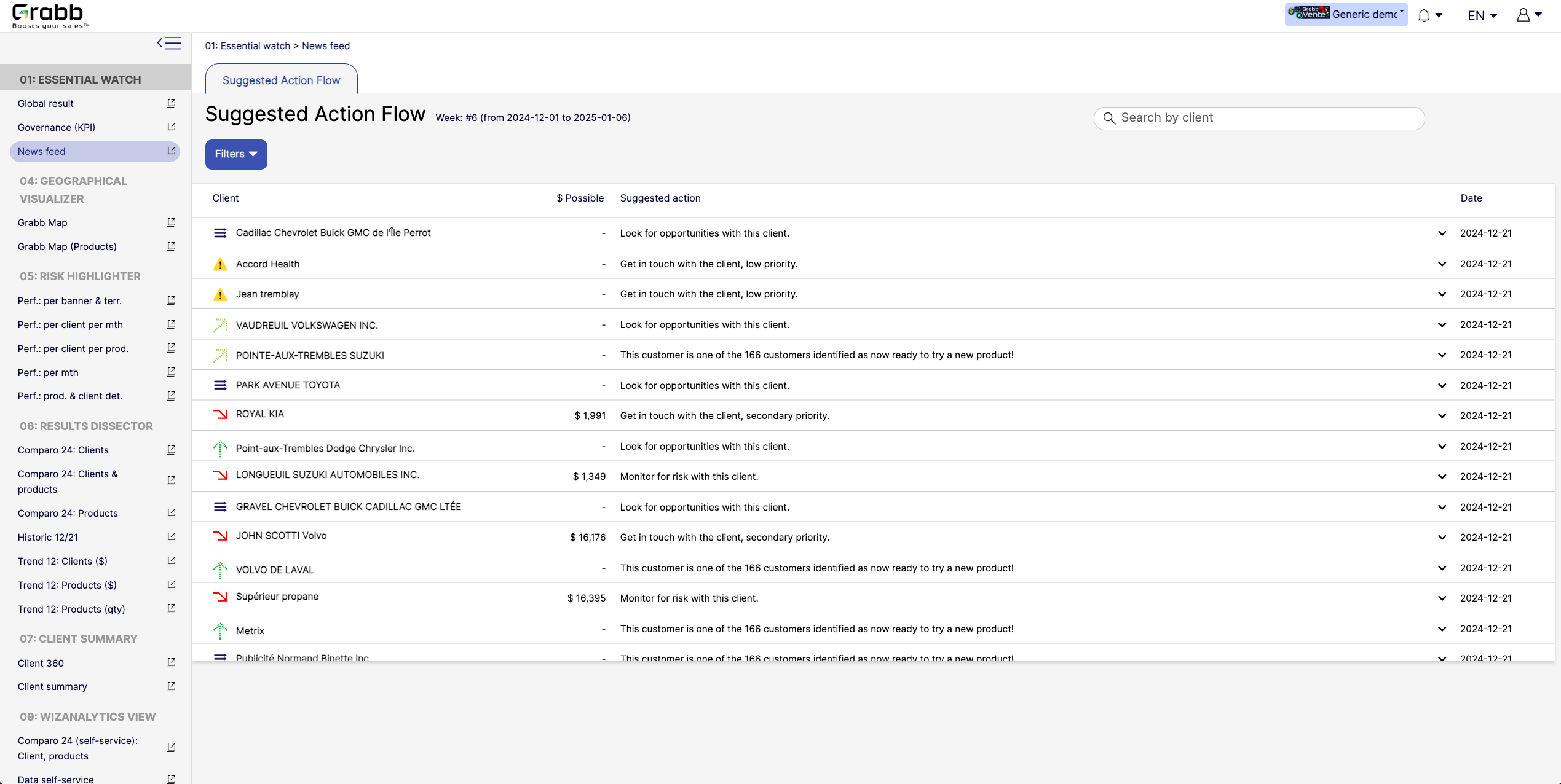
This holistic view enables data‐driven decisions—whether to focus on strengthening loyalty, pitching new products, or preventing churn.Screenshot of A visualization for sales reps and managers, providing:

Prioritized Recommandations: Provides a dynamic feed of next best actions—whether it’s “Look for opportunities with this client” or “Monitor for risk,” ensuring no lead or account slips through the cracks.
Opportunity & Risk Indicators: Quickly flags which clients are “ready to try a new product” versus those at higher risk, so teams can focus their energy where it matters most.
Estimated Upside ($ Possible): In some cases, the screen shows potential revenue if successful, helping reps evaluate the ROI of their outreach efforts.
Search & Filter Capabilities: Salespeople can easily locate a specific client in the list and see suggested actions, which speeds up daily planning and follow‐ups.
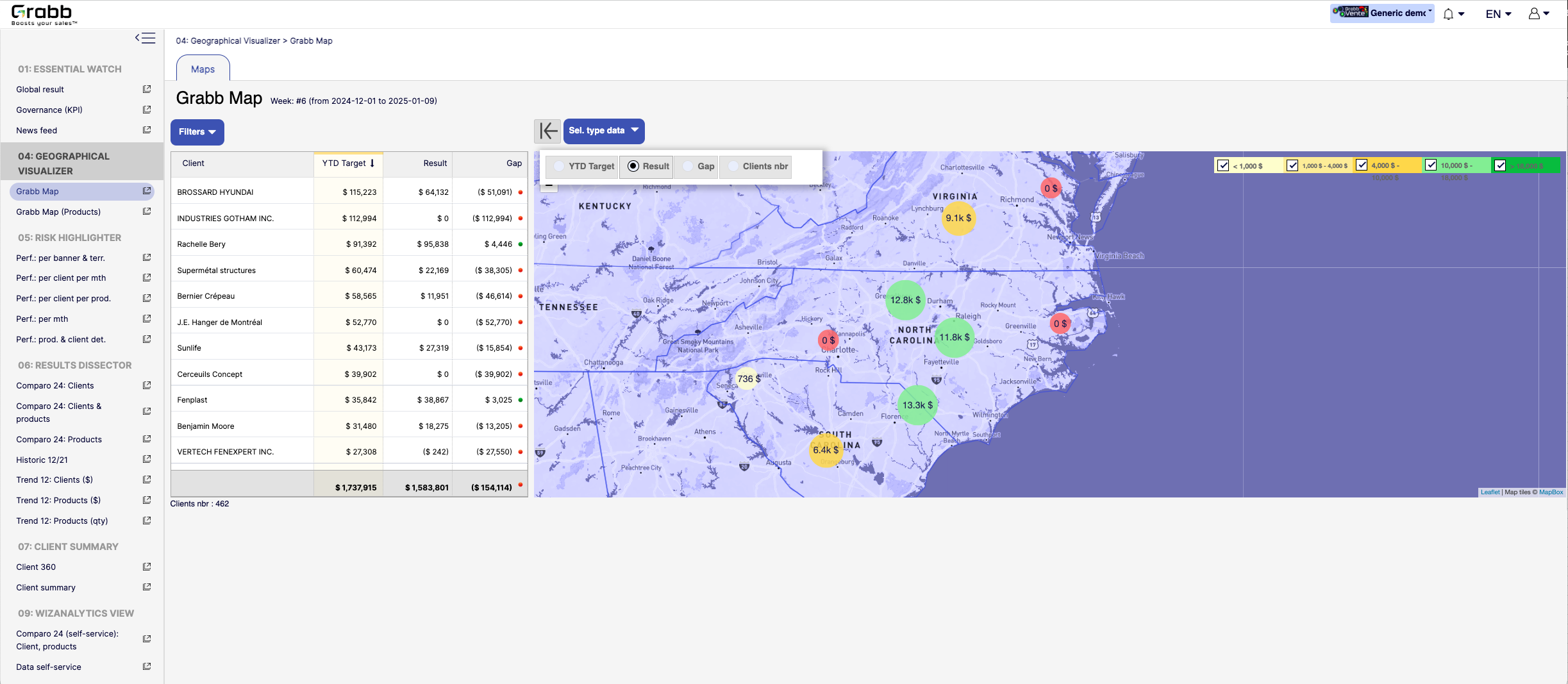
By centralizing these recommended “next steps,” the Suggested Action Flow turns raw data into a practical to‐do list—making each sales call or client interaction more purposeful and timely.Screenshot of a visualization for sales teams that helps them understand how their performance is distributed across different territories or locations. Without geographic context, managers can overlook local trends, regional opportunities, or problem areas.

Solution Provided:

Interactive Territory Overview: Displays each client’s Year‐to‐Date (YTD) target, actual results, and any gap in a color‐coded map, quickly revealing where the biggest mismatches lie.
Client‐Level Details: The list alongside the map allows you to see real‐time data—such as current gap amount or sales performance—sorted by region or client.
Visual Clustering: Bubbles on the map show consolidated sales amounts or gaps for clusters of clients, making it easier to spot hot‐spots or underperforming zones.
Target & Result Comparison: By toggling between metrics (e.g., “YTD Target,” “Result,” “Gap,” “Clients nbr”), managers can instantly pivot the view to see how the team is tracking.
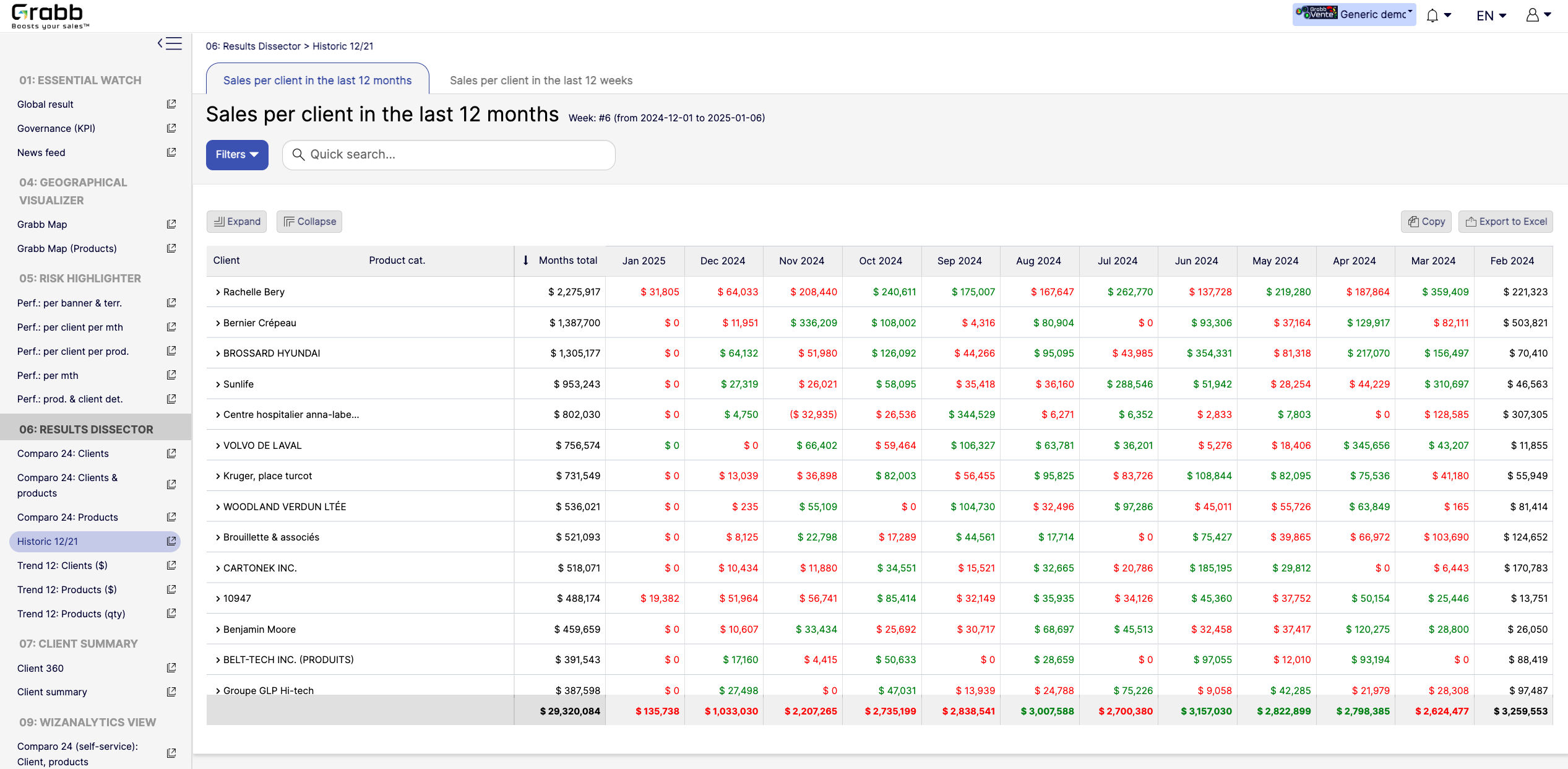
With this map‐based dashboard, leaders can optimize travel routes, allocate resources effectively, and prioritize outreach in areas where the potential impact is greatest.Screenshot of monthly sales trends at the individual‐client level. The visualization provides:

Month‐by‐Month Breakdown: Lists each client with color‐coded monthly sales (green and red), allowing you to see exactly when sales surge or drop off.
Total and Monthly Views: A “Months total” column plus each month’s figure helps you quickly gauge each client’s cumulative performance versus their monthly fluctuations.
Trend Spotting & Seasonality: By laying out 12 consecutive months, it becomes easier to see recurring patterns—helpful for forecasting, inventory planning, and targeted campaigns.
Actionable Insights: Identify which clients need re‐engagement (red cells or big drops) and which clients might be ready for expansion (consistently green or strong increases).
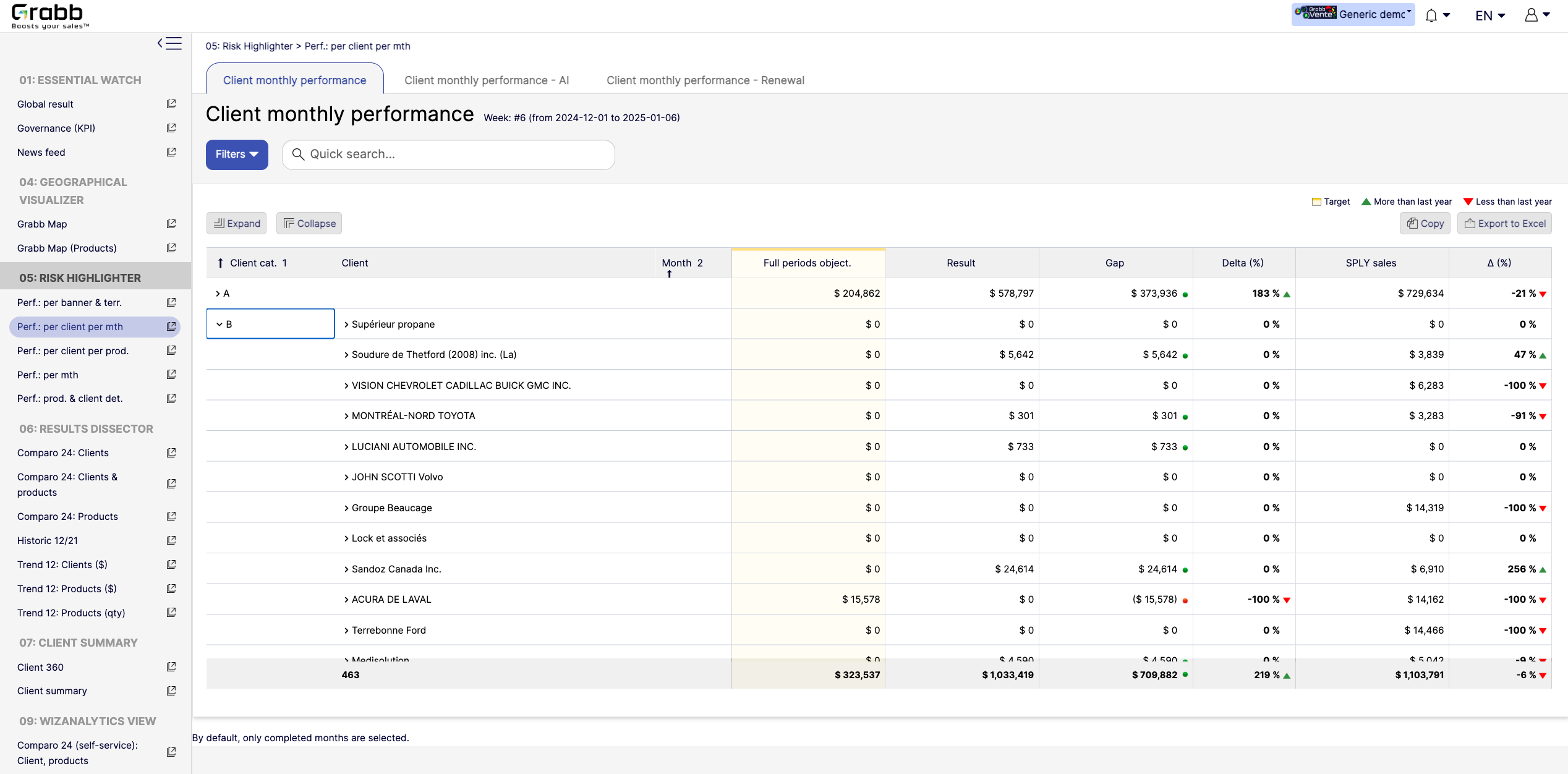
By visualizing an entire year in detail, sales teams can preemptively address potential downturns and capitalize on positive trends.Screenshot of a visualization tracking how each client performs on a month‐to‐month basis, and across accounts. This information provides:

Side‐by‐Side Comparisons: Displays each client’s monthly objectives versus actual results, so sales teams see immediately whether targets are met or missed.
Delta & Gap Analysis: Automatically calculates the variance between the goal and real outcomes—highlighting where shortfalls or over‐performance exist.
Year‐Over‐Year Comparison: “More than last year” or “Less than last year” labels provide quick trend context, guiding strategy for retention or growth.
Easy Filtering & Sorting: Users can filter by client category or name, then expand or collapse details to focus only on accounts that need attention.
With this screen, managers can prioritize which clients need immediate support and which are on track—using precise data rather than guesswork.