Proliant vs. WorkBright

Overview
ProductRatingMost Used ByProduct SummaryStarting Price
Proliant
Score 9.3 out of 10
N/A
Proliant provides a cloud-based human capital management solution designed to simplify payroll and HR processes, improves accuracy, and ensures industry compliance. Proliant is an all-in-one solution for workforce and talent management across the entire employment life cycle. Specializing in payroll, Proliant helps users pay people accurately, on time, and without risk from the IRS, supporting tax filings, contractor payments, and unlimited payroll runs. Proliant also streamlines…N/A
WorkBright
Score 9.8 out of 10
Mid-Size Companies (51-1,000 employees)
For businesses that are rapidly, seasonally, or just plain constantly hiring, WorkBright aims to take the cumbersome and traditionally paper-heavy process of onboarding and puts it all online. They make it possible for new employees to fill out their W4s, upload photos of licenses and certifications, sign digitally, and complete any paperwork from their laptop, tablet, or smartphone before they show up for their first day on the job. Integrations and an open API…
$158
hires per year
Pricing
ProliantWorkBright
Editions & Modules
No answers on this topic
Onboarding
Starting at $158/mo
hires per year
Offerings
Pricing Offerings
ProliantWorkBright
Free Trial
NoYes
Free/Freemium Version
NoNo
Premium Consulting/Integration Services
NoNo
Entry-level Setup FeeNo setup feeRequired
Additional DetailsOur pricing is based off the number of hires in a given contract year. All contracts are annual but can be billed on a monthly basis.
More Pricing Information
Community Pulse
ProliantWorkBright
Features
ProliantWorkBright
Human Resource Management
Comparison of Human Resource Management features of Product A and Product B
Proliant
8.3
5 Ratings
3% above category average
WorkBright
-
Ratings
Employee demographic data8.85 Ratings00 Ratings
Employment history8.65 Ratings00 Ratings
Job profiles and administration7.93 Ratings00 Ratings
Workflow for transfers, promotions, pay raises, etc.9.25 Ratings00 Ratings
Organizational charting6.02 Ratings00 Ratings
Organization and location management9.03 Ratings00 Ratings
Compliance data (COBRA, OSHA, etc.)8.52 Ratings00 Ratings
Payroll Management
Comparison of Payroll Management features of Product A and Product B
Proliant
9.6
6 Ratings
16% above category average
WorkBright
-
Ratings
Pay calculation10.06 Ratings00 Ratings
Support for external payroll vendors9.52 Ratings00 Ratings
Off-cycle/On-Demand payment10.04 Ratings00 Ratings
Benefit plan administration8.33 Ratings00 Ratings
Direct deposit files10.05 Ratings00 Ratings
Salary revision and increment management9.54 Ratings00 Ratings
Reimbursement management10.01 Ratings00 Ratings
Leave and Attendance Management
Comparison of Leave and Attendance Management features of Product A and Product B
Proliant
8.1
5 Ratings
1% below category average
WorkBright
-
Ratings
Approval workflow9.24 Ratings00 Ratings
Balance details7.45 Ratings00 Ratings
Annual carry-forward and encashment7.73 Ratings00 Ratings
Employee Self Service
Comparison of Employee Self Service features of Product A and Product B
Proliant
9.0
5 Ratings
9% above category average
WorkBright
-
Ratings
View and generate pay and benefit information10.05 Ratings00 Ratings
Update personal information10.05 Ratings00 Ratings
View company policy documentation8.33 Ratings00 Ratings
Employee recognition7.73 Ratings00 Ratings
View job history9.02 Ratings00 Ratings
Asset Management
Comparison of Asset Management features of Product A and Product B
Proliant
10.0
2 Ratings
23% above category average
WorkBright
-
Ratings
Tracking of all physical assets10.02 Ratings00 Ratings
HR Reporting
Comparison of HR Reporting features of Product A and Product B
Proliant
9.8
6 Ratings
26% above category average
WorkBright
-
Ratings
Report builder10.06 Ratings00 Ratings
Pre-built reports10.06 Ratings00 Ratings
Ability to combine HR data with external data9.52 Ratings00 Ratings
Onboarding
Comparison of Onboarding features of Product A and Product B
Proliant
9.3
4 Ratings
15% above category average
WorkBright
-
Ratings
New hire portal9.33 Ratings00 Ratings
Manager tracking tools9.34 Ratings00 Ratings
Performance and Goals
Comparison of Performance and Goals features of Product A and Product B
Proliant
8.0
1 Ratings
0% below category average
WorkBright
-
Ratings
Individual goal setting8.01 Ratings00 Ratings
Performance Management
Comparison of Performance Management features of Product A and Product B
Proliant
9.2
2 Ratings
15% above category average
WorkBright
-
Ratings
Performance plans9.02 Ratings00 Ratings
Performance improvement plans9.02 Ratings00 Ratings
Review status tracking10.02 Ratings00 Ratings
Review reminders9.02 Ratings00 Ratings
Multiple review frequency9.01 Ratings00 Ratings
Succession Planning
Comparison of Succession Planning features of Product A and Product B
Proliant
6.3
1 Ratings
21% below category average
WorkBright
-
Ratings
Create succession plans/pools8.01 Ratings00 Ratings
Candidate ranking9.01 Ratings00 Ratings
Candidate search4.01 Ratings00 Ratings
Candidate development4.01 Ratings00 Ratings
Recruiting / ATS
Comparison of Recruiting / ATS features of Product A and Product B
Proliant
4.0
1 Ratings
63% below category average
WorkBright
-
Ratings
Job Requisition Management7.01 Ratings00 Ratings
Company Website Posting5.01 Ratings00 Ratings
Job Search Site Posting3.01 Ratings00 Ratings
Duplicate Candidate Prevention3.01 Ratings00 Ratings
Applicant Tracking3.01 Ratings00 Ratings
Notifications and Alerts3.01 Ratings00 Ratings
Best Alternatives
ProliantWorkBright
Small Businesses
Dayforce Powerpay
Dayforce Powerpay
Score 9.4 out of 10
PowerDMS by NEOGOV
PowerDMS by NEOGOV
Score 7.1 out of 10
Medium-sized Companies
Paypro Workforce Management
Score 9.2 out of 10
PowerDMS by NEOGOV
PowerDMS by NEOGOV
Score 7.1 out of 10
Enterprises
PeopleStrong
PeopleStrong
Score 9.9 out of 10
Vibe HCM (discontinued)
Score 4.3 out of 10
All AlternativesView all alternativesView all alternatives
User Ratings
ProliantWorkBright
Likelihood to Recommend
10.0
(6 ratings)
9.7
(6 ratings)
Usability
10.0
(1 ratings)
-
(0 ratings)
User Testimonials
ProliantWorkBright
Likelihood to Recommend
Proliant
This is solely based on two things: the fact that we have been unable to have issues fixed after more than a year of dealing with them AND since a key contact for us left we are unable to get a fast turnaround on many questions unless we contact the person who handles our payroll. I like the platform and it's easy to use, but when it's not functioning how we need it to, that's a problem. I still cannot see what my actual PTO balance is on my dashboard (the same for three other employees). This is an issue.
Read full review
WorkBright
Workbright is well suited because of the following reasons: 1. Data transmission between browser and application is highly encrypted 2. Bank grade data encryption for maximum security 3. Data is backed up at various locations 4. Database security is maintained to the highest standards with Engineers 5. Automated reminders and user correction error flow system
Read full review
Pros
Proliant
  • Fantastic customer service!!
  • Well implemented products.
  • Well rounded choices for all HR needs.
Read full review
WorkBright
  • Being able to share candidate information with other supervisors or team members and others involved in the hiring process.
  • The convenience of filling in new employee hiring forms.
  • Create groups, organize all paperwork and send to employees with just one click.
Read full review
Cons
Proliant
  • I cannot get RPO to be changed to how it needs to be for our business needs (when T&L employees move to salaried, for example). I have had several meetings regarding this and it still is not fixed -- more than a year later
  • Slow response from employee.helpdesk@proliant.com often leads me to send messages to payroll administrator for response
  • I believe we are paying for some added services; I do not know what these services are and I've asked on several occasions to have someone contact me about this.
Read full review
WorkBright
  • Onboarding Paperwork - It would be great if there was only one website we had to log into. For example, I have to log into one to send paperwork, and then log into another domain to check the paperwork sent.
  • Note Timeline - Anytime any application is touched, viewed, etc. a note is made. We also utilize the note feature to communicate about each applicant. However, it gets quite messy when their are over 40 notes and you are not able to sort or organize them.
  • Attachments - Can't attach items in notes, would be nice feature for attaching images, snippets, pdfs, etc.
Read full review
Usability
Proliant
Super user friendly!
Read full review
WorkBright
No answers on this topic
Alternatives Considered
Proliant
Proliant is the only payroll software I have used, and I don't plan on changing that anytime soon. It gives me everything I need in simple, easy-to-use software. If I have questions they have quality customer service. I get calls weekly to change to other payroll services, and I don't consider changing because there is no need to change - I have everything I need here. Proliant does exactly the job I am looking for it to do.
Read full review
WorkBright
WorkBright was selected as the primary HR software within our company. One of the main reasons it was selected is the intuitive user interface and dashboard. Additionally, the software had excellent features for the cost such as custom reporting, notifications, enhanced security, and training. WorkBright offered many features that other HR software in the same price range did not.
Read full review
Return on Investment
Proliant
  • All of my employees use the app on a regular basis and love it.
  • Proliant has helped us solve tax issues our last payroll company could not
Read full review
WorkBright
  • Huge return on investment in terms of time needed to circulate new openings nationally.
  • Very positive impact on speed with which interviewer can contact prospective employees.
  • Outstanding onboarding for new employees. Tick 5 boxes and all info is emailed directly to the new employee.
  • Very challenging build process that took many weeks to fully integrate.
Read full review
ScreenShots

WorkBright Screenshots

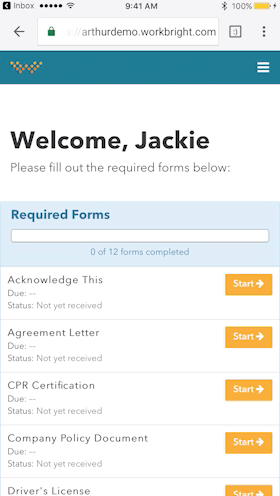
Screenshot of Works on any Device - Not just ‘mobile friendly’ but mobile FIRST! Designed to complete all forms quickly and efficiently from any smart enabled device.Screenshot of Automatic Reminders - Reminders are automatically sent out to employees who have not completed their forms with increasing urgency and frequency.Screenshot of Fingertip Signature - Best in class eSignatures allows employees to sign forms with their fingers on mobile devices including timestamp and IP address.