Sellerview.AI vs. Woopra

Overview
ProductRatingMost Used ByProduct SummaryStarting Price
Sellerview.AI
Score 0.0 out of 10
Small Businesses (1-50 employees)
Sellerview.ai is a profit intelligence platform for Amazon FBA and FBM sellers. The system provides SKU-level profitability analysis by calculating net margins after accounting for Amazon fees, advertising costs, and product returns. Core Features SKU-level P&L: Generates Profit and Loss (P&L) statements for individual products, incorporating FBA charges, ad spend, and return costs. Advertising Performance: Tracks Total Advertising Cost of Sale…
$19
per month per user
Woopra
Score 3.0 out of 10
Enterprise companies (1,001+ employees)
Woopra provides real-time customer analytics. It begins by tracking users across digital touch points (website, mobile app, help desk, marketing automation, etc.) and building a comprehensive behavioral profile for each user. These Customer Profiles are Woopra's building blocks, which are used to generate custom analytics reports, funnel analytics, retention analytics, and more.
$80
per month
Pricing
Sellerview.AIWoopra
Editions & Modules
Starter
19$
per month per user
Growth
31$
per month per user
Scale
63$
per month per user
Pro
127$
per month per user
Pro
$999.00
per month
Offerings
Pricing Offerings
Sellerview.AIWoopra
Free Trial
YesYes
Free/Freemium Version
NoYes
Premium Consulting/Integration Services
YesYes
Entry-level Setup FeeNo setup feeOptional
Additional DetailsSellerview.ai offers SaaS pricing designed for Amazon sellers, aggregators, and growing eCommerce brands. Pricing may vary based on business size, number of SKUs, and reporting requirements. All plans include access to SKU-level profitability analytics, TACoS and ACoS tracking, ad spend visibility, margin analysis, and profit leak detection tools. A 30-day free trial is available for new users, and custom onboarding or consulting support may be available for larger teams and enterprise accounts.
More Pricing Information
Community Pulse
Sellerview.AIWoopra
Best Alternatives
Sellerview.AIWoopra
Small Businesses
Webgility
Webgility
Score 9.6 out of 10
Fullstory
Fullstory
Score 9.1 out of 10
Medium-sized Companies
Looker
Looker
Score 8.3 out of 10
Whatfix
Whatfix
Score 9.9 out of 10
Enterprises
Looker
Looker
Score 8.3 out of 10
Whatfix
Whatfix
Score 9.9 out of 10
All AlternativesView all alternativesView all alternatives
User Ratings
Sellerview.AIWoopra
Likelihood to Recommend
-
(0 ratings)
7.0
(16 ratings)
Likelihood to Renew
-
(0 ratings)
9.0
(7 ratings)
Usability
-
(0 ratings)
9.0
(1 ratings)
Support Rating
-
(0 ratings)
10.0
(1 ratings)
Implementation Rating
-
(0 ratings)
10.0
(1 ratings)
User Testimonials
Sellerview.AIWoopra
Likelihood to Recommend
Sellerview.ai
No answers on this topic
Woopra
My rating of Woopra is the absolute best possible. I would recommend them to anyone looking for an analytics website that prefers a visual interface and a beautiful design. I have not encountered any problems using their app -- ZERO! Their integration with other marketing software, such as MailChimp, helps our company zero in on our marketing campaigns and gives us the information we need to make better choices. I LOVE Woopra and think they are the best out there! I have used other websites and there is no comparison!
Read full review
Pros
Sellerview.ai
No answers on this topic
Woopra
  • Woopra tracks *individual users and customer accounts*. It cannot be understated how important this is. Google Analytics and other low cost solutions only sample users and provide aggregate data. For enterprise sales, this is critical. Likewise, for product managers trying to segment product usage by types of accounts, this is incredibly useful.
  • Woopra updates user analytics in real time. This is critical in a sales context as you want to be able to follow up quickly on opportunities. Likewise, it is useful for customer success as they can see usage in real time for an individual they are supporting.
  • Woopra has the most turnkey integrations of any web analytics solution on the market. By far the most useful are Marketo, SalesForce, and Slack, but there are several more we didn't tap into. While any solution worth its salt has an API, Woopra's integrations usually require a login and/or API key, and you are good to go. Here is the current list: https://www.woopra.com/appconnect/.
  • Woopra enables B2B product managers to track product and feature usage by revenue, not just clicks. Again, in a B2B context, this is critical, as there are high-value users and low-value users. Knowing the difference is critical.
  • Woopra's implementation is super simple. We were able to set it up with a couple of hours of one frontend developer and some help from our product intern.
Read full review
Cons
Sellerview.ai
No answers on this topic
Woopra
  • User explorer could get some upgrades. It has sometimes been difficult to filter some actions, or groups of actions or combine filters.
  • Can add more cards to the live dashboard.
  • More context data on the user, the device being used, etc.
Read full review
Likelihood to Renew
Sellerview.ai
No answers on this topic
Woopra
We just really like the tool. There are lots of us using it internally... from Product, to marketing, to customer service, to optimization team, to traffic acquisition, to Executives. Really helps us answer questions about how well things are going, and what is not going well.
Read full review
Usability
Sellerview.ai
No answers on this topic
Woopra
The UI and reports are great overall. Creating reports just requires a few too many screens and clicks. Also dashboard tiles can't be resized. Both of these are easy items that are being addressed
Read full review
Support Rating
Sellerview.ai
No answers on this topic
Woopra
Team was always responsive and helpful with special use cases.
Read full review
Implementation Rating
Sellerview.ai
No answers on this topic
Woopra
Compared to other products, the support was a small effort. We only had part time contributions from a product management intern and front end developer.
Read full review
Alternatives Considered
Sellerview.ai
No answers on this topic
Woopra
Woopra is much easier to setup and use than Google Analytics. I've spent hours trying to create custom reports in Google Analytics. Woopra does not take this much time to get solid reporting for our site. If you need something that tracks marketing efforts then Google Analytics will likely be a better fit.
Read full review
Return on Investment
Sellerview.ai
No answers on this topic
Woopra
  • Really helped us begin to segment our users based on their engagement and retention.
  • Helped increase retention by about 1.5% after about 5 months of implementation (don't shoot the messenger if your team can't implement that quickly).
  • I felt like it had great potential to create a pipeline between sales and the CSM, but I had trouble getting the sales team to implement it properly as they had their noses deep in calls and emails (they struggle entering notes in SalesForces as well, so it's more a company specific problem).
Read full review
ScreenShots

Sellerview.AI Screenshots

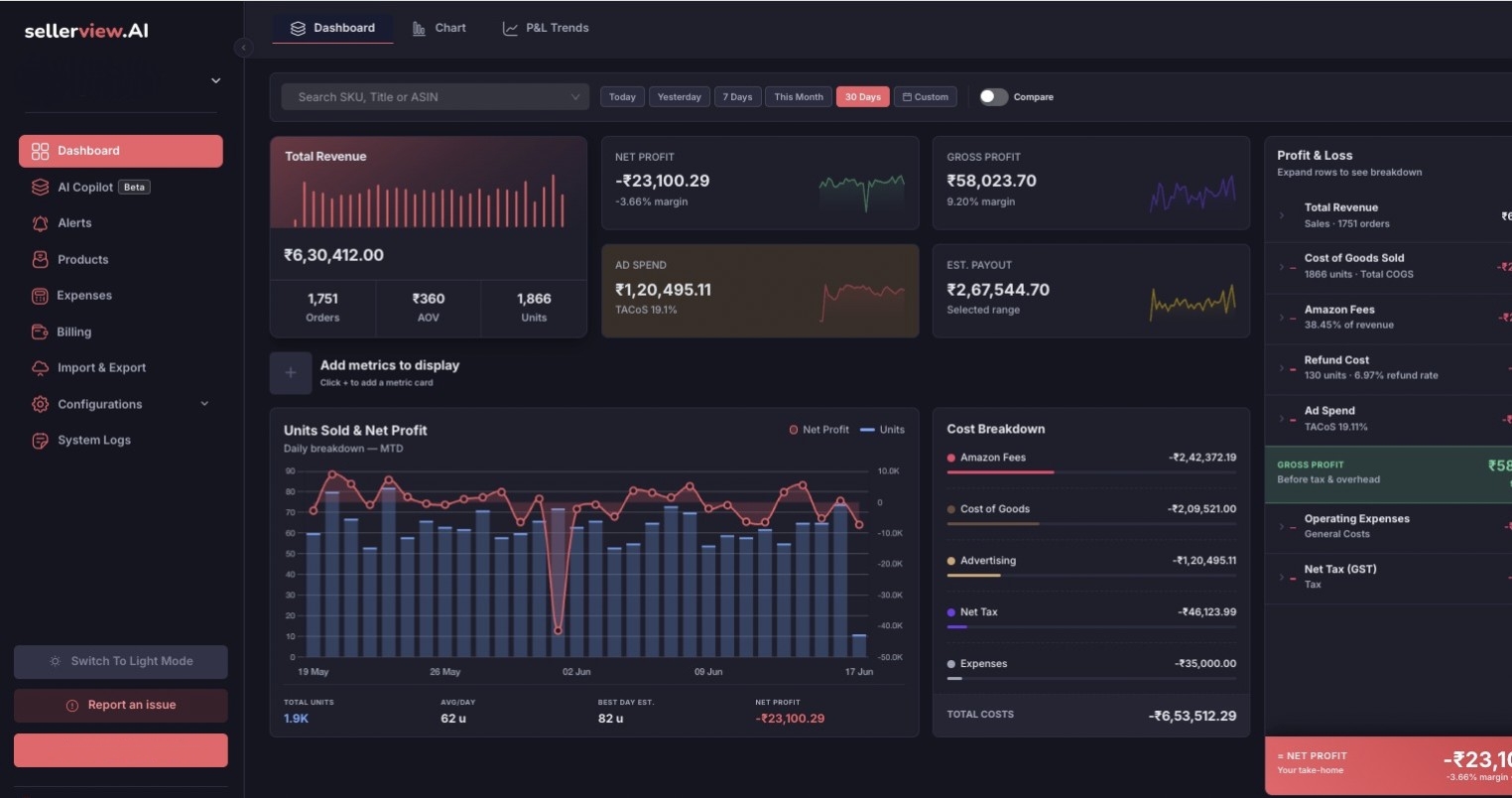
Screenshot of Sellerview.ai’s Dashboard provides Amazon sellers with a centralized view of business performance, profitability trends, and operational health across their catalog. The dashboard combines sales, ad spend, and net profit analytics into a single visual interface, helping sellers understand how revenue and profitability change over time.

Users can analyze performance by SKU, ASIN, marketplace, and date range while tracking key metrics such as total sales, advertising clicks, total units sold, order volume, ad conversion rate, refunds, and net profit. The Profit Health visualization makes it easy to identify profit fluctuations, rising ad costs, and performance anomalies before they impact overall margins.

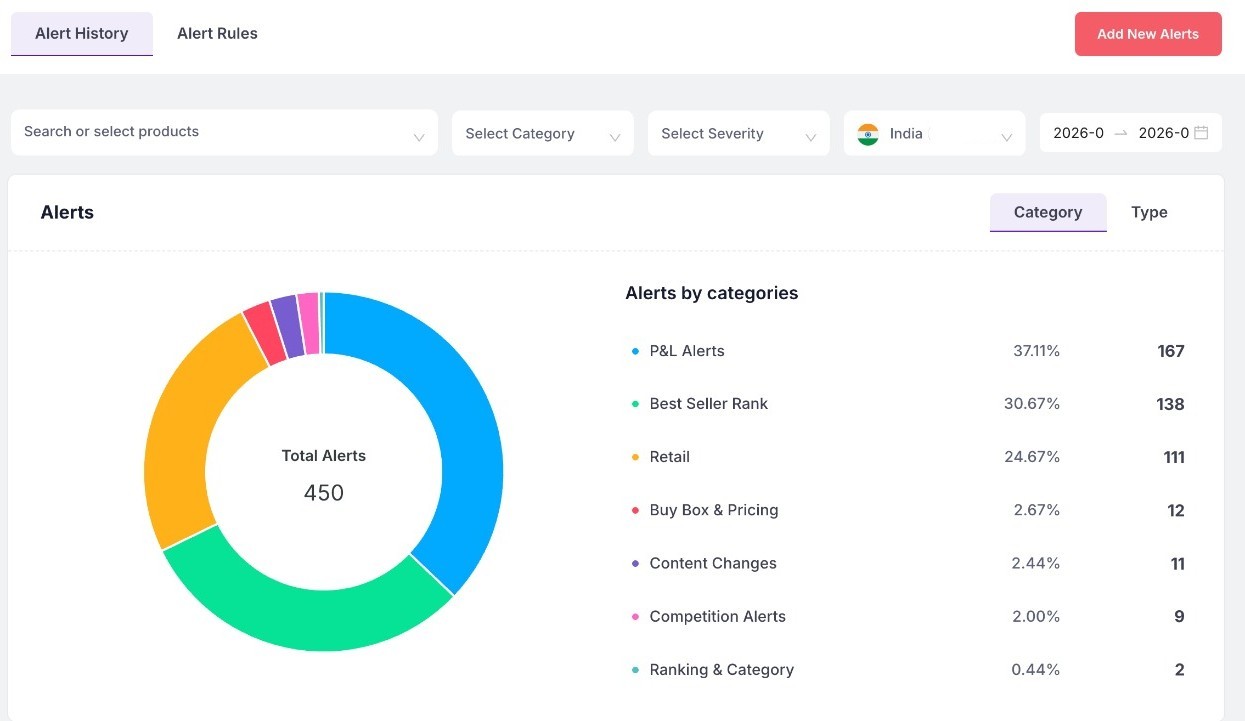
Advanced filtering, customizable columns, and export functionality allow teams to create focused reports and monitor the metrics most relevant to their business. The dashboard is designed to help Amazon brands make faster, data-driven decisions and scale operations more profitably.Screenshot of Sellerview.ai’s Alert System helps Amazon sellers proactively monitor critical changes affecting profitability, product performance, and marketplace visibility. The dashboard provides categorized real-time alerts across P&L performance, Best Seller Rank (BSR), retail activity, Buy Box changes, pricing fluctuations, content modifications, competition tracking, and ranking movements.

Users can filter alerts by product, category, severity, marketplace, and date range to quickly identify issues that need immediate attention. The visual alert breakdown makes it easy to understand which operational areas are generating the highest impact and where profit risks may be emerging.

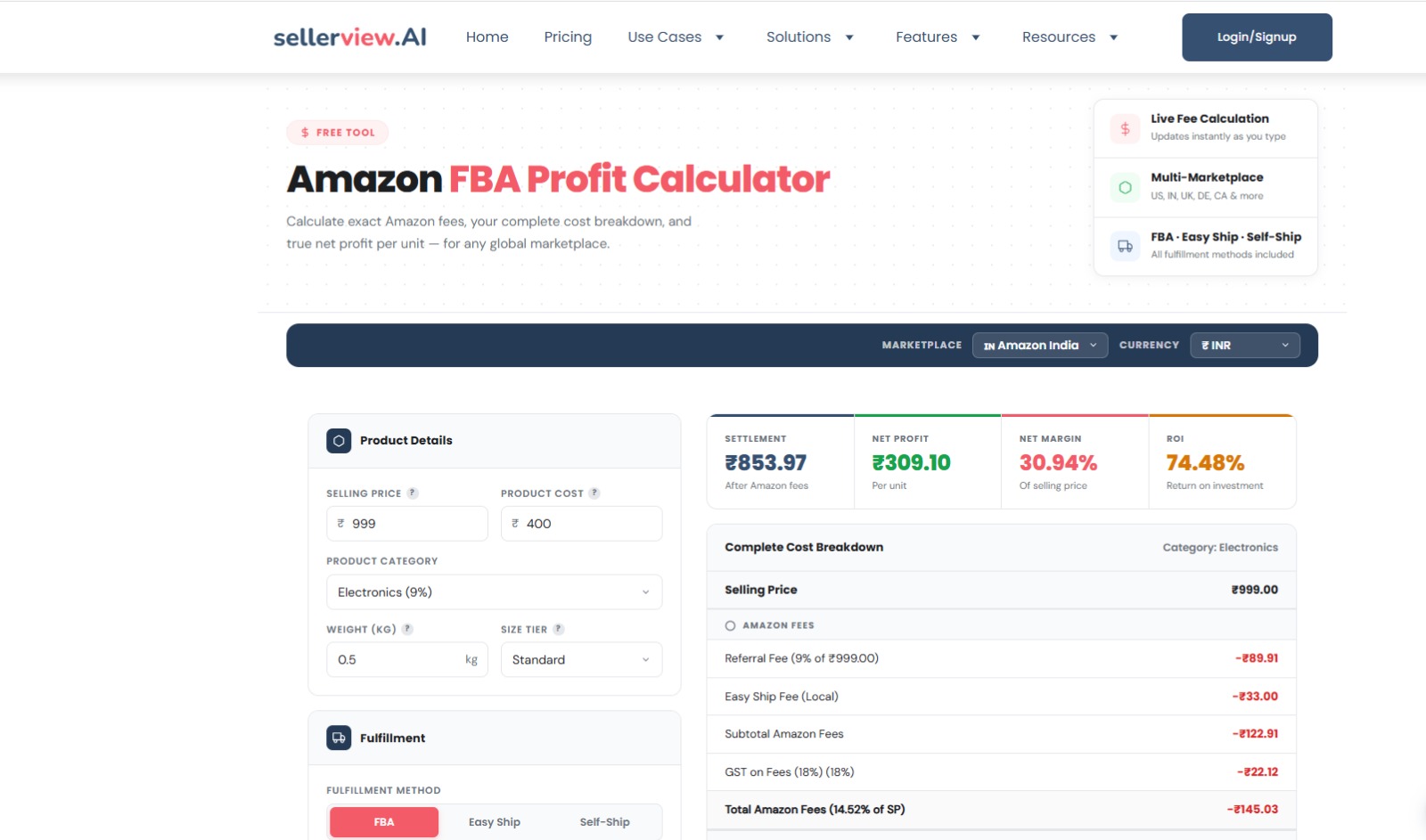
This feature is designed to help Amazon brands react faster, reduce hidden profit leaks, and stay ahead of operational and competitive changes across their catalog.Screenshot of Sellerview.ai’s Amazon FBA Profit Calculator helps sellers accurately estimate product profitability before launching or scaling products on Amazon. The tool provides a complete breakdown of Amazon fees, fulfillment costs, margins, ROI, and net profit per unit across multiple marketplaces and fulfillment methods.

Users can calculate profitability by entering selling price, product cost, category, weight, size tier, and fulfillment method, including FBA, Easy Ship, and Self-Ship options. The calculator automatically estimates referral fees, shipping charges, GST, and other Amazon-related costs to provide a real-time view of actual earnings.

The tool supports multiple marketplaces and currencies, making it useful for global Amazon sellers managing operations across different regions. By simplifying cost analysis and fee calculations, the FBA Profit Calculator helps sellers make better pricing, sourcing, and inventory decisions while reducing hidden profitability risks.

Woopra Screenshots

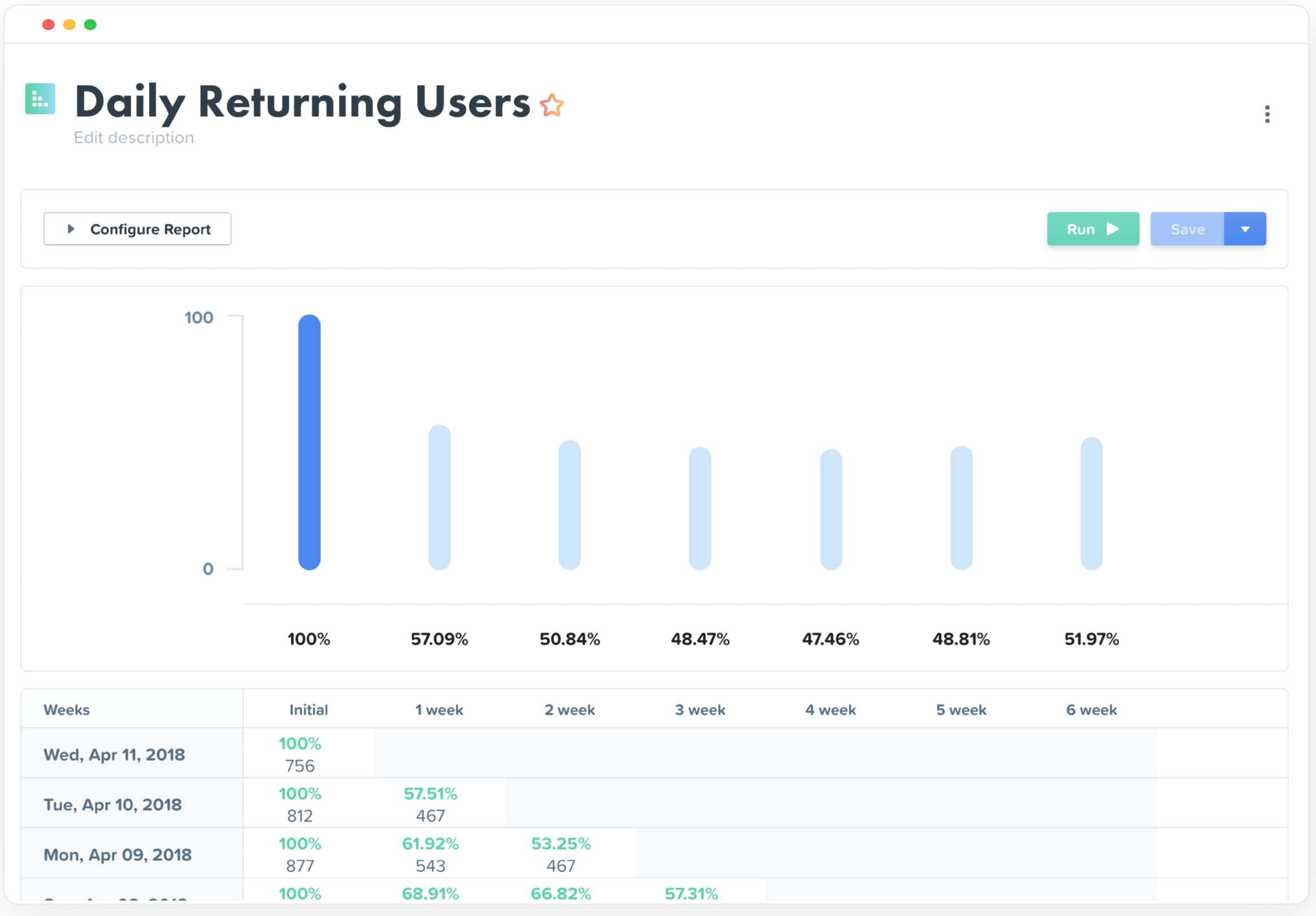
Screenshot of Screenshot of Screenshot of People Profiles - Understand Individual Users from Every AngleScreenshot of Journey Analytics Reports - Uncover critical obstacles and opportunities at every point in the customer experience - from campaign conversions to product engagement.Screenshot of Trends Analytics Reports - Analyze the growth of any metric over time and uncover the hidden forces that drive performance.Screenshot of Retention Analytics Reports - Measure the engagement of features and actions over time to proactively reduce churn and identify the behaviors that drive success.