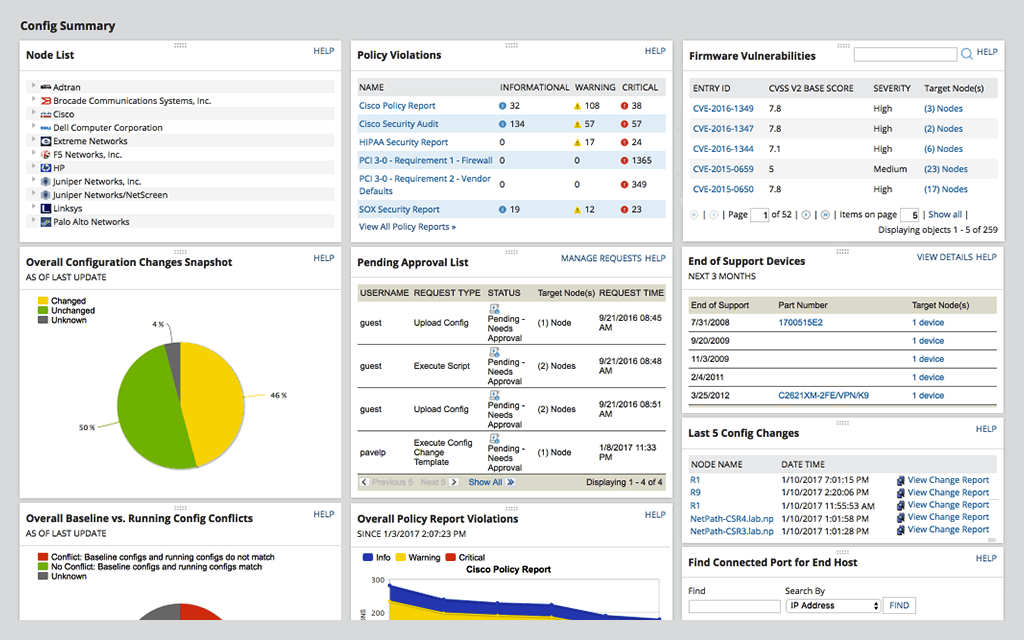
SolarWinds Network Configuration Manager is network diagnostics and troubleshooting technology, from Austin-based SolarWinds.
N/A
Splunk Enterprise
Score 8.5 out of 10
N/A
Splunk is software for searching, monitoring, and analyzing machine-generated big data, via a web-style interface. It captures, indexes and correlates real-time data in a searchable repository from which it can generate graphs, reports, alerts, dashboards and visualizations.
N/A
Splunk Enterprise Security
Score 8.3 out of 10
N/A
Splunk Enterprise Security is an analytics-driven SIEM that helps to combat threats with actionable intelligence and advanced analytics at scale.
SolarWinds NCM solution is more flexible and GUI is from my point of view more intuitive, from the other hand Manage Engine solution is [a] cheaper solution which has almost [the] same functionality but suffers of luck of deeper integration with other Manage Engine modules.
All of the SolarWinds solutions stack up against their competition. The customer support is excellent, KB articles are details, and the community (Thwack) is the best when it comes to working through complex configurations/monitors. These are the things that make them the right …
I actually prefer the ManageEngine Network Configuration Management engine product but switched to SolarWinds Network Configuration Manager to standardize to our Orion deployment.
Using Splunk Enterprise Security allows the combination of security data sources from any number of services or products, giving analysts a single view of the entire security footprint throughout the organization and correlating events across services that may otherwise be …
Splunk Enterprise Security is overall a better choice due to multiple factors. It can be easily deployed in any type of environment, whether you are looking for On-Premise or Cloud hosting. It scales amazingly well and it is very intuitive to use. It has a strong community, …
Above mentioned tools are environment-specific and provide insights into what is happening in the environment. We were looking for a product that is environment agnostic & able to work with many environments. Hence Splunk Enterprise security stands out for us. Also, we were …
Splunk Enterprise Security allows for data normalization that does not compare to other SIEMs such as QRadar or Trustwave. QRadar requires custom dsm parsers before the data can be onboarded. I appreciate that Splunk Enterprise Security can ingest any source of data and …
The fact that it is used by many large companies was a strong reason for selecting Splunk Enterprise Security. After several demos and POCs, the teams were convinced of the value it brings: it demands the right amount of customization to fit with the company data sources. Also …
Qradar is easy for first-timers. Easy to deploy and manage but if you need an advanced solution for ML, Anomaly Detection you need to use Splunk. Qradar is solid, too. But Splunk has advanced functionality for detection and automation.
Network Configuration Manager is well suited for backing up configurations of all your devices. It also has a great comparison tool for seeing only the differences in config. Another great feature is it's ability to push a script to any number of devices. This is very handy for pushing changes to one, 10 or multiple devices. There are also some great reports that you can run against the devices in inventory
It's well suited for what I do, which is network security operations. And that's for anything from troubleshooting incidents, troubleshooting performance, troubleshooting for the purpose of a compliance and auditing. It's not best suited for users who are new in terms of they're new to the product and they have expectations that probably Splunk cannot meet.
Based on my experience, Splunk is a strong git for some environments and a poor match for others. The distinction is primarily based on infrastructure complexity and budget. It's perfect for large enterprises with a mix of on-prem/cloud infrastructure. It's not a perfect match for small teams with restricted resources.
Writes Powerful Queries: The queries that can be written using the Splunk Query Language are very powerful and highly customizable to meet every need. Ex: Writing queries to search the intersection of two different sources like Network and Endpoint Logs.
Offers Dashboard Abilities: Helps build complex panels for Dashboards in addition to providing several out-of-the-box panels. Ex: creating panels to calculate the performance of analysts in a given timezone.
Helpful Search Aids: It helps to set up complex custom alerts very easily. The interesting fields section is very helpful while threat hunting. Ex: It shows all the users and the frequency of each in a failed login event. The user list on the interesting fields is useful to look for suspicious logins.
For our use case, it does everything great and some of the features we underutilize but I would like to be able to set a configuration baseline when initially adding a node instead of after the configuration is pulled but it's not a particularly big deal to let it pull the configuration then set it as the baseline.
Improved User Interface Customization: While the interface is generally intuitive, providing more options for users to customize their dashboards and views would enhance the overall user experience. Tailoring the interface to specific roles or use cases could be a valuable addition.
Simplified Alert Management: Streamlining the process of managing alerts, such as grouping or categorizing them based on severity or type, would make it easier for security teams to prioritize and respond to incidents effectively.
Expanded Threat Intelligence Feeds: Increasing the variety and sources of threat intelligence feeds available within ES would provide a broader context for identifying and mitigating emerging threats, ensuring a more comprehensive defense against evolving attack vectors.
Medium complexity to set up in the beginning if using any non-standard devices or configurations, else fairly easy (e.g. Cisco Nexus or IOS-based devices). Reports are fairly straightforward to set up. Updates to the platform are fairly straightforward and don't take a major effort. Easy to add or remove devices.
We are using Splunk extensively in our projects and we have recently upgraded to Splunk version 6.0 which is quite efficient and giving expected results. We keep track of updates and new features Splunk introduces periodically and try to introduce those features in our day to day activities for improvement in our reporting system and other tasks.
The user interface is lacking. It is difficult to navigate at times and things can be done multiple ways. Quite often I am confused by how their notification structure works. It is not very intuitive. They do offer a free Academy. They also offer a community of other technical folks. I have enjoyed both.
You can literally throw in a single word into Splunk and it will pull back all instances of that word across all of your logs for the time span you select (provided you have permission to see that data). We have several users who have taken a few of the free courses from Splunk that are able to pull data out of it everyday with little help at all.
Maintaining hundreds or even 1000+ SOC use cases is really difficult, considering that the Data sources may not always send the data. A module that detects data freshness issues and detect data format changes would be a great help. the main challenge today using Splunk Enterprise Security is making sure that the detection rules are still working properly given all the changes that occur in data source applications. Also, maintaining the data collects on tens of thousands of servers and more than 100k workstations is a real company IT challenge: the splunkbase forwarder may not support old OS anymore, while these are the most important to monitor. Moving to the Open Telemetry collector has become essential so that only 1 agent is required for both SIEM and application observability.
It takes a long time for items to load if you are just generally searching through logs. It is best to use the data models which load faster but can be strange in terms of what is coming from which logs where. Yes, you can look it up, but this also requires familiarity with where things are and how to look them up.
To be fair, I have not had to involve Support in a number of years, but when I did, I was greeted with enthusiastic engineers who wanted to understand and solve the issue. It was a fairly complex scenario and I have discovered in my most recent implementation that engineering included that option as a standard now.
Splunk maintains a well resourced support system that has been consistent since we purchased the product. They help out in a timely manner and provide expert level information as needed. We typically open cases online and communicate when possible via e-mail and are able to resolve most issues with that method.
It's good when it's responsive, but I've had times where I had to wait quite a while for a response. But these are typically the exceptions rather than the rule. When you do get a response it is always well-informed and appropriate. I would say they've been trending better over time with this.
I experienced only on-line training, but the trainers were very professional and competent. Maybe it could be more useful if they also have an experience in projects because sometimes they didn't have a real project experience to communicate to the students. Anyway, it was very interesting and I learned many thing that's very difficoult (or maybe impossible!) to have by myself, aven if I have more than 10 years of Splunk activity experience.
Solarwinds has actually produced new training since I last used it that is available on their site at any time. Their previous training was more than enough to get us started but now there is significantly more content. Since I'm comfortable with the Orion platform and the products we use I haven't checked the new training out yet but we have new staff go through portions of that training and they always come away with an understanding of the platform and ready to use it
The online course was simple clear and described the main capabilities of the solution. There is also an initial module that can be done for free so anyone can familiarize themselves with the functionality of this solution. On the other hand, however, there could be more free online courses. Maybe even with a certificate, this would broaden the group of people who are familiar with the platform while increasing familiarity with the solution itself.
It was very interesting and I learned many thing that's very difficoult (or maybe impossible!) to have by myself. The only problem was that, when I worked with the Splunk Professional Services, I found some difference between the training contents and the information from PS. In addition is required a long experience on Splunk Enterprise for the data ingestion part, in other words I'm able to work with ES because I'm worling on Splunk since 11 years, otherwise I'd some problem.
it was a fairly easy implementation and everything was pretty straightforward. only challenge we had was getting all the snmp communities updated on the networking equipment
At the time SolarWinds was the biggest player in the space and their whole portfolio was very comprehensive. As time progressed and newer technologies came about (i.e. SDWAN) their products couldn't keep up with the consumer demands and changing market. Security became such a big focus that once Solarwinds got hacked we had to remove all their products from our environment
I didn't get to fully evaluate Logstash as our corporation was already using Logstash, but both seemed like viable solutions to the problem that we were having. I wanted to evaluate Logstash some more, both did seem like they would work for the business needs that we had, we went with splunk as many teams were already using it.
Splunk enterprise is the only solution that we’ve been able to identify that provides risk based alerting, which allows our SOC to reduce analyst fatigue which would be a huge problem without it. Before RBA, there were thousands of alerts a day and it was impossible to review all of them
for my exterience, unit pricing and billing frequency are correct. As I already said, I hint to have more discount flexibility, expecially with new customers, because there are competitors less expensive and very aggressive that are dangerous. In addition the possibility to don't pay the license for the development period could be a very interesting feature for the final customers.
- 8 out of 10 and took 2 for the data pipeline and administration part. Even if you'd like to improve yourself or your team, you have to pay a lot of money and it could be more than GIAC education + cert. - Normalization for Data models and CPU-based searches can be a problem sometimes.
I had a fantastic experience with Splunk Professional Services: they worked with us in our last SON project (a SOC migration for a very large customer) and helped to build a multi tenent environment even if ES isn't a multi tenant platform. Th Splunk PS was a very professional and competent people, he is italian and was able to speak with our italian customers.
Saves 100s of hours a year in man hours over manual configuration.
Saved easily 50k in lost revenue when a switch rebooted with months old unsaved configuration. NCM let us quickly restore a snapshot of the running config from the previous day.
Saves us several man hours per week of config auditing by reducing all changes to a summary email.
I don't have any numbers to share but Splunk has positively served as a 24/7 monitoring tool that has saved hours of work by self-detecting, saving statistics and alerting problems in the system or from external interfaces as soon as they happen.
Splunk dashboards does a solid job in collecting, analyzing data and creating reports that contain an entire day's activity and then automatically sent out to the business.
Splunk is very easy to learn and very useful to any program or business application.
We have a 100% success rate on all our ES implementations due to the amazing documentation and Splunk enablement on the subject.
Our Splunk ES business has grown 100% YoY for the last 3 years.
In terms of long term management and maintenance, ES has been highly stable and predictable, reducing our overhead on costly services team for ad hoc maintenance work.