Workflowy vs. Zoho Mail

Overview
ProductRatingMost Used ByProduct SummaryStarting Price
Workflowy
Score 9.6 out of 10
N/A
Workflowy is a note-taking and organizational tool designed to help users manage their tasks, notes, and projects. Its simplicity and features make it a choice for individuals and teams looking to streamline their workflow. Infinite Nesting Structure: Workflowy allows users to create lists within lists to an infinite degree, enabling a detailed and structured way to organize information Global Search: Its search function is used to search through all their…
$8.99
per month per user
Zoho Mail
Score 9.3 out of 10
N/A
Zoho offers their business email suite, which includes Calendar, Tasks, Notes, and Contacts bundled with an inbox.
$1
per user/per month
Pricing
WorkflowyZoho Mail
Editions & Modules
Workflowy basic
$0
per user
Workflowy pro - Monthly
$8.99
per month per user
Workflowy pro - Yearly
$83.88
per year per user
Mail Lite
$1
per user/per month
Workplace
$3
per user/per month
Mail Premium
$4
per user/per month
Offerings
Pricing Offerings
WorkflowyZoho Mail
Free Trial
YesYes
Free/Freemium Version
YesYes
Premium Consulting/Integration Services
NoYes
Entry-level Setup FeeNo setup feeNo setup fee
Additional Details
More Pricing Information
Community Pulse
WorkflowyZoho Mail
Features
WorkflowyZoho Mail
Project Management
Comparison of Project Management features of Product A and Product B
Workflowy
8.0
2 Ratings
4% above category average
Zoho Mail
-
Ratings
Task Management8.82 Ratings00 Ratings
Mobile Access6.12 Ratings00 Ratings
Search9.02 Ratings00 Ratings
File Sharing & Management
Comparison of File Sharing & Management features of Product A and Product B
Workflowy
6.4
2 Ratings
22% below category average
Zoho Mail
-
Ratings
Video files5.72 Ratings00 Ratings
Audio files5.01 Ratings00 Ratings
Document collaboration6.82 Ratings00 Ratings
Access control6.42 Ratings00 Ratings
Device sync8.12 Ratings00 Ratings
Secure Email Gateway
Comparison of Secure Email Gateway features of Product A and Product B
Workflowy
-
Ratings
Zoho Mail
8.1
6 Ratings
3% below category average
Anti-malware00 Ratings9.06 Ratings
Customizability00 Ratings8.06 Ratings
Data Loss Protection00 Ratings9.05 Ratings
Threat Detection00 Ratings7.05 Ratings
Sandboxing00 Ratings6.53 Ratings
End-to-End Encryption00 Ratings8.35 Ratings
Management Tools00 Ratings9.06 Ratings
Best Alternatives
WorkflowyZoho Mail
Small Businesses
Stackby
Stackby
Score 9.0 out of 10
Trend Micro Worry-Free Services Suite
Score 9.0 out of 10
Medium-sized Companies
Troop Messenger
Troop Messenger
Score 9.8 out of 10
Avanan
Avanan
Score 9.8 out of 10
Enterprises
HCL Connections
HCL Connections
Score 9.0 out of 10
Avanan
Avanan
Score 9.8 out of 10
All AlternativesView all alternativesView all alternatives
User Ratings
WorkflowyZoho Mail
Likelihood to Recommend
9.5
(3 ratings)
9.0
(6 ratings)
Usability
8.9
(3 ratings)
10.0
(1 ratings)
Support Rating
-
(0 ratings)
9.0
(1 ratings)
User Testimonials
WorkflowyZoho Mail
Likelihood to Recommend
Workflowy
For my money, it is best to use Workflowy for all areas of focus in my daily life. When I start to separate information, notes, convo's that's when I run into trouble. By using Workflowy for everything, I keep my sanity and my effectiveness. I cannot think of any environment where the Workflowy app would not work out extremely well!
Read full review
Zoho
If you don't have a huge budget and want something that works with minor quirks here and there then Zoho Mail is definitely something you should look into. For half the price of Google G Suite or Office account you get 5GB of storage per user and can send up to 25MB emails without restrictions. Great for small businesses in my opinion. I have had some issues with their spam filter, but we use SpamTitan and just shut off the one that comes with Zoho Mail. Zoho's spam filter isn't horrible but you should definitely use something in addition or instead of what comes with Zoho.
Read full review
Pros
Workflowy
  • searching
  • storing information
  • organizing information
Read full review
Zoho
  • I really like that there is a free version in which a single user can be created. It is really useful because it allows you to evaluate each characteristic of the service without having to buy it.
  • I also really like the visual aspect of the inbox, which is partially customizable. Because you can make small changes such as changing the color, the language, and among other things.
Read full review
Cons
Workflowy
  • Insert a more affordable Tier between Pro and Free
  • Provide the capability to add separate files for different projects and areas of focus
Read full review
Zoho
  • It does allow for notifications for various things, but I am not sure where to turn them all off
  • It only counts to 9 the unread email alert, then says 9+
  • Overall I don't think there is much they need to work on.
Read full review
Usability
Workflowy
I now have 12+ years of notes stored in Workflowy - everything from song lyrics to book outlines to classroom notes. It makes it VERY easy to find, VERY easy to sort, and VERY easy to organize.
Read full review
Zoho
It is very easy to use and does all you need. It sends newsletters to their own folder. A notification folder for more important things. The Spam folder collect the right amount of spam emails
Read full review
Support Rating
Workflowy
No answers on this topic
Zoho
I have spoken with Zoho several times and their support is always friendly and helpful. I have always been asked for security pins and codes when seeking assistance which helps me to feel my accounts are secure and I have never had to wait on hold to speak with someone for more than 5 minutes. They always seem to have someone available to help. If you call asking for instructions on how to do something they gladly walk you through the process and if you just need something done and don't have time to do it yourself they will happily customize whatever you need without you having to spend all day with it.
Read full review
Alternatives Considered
Workflowy
Workflowy seems to have less constraints than those other products. It is easier to use and more versatile.
Read full review
Zoho
Zoho is free. Also, there is no need for a separate IT guy for creating mail, or if any issues come you don't have to find anyone anyone can check and fix all issues from their super admin panel. Zoho overview is much better than outlook and its appearance of getting mail popup and functionality is better than outlook. My friend suggested for this and also after using I have referred my friend
Read full review
Return on Investment
Workflowy
  • I estimate that Workflowy easily saves me 1.5 - 2 hours each day in streamlined productivity. That calculates, for my organization approximaely $500.00 a month!
Read full review
Zoho
  • It has a direct impact on the commercial communications of the company since with this application we send the economic proposals for services.
  • Thanks to the fact that we can configure our corporate domain and a signature, we show a corporate professional image.
  • Allows you to manage and store internal and external communications
Read full review
ScreenShots

Workflowy Screenshots

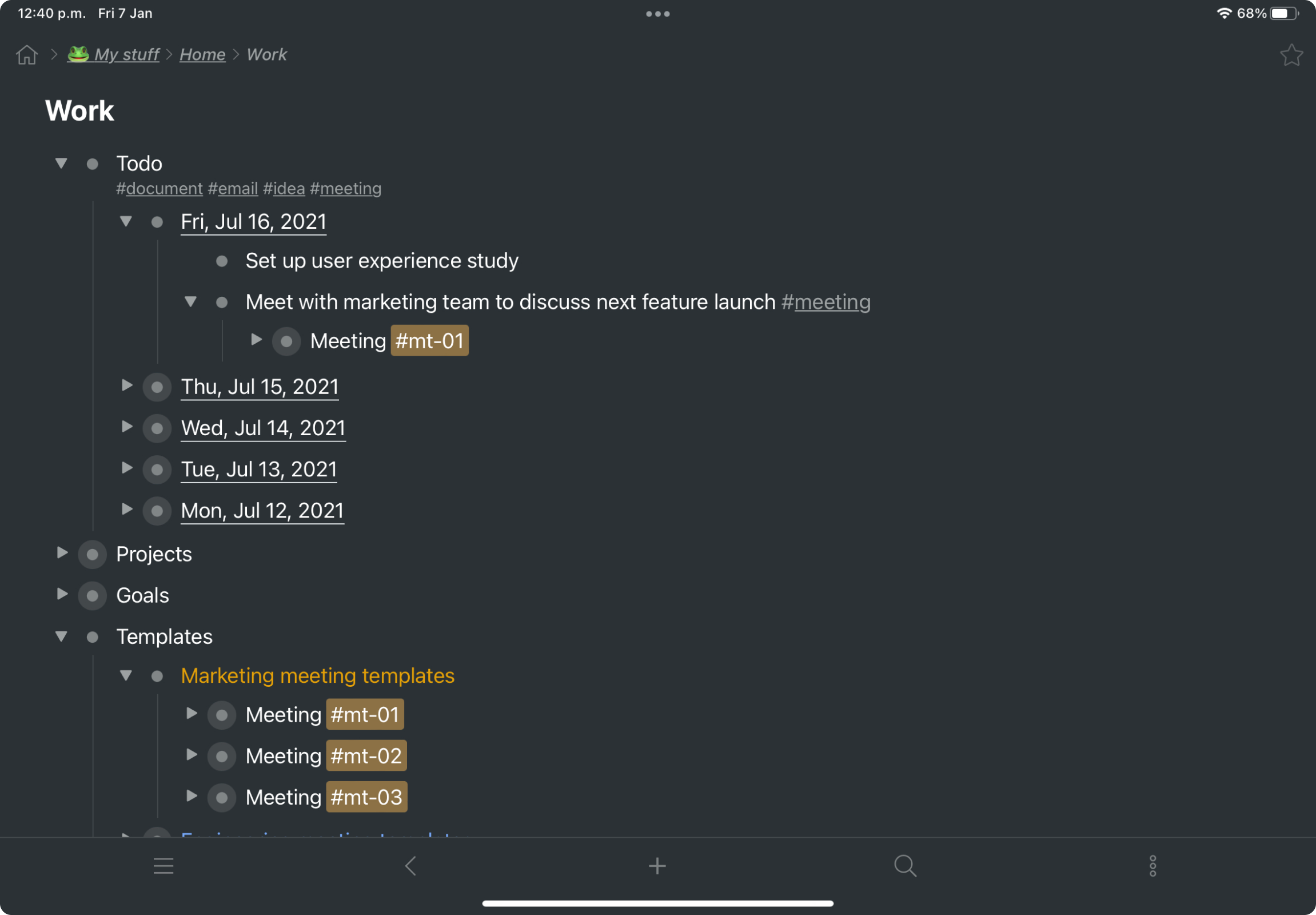
Screenshot of a kanban board in Workflowy, used to organize files and images.Screenshot of the interface to draft complex documents and artistic works while keeping everything organized.Screenshot of Workflowy's task management interface, where boards boards and lists can be managed and combined.Screenshot of item highlighting, with search by highlight color.Screenshot of tags, used to find anything in an account, no matter where it is.

Zoho Mail Screenshots

Screenshot of All in one viewScreenshot of CalendarScreenshot of TaskScreenshot of NotesScreenshot of Contact managementScreenshot of Instant Chat