

TrustRadius: an HG Insights company

Zoho Mail

Score9.2 out of 10

103 Reviews and Ratings

What is Zoho Mail?

Zoho offers their business email suite, which includes Calendar, Tasks, Notes, and Contacts bundled with an inbox.

Media

All in one view
Calendar
Task
Notes
Contact management
Instant Chat
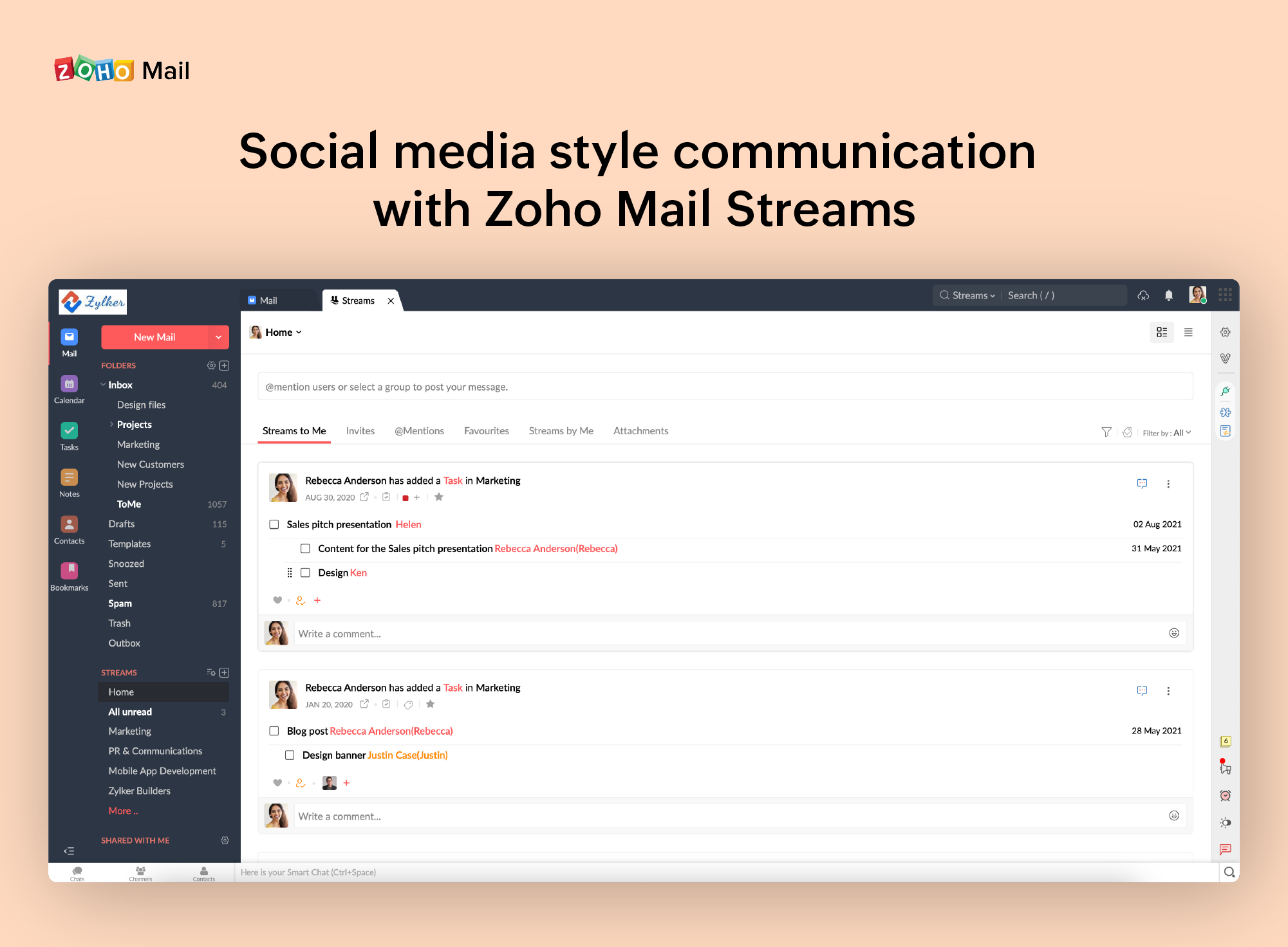
Zoho Mail Streams

1 / 7

Top Performing Features

  • Anti-malware

    Anti-malware is a type of software program designed to prevent, detect and remove malicious software

    Category average: 8.8

  • Data Loss Protection

    A set of tools and processes used to ensure that sensitive data is not lost, misused, or accessed by unauthorized users.

    Category average: 7.7

  • Management Tools

    Management tools include administrator dashboards, reports, etc.

    Category average: 8.4

Areas for Improvement

  • Customizability

    Customizing email security gateways can improve detection capabilities

    Category average: 7.8

  • Threat Detection

    Threat protection defend against sophisticated malware or hacking-based attacks targeting sensitive data.

    Category average: 8.5

  • Sandboxing

    Sandboxing is a software management strategy that isolates applications from critical system resources and other programs providing an extra layer of security

    Category average: 7.5

Great email product for business

Use Cases and Deployment Scope

We use Zoho Mail as our main email client. It works well. Great reminders. Can get alerts if required. Integrated Calendar. All the usual things. There is a desktop app that allows you to keep working even when you are offline - as well as the browser version (which is essentially the same UI). I can recommend it.

Pros

  • Groups conversations together
  • Seamless calendar integration
  • Very quick to launch
  • Manage several email accounts from one screen

Cons

  • It does allow for notifications for various things, but I am not sure where to turn them all off
  • It only counts to 9 the unread email alert, then says 9+
  • Overall I don't think there is much they need to work on.

Return on Investment

  • We have several email accounts for a low cost
  • Easy to train new staff on the system
  • Some confusion exists over Zoho One accounts and what is included

Usability

Alternatives Considered

Outlook4Gmail

Other Software Used

Zoho Calendar, Microsoft Edge, Slack

Zoho Mail With Best visibility in mobile and desktop - Easy to use

Use Cases and Deployment Scope

I have created a free account there for a client there are no issues while setup but in reflecting records to hosting and getting verified it take 2 days overall I didn't face any issues while using the mail and managing the client account and the greatest thing in Zoho this is free.

Pros

  • Its easy to use in Mobile
  • A fresher can easily use
  • Super admin pannel is also easy to use

Cons

  • No 1. in uploading appearance
  • No 2. Signatures option
  • No 3. when we copy paste there are major errors that we have to fix before sending so it takes double the time

Return on Investment

  • as is said before i have not taken paid version of Zoho
  • but for my use i have not seen any issues and no glitch

Alternatives Considered

Outlook4Gmail

Other Software Used

Google Analytics, Google Meet, AwsQuality Salesforce Services

Zoho Mail is the perfect email client for small and medium businesses

Pros

  • Set up your domain to have a professional account
  • Administration and management of information through cards and labels

Cons

  • When receiving an email with images that are not displayed automatically, you have to activate this function manually. It is a bit uncomfortable, I would prefer that it be activated automatically
  • The filter to search for information is not very accurate and unfriendly
  • The way to manage the storage capacity and to buy more space for the mail is not very friendly

Return on Investment

  • It has a direct impact on the commercial communications of the company since with this application we send the economic proposals for services.
  • Thanks to the fact that we can configure our corporate domain and a signature, we show a corporate professional image.
  • Allows you to manage and store internal and external communications

Other Software Used

Bitrix24, QuickBooks Online, Microsoft Excel

Personalized and 100% professional email for greater credibility.

Pros

  • I really like that there is a free version in which a single user can be created. It is really useful because it allows you to evaluate each characteristic of the service without having to buy it.
  • I also really like the visual aspect of the inbox, which is partially customizable. Because you can make small changes such as changing the color, the language, and among other things.

Cons

  • One of the biggest problems zoho mail has. It is that MX, SPF and DKIM records are never perfectly placed the first time you try to configure them. Whether you do them manually or automatically, something unexpected always happens.
  • Another negative aspect of this service. Is that when you receive a message with some type of image incorporated, it is not displayed correctly and a notification appears within the email that says Show now once you activate them is that the image is displayed correctly. I would like it to be activated automatically instead of manually. Although it is a minor problem.

Return on Investment

  • The most positive aspect that we have noticed after investing in this service. It is that now we have a better visual appearance and greater credibility with our customers and business partners.

Alternatives Considered

MailsDaddy

Other Software Used

Zoho CRM, Pipedrive, Kudos

Worth every bit of what you pay, compares to larger more expensive hosts.

Pros

  • Alerts to admins and users when mail box storage is close to full.
  • Downtime is almost non existent and has been reliable in the 2 years we have used it.
  • Managing user accounts via mobile app or web browser is simple once you get the hang of it.

Cons

  • Navigating around the admin menus is annoying. You can't sort alphabetically or by anything really. Where most programs you can click a header to sort, Zoho Mail does not contain this functionality. You have to sort through your users page by page until you find who you are looking for.
  • Unblocking users is a common occurrence because of the extremely sensitive rules they have in place server side. They claim no mass marketing but we have several salesmen who have to send the same invoice and information to multiple people within our company and they constantly get marked as spam, blocked, then I have to unblock them.
  • Things are named strangely in the back end. There is something similar to Google's filtering for promotional emails and social emails that Zoho has tried to implement, but it is on by default and cannot be shut off for everyone in one fell swoop. You have to have every single user log into the web portal to disable "streams" or emails that Zoho decides fits a certain criteria will skip the inbox and show up in a folder called "Notifications" or "Messages" and it took a very long time for my users to get used to needing to search this additional set of folders.

Return on Investment

  • We have saved a lot of money using Zoho over our previous provider for essentially the same functionality. We went from our ISP hosting our email which had insanely small storage per user and constantly had issues with delivery and are now paying less and getting the same or more in return.
  • I have had to train employees on what to look out for as emails bounce back often and if one email is sent to many users, one failed email address will stop all recipients from receiving the communication.
  • The alerts are awesome for storage capacity and allows users to manage their own inboxes and mail clients BEFORE the capacity is reached to avoid missing emails.

Other Software Used

SpamTitan
