TrustRadius: an HG Insights company

Autodesk Forma Build

Score9.6 out of 10

157 Reviews and Ratings

What is Autodesk Forma Build?

Autodesk Forma Build, previously known as Autodesk Build and originally based on PlanGrid, is a Construction Management and Job Site Management application within the Autodesk Forma suite. It provides contractors, owners, and subcontractors with a unified platform for project collaboration and information management across the construction and operations lifecycle.

Read more details.

Media

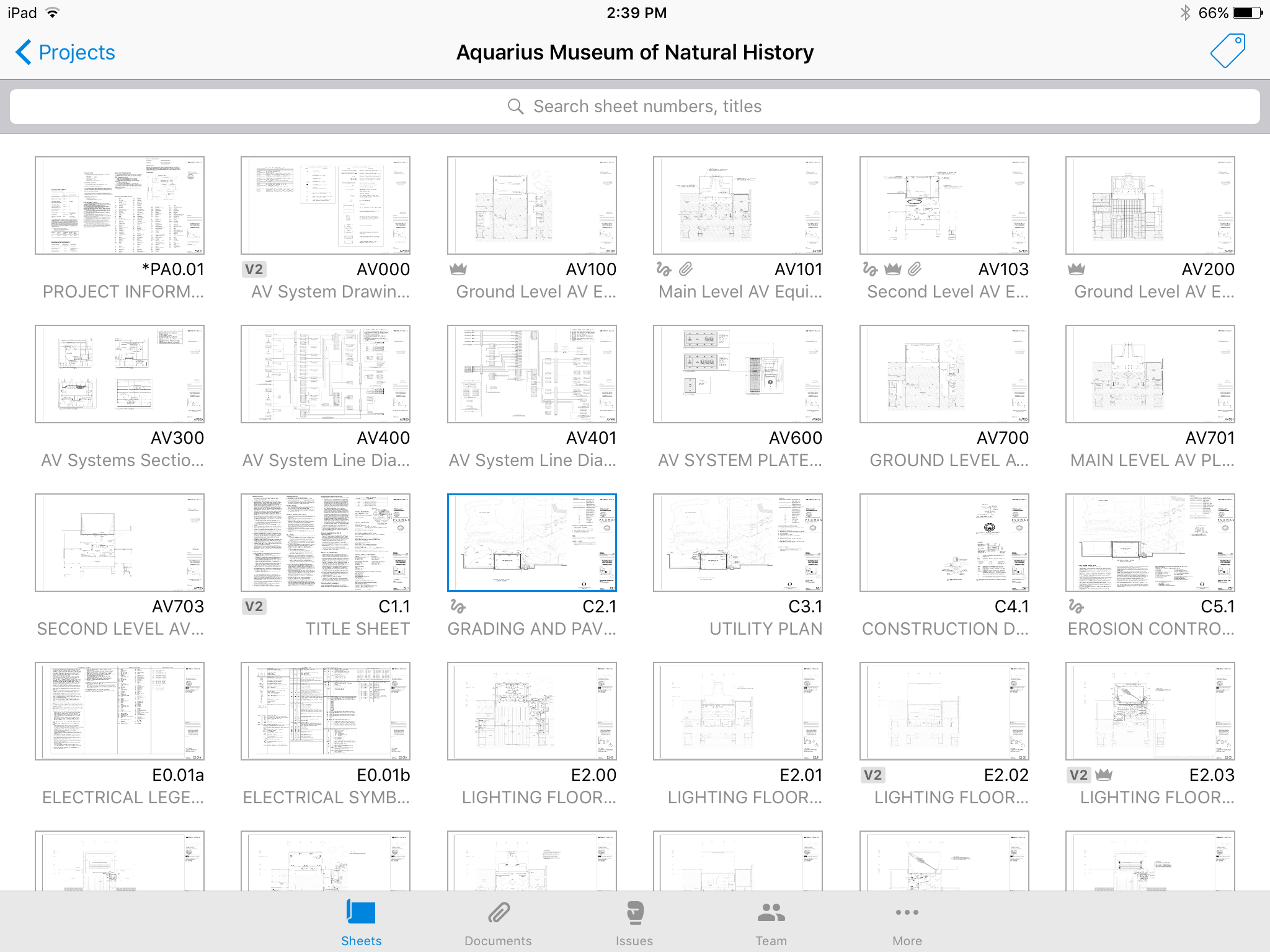
Screenshot of No confusing folders - all your plans at your fingertips.
Screenshot of Easy overlay to visually detect changes or clashes.
Screenshot of Track issues directly on the plan, including descriptions, photos, cost, and schedule impacts.
Screenshot of Mark up plans for instant communication between field and office.
Screenshot of Attach any kind of construction documents to your plans, including 360 photos.
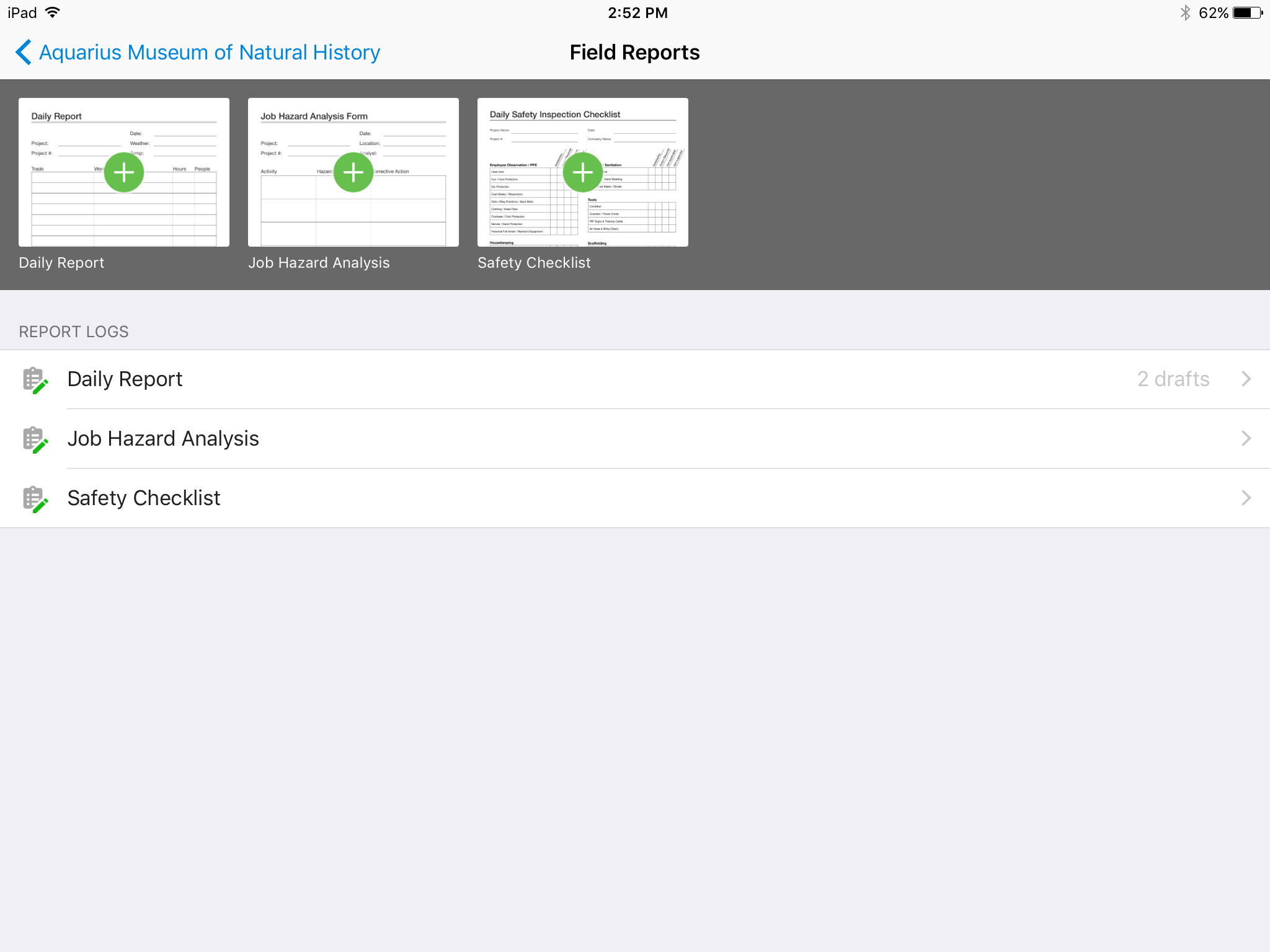
Screenshot of Track, review, and submit all your field reports on a mobile device.

1 / 6

Screenshot of No confusing folders - all your plans at your fingertips.

Top Performing Features

  • Meeting Minutes

    Tools that help you keep track of minutes in meetings.

    Category average: 7.7

  • Collaboration & approvals

    Users can comment, send messages, and/or approve documents.

    Category average: 8.1

  • Issue tracking & punchlists

    Users can track issues from the field, and create punchlists upon substantial completion.

    Category average: 8.5

Areas for Improvement

  • Jobsite reports

    Users can create and share reports on jobsite safety, daily progress, etc.

    Category average: 8.1

  • Specifications

    Construction specifications, also called specs, are the details for the work that needs to be completed in a construction project.

    Category average: 8.2

  • As-built drawings

    Users can generate as-built drawings upon project completion, to reflect the exact dimensions and materials of the final work, including any changes made to the initial plans during the construction process.

    Category average: 7.9

Who Buys & Uses Autodesk Forma Build

Autodesk Forma - The next generation of construction management

Use Cases and Deployment Scope

At Malitz Construction we used Autodesk Forma as the one platform for managing plans, specifications, RFI's, Submittals, pictures, daily reports and closing documents. We also use Autodesk Forma as historical database, in that we can pull up any of our projects at anytime, anywhere to resolve issues or questions that our client may have. It is also useful to show new clients projects that we have done and the process we take to construct the buildings. My personal favorite is this software can be used on a computer, iPad or iPhone (and android devices as well) seamlessly and it is also available to all of our subcontractors, vendors, clients and A&E team free of charge under our own account. This helps all of us stay on the same page at all times.

Pros

  • Organizing plans revisions and highlighting the difference between old to new files.
  • Plan overlay. You can overlay new to old pages, but you can also overlay Architectural plans with the MEP Pages to see how they compare. Very useful for example with RCP to make sure that Lighting, HVAC Grills and fire sprinklers all have their own spots to be located.
  • Submittal processing. It can adapt to those who use the software to process the submittal and to those who don't. It is easy to accommodate users who prefer the old style of submittals or those who prefer the new way. It also has its own submittal approval page, or you can upload your own. It also has approval stamps each party can use. I also like that it has the submittal system, but you can also store the final document in "Files" for those who don't like to navigate the submittal system to find the information they need
  • Punch list process is the easist one I have ever used. So easy for the team to adapt and user friendly. I have found more people use Autodesk Formas Punch list feature compared to any other software I have used.

Cons

  • I would like a more seamless transition from Building Connected to Autodesk Forma. We have to build the team in Building Connected and then rebuild it again in Forma.
  • Ability to delete submittals and not loose the submittal number. I would like to reuse the submittal number if I delete it.

Return on Investment

  • Our clients like that we use technology to track progress and not old school paper. as a result we get more work from clients.
  • Our clients like that we can transmit an electronic copy of the plans and files instead of paper files.
  • We have a significant reduction in paper cost, plan printing, submittal printing, storing of paper in file drawers and archive storage containers

Usability

Alternatives Considered

Procore

Other Software Used

Procore, Microsoft Project, Microsoft Excel

Best in Class Construction Management Software - Hands Down

Use Cases and Deployment Scope

Autodesk Construction Cloud creates a one-stop solution for managing construction documents from correspondence, invoices, pay applications, change orders, submittals, RFIs, and meeting minutes. The ability to interconnect items is a huge time saver. For example, when taking meeting minutes, you can link an RFI/Submittal/issue to the agenda item so you are aren't having to go to a different module to find the item. The ease of assigning tasks and due dates to items encourages accountability. The ability to customize modules/reports/views is very intuitive and appreciated. It's easy to use out of the box and then allows you to increase the breadth and depth of the integration into your organization.

Pros

  • Meeting Minutes: Simple to use and adapt from Agenda to Minutes, attach reference documents efficiently, and assign accountability to attendees.
  • Budget/Cost Reporting: There is a learning curve, but the visibility of budgets and costs from inception to closeout is beneficial for the user and makes reporting to investors simple and consistent.
  • Document Management: The version history on drawings "sheets" is very helpful when managing a project through design and construction. Issuing addenda, drawings, or tracking down a change in design is simple.
  • Pay Applications/Change Order Workflow: the customizable workflows along with time stamps of reviews and response makes tracking down status and bottlenecks very easy.

Cons

  • External Users: The ability to have external users review and respond to items or even just distribute items like invoices for example would be beneficial.
  • Budget Format: There are so many layers to budgets/contract/etc. When you need to update a budget code, it feels like you need to do it in 3 places in 3 different ways to make it take effect.
  • User Management: This has become easier since you don't have to login to a different system anymore but is still a bit cumbersome.
  • Program Tracking: The ability to have multiple projects roll-up under a program would be a suggestion.
  • Dashboard: The ability to have a dashboard reporting across multiple projects by type/region/program/etc.

Return on Investment

  • Consistent processes for a development team to manage a portfolio of projects using different designers and contractors.
  • Improved reporting and tracking to investors. We are able to provide our clients a consistent product when it comes to change orders, pay applications, and cost reports. This increases our professionalism and reduces the amount of time wasted in creating/updating excel sheets.

Usability

Alternatives Considered

Procore, Oracle JD Edwards EnterpriseOne and Constructware (discontinued)

Other Software Used

Bluebeam, Microsoft 365

Great value

Use Cases and Deployment Scope

We use it to keep track of submittals and RFIs in construction. By having one cloud platform, it stops documents from getting lost in emails. It also eliminates the need for a separate to-do list per project, as all consultants can see what needs to be done and the status of each task. I also use it to see the most up to date project documents.

Pros

  • Easy to view submittal/RFI status
  • Assigning roles to certain consultants

Cons

  • The ability to customize RFI/submittal responses (some clients have separate preferences)

Return on Investment

  • Positively impacts productivity!

Usability

Alternatives Considered

Procore

Other Software Used

Procore, Oracle Primavera Submittal Exchange

Autodesk Build Review

Use Cases and Deployment Scope

Autodesk Build is the home of all our files and BIM sheets. Constant site monitoring reports are used on the build page such as forms, meetings, reports, sheets, schedule, files, and photos. Autodesk Build allows us to have all of our files for specific project, all easily accessible in one online cloud platform.

Pros

  • File management
  • Collaboration
  • Time saving

Cons

  • Files, making the files system easier to navigate and find files.
  • More ability to alter meeting templates to be used in multiple ways.
  • The sheets tool - has a hard time loading large sheet packages, and scrolling between sheets or files is not possible making review online harder then downloading a pdf.

Return on Investment

  • Autodesk Build increases time saved on modest tasks
  • Allows workers to focus on larger tasks now that admin work can be sorted out by Autodesk Build
  • Autodesk Build allows us to manage more projects and increase work load without increasing employees

Usability

Alternatives Considered

Procore

Other Software Used

monday.com, Adobe Acrobat, Collage HR, DocuSign, QuickBooks Online, Miro

Nothing for Something

Pros

  • [In my opinion] sell their product.
  • [In my experience] invoice for a product you don't use

Cons

  • Make product more user friendly.
  • Get rid of shady billing practices.

Return on Investment

  • We were unable to place this into operation at our business so no ROI

Other Software Used

QuickBooks Online, WinZip
