TrustRadius: an HG Insights company

ChatBot.com

Score9 out of 10

13 Reviews and Ratings

What is ChatBot.com?

ChatBot.com is a cloud-based conversational automation platform for customer service, ecommerce, and lead generation. Organizations configure AI Agents using their websites, help centers, product documentation, uploaded files, and manually created articles as knowledge sources.

Key Capabilities

  • Automated Customer Service: AI Agents answer customer questions using organization-provided content rather than general internet sources.
  • Ecommerce Assistance: Agents can recommend products, collect lead information, provide discount codes, and assist shoppers during checkout.
  • Human Handoff: Conversations requiring human review transfer to an agent in the Text.com inbox with the conversation history preserved.
  • Natural-Language Configuration: Teams define an agent’s role, instructions, tone, response length, and operating limits using written prompts.
  • Agent Skills: Configurable skills allow an AI Agent to create tickets, route conversations, collect customer details, and perform supported business actions.
  • Knowledge Management: Administrators can select, exclude, refresh, or disable individual knowledge sources.
  • Multiple Agents: Supported plans allow organizations to configure multiple AI Agents with separate instructions, knowledge sources, skills, and communication channels.

Integrations
ChatBot.com provides integrations for LiveChat, HelpDesk, KnowledgeBase, Shopify, Facebook Messenger, WordPress, Webflow, Slack, and Zapier. Website deployment options also support BigCommerce, Squarespace, and Wix.

An application programming interface (API) and webhooks support connections with internal systems, databases, and additional third-party applications. Webhook implementations require technical configuration. Current connectors are listed in the official integration directory.

Platform Context
ChatBot.com operates within the Text.com customer service platform. AI-managed conversations, live chats, and support tickets can be routed through a shared Text.com inbox. The platform can therefore connect automated responses with the live-chat and ticket-management functions provided by other Text.com products.

Vendor-Reported Outcomes
Vendor-published case studies associate ChatBot.com deployments with additional ecommerce revenue, reduced communication time, and automated handling of customer requests. The vendor also reports that resolution rates increase when organizations configure relevant knowledge sources. These results are customer-specific and should not be treated as independent performance benchmarks.

Audience & Use Cases

  • Audience: Customer service teams, ecommerce operators, sales teams, and support administrators.
  • Use Cases: Frequently asked question handling, product recommendations, lead capture, checkout assistance, ticket creation, conversation routing, and after-hours support.

Technical Specifications

  • Deployment: Cloud-based web application
  • Customer Channels: Website chat, email, Facebook Messenger, and supported mobile or ecommerce integrations
  • Extensibility: API and webhook access
  • Entry Pricing: As of July 2026, the Essential plan starts at $19 per user per month with annual billing or $25 per user with monthly billing.
  • Trial: The vendor offers a 14-day trial without requiring a credit card.

Plans impose different limits on AI Agents, automated resolutions, API calls, and other features. Current terms are available on the official ChatBot.com pricing page.

Categories & Use Cases

Media

Screenshot of Chatbot conversations are automatically archived, allowing users to analyze and improve their story flows.
Screenshot of With ChatBot you can control the entire conversation flow.
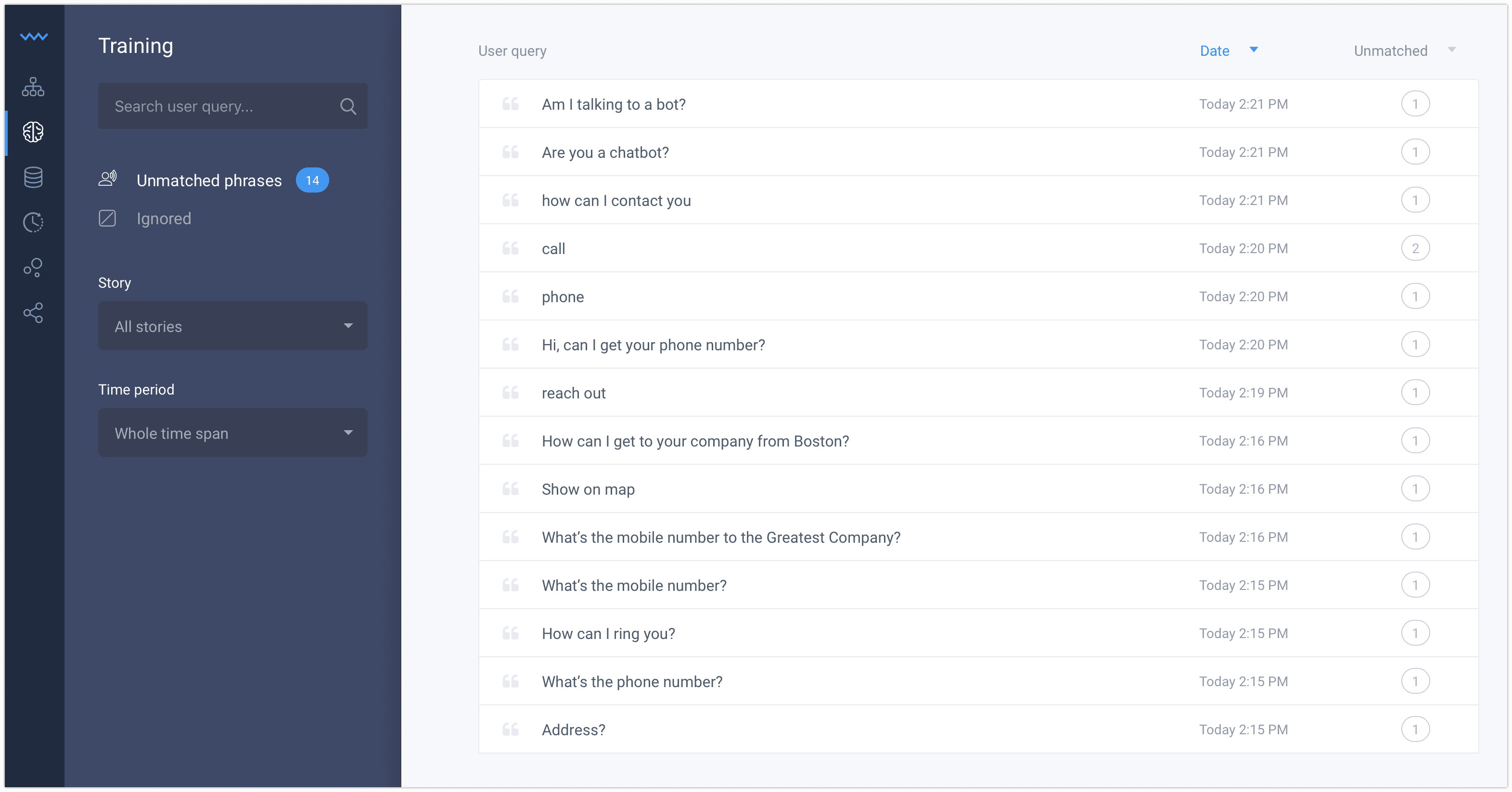
Screenshot of Improve your chatbot day by day using the training tool.
Screenshot of Save your time importing a ready to use template and turn it into your own bot assistant.
Screenshot of Stories are an intuitive way to tell the bot how to react to different situations. Create Stories for frequent questions and cases to save more time for the difficult ones.
Screenshot of To create a fully operating chatbot you don’t need any other tools or apps. The scenario tree structure and drag and drop interface are very intuitive.
Screenshot of Connect the tools you already know and love using one-click integrations
Screenshot of Our AI & Machine Learning technology lets you continually improve your bot by collecting and analyzing historical chat data

1 / 8

Screenshot of Chatbot conversations are automatically archived, allowing users to analyze and improve their story flows.

Top Performing Features

  • Chat history and transcripts

    Enables users to visualize past conversations and notes.

    Category average: 8.9

  • Chat and web analytics

    Analytics that enable the tracking of user website visits and chat box interactions.

    Category average: 8.3

  • Chat reporting

    Standard or customizable reports with user engagement metrics.

    Category average: 8.2

Areas for Improvement

Who Buys & Uses ChatBot.com

ChatBot - a 24/7, real-time help for students questions!

Use Cases and Deployment Scope

We use ChatBot to help our students navigate the website better. It helps them find answers quickly and us - knowing the frequently asked questions.

Pros

  • Finding answers.
  • Tracking questions asked by students.
  • Questions asked from other schools.

Cons

  • Getting answers from other sources or databases.
  • Better customizable dashboards.
  • Collaboration with another school/sharing questions.

Return on Investment

  • Connecting to DB.
  • Customizable dashboards.
  • Automated reporting.

Usability

Other Software Used

Ellucian Colleague, Entrinsik Informer, eLumen

Great tool for starting with a bot solution for your platform!

Use Cases and Deployment Scope

We have deployed ChatBot on our website, we use it to filter our visitors based on their requirements. Sales - get routed to the sales team. Support - gets routed to the support team and visitors looking for Self help are directed to our help section. Since, we have various products, visitors / prospects looking for information regarding certain products are also directed to the relevant product page to read for more information.

Pros

  • Routing rules
  • no code workflows
  • UI/UX is excellent for a newbie to start on
  • Their Chat support is very helpful

Cons

  • I think the pricing could be a little more competitive

Return on Investment

  • It impacts the way our lead flows into the system
  • It helps us route our leads effectively.
  • It saves us costs on human intervention during the initial visit of the prospect

Usability

Alternatives Considered

LiveChat

Other Software Used

HubSpot CRM, Seamless.AI, Apollo.io, LinkedIn Sales Navigator

ChatBot: I will do the Heavy lifting you can focus on quality.

Use Cases and Deployment Scope

ChatBot is used in our organization as a support tool for the maintenance team when the customer asks some common questions that are relevant to the services that we are offering. It helps a lot by reducing the huge load on the team. It also helps to make the UI better and more interactive.

Pros

  • Answering most of the FAQs.
  • Sending users in the right direction rather then going from one support staff to other.
  • Reduces unnecessary load from the the team

Cons

  • Solution should also have a dashboard to view the customer analytics
  • some times user typed long sentences it should decipher most common word from it.
  • Options to use native UI

Most Important Features

  • integration with other softwares like Slack.
  • prebuild chat templates
  • segments and filters

Return on Investment

  • It reduced heavy load from team.
  • Customers are more satisfied
  • Handling time of a customer is reduced significantly.

Alternatives Considered

Kore.ai

Other Software Used

Slack, Google Meet, Zoom

Chatbot or not to chat with a bot - that is the question!

Pros

  • Superb for interactive form filling.
  • Great for standard messages and relaying information.
  • Out-of-house assistance and redirecting or capturing followup details.

Cons

  • Having enough conversational data to train the chatbot.
  • Really understanding intent.
  • Understanding emotion.

Return on Investment

  • Good customer engagement levels (positive intent recognition).
  • Positive CSAT.
  • Not enough volume yet to have a cost ROI.

Alternatives Considered

Genesys PureConnect, AWS Lambda and IBM Watson Assistant

Other Software Used

Genesys PureConnect, AWS Lambda, Azure Bot Service