AdNativia vs. Adobe Advertising Cloud

Overview
ProductRatingMost Used ByProduct SummaryStarting Price
AdNativia
Score 0.0 out of 10
N/A
AdNativia is a platform for native advertising headquartered in the United Kingdom, specializing in the dissemination of ads through "recommended" content across a wide spectrum of popular media portals. This approach ensures that advertisements integrated into the user experience are less intrusive and more engaging for the audience. The vendor states that geographically, the platform is most popular in Europe, with a particular focus on the markets of Germany,…
$0.01
Adobe Advertising Cloud
Score 8.8 out of 10
N/A
AdobeAdvertising Cloud (formerly Adobe Media Optimizer) is an ad management product and is part of the Adobe Marketing Cloud. It delivers a rules-based bidding solution that improves the performance of search engine marketing campaigns and is integrated with Adobe Analytics.N/A
Pricing
AdNativiaAdobe Advertising Cloud
Editions & Modules
No answers on this topic
Offerings
Pricing Offerings
AdNativiaAdobe Advertising Cloud
Free Trial
NoNo
Free/Freemium Version
NoNo
Premium Consulting/Integration Services
NoNo
Entry-level Setup FeeNo setup feeNo setup fee
Additional Details
More Pricing Information
Community Pulse
AdNativiaAdobe Advertising Cloud
Features
AdNativiaAdobe Advertising Cloud
Ad Network Integration
Comparison of Ad Network Integration features of Product A and Product B
AdNativia
-
Ratings
Adobe Advertising Cloud
7.5
9 Ratings
2% above category average
Data Transfer00 Ratings8.09 Ratings
DSP integration00 Ratings7.09 Ratings
Ad Campaigns
Comparison of Ad Campaigns features of Product A and Product B
AdNativia
-
Ratings
Adobe Advertising Cloud
8.6
10 Ratings
9% above category average
Ad campaign creation00 Ratings9.010 Ratings
Ad deployment00 Ratings9.010 Ratings
Display advertising00 Ratings8.010 Ratings
Ad display and retargeting segmentation00 Ratings9.010 Ratings
Sequence targeting00 Ratings8.09 Ratings
Ad Reporting & Analytics
Comparison of Ad Reporting & Analytics features of Product A and Product B
AdNativia
-
Ratings
Adobe Advertising Cloud
8.5
10 Ratings
9% above category average
Ad dashboards00 Ratings9.010 Ratings
Ad performance reports00 Ratings10.010 Ratings
Ad conversion tracking00 Ratings8.08 Ratings
Ad attribution reporting00 Ratings8.09 Ratings
Cross-channel ad management00 Ratings9.09 Ratings
Ad forecasting and optimization00 Ratings7.28 Ratings
Best Alternatives
AdNativiaAdobe Advertising Cloud
Small Businesses
Amazon Advertising Sponsored Products
Score 7.7 out of 10
Criteo Commerce Growth
Score 8.0 out of 10
Medium-sized Companies
Amazon Advertising Sponsored Products
Score 7.7 out of 10
The Trade Desk
The Trade Desk
Score 9.0 out of 10
Enterprises
LinkedIn Marketing Solutions
Score 8.5 out of 10
Criteo Commerce Growth
Score 8.0 out of 10
All AlternativesView all alternativesView all alternatives
User Ratings
AdNativiaAdobe Advertising Cloud
Likelihood to Recommend
-
(0 ratings)
9.0
(17 ratings)
Likelihood to Renew
-
(0 ratings)
1.8
(2 ratings)
Usability
-
(0 ratings)
8.0
(2 ratings)
Support Rating
-
(0 ratings)
3.3
(4 ratings)
Implementation Rating
-
(0 ratings)
8.0
(1 ratings)
User Testimonials
AdNativiaAdobe Advertising Cloud
Likelihood to Recommend
AdNativia
No answers on this topic
Adobe
I think it is good to keep in mind the type of business application you have in mind when selecting Media Optimizer for your company. For us, as an agency, it makes sense for us to utilize the reporting and paid search optimizing portions for our clients as we manage over 300+ clients PPC campaigns. With this tool it is possible to set up campaigns easily and as long as the parameters are set correctly within the portfolio, there is a great opportunity for the tool to do its job and use the simulation/modeling process to run and grow a paid search campaign with ease of human interaction.
Read full review
Pros
AdNativia
No answers on this topic
Adobe
  • An all in one solution for so many things that range from advertising campaigns to pushing out content to PPC.
  • Integration for many channels without much setup, this includes lesser known search engines and various social media partners.
  • Automation for delegating many tasks that can be a hassle to accomplish.
Read full review
Cons
AdNativia
No answers on this topic
Adobe
  • As with most Adobe products, it can be a little tedious to use and requires a bit of extra training and "googling" around to make sure you are getting things right. It has improved over time within the entire Adobe suite, and I anticipate that this will be true of this as well.
  • Adobe training and learning platforms can include a lot of technical terminology and jargon that makes it difficult for a novice to understand without feeling like they need a whole new education.
Read full review
Likelihood to Renew
AdNativia
No answers on this topic
Adobe
As of this writing, we have just discontinued our use of Adobe Media Optimizer. Other vendors gave us a better rate, a better contract option, and the product is just better than what we had with Adobe at the time. We may revisit Adobe again at the future, but it seems like they have a lot of work to do to catch up with the leader in the space
Read full review
Usability
AdNativia
No answers on this topic
Adobe
It definitely takes some instruction to get to be able to use the system. One would struggle trying to get it to work without any previous experience with it. If you are famailiar with the interface it is actually quite fast and easy to maneuver around.
Read full review
Support Rating
AdNativia
No answers on this topic
Adobe
They are super knowledgable and help in almost all situations, however sometimes I feel they put you on hold to find the answers themselves as they literally have said. "Can you hold a few minutes while I research that answer for you?" Most of the time they come back with a solution, other times they manually escalate it to someone else.
Read full review
Implementation Rating
AdNativia
No answers on this topic
Adobe
It was difficult initially, but the implementation of the Dynamic Tag Manager was a big help and timesaver.
Read full review
Alternatives Considered
AdNativia
No answers on this topic
Adobe
It was a step up from Marin in terms of UI. Very similar functionality to Marin. Compared to Kenshoo Search and Google Marketing Platform it was probably not as advanced but offered the benefit of integrating with other products in the Adobe stack like Adobe Analytics, Adobe Target, and Adobe Campaign.
Read full review
Return on Investment
AdNativia
No answers on this topic
Adobe
  • This has increased the number of clients.
  • This has increased the amount of productivity and time we can spend on clients.
  • This has increased the overall revenue because we can handle more than we used to be able to handle without this tool.
Read full review
ScreenShots

AdNativia Screenshots

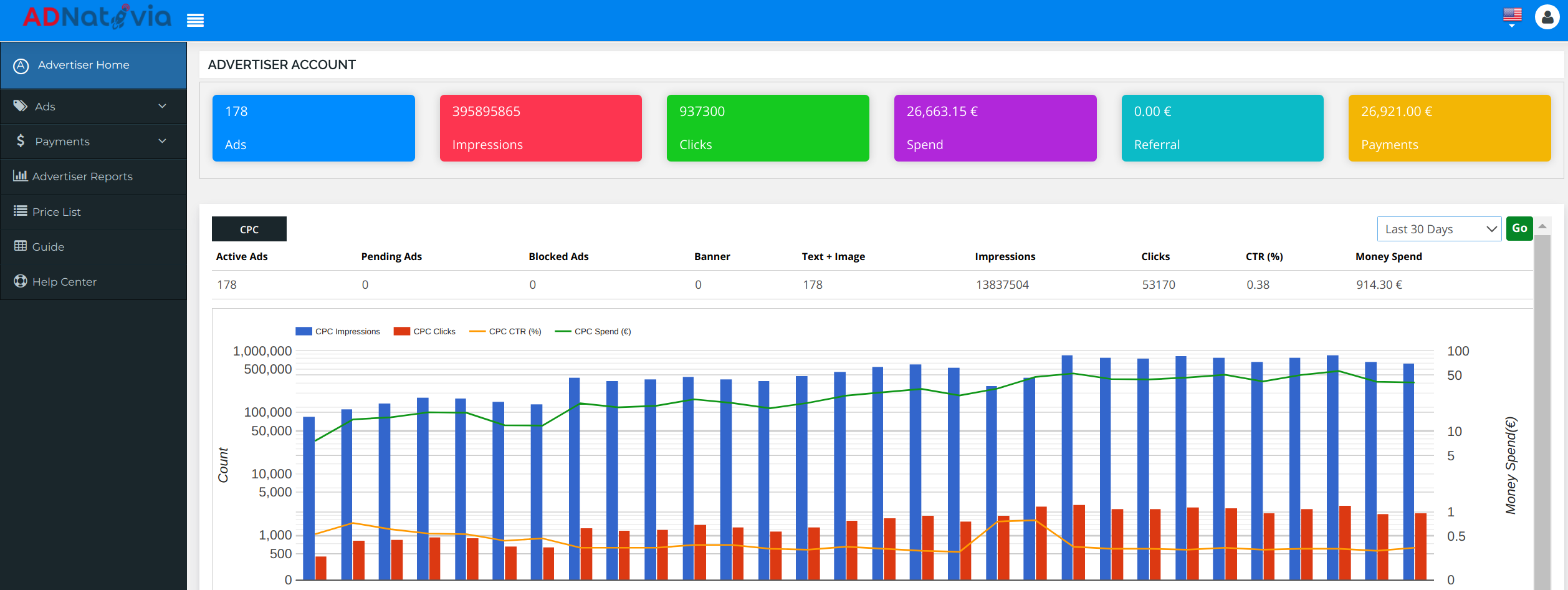
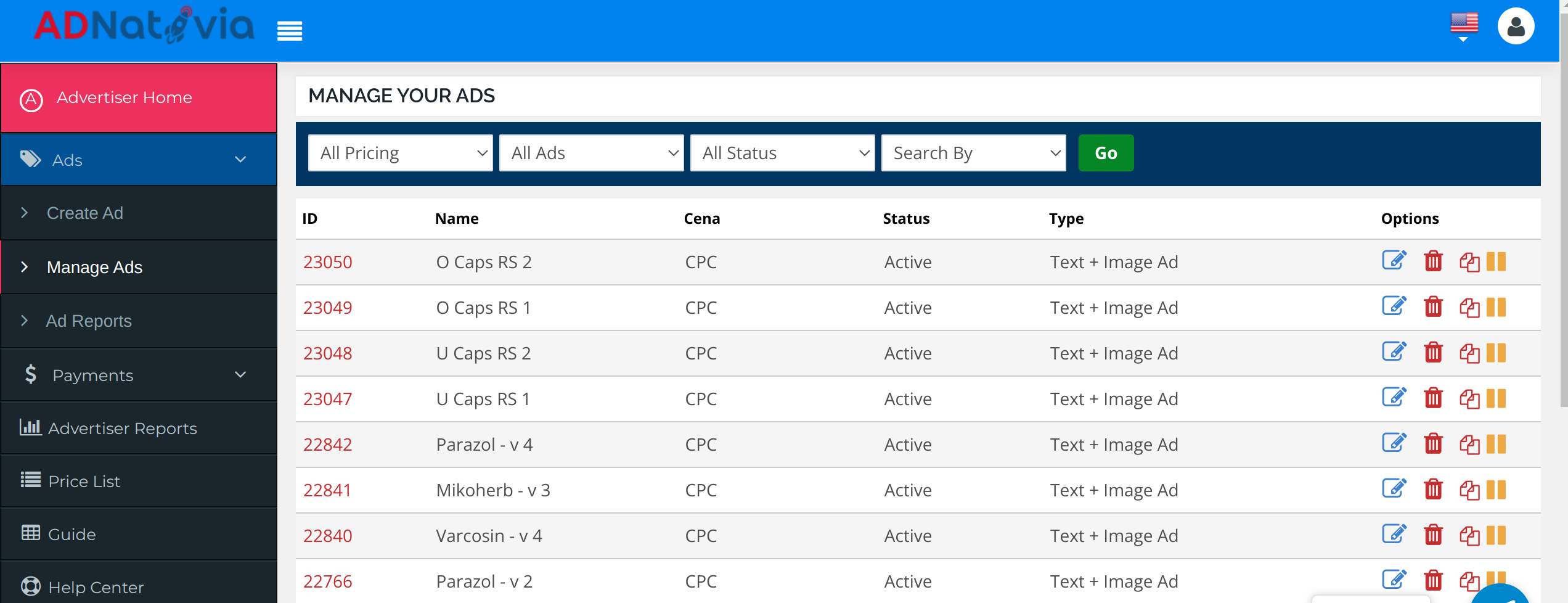
Screenshot of a dashboard screenshot from AdNativia that provides an overview of an advertiser’s account performance. The interface displays key metrics such as the total number of ads running, impressions, clicks, and overall spend, allowing for tracking and analysis of advertising campaigns. With a glance, one can appreciate the volume of traffic generated and the efficacy of the ads, highlighted by the number of clicks versus impressions. The graph at the bottom illustrates the trends over the last 30 days, presenting a comparative view of CPC impressions, clicks, and click-through rate (CTR) against the budget spent. This visual representation is an example of AdNativia’s approach to data transparency and its commitment to enabling advertisers to monitor and optimize their campaigns.Screenshot of a screenshot from the AdNativia platform that showcases the 'Manage Your Ads' section, which provides a user-friendly and efficient management system for advertisers' campaigns. The interface reveals various options for each ad campaign, such as the ability to edit, pause, or even clone an ad, giving advertisers the flexibility to quickly duplicate successful campaigns without starting from scratch. Each ad is listed with an ID, name, pricing model (CPC - Cost Per Click), current status (e.g., Active), and type (Text + Image Ad).Screenshot of a screenshot that displays the 'Create Ad' interface of the AdNativia platform, highlighting the initial step in crafting an advertisement. Here, advertisers can begin the ad creation process by entering essential details such as the ad's name, title, and the click-through URL that leads potential customers to their designated webpage. 

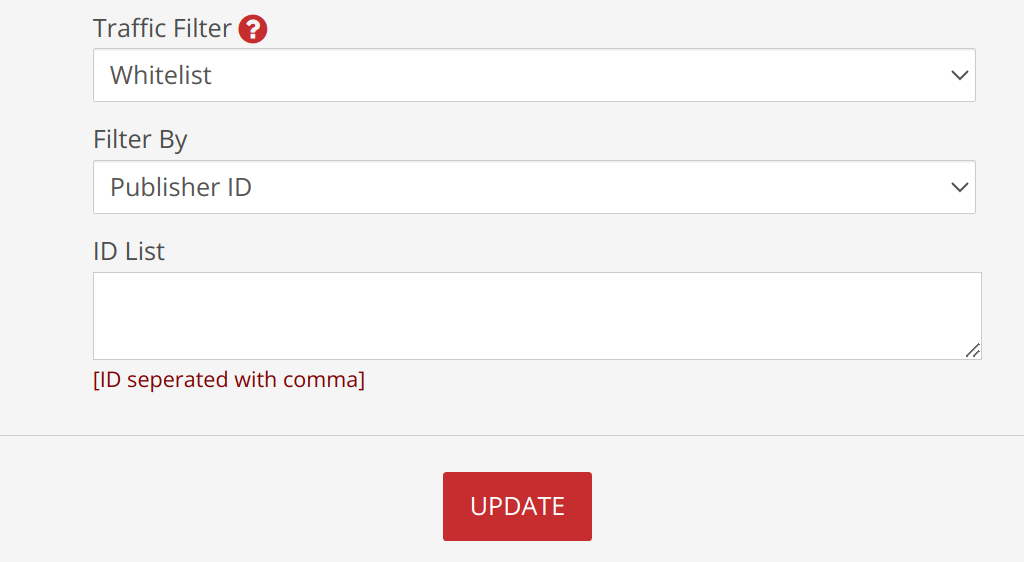
The process's step-by-step progression marked at the top, guides users from ad information to pricing, to ensure a seamless creation experience.Screenshot of a screenshot that presents the 'Traffic Filter' feature within the AdNativia platform, a tool that enables advertisers to curate the flow of traffic towards their ads. With options such as "Whitelist" or "Blacklist," advertisers can specify whether to exclusively allow or block traffic from certain sources. The "Filter By" dropdown menu is set to "Publisher ID," suggesting that advertisers can target or exclude specific publishers from displaying their ads.

Below this, the "ID List" textbox awaits a list of Publisher IDs, separated by commas, which provides a straightforward method for advertisers to fine-tune where their ads will appear. This specificity allows for greater control over the ad spend and enhances the ability to target ads more effectively to the desired audience.

The addition of macro commands offers advanced customization for tracking and optimizing ad performance. Macros like `{CAMPAIGN_ID}`, `{USER_IP}`, `{COUNTRY}`, `{DOMAIN_ID}`, `{DOMAIN_ENC}`, `{PUBLISHER_ID}`, `{PLACEMENT_ID}`, `{CLICK_ID}`, and `{CLICK_COST}` can dynamically insert relevant data points into the ad URLs, allowing for granular tracking of user interaction with the ads. These tools are essential for advertisers who want to analyze data and optimize their campaigns based on user behavior and ad placement performance.Screenshot of The screenshot highlights the 'Budget Settings' section of the AdNativia platform, where advertisers can fine-tune their campaign costs according to the quality of traffic they desire. With options to select from Top Level, Middle, and Low traffic quality, each with corresponding Cost Per Click (CPC) rates, advertisers have the flexibility to allocate their budget efficiently. 

For precise budget management, the platform allows setting different CPC rates for each traffic quality tier—Top Level CPC, Middle Level CPC, and Low Level CPC—with minimum rate thresholds to maintain competitive pricing.