Adobe Acrobat Reader vs. OpenText XM Fax

Overview
ProductRatingMost Used ByProduct SummaryStarting Price
Adobe Acrobat Reader
Score 8.6 out of 10
N/A
Acrobat Reader is a PDF viewer and converter, available as a free download from Adobe. Users can view, sign, collaborate on and annotate PDF files, or edit and convert PDFs into file formats like Excel and Word.N/A
OpenText XM Fax
Score 10.0 out of 10
Small Businesses (1-50 employees)
XM Fax, now from OpenText (acquired March 2020) is a software-based solution for sending and receiving confidential faxes by email. It allows secure transmission of highly sensitive documents, using standardized T.38 Fax-over-IP and G.711 Fax Pass-Through protocols. The vendor says it is easy to install, and faxes can be sent using a desktop client (SendFAX), email clients (MS outlook), networked MFPs or via Web Services. According to the vendor, one of the main benefits of using XM Fax…N/A
Pricing
Adobe Acrobat ReaderOpenText XM Fax
Editions & Modules
No answers on this topic
Offerings
Pricing Offerings
Adobe Acrobat ReaderOpenText XM Fax
Free Trial
NoYes
Free/Freemium Version
NoNo
Premium Consulting/Integration Services
NoNo
Entry-level Setup FeeNo setup feeOptional
Additional Details
More Pricing Information
Community Pulse
Adobe Acrobat ReaderOpenText XM Fax
Features
Adobe Acrobat ReaderOpenText XM Fax
PDF Editors
Comparison of PDF Editors features of Product A and Product B
Adobe Acrobat Reader
9.1
2 Ratings
4% above category average
OpenText XM Fax
-
Ratings
Edit Text and Images9.02 Ratings00 Ratings
Merge or Split PDFs9.52 Ratings00 Ratings
Add Annotations9.02 Ratings00 Ratings
Text Recognition (OCR)8.02 Ratings00 Ratings
Page Management8.52 Ratings00 Ratings
Form Creation and Editing10.01 Ratings00 Ratings
Secure PDFs10.01 Ratings00 Ratings
Convert to Different Formats9.02 Ratings00 Ratings
Comment and Review Tools9.02 Ratings00 Ratings
Undo and Redo Actions8.52 Ratings00 Ratings
Best Alternatives
Adobe Acrobat ReaderOpenText XM Fax
Small Businesses
Tungsten Power PDF
Tungsten Power PDF
Score 9.8 out of 10

No answers on this topic

Medium-sized Companies
pdfFiller
pdfFiller
Score 9.0 out of 10

No answers on this topic

Enterprises
Bluebeam
Bluebeam
Score 9.2 out of 10

No answers on this topic

All AlternativesView all alternativesView all alternatives
User Ratings
Adobe Acrobat ReaderOpenText XM Fax
Likelihood to Recommend
9.5
(75 ratings)
10.0
(9 ratings)
Likelihood to Renew
7.2
(2 ratings)
-
(0 ratings)
Usability
9.5
(3 ratings)
-
(0 ratings)
Implementation Rating
10.0
(1 ratings)
-
(0 ratings)
User Testimonials
Adobe Acrobat ReaderOpenText XM Fax
Likelihood to Recommend
Adobe
After creating a document, converting it into Adobe Acrobat Reader is usually very easy for storage in my computer, sending/sharing via emails, etc. This also saves a significant amount of unnecessary printing and paper waste, which is great for reducing waste. I don't have to worry about not having the right software/app to view, edit, and share with anyone.
Read full review
OpenText
XMedius is well suited for a large business with hundreds of fax numbers. Could you imagine trying to manage 1000 individual fax machines? That would be a nightmare! Instead it's all in one neat place
Read full review
Pros
Adobe
  • It has all the tools that individuals need for reading/doing light editing of PDF files.
  • It is the most secure PDF reader on the market, and it tends to get patched with timely updates on a regular basis.
  • It usually works very well, as far as the software itself. It doesn't crash a lot, or is particularly an error prone software platform.
Read full review
OpenText
  • Contacted sales to set up the creation of enterprise accounts directly through the dashboard.
  • XM Fax Support worked directly with Xerox to correct an issue I had with a device software update. Issues correct within a few days.
  • XM Fax provided onsite sales support for sales and technical training.
Read full review
Cons
Adobe
  • Being able to add image "stamps" to a document is a little tricky as the stamp has to already be in PDF format (at least on Mac) to work. This mean you have to convert the image to PDF before you can use it as a stamp.
  • Being only able to save one signature and one set of initials is a bit of a pain but you can actually use stamps if you need different versions frequently used scribbles for various reasons. The stamp won't secure the document and prevent future changes the same way the signature would though.
  • All of the other features you might want to use are only included with Acrobat Pro but the options are all displayed in the Reader app. When clicked they will offer the free trial that leads to a paid subscription. This is more of an annoyance but you can't fault Adobe for trying to make a sale.
Read full review
OpenText
  • Error logs include error codes, but sometimes it is hard to understand what it means. Either a shared documentation or detailed error log might help end users better to detect any issue on fax requests.
Read full review
Likelihood to Renew
Adobe
To be honest, I do not have any say in the renewal of Adobe Acrobat Reader DC. It is managed at an enterprise level, and the decision to renew or not renew is handled well above my pay grade as an external consultant.
Read full review
OpenText
No answers on this topic
Usability
Adobe
Again, Adobe Creative Suite is widely used and backed by an industry leader, making the experience very familiar and common for anyone who has used a PDF and wants more features to interact with it. It also makes copy text a lot easier than just previewing the file.
Read full review
OpenText
No answers on this topic
Implementation Rating
Adobe
The application is pretty much "plug and play"
Read full review
OpenText
No answers on this topic
Alternatives Considered
Adobe
We have reviewed DocuSign in comparison to [Adobe] Acrobat Reader [DC's] e-sign capabilities. We found that DocuSign has more robust options when creating contracts and consent capabilities. DocuSign's online UI is much more suited to this type of task as well. However, we decided to stick with [Adobe] Acrobat Reader DC because of the price (DocuSign is more expensive) and we felt we didn't need all of the bells and whistles for contract signature and consent.
Read full review
OpenText
XMedius does faxing for a quick response from an end user where Egnyte is best suited for secure file transfer.
Read full review
Return on Investment
Adobe
  • It's available for free, so there is no excuse to not install
  • Contains features that you would normally have to pay for in competitor software, so it has a positive impact on ROI
  • Reduces the amount of printing
  • Decreases the amount of time spent on regulatory and governance documentation
Read full review
OpenText
  • I m not sure on pricing or how XMedius is pricing solutions now
  • Cloud-based / vs On-Prem I think my vote always goes for on Prem
  • ROI (not my field)
Read full review
ScreenShots

OpenText XM Fax Screenshots

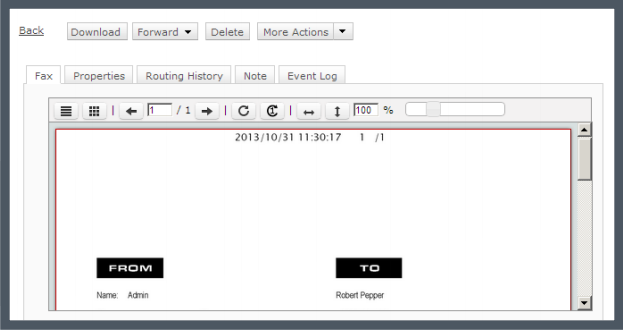
Screenshot of Track your faxes through an event log tab.Screenshot of Built-in viewer in the web client: XMediusFAX® allows you to view faxes directly in your browser without having to download files.Screenshot of Download the free XMediusFAX® application for Android, iPhone or iPad and send secure faxes from your mobile.Screenshot of Choose your fax recipients (Device contacts, Fax service Phone Book, Favorites).Screenshot of Select your documents from any file management application available on your mobile device.Screenshot of Configure your fax options (priority, resolution, retries).