Adobe Customer Journey Analytics B2B Edition vs. Totango

Overview
ProductRatingMost Used ByProduct SummaryStarting Price
Adobe Customer Journey Analytics B2B Edition
Score 0.0 out of 10
N/A
Launched in June of 2025, Adobe Customer Journey Analytics B2B Edition gives marketing sales teams actionable insights that let them optimize customer experiences, expand the sales pipeline, and drive strategic growth across the buyer’s journey.N/A
Totango
Score 7.6 out of 10
N/A
Totango customer success software, now with Catalyst, helps enterprise businesses and cross-functional teams accelerate customer outcomes in productivity, retention, and expansion. Totango and Catalyst will become a unified product, following the merger in February 2024.N/A
Pricing
Adobe Customer Journey Analytics B2B EditionTotango
Editions & Modules
No answers on this topic
Offerings
Pricing Offerings
Adobe Customer Journey Analytics B2B EditionTotango
Free Trial
NoNo
Free/Freemium Version
NoNo
Premium Consulting/Integration Services
NoYes
Entry-level Setup FeeNo setup feeOptional
Additional DetailsContact Adobe for pricing information.Each package gives teams a 360° customer account profile, customer health scoring, customer journey program templates (SuccessBLOCS), automated workflows (SuccessPlays), email campaigns, self-paced onboarding, and customer support.
More Pricing Information
Community Pulse
Adobe Customer Journey Analytics B2B EditionTotango
Features
Adobe Customer Journey Analytics B2B EditionTotango
Security
Comparison of Security features of Product A and Product B
Adobe Customer Journey Analytics B2B Edition
-
Ratings
Totango
8.5
182 Ratings
3% below category average
Role-based user permissions00 Ratings8.5182 Ratings
Platform & Infrastructure
Comparison of Platform & Infrastructure features of Product A and Product B
Adobe Customer Journey Analytics B2B Edition
-
Ratings
Totango
8.4
216 Ratings
3% below category average
API00 Ratings6.9149 Ratings
Integration with Salesforce.com00 Ratings9.4173 Ratings
Integration with Marketo00 Ratings9.035 Ratings
Customer Data Extraction / Integration
Comparison of Customer Data Extraction / Integration features of Product A and Product B
Adobe Customer Journey Analytics B2B Edition
-
Ratings
Totango
8.1
247 Ratings
8% below category average
Product usage00 Ratings8.1243 Ratings
Help desk / support tickets00 Ratings8.2160 Ratings
Customer Success Management
Comparison of Customer Success Management features of Product A and Product B
Adobe Customer Journey Analytics B2B Edition
-
Ratings
Totango
8.1
260 Ratings
6% below category average
NPS surveys00 Ratings9.4124 Ratings
Sponsor tracking00 Ratings6.16 Ratings
Customer profiles00 Ratings7.9251 Ratings
Automated workflow00 Ratings9.0240 Ratings
Internal collaboration00 Ratings7.7226 Ratings
Customer health scoring00 Ratings7.5253 Ratings
Customer segmentation00 Ratings8.7243 Ratings
CSM Reporting & Analytics
Comparison of CSM Reporting & Analytics features of Product A and Product B
Adobe Customer Journey Analytics B2B Edition
-
Ratings
Totango
8.3
254 Ratings
2% below category average
Customer health trends00 Ratings8.4243 Ratings
Engagement analytics00 Ratings8.8229 Ratings
Revenue forecasting00 Ratings7.7175 Ratings
Dashboards00 Ratings8.3237 Ratings
Best Alternatives
Adobe Customer Journey Analytics B2B EditionTotango
Small Businesses
Ortto
Ortto
Score 8.9 out of 10
ChurnZero
ChurnZero
Score 8.7 out of 10
Medium-sized Companies
Quadient Inspire
Quadient Inspire
Score 9.3 out of 10
CustomerSuccessBox
CustomerSuccessBox
Score 9.5 out of 10
Enterprises
Quadient Inspire
Quadient Inspire
Score 9.3 out of 10
Gainsight CS
Gainsight CS
Score 8.9 out of 10
All AlternativesView all alternativesView all alternatives
User Ratings
Adobe Customer Journey Analytics B2B EditionTotango
Likelihood to Recommend
-
(0 ratings)
9.0
(261 ratings)
Likelihood to Renew
-
(0 ratings)
7.3
(8 ratings)
Usability
-
(0 ratings)
8.6
(95 ratings)
Availability
-
(0 ratings)
9.9
(3 ratings)
Performance
-
(0 ratings)
8.8
(2 ratings)
Support Rating
-
(0 ratings)
7.7
(93 ratings)
Online Training
-
(0 ratings)
7.0
(1 ratings)
Implementation Rating
-
(0 ratings)
10.0
(12 ratings)
Configurability
-
(0 ratings)
8.2
(4 ratings)
Ease of integration
-
(0 ratings)
8.0
(8 ratings)
Product Scalability
-
(0 ratings)
9.8
(3 ratings)
Vendor post-sale
-
(0 ratings)
8.0
(1 ratings)
Vendor pre-sale
-
(0 ratings)
8.0
(1 ratings)
User Testimonials
Adobe Customer Journey Analytics B2B EditionTotango
Likelihood to Recommend
Adobe
No answers on this topic
Totango
for a CSM it´s marvelous, you have in one window everything,the agenda for your day by day work, the workload you have in a day,all the customers database and call history added by tasks and toutch points, the to do thing in each customer you know what to do next, with renewal you hace an digital engadgement with customers inform they need to renew in order to keep using the app.
Read full review
Pros
Adobe
No answers on this topic
Totango
  • Enables us to easily send and collect NPS & CSAT scores regularly.
  • Syncs with HubSpot to bring in updated client data and deals automatically.
  • Allows us to manage clients based on health score which is multi-dimensional.
  • I can log touch points directly in Totango from Gmail so easily..
  • As we improve and develop our non SaaS business client experience, Totango continues to develop more functionality that we can benefit from.
Read full review
Cons
Adobe
No answers on this topic
Totango
  • Integrations -- in my experience, they constantly break and disconnect.
  • Implementation -- I feel it was a HUGE challenge to set-up our environment. It took over 200 hours and it didn't work.
  • Communication -- during implementation/onboarding, in my opinion, we were mislead on how to create some of our custom data objects and it ended up being a big waste of time since the approach we were instructed to use ended up being incorrect.
Read full review
Likelihood to Renew
Adobe
No answers on this topic
Totango
I personally believe Totango is the right Customer Success Tool for me, my team, and my organization. I couldn't find limitations until now, it's capabilities are on point and it's very scalable. of course, transitioning to another tool would mean a lot of hours and training, and would expose risks
Read full review
Usability
Adobe
No answers on this topic
Totango
It is easy to use and understand, and simple to follow day to day. Logging notes and tasks is one of the key areas this is utilised along with tracking reports and accessing key data points for conversations with customers which is helpful. Mobile app helps too to access information on the go.
Read full review
Reliability and Availability
Adobe
No answers on this topic
Totango
I have yet to experience any downtime with Totango (knock on wood) so reliability has been really top tier since we were onboarded. Given that the support team has been really helpful so far, I can imagine should downtime every be the case, they'll be able to communicate proactively/effectively on the current state of the platform
Read full review
Performance
Adobe
No answers on this topic
Totango
At times the integration sync can be really slow when it comes to touchpoints. I can't say the same for customer health syncing, but I do tend to notice the lag from email syncing, and in those cases, I will need to refresh the Totango page a couple of times or wait a couple of extra seconds/minutes for it to show up.
Read full review
Support Rating
Adobe
No answers on this topic
Totango
I give Totango a support rating of 10 because I can always get support whenever needed. If its a technical issue, I know I can email their support team for help. If it's a more in depth question with respect to our instance of Totango, I can reach out to our CSM and always get help in a very reasonable amount of time. I always look to Totango as the standard when I think of how to best communicate and support our own customers.
Read full review
Online Training
Adobe
No answers on this topic
Totango
Our CSM did a great job of conducting the training so we understand, at the very least, the functionality that is directly relevant to us. This also allowed us to train our own new team mates when onboarding based on the training flow that was first presented to us. This was also conducted as a interactive sessions, as training are notoriously known to be dry
Read full review
Implementation Rating
Adobe
No answers on this topic
Totango
Totango has been easy for our team to integrate most of our new features into, which is great considering we have to factor in the customers' usage of the new features into all of the health and usage metrics we have. It has taken a while to integrate our second product however, which is why I would rank this a 7.
Read full review
Alternatives Considered
Adobe
No answers on this topic
Totango
Pipedrive is a great CRM for Sales purposes but it doesnt give much tools for CX management. Totango is all the opposite, it is an excellent product for Customer Management . We currently use both platforms integrated with each other and it gives great results to both Sales and Customer Success teams
Read full review
Scalability
Adobe
No answers on this topic
Totango
Information keeps missing and changing in totango . Because of that there is are lot of problems with it. We need to manually keep the backup in an another file. More over if in case we take the backup its so hard to track since its all in numbers. Totango can be much better if the cloud storage is working fine. My company is planning to discontinue due to this factor
Read full review
Return on Investment
Adobe
No answers on this topic
Totango
  • Since using Totango we have seen our engagement numbers go up as we are better able to identify the groups that are struggling.
  • We have also seen an increase in retention as we are more consistent in messaging and not missing any data.
Read full review
ScreenShots

Adobe Customer Journey Analytics B2B Edition Screenshots
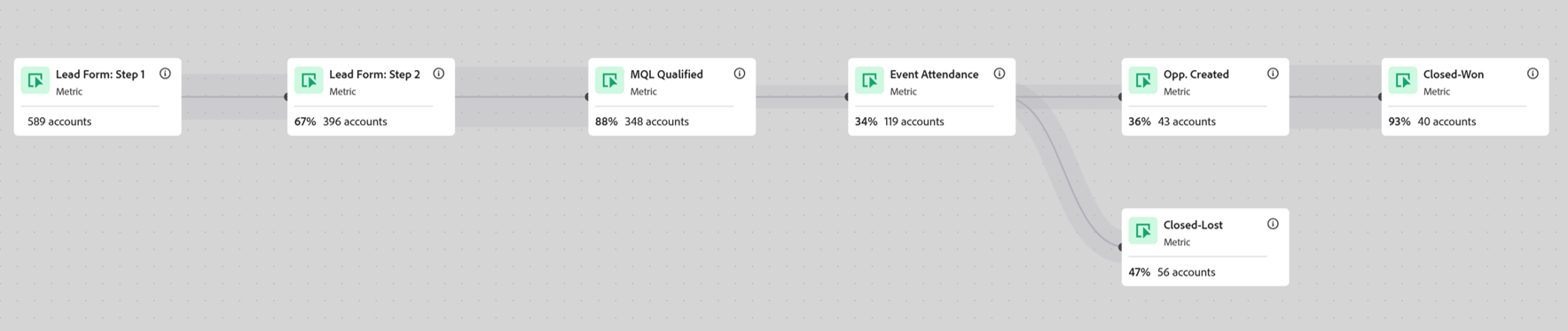
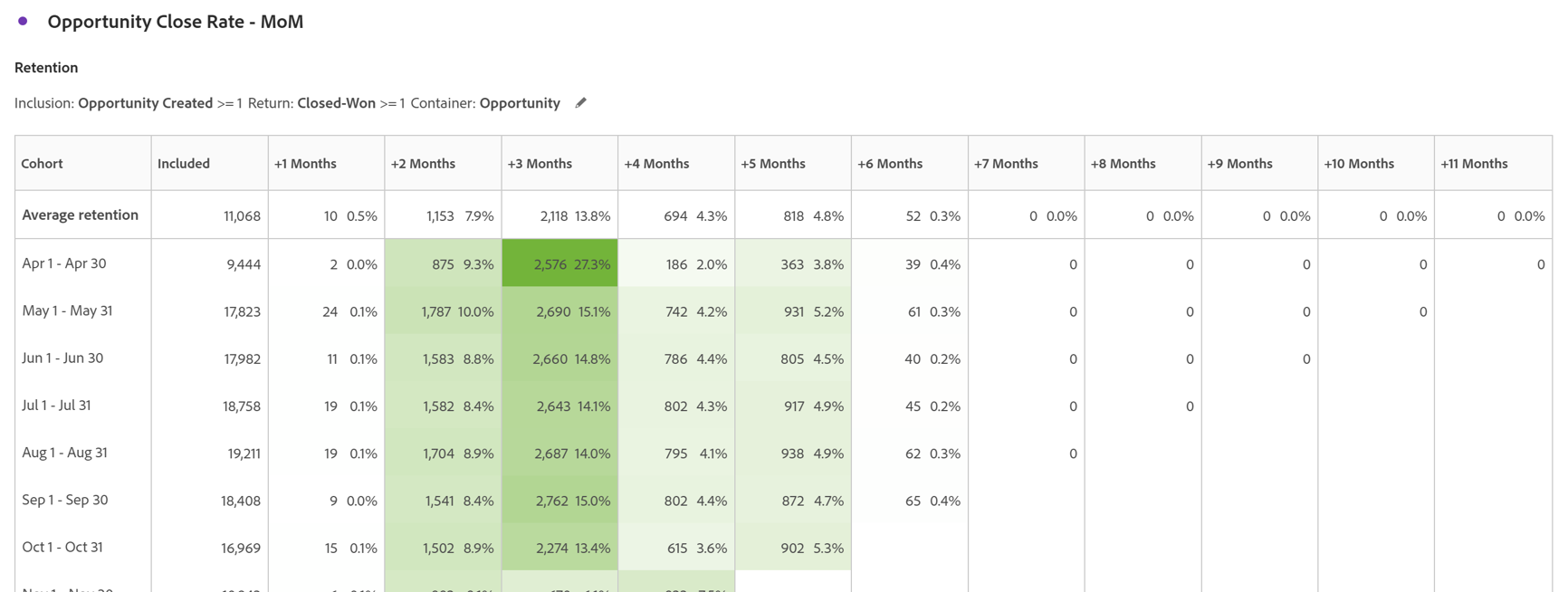
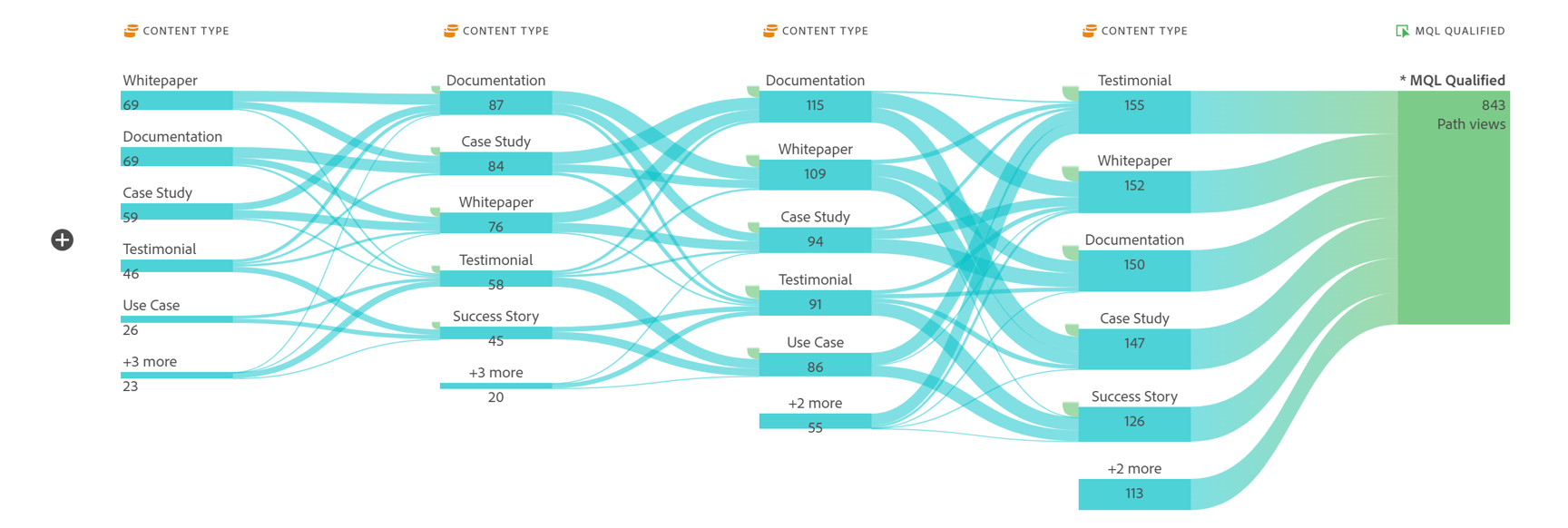
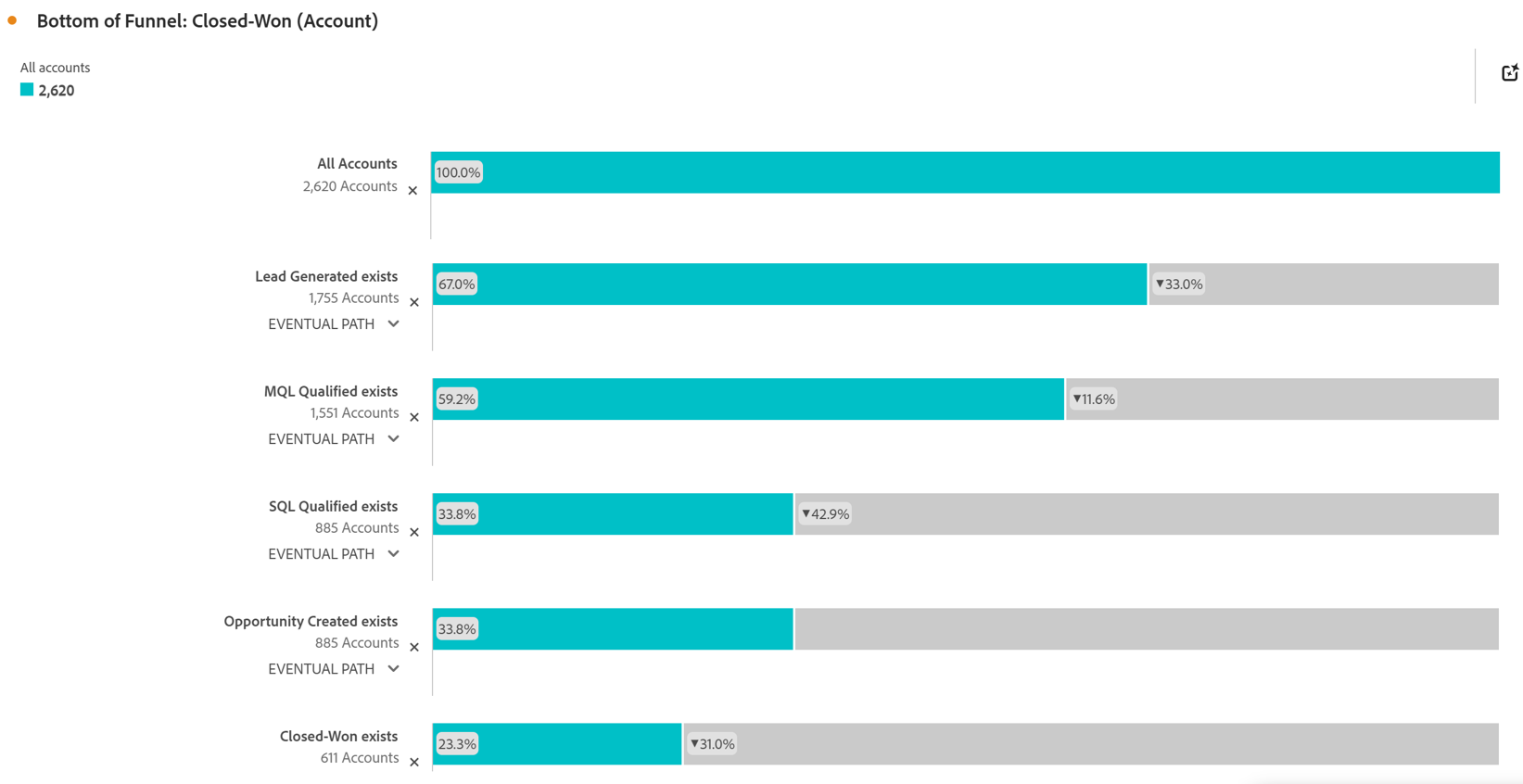
Screenshot of Account Based Marketing Engagement using the Journey Canvas feature. Effective Account Based Marketing requires a deep understanding of the buying journey at the account level to determine the most impactful marketing activities to drive deal closer. Identify which experiences - both online and offline - are most impactful in driving closed opportunities. Journey canvas maps every interaction across accounts, buying groups, opportunities, campaigns and channels for clarity on what's working and what isn't. The Journey Canvas feature in CJA B2B Edition lets users see a detailed path for a specific high value account or buying group, including all known online and offline interactions. And users can contextualize key events, such as an MQL trigger and an Opportunity creation. Plus, Sales Development Reps can see the interaction history for specific accounts before outreach, allowing for highly relevant conversations.Screenshot of Cohort Segmentation. This identifies key groups of buyers to publish to CDP for activation in paid media, personalization or email orchestration. Cohort tables lets users group B2B entities - Accounts, Opportunities, Buying Groups - based on a shared starting point and track their progress across pipeline stages over time. By analyzing behavior patterns of buying groups, marketing and sales teams can understand the time to reach key milestones in the buying journey and determine which marketing efforts lead to faster pipeline progression.Screenshot of In-Person Events. The impact of in-person event attendance can be optimized by reporting on engaged accounts and viewing activity across multiple in-person events. Flow lets you visualize the paths accounts and buying groups take between key interactions or stages over time. Understanding what behaviors led to a key milestone, such as registering for an in-person event or flagging a lead as an MQL, helps both marketing and sales teams understand the most influential experiences that lead to conversion. For in-person events, the steps leading up to registration may include previous in-person event attendance, as well as digital experiences such as downloading white papers and case studies.Screenshot of Sales Stage Progression. The fallout report in CJA B2B Edition gives you sales funnel insights by letting you visualize conversion and drop off rates between predefined steps in a sequential journey. The fallout report can answer key questions around which steps in the sales stages caused the most drop off towards deal close.

Totango Screenshots

Screenshot of collaboration tools to manage a customer portfolioScreenshot of a 360° view of customer healthScreenshot of the dashboard to monitor customer metricsScreenshot of engaging in-app experiences and email campaigns to improve customer retentionScreenshot of integrated data in the Customer Data Hub