Chose Adobe Express
Adobe PhotoShop

| Product | Rating | Most Used By | Product Summary | Starting Price |
|---|---|---|---|---|
 Adobe Express | N/A | Adobe Creative Cloud Express (formerly Adobe Spark) is a task-based, web and mobile product used to create and share rich multimedia content – from social media posts and stories to invitations to marketing materials like logos, flyers and banners. | $0 | |
 Adobe Premiere Pro | N/A | Adobe offers their video editing platform Adobe Premiere Pro, supporting video and audio editing as well as VR presentations, available as part of the company's Creative Cloud suite or as a standalone application. | $22.99 per month | |
 Filmage Editor | N/A | Filmage Editor is a video editing app with editing tools and drag-and-drop effects. Filmage Video Editor makes the user a video creator by speeding up the workflow of creating & editing videos, even for those new to video editing. A Video Editor - Cut, merge, trim, splice, rotate, flip and crop videos or images with simple clicks. - Edit and export videos in up to 4K. - Animated text and titles… | $39.99 6 months per user |
| Adobe Express | Adobe Premiere Pro | Filmage Editor | ||||||||||||||||||||||
|---|---|---|---|---|---|---|---|---|---|---|---|---|---|---|---|---|---|---|---|---|---|---|---|---|
| Editions & Modules |
|
|
| |||||||||||||||||||||
| Offerings |
| |||||||||||||||||||||||
| Entry-level Setup Fee | No setup fee | No setup fee | No setup fee | |||||||||||||||||||||
| Additional Details | Contact Adobe directly for Enterprise pricing plan details. | Discounts available for student and teacher plan. | — | |||||||||||||||||||||
| More Pricing Information | ||||||||||||||||||||||||
| Adobe Express | Adobe Premiere Pro | Filmage Editor | |
|---|---|---|---|
| Considered Multiple Products |  Adobe Express  Daniel Flores Creative Genius Chose Adobe Express Express has put all the tools a design agency will need for day-to-day operations, production, and creation. And with the addition of the Calendar, scheduling these posts is a breeze and very important in a designer's tool belt. We used other products before and found ourselves …  Lisa Guillory Multimedia Specialist Chose Adobe Express In addition to Adobe Express, I have also used Canva because both platforms are quite similar. Basically, the application that I use is typically based on the clients needs, however my personal preference is Adobe Express because I find it too intuitive to my creative persona.  Pauline Goyard art director Chose Adobe Express I think they all have a different target audience and a different use for them. I love crafting posts with Figma but i think the "figma look" is a bit cold and super recognizable for my taste. I think creating something with Illustrator still gives me the most options in terms …  Najihah Najlaa Adobe Certified Instructor Chose Adobe Express I use Adobe Express for designing social media content, appreciating its ready-made templates which save time and effort. It solves creative blocks by providing design ideas, and I love its voice character feature for making animations. However, the layering feature feels basic …  Nix Thomas Personal Brand Specialist Chose Adobe Express I think Adobe Express is a bit behind Canva, but as an Adobe Community Expert, I try to provide as much feedback as I can to help improve Adobe Express. ADobe Express does a better job than InShot and a few other apps, but isn't quite there against Canva, I'm sorry to say!  Jimmy Flame Illustrator Chose Adobe Express In my opinion, Adobe Express blows it away. Canva is great and all and gets the job done. But it lacks the additional value offered by Adobe Express and Adobe. Canva's stock asset library doesn't come close to Adobe's stock asset library, and the Creative Cloud makes using …  Christiano Theiss Neto Graphic Designer Chose Adobe Express Software like Illustrator, Photoshop, and After Effects are indispensable for my needs. I used Canva to streamline the process of creating carousels, mainly, and Express effectively replaces Canva. The advantage of having everything under a single subscription was crucial for …  Christelle Richard Illustrator & Graphic Designer Chose Adobe Express It's very easy to generate images or graphics and find them on Adobe Express.In the application, in "Your stuff" > Files section, you'll find all the creations you've made with Adobe Photoshop and Adobe Illustrator, and you can use them directly in Adobe Express. No need to … |  Adobe Premiere Pro  Michael Craven Owner/President/CEO Chose Adobe Premiere Pro Davinci Resolve works nicely (though some things have a different flow compared to Adobe Premiere Pro). More importantly though, whenever I ran into a limitation with Davinci Resolve, I can always find a solution with Adobe Premiere Pro.  Ignacio Lopez Editor Chose Adobe Premiere Pro Adobe Premiere Pro works great on both Mac OS and Windows OS. Avid not so much.  Arthur Zepeda Owner Chose Adobe Premiere Pro I have used APP for so long, it was hard to try other editing applications. Adobe stands on its own. FCPX normally has to try to live up to APP.  Travis Brown Account Manager and Tactical Projects Leader Chose Adobe Premiere Pro Not even close. iMovie is a good starter set, Adobe Premiere Pro is the real deal. iMovie is a great entry point for you to learn the basics, but when you are ready to take your editing to the next level, Adobe Premiere Pro is the way to go.  Emily Hammell Marketing and Communications Manager Chose Adobe Premiere Pro We had looked at Camtasia due to an industry referral and although it offers a much more simplistic interface and took less time to learn, it wasn't able to compete with some of the upscale Adobe options. That being said, we do use it for small projects that focus more on …  ANDREW TOUTANT Motion Graphic Designer & Editor Chose Adobe Premiere Pro Compared to other editing software, it's a cleaner layout, faster render, and much more easy to learn some of the more complex features. Similar platforms take too long to set up and give commands in one step as opposed to 3 or 4 steps in some software, which saves time.  Andy Ryan Launch Engineer Chose Adobe Premiere Pro Camtasia is a lower end video editing software. There is limited features and not any integrations with other apps. I think Camtasia is good for super simple video edits. But Adobe Premiere Pro is going to give you all the latest video editing tricks and tools to produce …  Hilary Hobbs Senior Video Editor Chose Adobe Premiere Pro We actually took time in 2020 to test out Final Cut Pro and DaVinci Resolve to see if they would be better suited for our department but ended up sticking with Premiere. Each has [its] strong suits, but the non-linear editing style of Resolve was too complicated to grasp when …  Andrew Folts YouTube Filmmaker Chose Adobe Premiere Pro I had no problems with Final Cut. It was also easy to use and very powerful. However, Adobe Premiere Pro is part of the Adobe ecosystem, so it just makes sense to use it instead of Final Cut Pro. Of course, some people may prefer to pay a one-time fee of $300 with Final Cut vs …  Jeff Huisjen Director of studentLife Chose Adobe Premiere Pro We used Final Cut for a while before switching to Premiere. Overall we found Premiere to be a better and more professional video editor with a number of great and easy to use features. Couple that with the fact that it's a part of the Creative Suite and compatible with all the …  Kenny Madison Video Editor, ChiveTV Chose Adobe Premiere Pro Final Cut Pro X was better at handling footage playback. Red footage playback was instantaneous. But I couldn't make heads or tails of the layout. It was so radically different and I didn't have time to relearn how to use editing software. Premiere provides fairly smooth …  Karee Smith STEM teacher Chose Adobe Premiere Pro Adobe Spark is better for the average user who does not have video editing experience or even for student use. Premiere Pro is definitely more of a professional software.  Mark Anderson Digital Marketing Specialist Chose Adobe Premiere Pro This is the only software of it's kind that I have worked with. |  Filmage Editor No answer on this topic |
| Adobe Express | Adobe Premiere Pro | Filmage Editor | |
|---|---|---|---|
| Small Businesses |  Pexels Score 8.1 out of 10 |  iMovie Score 10.0 out of 10 | iMovie Score 10.0 out of 10 |
| Medium-sized Companies | Pexels Score 8.1 out of 10 | iMovie Score 10.0 out of 10 | iMovie Score 10.0 out of 10 |
| Enterprises | Pexels Score 8.1 out of 10 |  Vyond Score 8.7 out of 10 | Vyond Score 8.7 out of 10 |
| All Alternatives | View all alternatives | View all alternatives | View all alternatives |
| Adobe Express | Adobe Premiere Pro | Filmage Editor | |
|---|---|---|---|
| Likelihood to Recommend | 8.8 (0 ratings) | 9.2 (0 ratings) | - (0 ratings) |
| Likelihood to Renew | 9.5 (0 ratings) | 10.0 (0 ratings) | - (0 ratings) |
| Usability | 8.2 (0 ratings) | 8.1 (0 ratings) | - (0 ratings) |
| Support Rating | 7.0 (0 ratings) | 3.2 (0 ratings) | - (0 ratings) |
| In-Person Training | - (0 ratings) | 8.0 (0 ratings) | - (0 ratings) |
| Implementation Rating | 6.4 (0 ratings) | - (0 ratings) | - (0 ratings) |
| Adobe Express | Adobe Premiere Pro | Filmage Editor | |
|---|---|---|---|
| Likelihood to Recommend |
Lisa Guillory Multimedia Specialist |
Jeff Huisjen Director of studentLife | No answers on this topic |
| Pros |
 Anissa Barton-Thompson Digital Technologist |
| No answers on this topic |
| Cons |
|
 John Uibel Creative Specialist | No answers on this topic |
| Likelihood to Renew |
|
| No answers on this topic |
| Usability |
|
| No answers on this topic |
| Support Rating |
|
| No answers on this topic |
| In-Person Training | No answers on this topic |
Michael Craven Owner/President/CEO | No answers on this topic |
| Alternatives Considered |
Daniel Flores Creative Genius |
Hilary Hobbs Senior Video Editor | No answers on this topic |
| Return on Investment |
|
Kenny Madison Video Editor, ChiveTV | No answers on this topic |
| ScreenShots | Adobe Express Screenshots  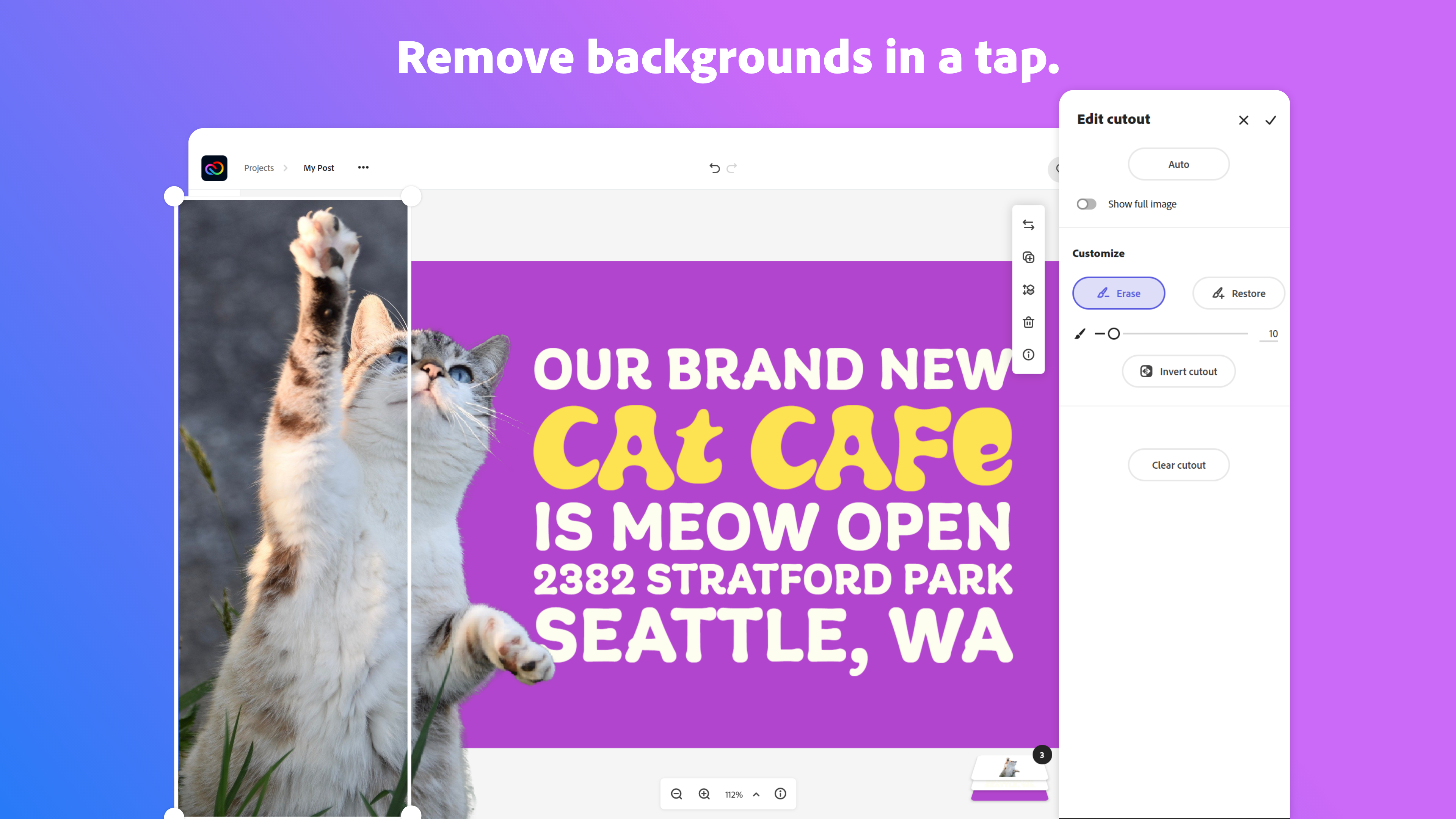    | Filmage Editor Screenshots      |