AI SoloHR vs. OpenText Documentum

Overview
ProductRatingMost Used ByProduct SummaryStarting Price
AI SoloHR
Score 0.0 out of 10
N/A
AI SoloHR is HR case management software for U.S. small businesses and lean HR teams that need a structured way to manage sensitive HR workflows. The product is designed for teams that handle HR in-house and need more than spreadsheets, inbox threads, and shared folders to track case activity. AI SoloHR helps users organize FMLA, ADA accommodation, employee relations, benefits renewal, leave-related, and other HR follow-up workflows in a case-based workspace. Each…
$79
per month per workspace
OpenText Documentum
Score 9.0 out of 10
N/A
OpenText acquired Documentum from Dell EMC in 2017, and now supports the enterprise content management (ECM) system. The vendor says users can build content-centric applications and solutions from collaborating on business documents to delivering case-based applications to managing highly precise processes in the most regulated business environments.N/A
Pricing
AI SoloHROpenText Documentum
Editions & Modules
Starter
$79
per month Per workspace
Solo HR
$199
per month Per workspace
HR Ops Team
$399
per month Per workspace
Compliance Plus
$799
per month Per workspace
No answers on this topic
Offerings
Pricing Offerings
AI SoloHROpenText Documentum
Free Trial
YesNo
Free/Freemium Version
NoNo
Premium Consulting/Integration Services
NoYes
Entry-level Setup FeeNo setup feeOptional
Additional DetailsAI SoloHR is sold as subscription SaaS with four monthly plan tiers. Starter begins at $79/month. Solo HR is $199/month, HR Ops Team is $399/month, and Compliance Plus is $799/month. Plans are based on workspace tier and operational limits such as active cases, people records, seats, AI drafts, intake links, outbound email, audit exports, and advanced controls. A 14-day free trial is available with no credit card required.
More Pricing Information
Community Pulse
AI SoloHROpenText Documentum
Features
AI SoloHROpenText Documentum
Enterprise Content Management
Comparison of Enterprise Content Management features of Product A and Product B
AI SoloHR
-
Ratings
OpenText Documentum
9.2
7 Ratings
13% above category average
Content capture & imaging00 Ratings10.07 Ratings
File sync, storage & archiving00 Ratings9.07 Ratings
Document management00 Ratings9.07 Ratings
Records management00 Ratings9.07 Ratings
Content search & retrieval00 Ratings9.07 Ratings
Enterprise content collaboration00 Ratings9.07 Ratings
Content publishing & creation00 Ratings9.07 Ratings
Security, risk management & information governance00 Ratings10.07 Ratings
Contract lifecycle management00 Ratings9.07 Ratings
Automated workflows00 Ratings9.03 Ratings
Artificial intelligence00 Ratings9.03 Ratings
Mobile support00 Ratings9.03 Ratings
Integration00 Ratings10.03 Ratings
User Ratings
AI SoloHROpenText Documentum
Likelihood to Recommend
-
(0 ratings)
9.0
(10 ratings)
Likelihood to Renew
-
(0 ratings)
8.0
(4 ratings)
Performance
-
(0 ratings)
9.0
(1 ratings)
Support Rating
-
(0 ratings)
7.0
(1 ratings)
Implementation Rating
-
(0 ratings)
9.0
(1 ratings)
User Testimonials
AI SoloHROpenText Documentum
Likelihood to Recommend
DragonVerse Media Inc
No answers on this topic
OpenText
Documentum is best used in medium to large institutions that can afford it, have alternate solutions for web publishing, and who have either in-house developers or can hire good Documentum developers (not the ones who know Java but do not understand ECM). It is, in my opinion, the best heavy duty ECM solution out there, assuming OT is not gutting it as we speak. That is my only hesitation to not giving it a 10, OpenText is an unknown quantity in this and I worry that they will only support Documentum until they have figured out how to fill the gap between Documentum and OT and then offer a migration path to OT with a Documentum sunsetting as an incentive.
Read full review
Pros
DragonVerse Media Inc
No answers on this topic
OpenText
  • Records management: Compared to other content management systems, this provides a efficient and scalable solution. It gives lot of flexibility in managing the content as Records or Legal holds.
  • Workflow system has external plugins to connect with FAX, Mail, Database and FTP servers etc. which gives an option to integrate with any system with documentum.
  • Creation of websites and maintenance is easy. Content authors can create the pages with effective mechanism.
Read full review
Cons
DragonVerse Media Inc
No answers on this topic
OpenText
  • WDK framework has been the biggest drawbacks from the application speed point of view, as well as client complexity and not so natural look and feel. Yes, with the latest releases much of these features are improved.
  • EMC is very expensive to buy, own and support, where some products require many dependent Docuemntum products to be installed to work at its best.
Read full review
Likelihood to Renew
DragonVerse Media Inc
No answers on this topic
OpenText
Stability is a key factor as well as its flexibility. Also, any organization that deploys Documentum will have made a significant investment in terms of time and money, so not renewing its commitment can come with a significant cost. That said, the decision to deploy Documentum initially should come only after extensive evaluation, knowing that once deployed it will likely remain the platform of choice.
Read full review
Support Rating
DragonVerse Media Inc
No answers on this topic
OpenText
Support is better than with ECM, but could use some improvement.
Read full review
Alternatives Considered
DragonVerse Media Inc
No answers on this topic
OpenText
At the time it was purchased it was one of the best, most robust solutions available on the market.
Read full review
Return on Investment
DragonVerse Media Inc
No answers on this topic
OpenText
  • After this product, the client is able to manage content security and due to it, the client is able to use the business process, and this really reduces effort and increases the profit in business.
  • It provides integration with SAP easily which really helps the client to manage this effectively and with minimum effort system is ready to use.
  • Also searching, automated flows also create a bigger impact and reduce a lot manual effort.
Read full review
ScreenShots

AI SoloHR Screenshots

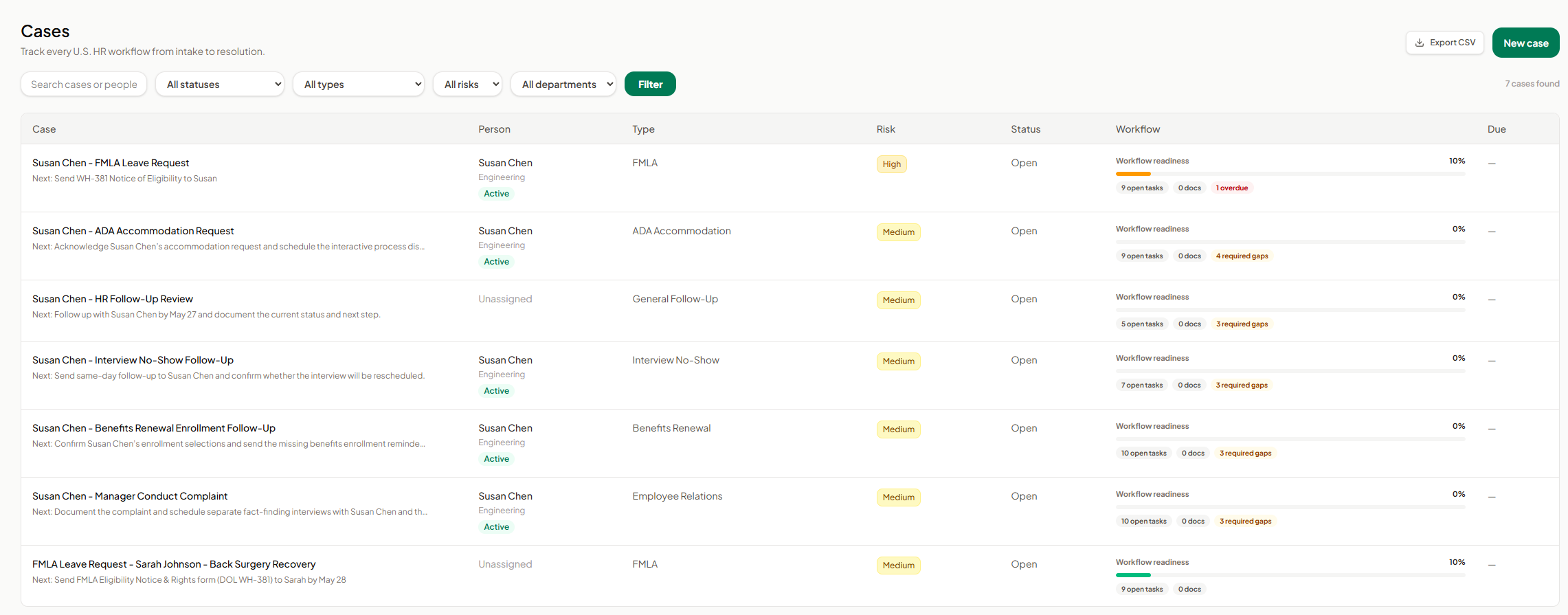
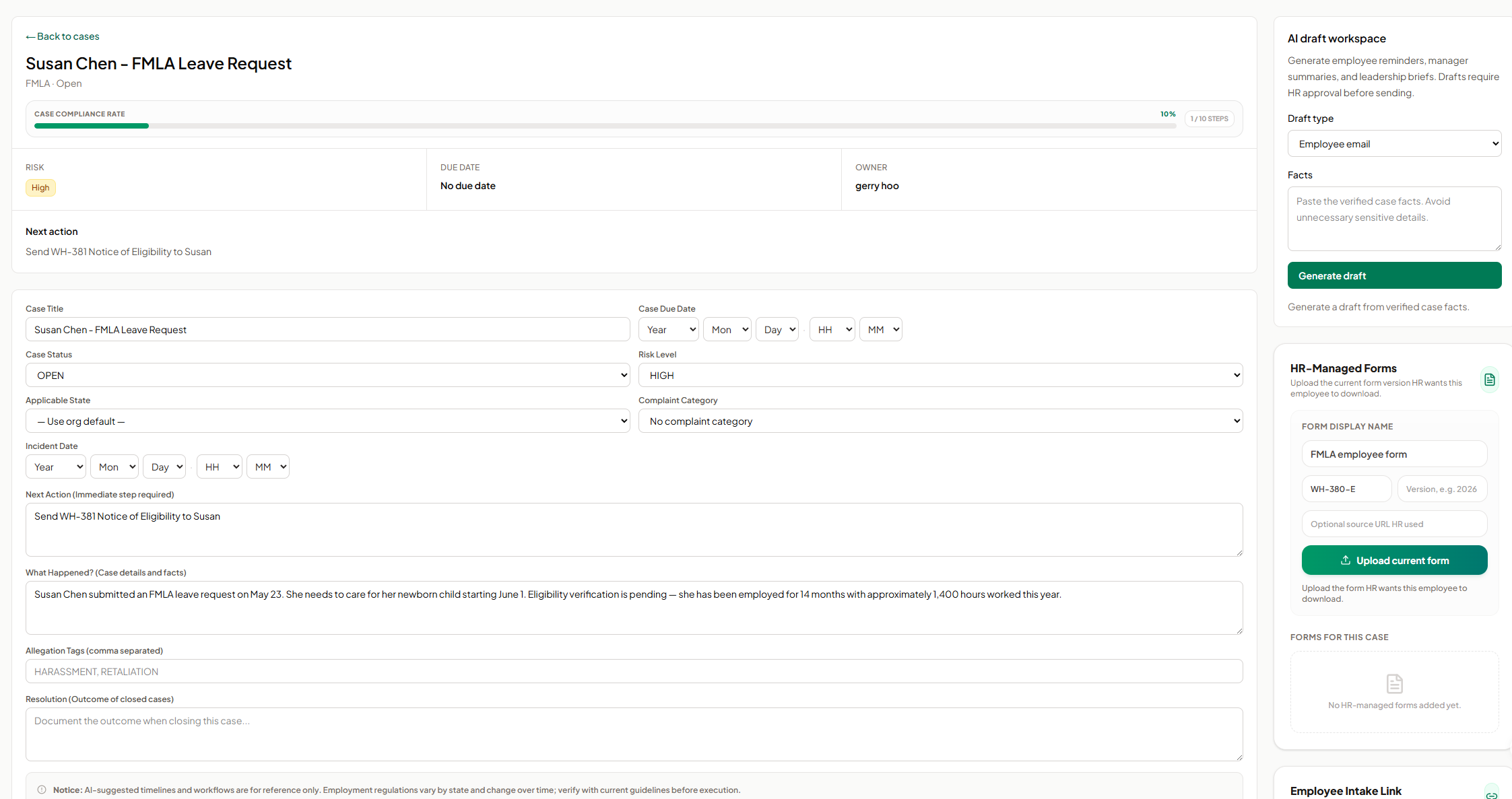
Screenshot of AI SoloHR FMLA workflow screen showing how HR teams can track leave request details, eligibility review, notice dates, certification deadlines, designation status, payroll or benefits status, and return-to-work readiness in one structured case workflow. The screen shows a case moving from intake through certification and designation, with workflow state, blocking reason, key dates, status fields, notes, and a save action for maintaining an organized FMLA case record.Screenshot of AI SoloHR HR-managed forms screen showing how HR can upload and organize the current form version for an employee case. The panel includes fields for form display name, form code, version, optional source URL, and an upload action, helping HR keep case-specific forms such as FMLA employee forms connected to the relevant case record.Screenshot of AI SoloHR AI draft workspace showing how HR can generate draft communications from verified case facts. The screen includes a draft type selector for employee emails, manager summaries, or leadership briefs, a case facts field, and a generate action, with drafts positioned for HR review before sending.Screenshot of AI SoloHR cases dashboard showing a centralized list of HR workflows from intake to resolution. The screen includes search, status, type, risk, and department filters, plus case rows for FMLA, ADA accommodation, interview no-show, benefits renewal, employee relations, and general follow-up workflows. Each row shows the related person, case type, risk level, status, workflow readiness, open tasks, document count, required gaps, overdue items, and export or new case actions.Screenshot of AI SoloHR case detail screen for an FMLA leave request, showing the case summary, compliance progress, risk level, owner, next action, due date, editable case fields, incident details, case facts, tags, and resolution notes. The screen also includes side panels for AI draft generation and HR-managed forms, helping HR keep case tracking, communication drafts, and required form uploads connected to the same employee case record.Screenshot of AI SoloHR new case screen showing how HR can create a structured HR case by capturing the minimum facts first. The form includes primary person, case title, workflow type, risk level, applicable state, next action, and case summary fields, with a disclaimer reminding users to verify AI-generated workflow guidance against current official requirements.