Chose Akamai Cloud Computing
DigitalOcean

| Product | Rating | Most Used By | Product Summary | Starting Price |
|---|---|---|---|---|
 Akamai Cloud Computing | N/A | Akamai Cloud Computing (formerly Linode) include scalable and accessible Linux cloud solutions and services. These products and services support developers and enterprises as they build, deploy, secure, and scale applications. | N/A | |
 Azure Managed Disks | N/A | Microsoft's Managed Disks service on Azure are the company's recommended disk storage offering for use with Azure virtual machines for persistent storage of data. | N/A | |
 DigitalOcean | N/A | DigitalOcean is an infrastructure-as-a-service (IaaS) platform from the company of the same name headquartered in New York. It is known for its support of managed Kubernetes clusters and “droplets” feature. | $5 Starting Price Per Month |
| Akamai Cloud Computing | Azure Managed Disks | DigitalOcean | ||||||||||||||||||||||
|---|---|---|---|---|---|---|---|---|---|---|---|---|---|---|---|---|---|---|---|---|---|---|---|---|
| Editions & Modules | No answers on this topic | No answers on this topic |
| |||||||||||||||||||||
| Offerings |
| |||||||||||||||||||||||
| Entry-level Setup Fee | Optional | No setup fee | No setup fee | |||||||||||||||||||||
| Additional Details | CPU, transfer, storage, and RAM are bundled into one price. Storage capacity can be increased with additional Block Storage or S3-compatible Object Storage. Instant Backups can be added with complete independence to the stack. Linode NodeBalancers ensure applications are available. | — | — | |||||||||||||||||||||
| More Pricing Information | ||||||||||||||||||||||||
| Akamai Cloud Computing | Azure Managed Disks | DigitalOcean | |
|---|---|---|---|
| Considered Multiple Products | Akamai Cloud Computing Chose Akamai Cloud Computing Better efficiency, better cost savings, improved Return on Investments. Overall the Akamai Connected Cloud (Linode) cloud solutions are a step above the competition in regards to all categories. We prefer it for several reasons but the one that stands out is the cost and …  Osama Khan Support Specialist Chose Akamai Cloud Computing Azure VM Image Builder  Erik Rothoff Andersson Founder Chose Akamai Cloud Computing It is more user-friendly than the big three cloud providers like AWS and GCP. The interface blows them out of the water; pricing is so much more competitive—no egregious bandwidth fees like AWS. As a small startup, cutting out the overhead of ultra-complex UI and pricing …  Panagiotis Karaberis CTO (Chief Technical Officer) Chose Akamai Cloud Computing Compared to AWS EC2, Linode has an easier creation of services and lots of options to pre-select and get a ready VM installed in minutes.  Giuseppe Nucifora Senior Software Engineer Manager Chose Akamai Cloud Computing the relevant point that made me choose linode is the pricing strategy.  Eric Mintz CEO Chose Akamai Cloud Computing We've used larger solutions, including AWS, Azure, Google Cloud, and Oracle Cloud. In each case, the pricing was confusing and, with all of the add-ons needed for even a simple infrastructure, ended up being several times the cost of a similar Linode solution. On the flip side, …  👨🏼💻 Roy Verrips Director Chose Akamai Cloud Computing Linode's offering is almost identical to DigitalOcean's, but I find Linode's customer service better AWS, Azure and Google Cloud provide all services Linode does, but provides a much large set of other features and customizations.  Sheryl Villaroman President Chose Akamai Cloud Computing AWS Instance, AWS S3 Bucket, and other AWS Services. Linode is more cost-efficient, easier to deploy servers.  Arthur Furlan CEO & Co-founder Chose Akamai Cloud Computing Linode delivers higher performance cloud servers, within an easier web interface, simpler API, and better cost-benefit. Amazon has a complex interface that many times make the customers spend much more time in order to finish simple tasks and use "AWS-terms" so even if you need …  Roseli Bianca DevOps Engineer Chose Akamai Cloud Computing Linode offers the most applicable services to the users through Cloud deployment and easy data management capabilities, and even easy project cost management. The features adaptation is easy and quality services from the migration of data and demand monitoring and the project …  James Freeman Head of Consultancy Chose Akamai Cloud Computing I've had performance issues with other providers, and when running workloads where CPU performance is vitally important, my experience with Linode has been excellent. The cloud landscape is crowded, and I think it's important to know why one vendor might stand out amongst …  Harry Finn Lead Developer Chose Akamai Cloud Computing DigitalOcean, Heroku Platform, Vultr Object Storage and Redis | Azure Managed Disks  Rao Tahir DotNet Project Manager Chose Azure Managed Disks We have been using miscrosoft products from the start so it was quite natural to go with Azure Managed Disks as it would be very easy to integrate with other products that we have in use and obviously the knowledge most of our engineeirs have also played a big part it, so we …  Kimberly Brooke Marketing Analyst Chose Azure Managed Disks Azure Managed Disks is the most effective data storage platform that has given us the most reliable services in our company. It enhances data security and data backup plans that contribute to better workflow infrastructure. It gives us hope of our continuity in case of any lost …  Kyle Kochtan Application Development Manager Chose Azure Managed Disks Azure Managed Disks stacked up very well against Amazon Elastic Block Store. In the End it really came down to the fact we are running numerous other Microsoft Azure products and Azure Managed Disks would fit nicely into that ecosystem. We had less ramp up for training and … | DigitalOcean  Vinaya Kumar B Engineering Lead Chose DigitalOcean The target segment of DigitalOcean is application developers and small teams working in startups for easily configuring and deploying infrastructure in the cloud. We selected DigitalOcean for some of our usecases as it is cost effective and easy to integrate with compared to …  Jan Saggiori Director Chose DigitalOcean Simple, and quick setup, competitive pricing as well as geographically you can choose the location of the datacenter. The setup of the machine with RAM / CPU and SDD gives all options, it is just what we always needed and find our self very well with such type of service by … Chose DigitalOcean I chose DigitalOcean over Oracle Cloud because it's simpler, more cost-effective, and quicker to deploy. DigitalOcean’s intuitive interface allows me to manage servers easily, while Oracle Cloud is more complex and suited for larger enterprises. Also, DigitalOcean’s transparent …  Krzysztof Falcman Lead Backend Engineer Chose DigitalOcean DigitalOcean Spaces  Marco Carnevali VP Products Chose DigitalOcean DigitalOcean is an easier and cheaper way to [set up] new machines. The UX is really good and it's easy to find what you need. Competition offer[s] a complicated way to manage machines and the cost is sometimes more than [...] double of what DigitalOcean offer[s]. However[,] …  Bobby Johnson Co-Founder / Full Stack Dev Chose DigitalOcean As I have said, DigitalOcean was slightly more expensive than something like HostGator, but the amount of customization and quality of service make it worth any difference. AWS was always a pain to set up and use, but DigitalOcean makes it cake.  Leonel Quinteros Director of Technology Chose DigitalOcean Digital Ocean is easier to start with and was a great choice for that project. On other projects, I may choose Google Cloud products because of their more complex product offerings and advanced features. Products like Storage or Pub/Sub isn't available on Digital Ocean and the …  Chris Widner VP of Technology & Human Resources Chose DigitalOcean I've tried both AWS and Azure and, while they're both great solutions, they are much more challenging to setup and maintain. The idea that my billing could spike because of something unexpected leaves me a tad uneasy. For our solutions I'd rather pay the $10/mo with …  Fedor Paretsky Co-Founder/CEO Chose DigitalOcean Amazon has a very complex UI and many products to offer. They haven't polished up their UI and it has a much greater learning curve compared to DigitalOcean. However, Amazon Web Services (AWS) does have more comprehensive cloud computing services, which forces some companies to …  Tarun Mangukiya Co-Founder Chose DigitalOcean Initially we started using DigitalOcean due to their pricing point as we were in development phase. Slowly when we used it, we starting liking it a lot as it is very fast & easy to get started, compared to the other Cloud Providers we've used. Also they have blogs and …  Jeanine Schoessler Web Developer Chose DigitalOcean Site5's customer service and support have declined over the recent years. The last couple of tickets that I submitted in 2016 were never addressed by their help team. The only customer service agent seems to be on their Twitter account. Site5 does not allow any configuration of …  Praneeth Karnena Co-Founder & Editor-in-Chief Chose DigitalOcean Vultr is a new player in the game. They don't advertise their hardware model and for that reason, people may not trust them. I have run few benchmarks on Vultr, they performed slightly better than DigitalOcean but they aren't trustworthy. Their transparency index is very low …  Craig Nash Sr. Network Engineer Chose DigitalOcean Compared service to service, Digitalocean comes out on top usually, for smaller better spec servers. This is what they do, and specialty shops are always the best route, with no exception here. However, if you need more than a server, or are not comfortable doing more than …  Chris Putnam Senior Web Developer Chose DigitalOcean DigitalOcean has a much lower price point for VPS - but they are not fully managed as with other services. DigitalOcean VPSs are good for quick simple applications that we are comfortable and efficient at deploying ourselves. We do not generally recommend them for clients, as …  Tyler Longren IT Consultant Chose DigitalOcean DigitalOcean isn't nearly as robust as Google Cloud. DigitalOcean provides VPSs, as does Google Cloud. However, Google Cloud offers many other products as well. ChunkHost is very similar to DigitalOcean, but doesn't have the infrastructure that DigitalOcean has. Geographical …  Hernán Silva Front-end developer Chose DigitalOcean AWS: Too complex to set things up. Period. Mediatemple: Great features, services and customer service. Prices are a bit high for what they offer. Linode: Outstanding features and customer support. Difficult to start with for novice users.  Chris Gabriel Interactive Designer & Developer Chose DigitalOcean My cost savings were significant and I felt like I was much more in control of the hardware and processes. I also had issues with certain marketing decisions my former hosting company made, DigitalOcean was an easy choice! |
| Akamai Cloud Computing | Azure Managed Disks | DigitalOcean | |||||||||||||||||||||||||||||||||||||||
|---|---|---|---|---|---|---|---|---|---|---|---|---|---|---|---|---|---|---|---|---|---|---|---|---|---|---|---|---|---|---|---|---|---|---|---|---|---|---|---|---|---|
| Infrastructure-as-a-Service (IaaS) |
|
| Akamai Cloud Computing | Azure Managed Disks | DigitalOcean | |
|---|---|---|---|
| Small Businesses | DigitalOcean Droplets Score 9.6 out of 10 |  Vultr Score 8.9 out of 10 | DigitalOcean Droplets Score 9.6 out of 10 |
| Medium-sized Companies |  SAP on IBM Cloud Score 9.0 out of 10 |  Everpure FlashArray Score 8.3 out of 10 | SAP on IBM Cloud Score 9.0 out of 10 |
| Enterprises | SAP on IBM Cloud Score 9.0 out of 10 | Everpure FlashArray Score 8.3 out of 10 | SAP on IBM Cloud Score 9.0 out of 10 |
| All Alternatives | View all alternatives | View all alternatives | View all alternatives |
| Akamai Cloud Computing | Azure Managed Disks | DigitalOcean | |
|---|---|---|---|
| Likelihood to Recommend | 8.2 (0 ratings) | 8.2 (0 ratings) | 8.9 (0 ratings) |
| Likelihood to Renew | 9.2 (0 ratings) | - (0 ratings) | 9.0 (0 ratings) |
| Usability | 8.7 (0 ratings) | - (0 ratings) | 8.9 (0 ratings) |
| Availability | 8.3 (0 ratings) | - (0 ratings) | 10.0 (0 ratings) |
| Performance | 8.2 (0 ratings) | - (0 ratings) | 9.0 (0 ratings) |
| Support Rating | 9.0 (0 ratings) | - (0 ratings) | 8.8 (0 ratings) |
| Online Training | 8.2 (0 ratings) | - (0 ratings) | - (0 ratings) |
| Implementation Rating | 8.3 (0 ratings) | - (0 ratings) | - (0 ratings) |
| Configurability | 9.1 (0 ratings) | - (0 ratings) | - (0 ratings) |
| Ease of integration | 9.1 (0 ratings) | - (0 ratings) | - (0 ratings) |
| Product Scalability | 9.1 (0 ratings) | - (0 ratings) | 10.0 (0 ratings) |
| Vendor post-sale | 9.1 (0 ratings) | - (0 ratings) | - (0 ratings) |
| Vendor pre-sale | 9.1 (0 ratings) | - (0 ratings) | - (0 ratings) |
| Akamai Cloud Computing | Azure Managed Disks | DigitalOcean | |
|---|---|---|---|
| Likelihood to Recommend |
|
|
|
| Pros |
|
|
Chris Widner VP of Technology & Human Resources |
| Cons |
 P Thomas Mr Many Hats |
Rao Tahir DotNet Project Manager |
Leonel Quinteros Director of Technology |
| Likelihood to Renew |
| No answers on this topic |
 Creede Lambard Devops Engineer |
| Usability |
 David Chmelik scientist | No answers on this topic |
|
| Reliability and Availability |
| No answers on this topic |
Hernán Silva Front-end developer |
| Performance |
Erik Rothoff Andersson Founder | No answers on this topic |
Hernán Silva Front-end developer |
| Support Rating |
Osama Khan Support Specialist | No answers on this topic |
Bobby Johnson Co-Founder / Full Stack Dev |
| Online Training |
| No answers on this topic | No answers on this topic |
| Implementation Rating |
| No answers on this topic | No answers on this topic |
| Alternatives Considered |
Erik Rothoff Andersson Founder |
Rao Tahir DotNet Project Manager |
|
| Scalability |
| No answers on this topic |
Hernán Silva Front-end developer |
| Return on Investment |
|
|
|
| ScreenShots | Akamai Cloud Computing Screenshots   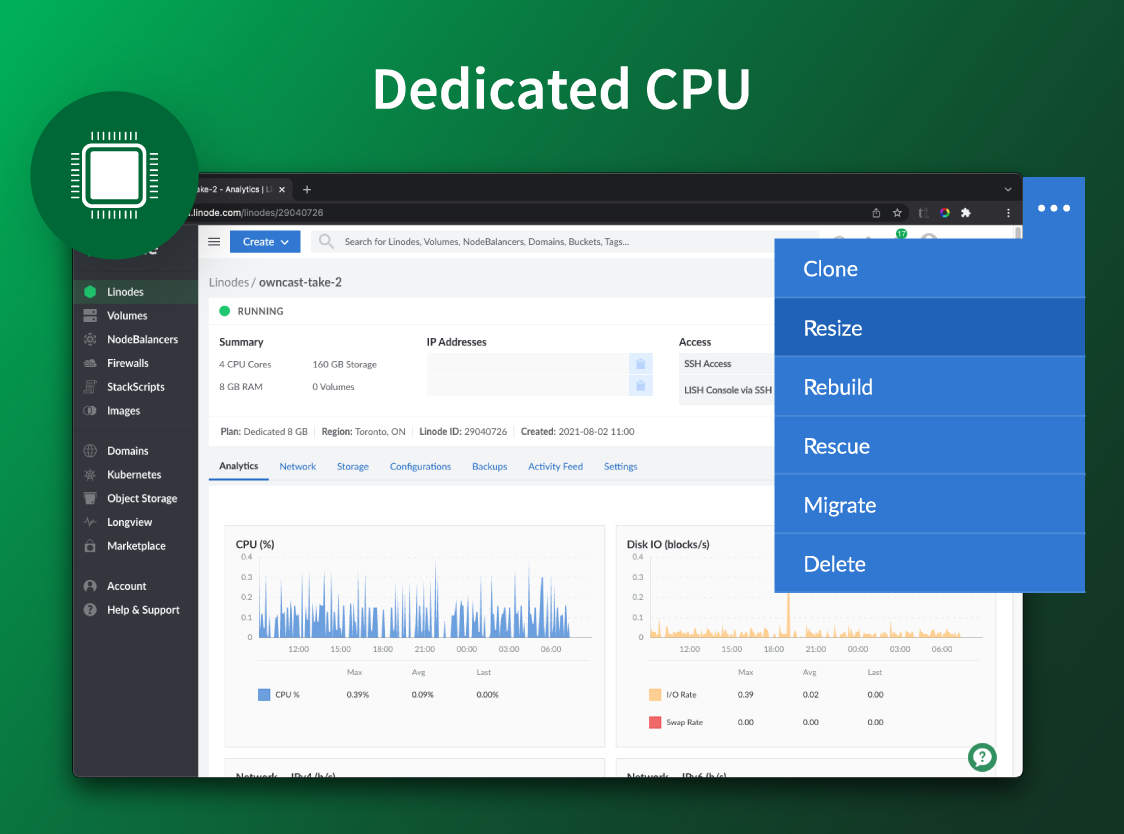 |

