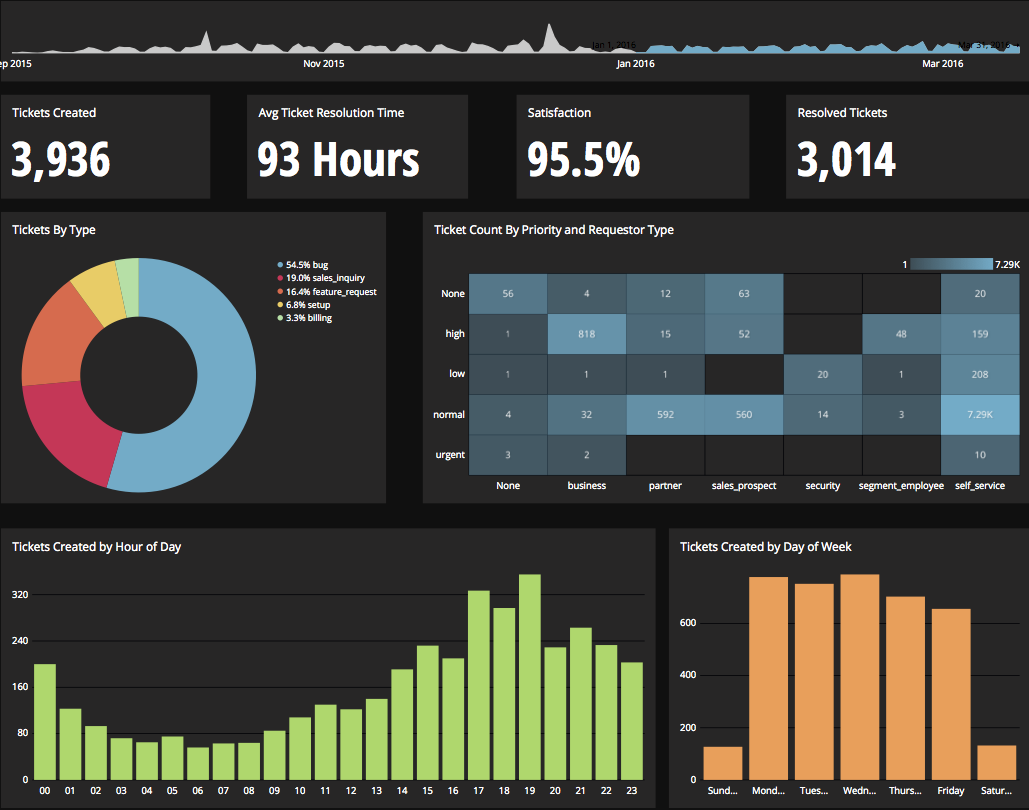
Chartio is a visualization tool designed to enable anyone to explore, transform and visualize data on the fly through a drag-and-drop interface. Chartio was acquired by Atlassian in February 2021 so that it's capabilities could be integrated into the Atlassian product portfolio's capabilities. Chartio is no longer available to new customers, standalone. Existing customers must migrate to alternatives by March 2022, when the service will be retired.
$40
per user/per month
Entrinsik Informer
Score10 out of 10
N/A
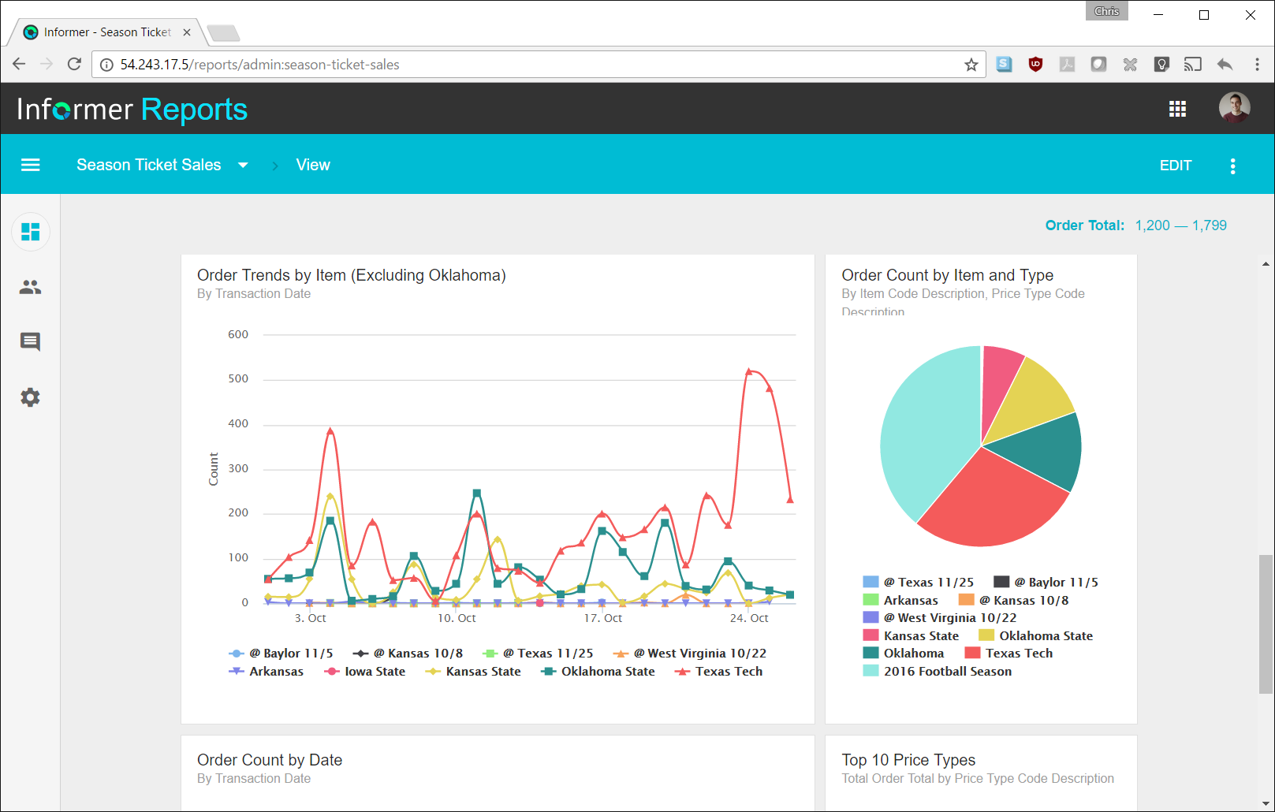
Entrinsik Informer is a web-based reporting and business intelligence application popular in the higher education vertical market. It helps organizations transform real-time data into actionable information by delivering ad-hoc reporting, data analysis, and interactive dashboards.
N/A
Pricing
Chartio (discontinued)
Entrinsik Informer
Editions & Modules
Starter
$40
per user/per month
Professional
$60
per user/per month
Organization
Contact sales team
No answers on this topic
Offerings
Pricing Offerings
Chartio (discontinued)
Entrinsik Informer
Free Trial
Yes
Yes
Free/Freemium Version
No
No
Premium Consulting/Integration Services
Yes
Yes
Entry-level Setup Fee
No setup fee
No setup fee
Additional Details
—
—
More Pricing Information
Features
Chartio (discontinued)
Entrinsik Informer
BI Standard Reporting
Comparison of BI Standard Reporting features of Chartio (discontinued) and Entrinsik Informer
Feature
Chartio (discontinued)
6.0
18 Ratings
29% below category average
Entrinsik Informer
7.3
8 Ratings
11% below category average
Pixel Perfect reports
3.614 Ratings
5.51 Ratings
Customizable dashboards
7.718 Ratings
9.17 Ratings
Report Formatting Templates
6.714 Ratings
7.57 Ratings
Ad-hoc Reporting
Comparison of Ad-hoc Reporting features of Chartio (discontinued) and Entrinsik Informer
Feature
Chartio (discontinued)
5.7
14 Ratings
31% below category average
Entrinsik Informer
8.6
11 Ratings
7% above category average
Drill-down analysis
6.913 Ratings
9.19 Ratings
Formatting capabilities
6.112 Ratings
8.210 Ratings
Integration with R or other statistical packages
3.15 Ratings
8.21 Ratings
Report sharing and collaboration
6.513 Ratings
9.110 Ratings
Report Output and Scheduling
Comparison of Report Output and Scheduling features of Chartio (discontinued) and Entrinsik Informer
Feature
Chartio (discontinued)
3.4
17 Ratings
83% below category average
Entrinsik Informer
9.1
11 Ratings
10% above category average
Publish to Web
2.79 Ratings
9.14 Ratings
Publish to PDF
6.117 Ratings
9.19 Ratings
Report Versioning
2.05 Ratings
9.13 Ratings
Report Delivery Scheduling
2.712 Ratings
9.17 Ratings
Delivery to Remote Servers
00 Ratings
9.11 Ratings
Data Discovery and Visualization
Comparison of Data Discovery and Visualization features of Chartio (discontinued) and Entrinsik Informer
Chartio is a great tool for building presentable dashboards. It can export, you can add read-only access, and it has permissions levels by dashboard for users. There are other data analysis tools that help to analyze the data, but few allow for such a nice presentation
It makes creating queries very easy for end users so not only research or technicians can do it. The availability for creating Live reports that are accessible via Excel on the network has given many of our users the ability to get the information they need in a format they can use without needing someone to translate the raw data
A de minimis incentive was given to thank the reviewer for their time. The incentive was not used to bias or drive a particular response, nor was the incentive contingent on a positive endorsement. More Info
Direct linkage to our databases. Abstracts away the visualization layer so we can focus on the data and the queries.
Host of graphs and tools that permits all types of data visualizations.
Haven't quite used this yet, but there is a new embedding feature that will be very helpful so that we can embed the charts into a company central dash.
Simple user-interface: Informer is relatively easy to learn and end users can begin running reports and creating new reports quickly.
Email "burst" functionality: This feature allows emails to be sent out based on data in the report. So for example, a report could be scheduled that would email all student employment managers listing out the specific employees that report to them that haven't submitted their time sheets. Each manager would only see the rows that correspond to their email address.
Analytics and grouping: Users can quickly drag columns to group and sub-total, and can use the analytics tab to get deeper insights into the data.
A de minimis incentive was given to thank the reviewer for their time. The incentive was not used to bias or drive a particular response, nor was the incentive contingent on a positive endorsement. More Info
There is not a last full month date range option. You can still get the range that you need, but the dashboards will have to be manually updated to exclusively display one whole month.
When building a chart, the area which displays your tables and fields is finite. You can't adjust the size to make it easier to see. They do allow a mouse-over to see the entire name of your table/field, but I would prefer to adjust the width.
Once you modify a query in the Custom Query tab, there doesn't seem to be a way to go back to using the U.I.
There are a lot of reports that we have in Informer that say they have never been run, even though I know they have been run. So that makes it really difficult to determine which reports can be deleted to keep a tidy report list.
The only other complaint I have about Informer is that there doesn't seem to be a properly detailed error code/message when the student information system can't be accessed. For example, I am currently trying to move Informer to its own standalone server and I get an error message saying that our license isn't valid. Informer Support sent a new license, which prompted the same message, and the only explanation they have given me is that Informer can't reach the student information system. I would think that if that were the case, the error message would say that instead of an invalid license.
A de minimis incentive was given to thank the reviewer for their time. The incentive was not used to bias or drive a particular response, nor was the incentive contingent on a positive endorsement. More Info
Great customer support: You will receive an answer by email usually within 20-30 minutes. Not only that but our CSMs for Chartio go out of their way to help, they have even created charts for some of the less experienced users that wanted an example to work from. We have had nothing but great experiences with this team.
A de minimis incentive was given to thank the reviewer for their time. The incentive was not used to bias or drive a particular response, nor was the incentive contingent on a positive endorsement. More Info
Informer has been handily meeting most of our reporting needs, and we've created a library of hundreds of reports that are used every day. They have a terrific support service to help when you have questions, and I've found them to be great at listening to what customers would like and adding new features. They are a small company that really listens and really cares, and I've been very pleased over the past few years getting to know them.
I really like using Chartio. I use it on a daily basis for pulling data from different sources and combining data (the explore tab was a great idea for this use). I think I would give it 8/10 because there needs to be more documentation or maybe blog posts about things people are doing with it. I only have my own ideas about what to do /how to graph things. I know there are some articles, but it would be awesome to have a section on the neat dashboards people are building or how they show data in different ways. Another complaint is how much time it takes to load. I know our databases aren't set up precisely for Chartio and I have been creating data stores. But the data stores have so many more limitations that adds a whole new layer of frustration. Love the product, keep up the good work and the fast fixes.
From the perspective of the new user and a seasoned user I would say eight would represent both parties. It presents a 'familiar' interface and easy to navigate display. Tagging is quite nice and allows for organization of reports based on those tags. These have to be monitored like anything else to keep them consistent but provides a better than average means of organizing reports.
Always able to get acceptable solutions in reasonable time from friendly support staff. Initial contact is always with knowledgeable person - not someone reading from a script trying to screen calls. Thanks Entrinsik for being in tune with my needs.
A de minimis incentive was given to thank the reviewer for their time. The incentive was not used to bias or drive a particular response, nor was the incentive contingent on a positive endorsement. More Info
I use self learning materials. Pretty helpful. I find myself having to go back to the "drilldown" instructions though, and have a hard time finding hidden variables on a dashboard, so perhaps there is room for intuitive improvements (or maybe I'm just being lazy)
We bought the product on a Thursday morning, and we were writing reports on Friday afternoon. We did take about a month to manage the Mapping, Linking and Security to allow us to open it up across campus. We are now mapping from as many third-party vendors as we can to enable the creation of more ad-hoc reporting.
Chartio so far has been the easiest BI tool to setup and has also been the most affordable. There are some other, great, BI tools out there but they were a bit to heavy handed for what we needed. Also - despite the high cost per user in Chartio, the other tools were still more expensive.
A de minimis incentive was given to thank the reviewer for their time. The incentive was not used to bias or drive a particular response, nor was the incentive contingent on a positive endorsement. More Info
I have experience with Advizor AnalystX, and it was just awful. It is advertised as an interactive reporting tool, in which you can use your mouse to select and segment constituents by where they live (by clicking on a map), how much they've given to your institution, when they last gave, etc. In practice, their map feature was unusable; it's a static map image (imagine a paper map hung on your wall), rather than draggable and zoomable Google Maps, and it required hours of work to configure one map region. As far as computing constituents' giving statistics, it required way too much back-end work to build simple giving totals.
A de minimis incentive was given to thank the reviewer for their time. The incentive was not used to bias or drive a particular response, nor was the incentive contingent on a positive endorsement. More Info
Chartio has worked well as our datawarehouse has rapidly expanded, and the usability/performance hasn't seemed to have suffered. What we haven't yet realized is additional savings from additional users. We have some dashboard needs for users who truly just view of a few charts, and the licensing structure hasn't yet been structured in a way that would support that type of approach...having 50 "core" licenses, and then potentially several hundred view only licenses for partners that would use the application infrequently.
We have definitely improved customer service due to better reporting using Informer. All departments are better empowered to help our students in a more timely and accurate manner.
Using Informer has given us the ability to eliminate functionality within our ERP system and offload reporting to a data store instead of the transactional system. This has resulted in successfully upgrading our core systems and improved response times.