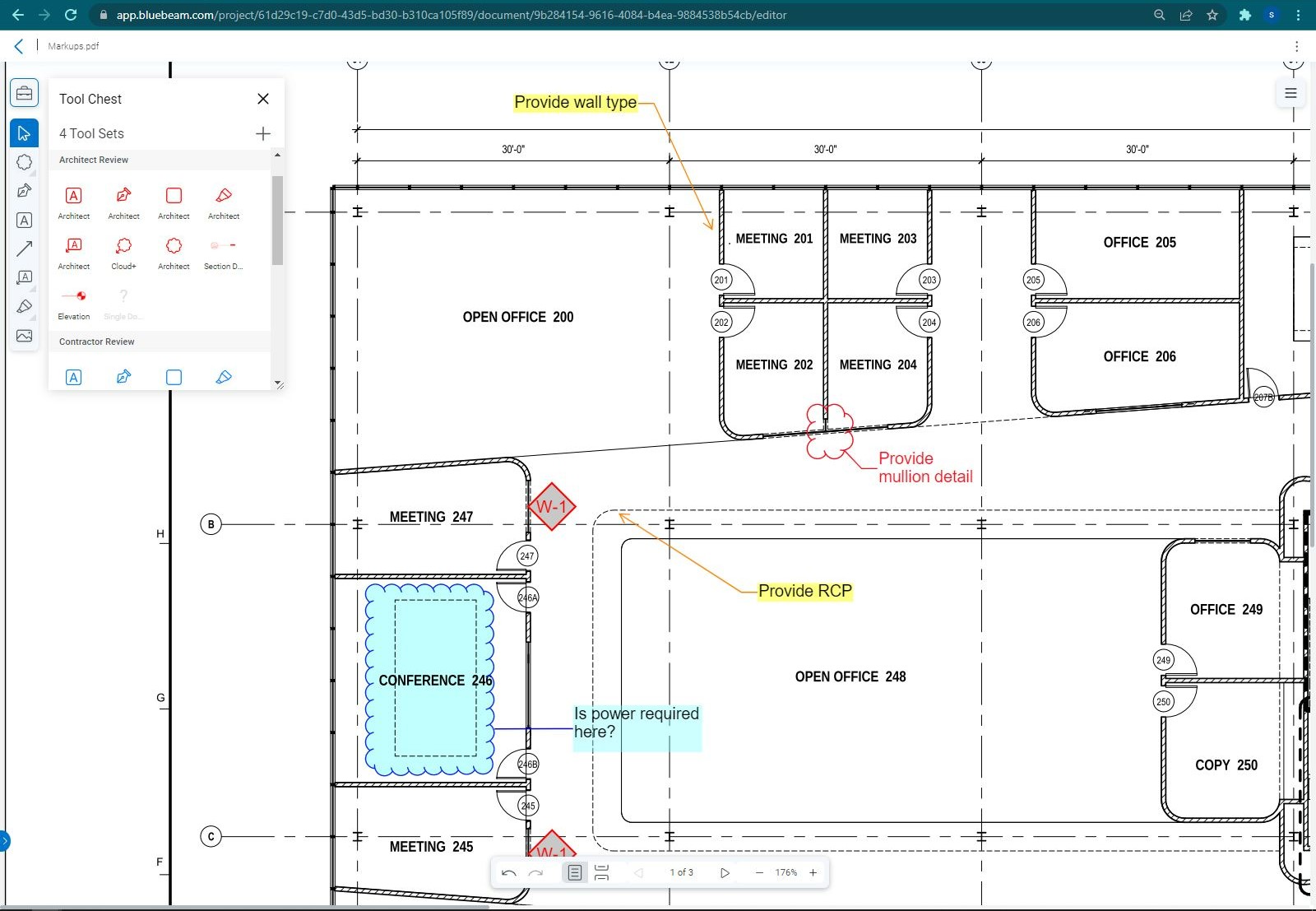
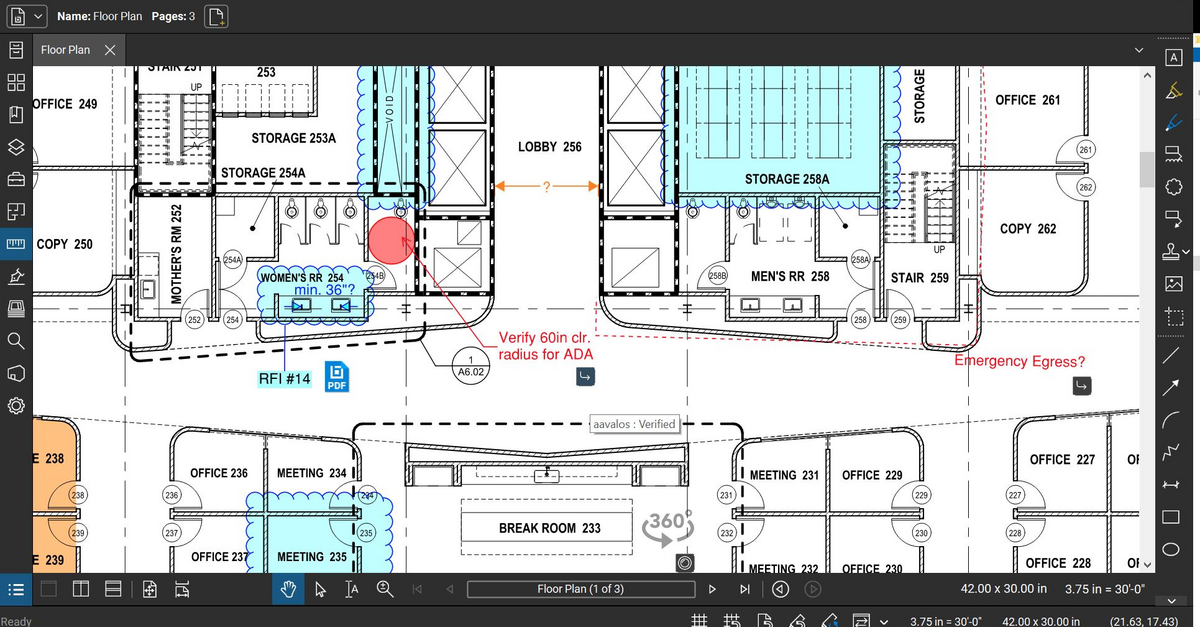
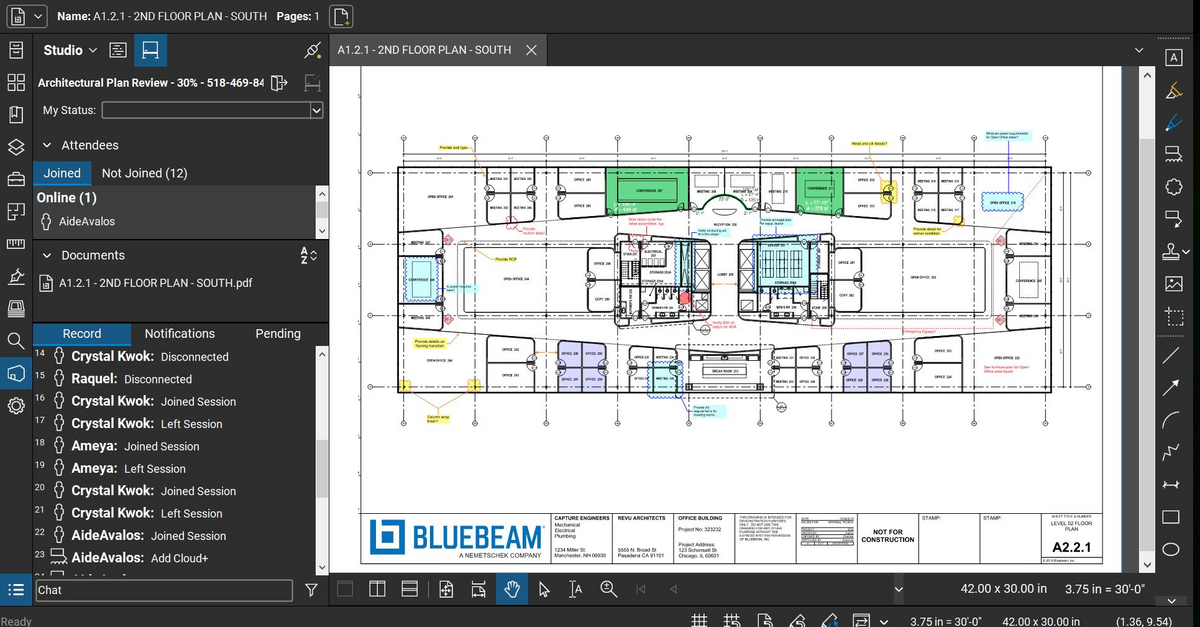
Bluebeam Revu is a PDF management, control, and editing tool. It enables collaboration and markup within shared documents across projects’ life cycles and has takeoff and bid creation capabilities.
$260
per year per user
iManage Work
Score 9.7 out of 10
N/A
iManage Work is a document management solution formerly known as HP Worksite. iManage was divested from Hewlett-Packard in 2015 and is now an independent company, headquartered in Chicago.
N/A
Pricing
Bluebeam
iManage Work
Editions & Modules
Basics
$260
per year per user
Core
$330
per year per user
Complete
$440
per year per user
Max
$590
per year per user
No answers on this topic
Offerings
Pricing Offerings
Bluebeam
iManage Work
Free Trial
Yes
No
Free/Freemium Version
No
No
Premium Consulting/Integration Services
Yes
No
Entry-level Setup Fee
No setup fee
No setup fee
Additional Details
—
—
More Pricing Information
Community Pulse
Bluebeam
iManage Work
Features
Bluebeam
iManage Work
Reporting & Analytics
Comparison of Reporting & Analytics features of Product A and Product B
Bluebeam
10.0
1 Ratings
26% above category average
iManage Work
-
Ratings
Dashboards
10.01 Ratings
00 Ratings
Standard reports
10.01 Ratings
00 Ratings
Custom reports
10.01 Ratings
00 Ratings
Data exportability
10.01 Ratings
00 Ratings
Construction Project & Field Management
Comparison of Construction Project & Field Management features of Product A and Product B
Bluebeam
9.8
54 Ratings
28% above category average
iManage Work
-
Ratings
Plan distribution & viewing
9.752 Ratings
00 Ratings
Plan markups & sharing
9.754 Ratings
00 Ratings
Issue tracking & punchlists
9.633 Ratings
00 Ratings
Photo documentation
9.736 Ratings
00 Ratings
Jobsite reports
9.731 Ratings
00 Ratings
Document sharing
9.847 Ratings
00 Ratings
RFI tools
9.735 Ratings
00 Ratings
Collaboration & approvals
9.742 Ratings
00 Ratings
As-built drawings
9.845 Ratings
00 Ratings
Mobile app
10.027 Ratings
00 Ratings
Submittal design and management
9.821 Ratings
00 Ratings
Checklists
9.93 Ratings
00 Ratings
Change orders
9.93 Ratings
00 Ratings
Estimating
Comparison of Estimating features of Product A and Product B
The program is great for editing construction drawings, stamping/approving official documents and overlaying revised documents to see design changes. You can use it as an estimating takeoff tool, estimating database, document control, cloud document storage, the list goes on! Bluebeam poses many applications for the user to utilize for the desired needs. There may be some other software that has one specific function that can perform the specific task better, but Bluebeam is a holistic program with many tools for use.
Legal team using this product helps the team to better access documents securely within their email app (Outlook) and the user experience to control the document is excellent and being able to make it private and isolate confidential documents during a court session is very important and iManage has met our requirements. Also, being able to access instantly from users' workstation/laptop devices is very important and iManage plugin for outlook has satisfied our Business requirements.
Once you set Bluebeam Revu as your default PDF handler, it launches immediately when clicking a PDF to open. The speed with which it opens documents is impressive.
Creating PDF's out of other documents, such as Word, Excel, JPG's, etc. is simple.
Digitally signing documents is a simple, secure process. You can keep your signature password-protected, yet still access it quickly.
The Bluebeam Revu mobile application ( I use the iOS version on an iPad Pro), is awesome. Not only does it handle PDF's like you would expect it to, it allows for effortless digital signing of documents on the fly. Nice to be able to quickly sign a document and email right back out from the tablet no matter where I am.
If you have several tabs open and you try to drag one out for a side by side view then you do not have all the modification options and you have to combine them back together.
There is a lag time when hitting the print option.
There is also a lag time when opening files, sometimes I think the window is frozen.
I wish the basic version also had basic file editing, as in editing a document as Adobe does.
Proper implementation of the software is important. We have a client who also has iManage for their large in-house legal department but the implementation seems to have not been as thorough so their experience with the software has not been as positive.
Again, proper implementation is key to how powerful the software can be. For a long while our organization did not have the full-text searching implemented, and it was a game changer when we finally did it.
I understand that our implementation of iManage does not allow for multiple template matters based on different situations. So we have five default folders, but it would be nice to have a couple of templates, with different numbers and names of the subfolders depending on the situation.
Bluebeam is a powerful PDF viewer and mark-up tool. We are more familiar with it than Adobe Acrobat Pro or other viewers, and it has more features geared towards construction document managers than Acrobat Pro does.
It has been what our firm has always used, and overall everyone seems to be pleased with it. It is user friendly and intuitive and it doesn't appear we have any intention of changing what we use for our purposes.
I'm constantly finding that Bluebeam Revu does more than I knew it could. And when I find something that it can't do, I've found that Bluebeam truly listens to its user base and will work to incorporate any good suggestion when feasible.
To me iManage is very intuitive and user friendly. The switch from the application vs the Outlook extension was an adjustment, but it was one I made pretty easily once it happened.
Its hard for me to give a rating on this one as we rarely have to use the support feature for Bluebeam. However, when we have used it, they have been ultra supportive in helping us get exactly what we needed. I know another engineer was trying to figure out a feature and the rep gave a detailed tutorial on how to complete the task
We had an issue a few years ago where a plug-in of some sort which allowed the viewing of PDFs got updated and then whenever some people previewed PDFs in iManage then Outlook would crash. My outlook crashed over 20 times in a single day once. It was a pretty bad time. I know one of our information technology professionals in another office worked non-stop with iManage to get it resolved, and it seemed like they did take the issue pretty seriously.
We feel there is not another program out there that would compare to Bluebeam at this current time. Some of the other programs out there do not include studio or the overlaying process which is one of our main uses. The ease of hyperlinking makes this product stand out the most.
I have viewed several other document management system software, but iManage was already installed at my company before I started working here. For us, I think this is the right solution. Companies with a smaller number of employees or smaller document collections could find some other options that might suite their needs and budget better. We definitely want an on premises solution that provides all the security, tracking, searching, and integration issues iManage offers. Many of the other solutions have adopted cloud technologies only at this point and we are not ready to consider cloud storage due for our sensitive documents at this point.
A major positive aspect is being able to take your computer home without taking the entire set of paper drawings. They have made it so easy to navigate a set of drawings that I can work at home using only the digital drawings.
Collaboration with owners and architects has been a great feature. Setting up a Bluebeam studio and having everyone get in and mark things up, then having the architect be able to go in and see what markups have been added, has made the constructability review process much much better.
Even when not working on drawings, Bluebeam is a very good tool for working with standard PDF documents. The markup tools are very easy to use.
The negative aspect is the takeoff function because some people would like estimators to use the Bluebeam takeoff because it would make their job easier down the road; however, the actual act of doing a full scale takeoff in Bluebeam would require much more time.
The amount of time needed in searching is reduced to few seconds and organizing the documents by case numbers has been the best ROI for our Legal team.
The Automation for index searching and AI of relating to the case numbers increases the productivity for the users within our legal team where error is minimum.
Less efforts are required to manage Permissions and granting permissions. Applying APIs for granting permissions has been automated.