Boomi is a cloud-based, on-premise, or hybrid integration platform. It offers a low-code/no-code
interface with the capacity for API and EDI connections for integrating with external organizations and
systems, as well as compliance with data protection regulations.
$550
per month
IBM webMethods Hybrid Integration
Score 8.1 out of 10
N/A
IBM® webMethods offers a hybrid, enterprise-grade integration platform as a service (iPaaS) that allows users to securely control applications, APIs, B2B and files across environments and locations.
$2,500
per month
Anypoint Platform
Score 7.9 out of 10
N/A
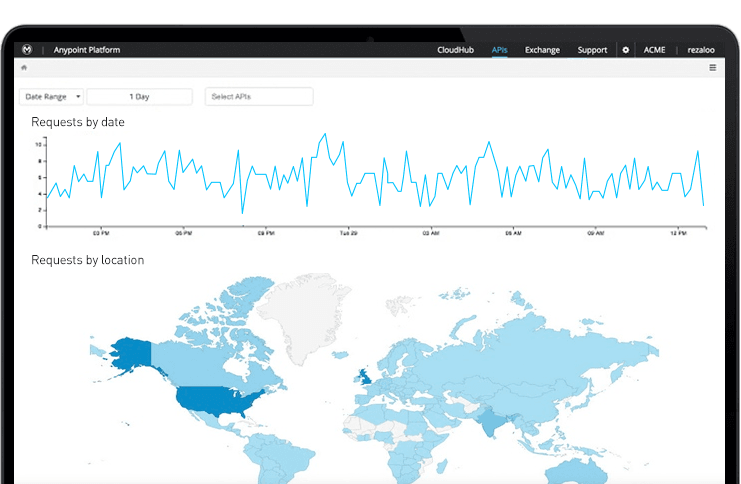
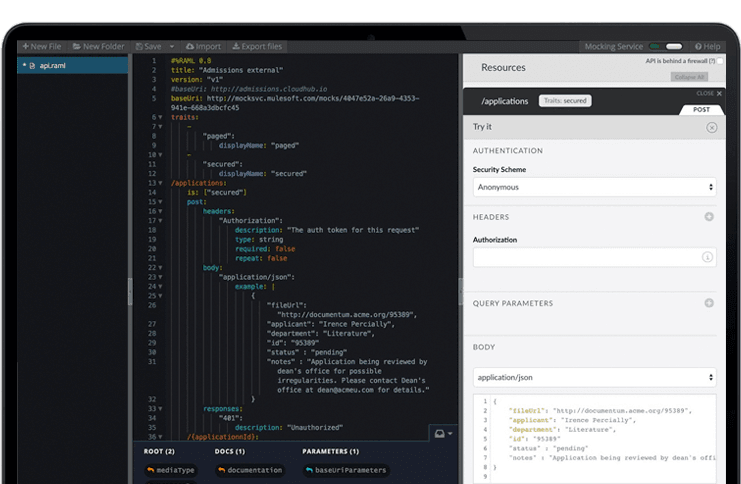
The Anypoint Platform developed by MuleSoft and acquired by Salesforce in early 2018 is designed to
connect apps, data, and devices anywhere, on-premises or in the cloud. This platform was built to
offer out-of-the-box connectors as well as tools that architects and developers can adopt quickly to
design, build and manage the entire lifecycle of their APIs, applications, and products.
Boomi is one of the best integration platforms out there, but it still has its niche. It is suitable for most integration scenarios especially those that doesn't require very high throughput. The runtime could be hosted on-prem and in the cloud or even in a hybrid mode, which …
MuleSoft and Boomi are built on totally different frameworks. Mulesoft is an API-led network whereas Boomi is an ETL middleware approach. In easy words, Mulesoft can connect to several apps and business units, can create and reuse multiple components. Boomi offers only …
Verified User
Engineer
Chose Boomi
Mulesoft was evaluated by [and] definitely was not the right fit for the organization considering the type of integrations which were built in the enterprise historically. Dell Boomi on the other hand was more graphical and was more easy to use and is the best ipaas at the …
We have evaluated Mulesoft as well before going with Dell Boomi. The only difference is the Complete Cloud architecture provided by Boomi and also the ease of using the software, where you don't need to install anything on a developer machine or testing machine or any quality …
Dell Boomi - no installation. Start immediate coding - it's the best thing which I like. Now all PaaS providers are doing same. Dell Boomi entered the game first.
Even though Azuqua may be a bit more user friendly, Boomi can handle many more situations. Azuqua couldn't handle the majority of the processes we wanted to perform.
IBM webMethods lags in terms of iPass offering as compared to mulesoft and dell Boomi. In terms of api management Apigee is much better than webMethods.
IBM webMethods was selected vs WSo2 for the reachness of the correspondign features regarding Mulesoft, the flexibility of IBM webMethods compared to the other platform, in relation to the existing architectural landscape was preferred
I have seen that other products have different UI to address various business problems like messaging, EDA, MFT. IBM webMethods has unified platform and can also support hybrid Integration. I think it is all rounded iPaaS tool with ease of development and ease of operation. The …
webMethods does better for end to end integrations whereas Azure is more focused on APIs. We selected webMethods because we felt their integrations, especially to mainframe environments, were much better than the others. IBM has been in this space for a long time and know it …
webMethods.io IntegrationDescriptionWe uses webMethods.io Integration to solve some of our application to applications and business to business integration needs. It is the Integration Platform as a Service solution that we use in a mix with our continued use of webMethods …
Compared to Dell Boomi the API management suite of Mulesoft is much mature, however if its only about the integration , then i would always go for Dell Boomi, as there is no infrastructure setup that needs to be done from the developer's end.
Dell Boomi is kind of similar in drag and drop implementation. However, it doesn't have as many connectors (shapes in Dell Boomi). Moreover, it also doesn't have deployment stuff on its own.
Informatica is way behind Dell Boomi and Anypoint Platform, but users are still using it …
Overall a better experience in pricing negotiation with the Sales team. The breadth of services offered by Mulesoft was really important and the expertise offered by our consulting partner influenced the decision. The overall deployment was completed well within the timelines. …
We selected Mulesoft for speed of implementation. We did not have the luxury of time and needed a solution that can be learned and implemented within weeks so we can take advantage of newly formed partnerships. The training that was provided to use during our pre-sales and …
We believe Anypoint Platform is best in breed and has features that match nearly any other iPaaS offering. It also allows for accomplishing much more challenging and complex integrations due to the ability to connect to nearly any system, use custom connectors, and embed …
Anypoint Platform is really very easy to adopt for application integration. Simple UI and easy data weave language allows user to focus on business portion only. The API management and deployment of application are hassle free. We have selected Anypoint platform because it is …
API led architecture focus with a decent API ecosystem for developer collaboration, policy management and declarative implementation. Batch processing, visualization, Anypoint MQ and ObjectStore leave a lot to be explored. Multiple deployment models make it worth considering.
We provide options to customers to choose from the best tools. Customers are the decision makers. Personally, because of open-source and large community base, MuleSoft is the repo in the market.
Features
Boomi
IBM webMethods Hybrid Integration
MuleSoft Anypoint Platform
Cloud Data Integration
Comparison of Cloud Data Integration features of Product A and Product B
Legacy systems often need to be replaced or integrated with new applications in order to modernize businesses. A strong API strategy that avoids custom coding and third-party programs is essential to enable this integration. Boomi's new-age connectivity and integration solutions ensure safe, secure, and robust integration. In the age of information, businesses are under more pressure than ever to be able to collect and manage large amounts of data. This data comes in from a variety of sources, including personalized devices such as voice assistants and wearable tech. While this data can be immensely valuable to businesses, they often lack the infrastructure necessary to handle it effectively. This can lead to data build-up in databases or silos, and can eventually lead to problems with integration and security.
In any scenario where a distributed enterprise IT landscape needs a unified approach to solve the challenges of enabling a common information supply chain where different stakeholders as well as citizen developers can be empowered to contribute, participate and own their own parts of the integration landscape - IBM webMethods offers a capable, architecturally sound and cost efficient way of supporting a wide range of enterprise system integration needs.
MuleSoft Anypoint Platform is best tool in the market for developing APIs with complex structures communicating with various different types of applications including web applications as well as legacy applications. Also applications including database connectivity for fetching and updating data in the DB tables. I cant think of any scenario which MuleSoft Anypoint Platform could not be used for developing the integrations.
More from a development perspective. It is always difficult to use the properties features. It takes a while to understand how the data/variables can be used across an integration.
Dell Boomi should also invest more on API Management and not just seen as a ETL,ESB tool.
Should roll out features more often based on users reviews.
Has more features than what we really need so we're paying for more than we use. Sort of like paying for an Abrams tank when all we really need is a Toyota Corolla.
Not a value product, tends to be expensive.
Takes a while for developers to learn to use Mulesoft Anypoint.
Dell Boomi has provided us with the ability to connect our campus together using our various existing platforms. There are many supported features and have yet to run into something that we cannot do. Its user interface is very intuitive which would allow users to begin developing fairly easily. There is a myriad of resources available
The webMethods platform is a fantastic tool for modernizing information systems. It's easy to use and delivers rapid results.The platform is focused on innovation and is accelerating its improvement with the acquisition by IBM.
My IT and Finance teams have noted that setting up the tool is a breeze. Dell Boomi has never caused an issue during a system implementation that I am aware of. We are pleased with the tool and recommend others consider it.
The webMethods product has a very user-friendly and easy-to-use interface.A weak point is the My webMethods Server portal (administration and monitoring portal for the on-premise platform). This weakness has been addressed thanks to the control plane on the hybrid version of the product. This version should be highlighted and used to ensure a very fluid and functional interface.
There’s a lot of learning curve at the beginning when it comes to building the code and everything. In terms of usability, I’d say once you get used to it, it’s fine — but it’s not very easy during the initial stages.
The webMethods platform is very stable and does not cause incidents: if it is well configured and tailored at the base. Infrastructure incidents represent 20% of incidents (full disk, memory peaks, etc.) 80% of incidents come from the implementation of the code in the platform. If a code is not optimized and a high volume is observed in production, this can cause incidents. Similarly, if all error cases or conditions are not handled in the code, this can cause errors. Finally, there can be common errors if the applications connected to the platform do not return quality data or are unavailable.
The atom sphere takes a time to load, when I open a process or when I open a log. One more slow processing is when I import objects from NetSuite.
About the performance of processing, it looks like Boomi takes a time to initialize some things such as connectors before starting the process. This is also performance we have.
The webMethods platform is designed to handle a high volume of small messages. It's a tool for continuous processing.The incidents I've seen involving application performance declines are caused by: - Code optimization issues - File size issues or fragmentation of the transmitted file - Misuse of the platform (batch processing) - Monitoring data was not purged, and the user was working with millions of data points
Boomi support was responsive and knowledgable, however being a closed cloud service, it doesn't have good community support. We found the learning curve to be steep and there aren't avenues like google, forums, or blogs that provide community driven insight into the product or how to go about designing solutions using the tool
In the majority of the tickets I've created, support has been very responsive and provided the right solutions or solutions.Resolving a ticket also depends on the information provided by the creator. It's important to provide the technical context and information about the environment, as well as information to help the support team reproduce the incident.
Anypoint Platform support is very responsive. There is also a huge knowledge base and an active online forum where answers to most questions can be found. When needed support engages the engineering group so adequate solutions or workarounds are always provided.
We received in-person training from the webMethods team. We received standard training from the vendor and custom training on specific security topics.The training sessions went well but remained very standard and did not adapt to the client's specific business. In-person training is more suitable for rapid skill development. It is necessary to practice for a few weeks to ensure familiarity with the tool.
I found clear and easy-to-follow training with realistic use cases for quick understanding and a 360° view of the features. The lesson format allows you to progress and learn by breaking down the allocated time.The technical courses are described step by step, allowing you to quickly get to grips with the products
When implementing webMethods, it's essential to have the right support and guidance.It's important to map out the interactions, document them, prepare test cases, and implement them while making maximum use of the product's native features.Additional tools must also be planned to automate deployments, visualize logs, and monitor the platform.
We decided to go with Dell Boomi because another department in our company was already using the software. We did not research competitor applications to use as our business solution. Dell Boomi was very easy and quick to set up, so once we decided to use Dell Boomi for systems integration, we had it set up and running within a few working days.
webMethods.io IntegrationDescriptionWe uses webMethods.io Integration to solve some of our application to applications and business to business integration needs. It is the Integration Platform as a Service solution that we use in a mix with our continued use of webMethods Integration Server and Trading Networks on-premises. For any solutions that meet the use cases that we deem an appropriate fit for running in the cloud, we build those solutions using webMethods.io Integration. More specifically, we use webMethods.io Integration to synchronize changes in one application or system, in another application or system, by shipping data mutations via integration messaging and API calls. We also use webMethods.io Integration to integrate with external organizations. Our trading partners and supply chain partners provide APIs that we consume, and vice versa, to notify each other of business process events as they occur in the respective organizations. Please provide some detailed examples of things that webMethods.io Integration (webMethods Integration Cloud) does particularly well. Easy to usePriced competitivelySupports robust and resilient integration solutions please provide some detailed examples of areas where webMethods.io Integration (webMethods Integration Cloud) has room for improvement. These could be features that are hard to use, missing functionality, or just things that you'd like to see done differently. Complex logic is hard to understand in a simple diagrammatic user interface too simplistic for solutions that are complicated or go against the gain runtime observability could be improved please describe some specific scenarios based on your experience where webMethods.io Integration (webMethods Integration Cloud) is well suited, and/or scenarios where it is less appropriate. We don't use webMethods.io Integration for scenarios where we need to integrate to on-premises legacy applications that have limited support for modern security controls such as OAuth 2.0 and transport encryption. Likewise, we don't use it for solutions that involve any of our systems that are controlled by safe-working processes. For those scenarios, of which we have many, we maintain on-premises webMethods Integration Server and Trading Networks instances to build and execute and support and monitor those solutions. This then requires us to hook our on-premises integration platform up to the webMethods.io Integration cloud, to ship messages between the two integration platforms. This all begs the question if a cloud solution cannot be used for all use cases or scenarios that the business has, then why add the complexity of using the cloud at all if you still need to maintain an on-premises solution to support the non-cloud appropriate scenarios. What positive or negative impact (i.e. Return on Investment or ROI) has webMethods.io Integration (webMethods Integration Cloud) had on your overall business objectives?webMethods.io Integration is a cost-effective approach to integration in isolationwebMethods.io Integration as a supplement to on-premises integration is pointless and redundant and just adds complexity to the environment and additional costswebMethods.io Integration is a tough sell for organizations using Microsoft Azure integration products such as Logic AppswebMethods.io Integration has a faster time to market where the use case means standard provided adapters can be used describe how webMethods.io Integration (webMethods Integration Cloud) stacks up against them and why you selected webMethods.io Integration (webMethods Integration Cloud). For any organization which is already using Software AG products on-premises, such as webMethods Integration Server and Trading Networks, or Universal Messaging, evaluating and using webMethods.io Integration is the path of least resistance. It will be incredibly easy for your webMethods team to get up to speed on how to use webMethods.io Integration, and start developing new solutions on it. However in my opinion you should only add cloud to your integration product portfolio if you believe you can move 100% of your integration needs to the cloud. Otherwise, you will need to maintain an on-premises integration solution anyway, which means you end up with a more complex IT landscape by adding cloud to supplement on-premises integration for little benefit in terms of cost, complexity, and resourcing requirements. For organizations that are not already a Software AG shop, you should evaluate webMethods.io Integration on its merits, however, it's usually the right decision to double down on your existing products and vendors if you have no big issues with the current state. This is to say that if you are a Microsoft shop then adding Azure cloud products to your portfolio is pretty much inevitable, and avoiding the complexity of multiple clouds should also be something organizations consider.
Once we have moved all of our system integration APIs to the MuleSoft Anypoint Platform, we will need to communicate with a wide variety of external systems. All of our business and service logic is stored in the aforementioned core systems. Anypoint Platform (and all of our APIs) makes it easy to connect to various other platforms. In order to link to these many other systems, connectors and/or components are utilized, and they are simple to configure and integrate.
It has allowed us to scale significantly without having to add headcount, specifically those geared towards data entry. We went from a $10m ARR business to $200m ARR business with the same amount of Order Processors and 12x amount of transactions by leveraging Boomi to perform a lot of the work, and then having the Order Processing team to simply review that the transaction was processed successfully.