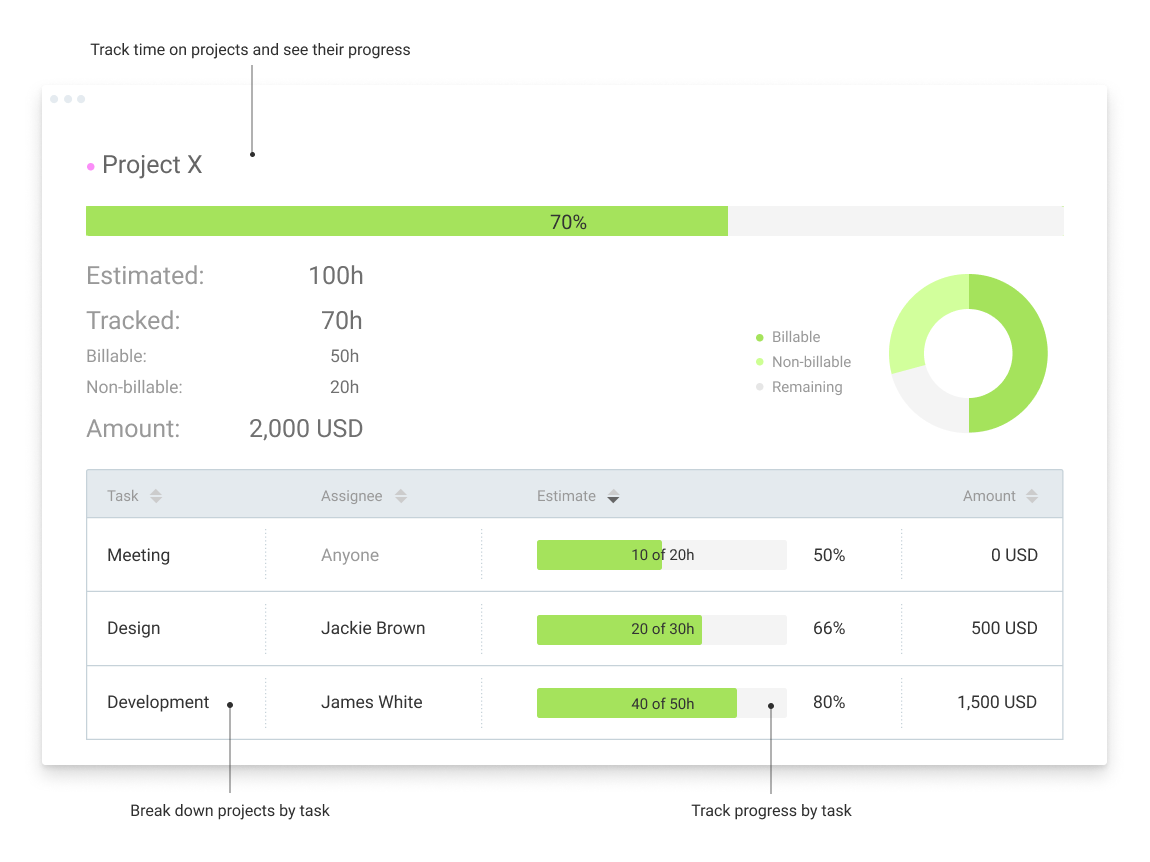
Clockify, from COING in Palo Alto, is a time tracker and employee timesheet software for teams of all sizes. Clockify lets users track how much time is spent working on tasks, as well as keep track of employee timesheets and billable hours, project completion, reports, and schedules.
$0
forever, unlimited everything
EPAY Systems
Score 9.0 out of 10
Enterprise companies (1,001+ employees)
EPAY Systems, a PrismHR Company, is a SaaS provider of human capital management technology and services designed to help medium to large businesses better manage their workforce. Their solutions include recruiting and applicant tracking, new hire onboarding, benefits administration, HR management, time tracking, workforce management, payroll processing, tax management, performance management, ACA reporting, and COBRA administration.
N/A
Pricing
Clockify
EPAY Systems
Editions & Modules
Clockify Free
$0
forever, unlimited everything
Clockify Plus
$9.99
per month, per workspace
Clockify Enterprise
$9.99
per month, per user, per workspace
Clockify Premium
$29.99
per month, per workspace
Clockify Server
Starts at 450
No answers on this topic
Offerings
Pricing Offerings
Clockify
EPAY Systems
Free Trial
Yes
No
Free/Freemium Version
Yes
No
Premium Consulting/Integration Services
Yes
Yes
Entry-level Setup Fee
Optional
Required
Additional Details
Unlimited usage and number of users for free. Paid plans are solely for access to additional features. Self-hosting software on own servers available.
—
More Pricing Information
Community Pulse
Clockify
EPAY Systems
Features
Clockify
EPAY Systems
Human Resource Management
Comparison of Human Resource Management features of Product A and Product B
Clockify
-
Ratings
EPAY Systems
2.2
2 Ratings
115% below category average
Employee demographic data
00 Ratings
2.32 Ratings
Employment history
00 Ratings
2.32 Ratings
Job profiles and administration
00 Ratings
2.12 Ratings
Organization and location management
00 Ratings
2.32 Ratings
Compliance data (COBRA, OSHA, etc.)
00 Ratings
2.12 Ratings
Payroll Management
Comparison of Payroll Management features of Product A and Product B
Clockify
-
Ratings
EPAY Systems
2.9
5 Ratings
95% below category average
Pay calculation
00 Ratings
6.55 Ratings
Support for external payroll vendors
00 Ratings
2.42 Ratings
Off-cycle/On-Demand payment
00 Ratings
2.32 Ratings
Benefit plan administration
00 Ratings
1.01 Ratings
Direct deposit files
00 Ratings
2.32 Ratings
Leave and Attendance Management
Comparison of Leave and Attendance Management features of Product A and Product B
Clockify
-
Ratings
EPAY Systems
2.5
3 Ratings
106% below category average
Approval workflow
00 Ratings
2.32 Ratings
Balance details
00 Ratings
3.23 Ratings
Annual carry-forward and encashment
00 Ratings
2.12 Ratings
Employee Self Service
Comparison of Employee Self Service features of Product A and Product B
Clockify
-
Ratings
EPAY Systems
2.9
3 Ratings
96% below category average
View and generate pay and benefit information
00 Ratings
3.23 Ratings
Update personal information
00 Ratings
3.33 Ratings
View company policy documentation
00 Ratings
2.32 Ratings
HR Reporting
Comparison of HR Reporting features of Product A and Product B
Clockify
-
Ratings
EPAY Systems
3.0
3 Ratings
86% below category average
Report builder
00 Ratings
3.13 Ratings
Pre-built reports
00 Ratings
2.93 Ratings
Ability to combine HR data with external data
00 Ratings
3.13 Ratings
Onboarding
Comparison of Onboarding features of Product A and Product B
Clockify
-
Ratings
EPAY Systems
2.1
2 Ratings
117% below category average
New hire portal
00 Ratings
2.12 Ratings
Manager tracking tools
00 Ratings
2.12 Ratings
Performance and Goals
Comparison of Performance and Goals features of Product A and Product B
Clockify
-
Ratings
EPAY Systems
2.2
2 Ratings
114% below category average
Individual goal setting
00 Ratings
2.12 Ratings
Performance tracking
00 Ratings
2.32 Ratings
Performance Management
Comparison of Performance Management features of Product A and Product B
Clockify
-
Ratings
EPAY Systems
1.9
2 Ratings
122% below category average
Performance plans
00 Ratings
2.42 Ratings
Performance improvement plans
00 Ratings
1.01 Ratings
Review status tracking
00 Ratings
2.42 Ratings
Review reminders
00 Ratings
2.42 Ratings
Multiple review frequency
00 Ratings
1.01 Ratings
Recruiting / ATS
Comparison of Recruiting / ATS features of Product A and Product B
Clockify is an easy 10 over 10 recommendation for me. I would recommend this anyone especially if they're required to track their time and productivity while on the job. Office workers, tellers, bankers - any desk jobs really can very well use the awesome features of Clockify to the fullest extent. It is easy to use, very simple to set up, and doesn't require that much resource from your computer for up-keep
I am able to track which of my clients have paid their invoices and which have not. The number of days that the EPAY invoice is outstanding is easily accessible. The date the original invoice was sent is displayed. The initial form to complete in order to send the EPAY is so simple a caveman can do it. Just need the client's name, email, and the amount of the invoice. The automated follow-up emails to the clients who have not paid are helpful.
Clockify records exact times on a per project basis when you click Start/Stop.
User interface is very easy. It is easy to add a project on the fly, change the times I just recorded if I forgot to click Stop for example. The interface is intuitive and gives me the flexibility I need.
Reporting gives me everything I need from times, hours per project, billable or not, per client and any tags I've created. This provides enough flexibility for many different use cases.
In general, manuals or how to use instructional videos are always welcome - just covering the very basic are very good to get everyone up and running.
Maybe work on your scalability - the main reason why we switched to a different provider is because the company was ramping up and the competitors have more features that come with not just time and productivity tracking.
I always like the classic blue and white pallets on the app but sometimes I just wish there's more option to customize how it looks just to give it a little more flavor.
I'm using the free version at the moment and loving it. What a great product, easy, responsive and has better up time than Yahoo Mail. :) What isn't there to like?
Very affordable, accessible and simple. For this very reason I would say, it culminates to Clockify being very beginner and start-up friendly. It is its strongest suit after all, and this is the main reason why I would recommend this to anyone. I am very thankful for me ex colleague who recommended this to me, we're no longer working together but I still hear that he's still using Clockify to this very day on his own business
Because I can't give it a Zero, I believe EPAY Systems is the most senseless system I have ever used. I worked on systems over 25 years ago that were better. In my opinion, there is no logic to the programming; the system is unbelievably SLOW, and there and hundreds of problems every week. And major ones that they will not or can not correct. For example, we can not file or access employee records in the system as it can take longer than 10 minutes to view or load one document for one employee - IF the system allows you to get that far, which it usually doesn't.
I have never had an issue logging in or it not being available. I use Clockify every work day during the week, frequently starting/stopping projects. I've had past experience with other systems that suddenly aren't usable for an hour and that is something I have never experienced with Clockify. They are doing something right on their backend. Nice job, Clockify folks
I already mentioned how it feels light across the wire. Pages load fast in the web browser. I have not tried the browser plug-in nor the mobile app. I give it a 9 instead of 10 as the desktop app seemed to hesitate when I clicked the start/stop of a project/task
I dealt very little with customer support because Clockify is so easy to use. That being said, the few times I did, I got fast responses and any issues that I did have were solved in a very fast manner.
I feel the support is terrible. We have an outsourced support purpose who doesn't understand the EPAY Systems or our company, [removed], will only answer the first thing mentioned even if there is an entire list. Then the answer does not solve the 1st problem on the list or any other and has no idea how to help us. We have requested a replacement and were told we would get one, then told later we would not. I believe while the support person is nice, I believe they were not trained or supported on their end, and effectiveness is probably 1% or less, takes forever, and is only on the minor issues.
Harvest is very similar to Clockify. The only difference is that Harvest also has an invoicing and billing system built into it. So if you're billing your clients based off of time directly, Harvest may be a better option as far as that goes. Of course, Harvest only has minimum billing increments of 6 or 10 minutes, there is no 10-minute option so that's something where Clockify has them beat. They are both very easy to use.
Our main reason for switching to Blueforce is that we found the platform to be pretty promising and interactive than other alternatives. With other alternatives, there was one issue or another which just used to not give us a very smooth and subtle experience. Thankfully, this tool has solved all our problems and has been a godsend gift that does its job quietly and lets the final results make the noise.
Because it feels light on the wire and runs so smoothly with great up-time. I have to assume that the same is true as it scales. I'm a single user so maybe I don't see if there are any scalability issues. With the way it seems architected to run so quickly across many platforms (desktop, mobile, web, browser plug-in), I have to think that it is using recent technology that provides scalability options
The free plan really did everything we needed for the 6 months or so we used it. Without Clockify, we would have had to pay roughly $40+/month for a software tool.
When we upgraded to the paid version, it was still only $10/month and helped us be able to have minimum billing increments which is a huge monetary increase.