Clockify, from COING in Palo Alto, is a time tracker and employee timesheet software for teams of all sizes. Clockify lets users track how much time is spent working on tasks, as well as keep track of employee timesheets and billable hours, project completion, reports, and schedules.
$0
forever, unlimited everything
Infor Expense Management
Score 7.5 out of 10
N/A
Infor Expense Management's suite of four integrated applications (Expense Reports, Travel Plans, Payment Requests, and Timesheets) can be used either individually or in any combination to automate expense-related business processes, enforce policy compliance, cut administrative costs, and reduce the risk of accidental errors and intentional fraud.
N/A
Toggl Track
Score 9.2 out of 10
N/A
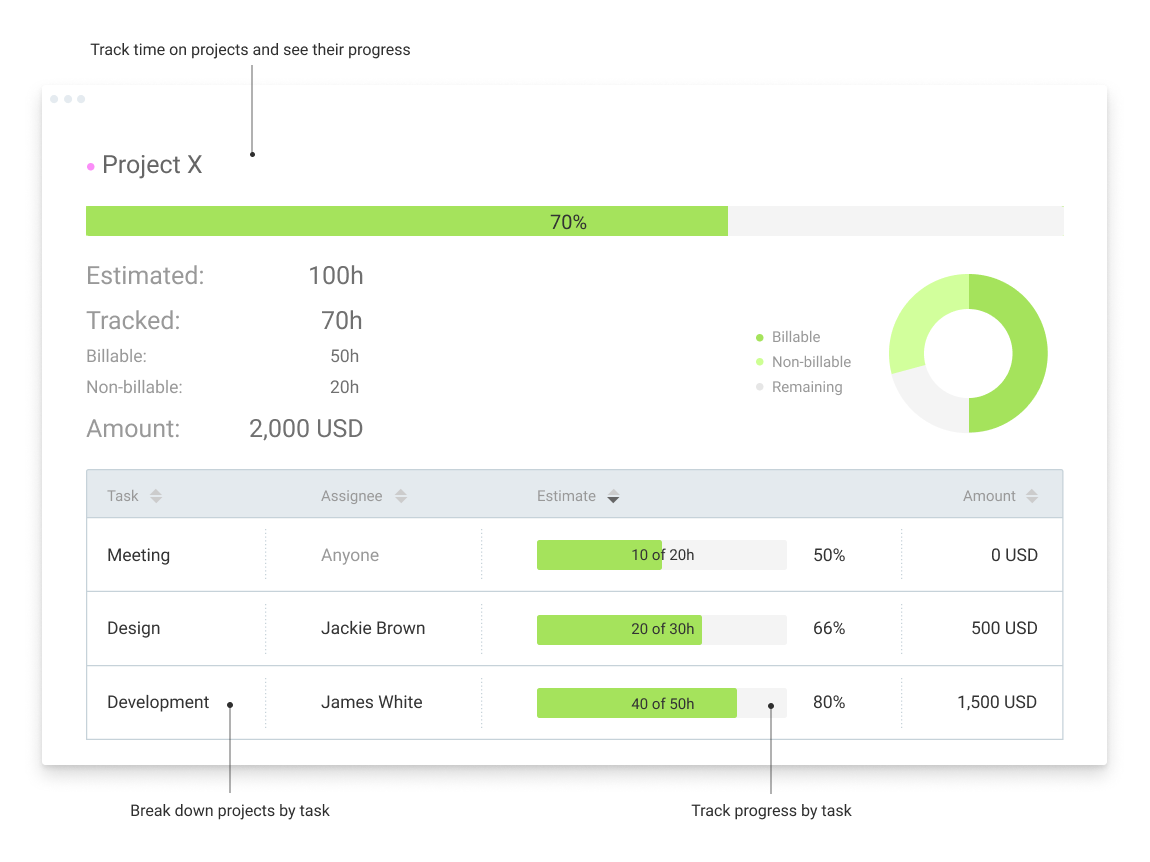
A solution for employee time tracking software that allows your team to track time on multiple platforms with just one click, featuring integrations with 100+ apps via browser extensions, and native calendar and integrations for any preferred project management tools.
$10
per month
Pricing
Clockify
Infor Expense Management
Toggl Track
Editions & Modules
Clockify Free
$0
forever, unlimited everything
Clockify Plus
$9.99
per month, per workspace
Clockify Enterprise
$9.99
per month, per user, per workspace
Clockify Premium
$29.99
per month, per workspace
Clockify Server
Starts at 450
No answers on this topic
Starter
$10.00
per month
Premium
$20.00
per month
Enterprise
Custom
Offerings
Pricing Offerings
Clockify
Infor Expense Management
Toggl Track
Free Trial
Yes
No
Yes
Free/Freemium Version
Yes
No
Yes
Premium Consulting/Integration Services
No
No
No
Entry-level Setup Fee
Optional
No setup fee
No setup fee
Additional Details
Unlimited usage and number of users for free. Paid plans are solely for access to additional features. Self-hosting software on own servers available.
Clockify is much more simple and straight-forward compared to their other tools that I have used. I would say that it is the most beginner and start up friendly as well, price wise. It offers the most freedom when it comes to doing edits and the submission of your timesheets.
More affordable, management of leaves, and expenses, overview of projects P&L. As disadvantage, Clockify schedule is worse than 10k ft and it doesn't have a drag and drop feature for scheduling projects.
It generated satisfactory timesheet for me comparing to other same softwares which was satisfying for me and my employer and the HR department. Each time explains my task and each task describes the time i have spent on during the days of the month. And also provide the …
Both Clockify and Hubstaff served our business well. I was not involved in the selection of Clockify to replace Hubstaff, but I believe the decision to move was financial reasons.
Harvest is very similar to Clockify. The only difference is that Harvest also has an invoicing and billing system built into it. So if you're billing your clients based off of time directly, Harvest may be a better option as far as that goes. Of course, Harvest only has minimum …
Clockify is a perfect cheaper alternative to Harvest and other software that are more expensive but provide more tools. If you need software that tracks time efficiently and generates the required project and employees time reports, Clockify is terrific. If you need software …
I did a Google search and tried a few. I don't remember which ones now. I wanted something that was free at first which was nice as I started my own business. Clockify has given me what I need for free and allows me to grow with more people if I want as well. I'd say I got …
We were using Concur Travel and Expenses to track our expenses and also having travelling expenses logged in and it was a good tool. Infor Expense Management was a better tool in terms of the functionalities features and makes it easy for a new person to get quickly accustomed …
I have used TickSpot before, but it was implemented by my workplace and not my choice. I thought it was fine, nothing superlative I would tell my friends about like Toggl, but I did like time tracking as a concept. I remember recording my time retroactively versus in real time. …
One year ago I compared it to several tools, trying to use them in parallel. Now I don't remember the exact names of those tools, but Toggl was the best for its simplicity. It is easier to use, with fewer clicks and hence less destruction
The key for us was the fact that Toggl has a desktop app allowing you to easily track time in realtime rather than having to go back and log it after the fact. This ensured much higher accuracy on our time tracking and made it so people tracked their time in real time rather …
Toggl is superior to the other apps I've used (some I couldn't remember the names of) because of one thing: simplicity and UI/UX. I hate overcomplicated apps, and I hate ugly UI/UX even more.
Toggl has great UI/UX and it does everything I need it to do in the simplest possible …
I don't recall using something so simply automated like Toggl in the past, although I have used more complicated automated timesheets years ago. I chose it when it was recommended by some online tech review, and thought I'd give it a shot. It works really well as a laptop app.
Toggl's user interface takes all the work out of creating time management documents. Projects are pre-loaded into the interface, and switching is a breeze. Toggling time on and off is literally one click, and generating reports takes no time at all. Truly a time saver for …
I've tried various other time tracking tools but I've been most impressed by Toggl because of the simplicity and functionality. I don't need a big complex program, I just need a little app that helps me track time and stays out of the way. And, it helps that it's free.
Harvest has a much more integrated feel for desktop and mobile and the reporting is much, much quicker in terms of time spent. There is also a much clearer functionality to log expenses. It is also more responsive in terms of starting and stopping the watch and setting up …
Toggl is just always available on my desktop, it's low bandwidth and doesn't consume a lot of system resources, and entering time is flexible and intuitive. All other programs I've tried require you to stop what you're doing to enter a new project or a new client. Not with …
Toggl is easily the best time tracking tool we've used. We have tested any others for less than a week. We've been working with Toggl for about a year and see no need to test additional tools. It does what we need, the pricing is right and the flexibility is right.
Toggl has the best price-per-feature, and a superior user interface for our use case. It doesn't require purchase of an expensive suite of tools, and is seamless to use in daily workflow.
Rocket Matter is far more sophisticated and better suited to a law office that has a high volume of matters that are billed by the hour. Otherwise, toggl is far simpler and easier to start using office wide.
Toggl is sleeker and so much more user-friendly than Time Doctor. The Chrome extension with the intuitive power button icon really does increase compliance, which I think is one of the most important, and sometimes overlooked, considerations when choosing a new software for …
We had previously used Harvest. It was a good solution too but as soon as we made the move to Toggl, we knew we had made the right choice. It just felt right.
I use Toggl to get an hourly rate for every single task, so I can estimate a current rate and negotiate rates for new clients and projects. I use Toggl concurrently with any other time and task trackers that are required for hourly jobs on freelance hubs, such as Upwork and …
Toggl is the best simple time tracking app that I've found. It performs best when that's all you're asking to do and you don't try to turn it into your invoicing software or project management app. I selected Toggl because it provides detailed time tracking and has a great …
We compared it with a few web-based tools and with Office 365 and at that time chose to go for a Toggl license. This was quick to set up and did what it had to do. Nothing more, nothing less. With the other solutions, this would be more involved as they are more complete …
Thanks to Toggle I could finally forget about time sheets. It does all the calculations for you. Now I do not start any task without hitting "start" with Toggl. It also helps me to control workload of the entire team. The speed and ease of use it true. The app is very light and …
I used the timer within Teamwork Projects and it worked well. I don't use the software anymore so can't choose to use that anymore. The time is basic in comparison to the Toggl timer but it was seamless with invoicing.
I would recommend this for someone who is a freelancer with multiple clients, but would not recommend to a company who has multiple employees doing the same job every single day. It'd be easier to have them clock in on one platform, like Square, for example, which automatically can take out taxes (for W9 employees)
The best suited scenarios is for new startups where I see that many expenses can be logged in easily with the help of the app and it can done with much ease and I would suggest that it good tool based upon my experience as it quickly loads up the interface.
I have been using Toggl for about seven years now, and I absolutely love it. It keeps me on track with the tasks I complete throughout the day. Tracking my time makes me more accountable for the work I produce and how much time my work takes. Having the breakdown of my tasks helps inform decisions on hiring support staff. I can see exactly where my time goes and then formulate a strategy to either bring in more help, delegate work, or re-prioritize. When coupled with other productivity apps (I particularly use ToDoist), you can unlock even more of Toggl's power. Toggl Track isn't so much a checklist tool--it's a time tracker; but when I integrate my to-do app with the time tracking, I can quickly and easily switch between tasks without disrupting workflow.
Toggl integrates smoothly across multiple devices. I can seamlessly move from the field on my phone to the office on my computer and utilize Toggl the entire time.
It has great customization. Setting up multiple customers in a variety of ways is easy and quick to do. We haven't found something we needed that we couldn't set up.
The reporting is clean and informative. Reports can be generated for multiple criteria.
In general, manuals or how to use instructional videos are always welcome - just covering the very basic are very good to get everyone up and running.
Maybe work on your scalability - the main reason why we switched to a different provider is because the company was ramping up and the competitors have more features that come with not just time and productivity tracking.
I always like the classic blue and white pallets on the app but sometimes I just wish there's more option to customize how it looks just to give it a little more flavor.
The Mac App is great, but sometimes I miss the notification when the Pomodoro timer goes off... I wish it were more intrusive, so to speak, so that it would be impossible to miss the end of the pomodoro session.
I wish there was a way to automatically send reports via slack at the end of the week.
I would love to have some different visual themes. I don't particularly like the color choices they've made after the rebrand.
I'm using the free version at the moment and loving it. What a great product, easy, responsive and has better up time than Yahoo Mail. :) What isn't there to like?
Very affordable, accessible and simple. For this very reason I would say, it culminates to Clockify being very beginner and start-up friendly. It is its strongest suit after all, and this is the main reason why I would recommend this to anyone. I am very thankful for me ex colleague who recommended this to me, we're no longer working together but I still hear that he's still using Clockify to this very day on his own business
Very easy to use, can enter projects and tasks on the fly, can use either a timer or enter hours later manually, the interface is simple and intuitive. Has a mobile app that is also easy to use.
I have never had an issue logging in or it not being available. I use Clockify every work day during the week, frequently starting/stopping projects. I've had past experience with other systems that suddenly aren't usable for an hour and that is something I have never experienced with Clockify. They are doing something right on their backend. Nice job, Clockify folks
I already mentioned how it feels light across the wire. Pages load fast in the web browser. I have not tried the browser plug-in nor the mobile app. I give it a 9 instead of 10 as the desktop app seemed to hesitate when I clicked the start/stop of a project/task
I dealt very little with customer support because Clockify is so easy to use. That being said, the few times I did, I got fast responses and any issues that I did have were solved in a very fast manner.
I haven't needed much support from Toggl, as it's mostly come from a small team trying out the tool. I'm not entirely sure what the best way to reach them would be if I did need them. I'm also not sure how responsive they would be to support requests. But I think it's positive that I have not needed them
Clockify is much more simple and straight-forward compared to their other tools that I have used. I would say that it is the most beginner and start up friendly as well, price wise. It offers the most freedom when it comes to doing edits and the submission of your timesheets
I have used TickSpot before, but it was implemented by my workplace and not my choice. I thought it was fine, nothing superlative I would tell my friends about like Toggl, but I did like time tracking as a concept. I remember recording my time retroactively versus in real time. But my needs were also different at that time, because I was a full-time employee trying to give management an idea of how long tasks took me versus generating the information for myself. When I started freelancing three years ago, I looked up free time tracking apps because I did miss time tracking. I may have tried a few briefly, but I found Toggl fairly quickly and realized how well it suited my needs. Been together ever since! I'm sure there are other tools out there but I don't care to look because I'm happy with Toggl and get free use.
Because it feels light on the wire and runs so smoothly with great up-time. I have to assume that the same is true as it scales. I'm a single user so maybe I don't see if there are any scalability issues. With the way it seems architected to run so quickly across many platforms (desktop, mobile, web, browser plug-in), I have to think that it is using recent technology that provides scalability options
The free plan really did everything we needed for the 6 months or so we used it. Without Clockify, we would have had to pay roughly $40+/month for a software tool.
When we upgraded to the paid version, it was still only $10/month and helped us be able to have minimum billing increments which is a huge monetary increase.
My timetracking needs are simple, so this is a great tool for me. Start the timer, stop the timer as client work is performed, whether that is uninterrupted time or not.
It is very easy to review work time invested for each of my clients, making it easy for me to track my daily time and review monthly hours for preparing invoices.
Daily time is automatically aggregated.
Each time entry can be tagged with work activity, or projects can be segmented and time assigned to the segments with start and stop times.