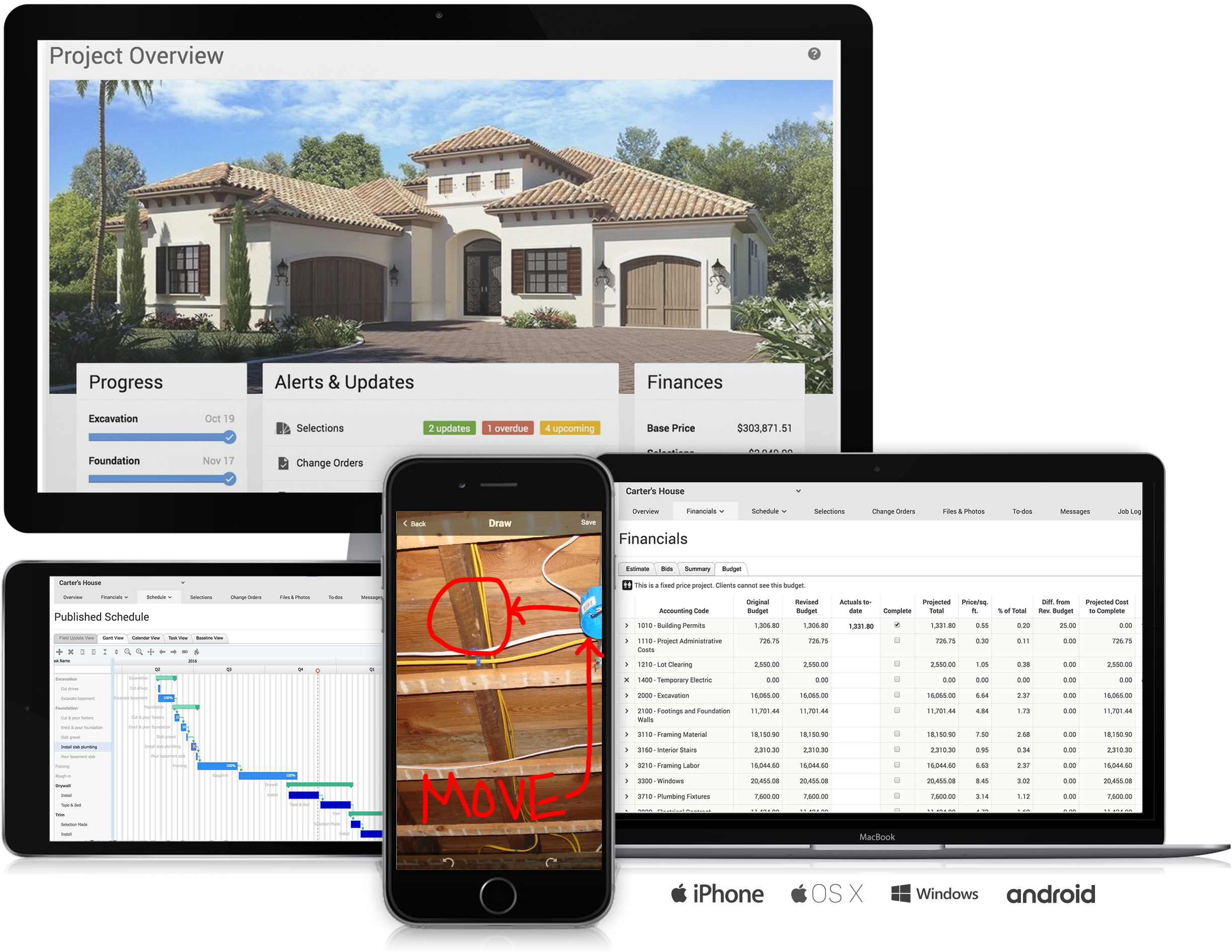
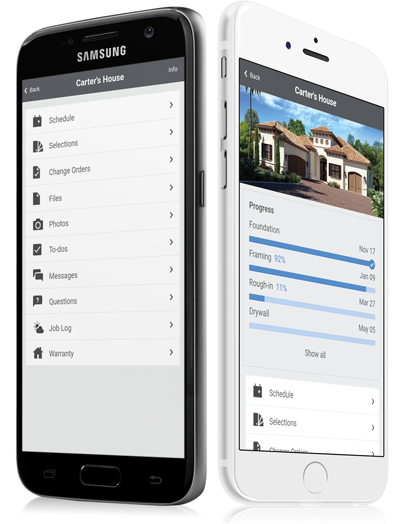
CoConstruct, from Buildertrend since the November 2021 acquisition, is a custom builder & remodeler software. It allows users to enter data once and have that information flow through the estimate, specs, selections, bids, proposals, change orders, and budgets, including to and from QuickBooks. In addition, CoConstruct includes scheduling and 3-way communication between builder, client, and trade partners. Everything is captured via email and texting. Login isn't required for…
$49
per month
MetaMeetings
Score 0.0 out of 10
N/A
N/A
$4,000
one-time fee
monday.com
Score 8.3 out of 10
Mid-Size Companies (51-1,000 employees)
monday.com Work OS is an open platform designed so that anyone can create the tools they need to run all aspects of their work. It includes ready-made templates or the ability to customize any work solution ranging from sales pipelines to marketing campaigns, CRMs, and project tracking.
$12
per month per user
Pricing
CoConstruct
MetaMeetings
monday.com
Editions & Modules
Ramp
$49
per month
Plus 5
$299
per month
Plus 10
$399
per month
Plus 15
$499
per month
Basic
$4,000
one-time fee
Basic
$12
per month per user
Standard
$14
per month per user
Pro
$24
per month per user
Enterprise
Contact Sales
Contact us
Offerings
Pricing Offerings
CoConstruct
MetaMeetings
monday.com
Free Trial
No
No
Yes
Free/Freemium Version
No
No
Yes
Premium Consulting/Integration Services
No
No
No
Entry-level Setup Fee
No setup fee
No setup fee
Optional
Additional Details
CoConstruct pricing is based on active job sites that have client access online, which means it is adaptable to builders & remodelers businesses. This means that there are an unlimited amount of projects available for estimates and proposals, so that customers only pay when they win a contract. Also built into the pricing are a myriad of services: a dedicated implementation coach, free estimate & scheduling templates based on industry best practices from successful builders and the NAHB, unlimited storage and users, software branded with the customer's logo, unlimited amount of warranty projects, and unlimited phone & email support. The vendor offers a money-back guarantee that is good for the first 90 days of service.
CoConstruct has a lot of similar functionality as comopared to BuilderTrend and when it came down to selecting one over the other, CoConstruct won our business because of this fact. The fact that it does almost all of the same things at a fraction of the cost of BuilderTrend …
Products like Procore and PlanGrid are geared towards projects with huge projects teams, multiple stakeholders and dozens of subcontractors. CoConstruct can be used for projects big and small (value) and also with small project teams or large projects teams. For small partial …
We utilize CoConstruct because it doesn't forget the close relationship with a client. Other software performs well in project management, but so often they epitomize the adversarial relationship in construction between the contractor and the client. CoConstruct tries to put …
We used Basecamp for two years in conjunction with CoConstruct, to make up for the team communication CoConstruct lacks. Basecamp was excellent for that purpose. We also used it to get quick, simple approvals for change orders, because CoConstruct did not have a simple method …
BuilderTrend provides a similar product; however, I found it a little more clunky to use. BuilderTrend integrates with a third party estimating software; however, it wasn't one I used. I had already invested in an estimating system that I could manipulate better to support …
I have looked at Builder Trend. It has a similar function and does many of the same things. Generally, I prefer the look and feel of CoConstruct, It has a cleaner and more approachable interface. Its ability to integrate with outside accounting software, specifically …
CoConstruct has no CRM or ability to search the system for information, and the team collaboration and tasks either don't work or don't work well across the board.
For the things that CoConstruct does, it does well, but the things it lacks in it might as well not do at all.
We have tried all the major products and some minor ones too.
Don't pick BuilderTrend. We spent a year with them and discovered that they release beta-quality features. We signed on to their payment system, and it cost us so much time and energy to sort out the mess that it …
CoConstruct is the only single-entry estimating system that allows each user to enter a piece of information once, and have that data flow directly from the estimate, specifications, selections, bids, change orders, budgets, and to and from QuickBooks with no double entry! It …
monday.com feels like it offers a lower barrier to entry as well as more versatility, extensibility without becoming too complex. Atlassian is geared more for larger companies requiring a greater degree of granular controls.
Both platforms have a number of integrations (though, …
I used Pipedrive in my previous roles, so I did not evaluate monday.com as an alternative to Pipedrive. Similarly, Salesforce is not positioned as an alternative to monday.com for us. We currently use both Salesforce and monday.com, as they serve different purposes and …
Planner is very hard to figure out. Insightly is a good resource to keeping track of customers and their info but for tasks, monday.com is far superior
Workfront offered a more intuitive user interface, which made team adoption easier. It also included additional products that aligned well with the needs of our Dev, Work Management, and Service teams.
Cost is a big factor as the alternatives stacked up poorly in user costs and built in features. Also, the business was already using a different facet of monday.com so it was a quick setup and we already had experience and people were Jo knew the platform. Less complex and also …
monday is more capable and comprehensive when it comes to project and task management as well as the CRM side. However, Odoo is better suited for managing other areas that monday doesn’t cover, such as employee management, payroll, and invoicing. If one were to prioritize cost …
We have not used anything like Monday.com before. We used to do all of what I described on Google Sheets and share them with the company. It was very time consuming and cumbersome to remake new sheets every year, Monday.com gives us the freedom to add on year by year and not …
monday.com is far superior to Microsoft Planner and Basecamp, and arguably superior to Trello and Slack Lists as well. Asana (for work management and Zendesk (for request management) put it to shame. My main monday-using client selected it primarily because of its slightly …
We have only ever tried one other software that was designed to work similarly to monday.com. I will not name the company but our experience with it was just short of harrowing. The company was friendly and supportive but the product they designed was not user friendly. It did …
monday.com is so much better and cheaper. We moved from Zendesk because, in our experience, their customer service was terrible, they kept raising prices, and there was limited functionality relevant to our organization. The tools within monday.com allow us to use it as more …
It's been a while since trying Asana, so it's hard to say. I think they are very similar from what I remember, but maybe monday.com has more reporting and customization possibilities?
monday.com offer much of the standard tools and seems to be ever evolving. They seem to take feedback and constantly upgrade the tools. If all the tools are there, the differentiating factor might be the cost, any integrations you may need, and the visual "chemistry". To me, …
We chose to move from Zoho to monday.com when our company started growing exponentially. Overall, our team was thankful for the change because we were growing at far to fast of a speed for Zoho's tools to keep up with us. monday.com is a better, beefier platform with far better …
We decided to go with monday.com because they offered a free tier for nonprofits and because they are easier to use and offered additional features that we could not find on the other choices. Hands down, there was no better choice for us than monday.com.
When I arrived at my org, I was initially disappointed to hear that we used something other than Asana for project management. Fast forward just a few months, and I became a complete monday.com convert. While its organization is similar to Asana's, it's user interface, …
CoConstruct is a great program for small to mid-size residential and commercial projects. It still has a ways to go with subcontractor engagement but the groundwork is there for this to be a good program. The needs and requirements for a residential or remodel project always are different and unique, but CoConstruct is very well suited to address these needs.
The platform is very well suited for our nonprofit programs that serve low-income clients who need diapers, wipes, and period products. It has helped us run our programs, capturing information and allowing us to view the data for reporting purposes. The ability to filter data is very helpful by allowing us to categorize information to get a better picture of the progress of our programs.
The integration of all aspects needed to run a remodeling company efficiently: project scheduling and management, financial planning and customer service. Since it’s an all-in-one suite and cloud-based, it enables our team to keep track of all our projects in real-time. Communication breakdown is the last thing we want, so being on the same page is not only desirable but makes for the best possible relationship with our clients.
Product education - We like how CoConstruct helps new users and get them to start using the tool right away. The dashboard resource materials are incredibly useful. We don’t have to spend a lot of time training new hires on the system and onboarding new clients.
I like summary of subitems, especially with subitasks as subitems and add item tracking for each subtask it can show total tracked in parent item. Similar with other columns, like numbers, status, date.
Dashboard features, Many kinds of dashboard view available, we can utilize on the basis of requirements.
monday.com workform is very powerful, easily share form link when submitted it will create line item in board with provided data.
monday.com automation is very helpful in order to automate steps with specific rules and easy setup.
monday.com also provides integrations in order to automate processes if need to integrate multiple app together. or need to transfer data between multiple apps.
Estimating is still done on third party software and pulled into the program. If you do manual takeoffs and work on a spreadsheet, this is relatively simple to do - and you could probably enter it straight into Co-Construct. However, if you use automatic takeoffs for accuracy and speed, you will end up doing a bit of double handling as you re-enter the output into Co-Construct. Ideally, you would be able to do the takeoffs within the program, entering the data only once.
The desktop app for Mac seems to have a few issues with visual glitches appearing on screen, it only seems to go away when I close the tool and reopen it
Subtasks don't show on the individual users to-do list, only main level tasks
Teams involved in content creation, such as marketing or editorial teams, could use monday.com to manage the entire content lifecycle. Boards might track content ideas, assignments, drafts, reviews, approvals, and publication schedules, helping teams collaborate and keep content production on track.
It's really about ease of use. I use Click-Up as well, which I really enjoy, but monday.com is a lot less complex to use. Its structure is a bit easier to understand and I got accustomed to the functionality very quickly. I have not explored enough of its functionality to comment any further but it's a really great tool for tracking progress and for capturing absolutely everything I need to save, including ideas, brain-dump, insights, continuous improvement on tasks and processes. I am lucky to be able to use monday.com as a member of my client's team.
Everything performs fairly well. Every now and then there are user errors where an employee will not click "ok" on a note they've created and simply exit out (I do wish that something was in place to prevent this, such as a pop "are you finished?")
The customer support for CoConstruct is hands down the best I have ever experienced from a software company. Any time I send a support request through the help center, my questions are either acknowledged or answered and solved within 20-30 minutes. For more complicated items, they will keep in touch with me as the team works through the problem.
I often offer enhancement requests which they take seriously, and over the years, some of the changes that I have wanted to see have been implemented.
monday.com only really care about accounts that have 20 seats or more. While this is great for monday.com, it pushes smaller organisations to evaluate alternatives. We rate monday.com highly in our organisation because key staff have already got good experience with the application and we know we will get to 20+ seats one day. But, till then the billing model and lack of permanent enterprise features is a dread.
To have someone walk you thru the features and capabilities of Monday.com is priceless. Someone also coming along later in the contract to see if you are maximizing the program to suit your company needs is beyond helpful. The staff that have provided this training are fun, creative and very patient.
We signed up for the accounts. Created the accounts. Ran the trial version and tested it live while we were running multiple projects and found that it was fitting our needs perfectly. When the trial ended and we were asked to purchase the full version, we did. We have found other ways to use it and it's a breeze.
CoConstruct has a lot of similar functionality as comopared to Buildertrend and when it came down to selecting one over the other, CoConstruct won our business because of this fact. The fact that it does almost all of the same things at a fraction of the cost of Buildertrend was ultimately the reason why we selected CoConstruct for our business needs.
monday.com feels like it offers a lower barrier to entry as well as more versatility, extensibility without becoming too complex. Atlassian is geared more for larger companies requiring a greater degree of granular controls. Both platforms have a number of integrations (though, Atlassian may have "more" because of it's marketplace and longer tenure), but monday.com may be easier to configure, though with potentially more limited functionality. monday.com definitely lends itself well to getting a business off the ground with simpler automations and the ability to grow you to the point of "graduating" to a more specialized tools.
For it to work across multiple departments and sites, I would like to see improvements made with integrations and automation. For this question, I am acknowledging not only the addition of internal triggers/automation, but also an expansion on external ones.
By using monday.com as an enablement tool for templated onboarding plans, we have been able to begin calculating the number of manager hours saved through our work (not defined yet).
monday.com's reporting tools also allow us to more easily report on the productivity and output of our team since we keep up with all projects and subitems in monday.com.