Coevera vs. Microsoft Dynamics 365

Overview
ProductRatingMost Used ByProduct SummaryStarting Price
Coevera
Score 8.0 out of 10
Mid-Size Companies (51-1,000 employees)
Coevera (formerly Pipeliner CRM) is a sales enablement tool focusing on pipeline management, sales processes, and analytics designed to empower sales professionals. It provides a visual sales process, profiles, and charts, all of which aim to help users take the right actions with their buyers and even helps identify key contacts within an organization. The CRM is available in three versions: Starter, Business & Enterprise. The vendor offers…
$65
Microsoft Dynamics 365
Score 8.0 out of 10
N/A
Microsoft Dynamics 365 is a CRM providing sales, marketing, and service functionality. It is offered as SaaS and on-premise. Dynamics 365 is part of the larger Dynamics suite of business intelligence and ERP products.N/A
Pricing
CoeveraMicrosoft Dynamics 365
Editions & Modules
STARTER - Basic sales management, tracking and collaboration
$65.00 per user per month
STARTER - Basic sales management, tracking and collaboration
$65 per user per month
BUSINESS - Full CRM functionality, customization and unique productivity features.
$85 per user per month
ENTERPRISE - Full CRM functionality with advanced reporting, customization and services.
$115 per user per month
UNLIMITED - Full CRM functionality with advanced reporting, customization and services.
$150 per user per month
UNLIMITED - Advanced CRM functionality including advanced features
$150 per user per month
No answers on this topic
Offerings
Pricing Offerings
CoeveraMicrosoft Dynamics 365
Free Trial
YesYes
Free/Freemium Version
YesNo
Premium Consulting/Integration Services
NoNo
Entry-level Setup FeeNo setup feeNo setup fee
Additional Details
More Pricing Information
Community Pulse
CoeveraMicrosoft Dynamics 365
Considered Both Products
Coevera
Chose Coevera
The most important reason for selecting pipeliner CRM:-exceptional user engagement through its sales-friendly interface. With its uniform navigation and visual approach, users can learn the system quickly. Users can easily customize what they see to make the system their own. …
Chose Coevera
Conversely from competitors listed below, Pipeliner CRM does not need expensive certification for its administration daily basis. It is very intuitive and easy to use. Pipeliner CRM has a friendly interface with drag-and-drop functions. this software is designed to deliver …
Chose Coevera
As mentioned before, way easier to adopt too.
Customization was easy to get a hang of, the training was superb, and allows anyone to quickly and easily get running with it.
Chose Coevera
Another CRM like Creatio is not very user-friendly. With a lot of complications, it might take a long time for a new user to master it, but Pipeliner CRM is easier to use and easier to master within a short period of time, which makes it more efficient and effective than any …
Chose Coevera
I will always select Pipeliner CRM because it is very flexible, easy to work with, data capturing is at its best, its integration to other major software’s and it aids in the monitoring of the core work process. One distinctive feature is it is very easy to learn without …
Chose Coevera
Sales friendly interface with uniform navigation
Chose Coevera
Pipeliner is easy to set up and it does not take time to get working other than the other CRM's that take up to 2 months before you can use it. Also pipeliner is easy to use and it is less costly unlike the other CRM's with high prices they charge.
Chose Coevera
We wanted a pure cloud-based solution with a reliable mobile app. This was a key driving force: reducing issues around upgrade and IT maintenance of servers etc. It was the first cloud-based solution welcomed by the team with an attractive interface that was common to both …
Chose Coevera
Easy to integrate, comprehensive navigation, and well-understanding sales process.
Chose Coevera
It is better than Pipedrive since its features are more advanced than Pipedrive. Pipeliner has a better mobile app and its features are great to use.
Chose Coevera
Pipeliner CRM has robust data entry functionality which is a panacea to exquisite output. On Pipeliner, customization and data viewing options are possible. We can choose the way we view data and information on the platform. Reporting is also easier and flexible because we can …
Chose Coevera
Pipeliner's visual user interface is a favorite of our sales team. I love the LinkedIn integration. It makes searching and linking in with prospects and customers easy. I also really enjoy how it pulls the pictures. This is especially handy when meeting with someone that you've …
Chose Coevera
Pipeliner CRM raises the bar far beyond any other currently available CRM. It makes all of your data immediately accessible and usable. It takes you away from constantly having to enter data into your CRM system and allows me to be a consultant and interpret findings from my …
Chose Coevera
We have been in the CRM space for a number of years. We represent and implement on-premise and Saas products regularly. Pipeliner CRM is one of those that provides a powerful set of tools for the sales team from agents to management to C-Team. It is the ONLY tool in our kit …
Microsoft Dynamics 365
Chose Microsoft Dynamics 365
The system we were using was an in-house developed system.
Chose Microsoft Dynamics 365
I have tried Zoho Books and QuickBooks CRM as well. However, there quiet a few things that were missing from them. Both the CRM were good when it comes to creating the quotes. However, none of them provides the visibility like Microsoft Dynamics 365. Additionally, it was a bit …
Chose Microsoft Dynamics 365
Dynamics is the middle ground between the Salesforce ecosystem and the SAP ecosystem: it's versatile enough to rival Salesforce, but its third-party integrations are significantly weaker. At the same time, it has enough capabilities to compete with SAP, even though the German …
Chose Microsoft Dynamics 365
Microsoft Dynamics 365 is easier to implement and with Office integration a better solution for our divisions.
Chose Microsoft Dynamics 365
Used Salesforce.com before Microsoft Dynamics 365 - working in sfdc is a breeze as compared to Microsoft Dynamics 365 hands down.
Chose Microsoft Dynamics 365
Microsoft Dynamics 365 is much more robust, with more customizable features, such as user-specific settings and customer customization options. The system is easy to us,e and all modules can be customized to the exact need of the user. The standard version includes everything …
Chose Microsoft Dynamics 365
Microsoft stands different from all of them. It's easy to use and comes with Microsoft's trust. On the basis of security, it's one of the best. It mainly solves the purpose and works as per desire. On the other hand, all the abovementioned items are also suitable for meeting …
Chose Microsoft Dynamics 365
We have used Salesforce and a homegrown CRM in the past. Neither gave us as seamless an implementation as Microsoft Dynamics 365 has done. We prefer Microsoft Dynamics 365 features that seems better fit for our enterprise growth than does Salesforce. We've also found that our …
Chose Microsoft Dynamics 365
We selected Microsoft Dynamics 365 over Salesforce because of the integrations with the other Microsoft products we are using.
Chose Microsoft Dynamics 365
Overall the usability and multi-functionality of Microsoft Dynamics 365 is really what stood out to our leadership team and board. We were able to eliminate the need for multiple platforms and integrate a lot of our processes into one single platform. The idea is we can …
Chose Microsoft Dynamics 365
I have also used some bespoke systems, which were much better than any of these. Microsoft Dynamics 365 was selected by senior management, against advice from technical experts. The products I could find in the list were also expensive and inefficient; Microsoft Dynamics …
Chose Microsoft Dynamics 365
Interfaces are better, faster in work and more secured. Cost of product is much better with Microsoft Dynamics 365. Moreover Microsoft Dynamics 365 works hard on its updates and tries its best from what I have seen to make a better available product for usage by companies and …
Chose Microsoft Dynamics 365
Informatica Cloud MDM - Customer 360 for Salesforce
Chose Microsoft Dynamics 365
It is Less Costly Compared to the other CRM.
For call Centre Management this Works best when we used The dialer.
Using Dialer and CRM side by Side gives the best Result.
Chose Microsoft Dynamics 365
Mailchimp is great at sending mass emails, but Dynamics can do that as well and much more!
Chose Microsoft Dynamics 365
Out of all the software and CRMs evaluated, Microsoft Dynamics 365 was the best suited for the company and team's needs.
Chose Microsoft Dynamics 365
As a trainer - I train on whatever the client opts to use. I trained on Microsoft Dynamics 365 because it was what the client used.
Chose Microsoft Dynamics 365
Microsoft Dynamics was part of a system overhaul for a local school, and we looked at many products. If we had used it for a company with low turnover, then it might have been more feasible. They needed something a new person could learn quickly, someone who might also be …
Chose Microsoft Dynamics 365
Microsoft has much better tools and customer support. Everything I need to see is organized in a database and it's easy to get an overview of from the dashboard. Salesforce is just more clunky and I don't really like the way they organize their data. Also, it is not as …
Chose Microsoft Dynamics 365
We liked the fact that Dynamics CRM had out of box integrations with O365 applications like Outlook, Power BI, etc. They also are a little more flexible when it came to the implementation. They offered sales and service in a fully cloud based edition while other options in the …
Chose Microsoft Dynamics 365
I think that Microsoft Dynamics 365 (formerly Microsoft Dynamics CRM) has made its spot amongst the business world and again, provides your needs based upon what it is your looking for in a cloud-based ERP. We are currently still using the software and so far I can say that it …
Chose Microsoft Dynamics 365
We had other applications from Microsoft like ERP applications and we already used Outlook for a mail client. Today, given the choice and having a big amount of money to invest, they would probably choose SalesForce for CRM, having a better mobile app and better reporting for …
Chose Microsoft Dynamics 365
While Hubspot CRM starts off as a free software, we went with Dynamics based on the additional features available at this time. MS Dynamics also works well with the other applications we already had in place. Besides that, they do both achieve a similar goal in the CRM field …
Features
CoeveraMicrosoft Dynamics 365
Sales Force Automation
Comparison of Sales Force Automation features of Product A and Product B
Coevera
9.0
Ratings
14% above category average
Microsoft Dynamics 365
7.7
Ratings
2% below category average
Customer data management / contact management8.10 Ratings7.90 Ratings
Workflow management8.90 Ratings7.90 Ratings
Territory management8.90 Ratings7.10 Ratings
Opportunity management9.00 Ratings7.50 Ratings
Integration with email client (e.g., Outlook or Gmail)9.70 Ratings7.90 Ratings
Contract management8.80 Ratings7.90 Ratings
Quote & order management9.60 Ratings7.30 Ratings
Interaction tracking8.90 Ratings8.10 Ratings
Channel / partner relationship management9.00 Ratings7.30 Ratings
Customer Service & Support
Comparison of Customer Service & Support features of Product A and Product B
Coevera
9.3
Ratings
19% above category average
Microsoft Dynamics 365
8.0
Ratings
4% above category average
Case management9.10 Ratings7.80 Ratings
Call center management9.10 Ratings7.90 Ratings
Help desk management9.60 Ratings8.50 Ratings
Marketing Automation
Comparison of Marketing Automation features of Product A and Product B
Coevera
8.6
Ratings
10% above category average
Microsoft Dynamics 365
7.9
Ratings
2% above category average
Lead management8.90 Ratings7.60 Ratings
Email marketing8.20 Ratings8.10 Ratings
CRM Project Management
Comparison of CRM Project Management features of Product A and Product B
Coevera
8.8
Ratings
13% above category average
Microsoft Dynamics 365
8.0
Ratings
3% above category average
Task management8.30 Ratings8.10 Ratings
Billing and invoicing management9.10 Ratings8.00 Ratings
Reporting9.00 Ratings8.00 Ratings
CRM Reporting & Analytics
Comparison of CRM Reporting & Analytics features of Product A and Product B
Coevera
8.3
Ratings
8% above category average
Microsoft Dynamics 365
7.6
Ratings
1% below category average
Forecasting9.00 Ratings7.60 Ratings
Pipeline visualization8.30 Ratings7.70 Ratings
Customizable reports7.50 Ratings7.40 Ratings
Customization
Comparison of Customization features of Product A and Product B
Coevera
8.3
Ratings
8% above category average
Microsoft Dynamics 365
7.7
Ratings
0% above category average
Custom fields8.20 Ratings7.60 Ratings
Custom objects8.00 Ratings7.50 Ratings
Scripting environment9.10 Ratings7.90 Ratings
API for custom integration8.10 Ratings7.80 Ratings
Security
Comparison of Security features of Product A and Product B
Coevera
8.2
Ratings
3% below category average
Microsoft Dynamics 365
8.8
Ratings
4% above category average
Single sign-on capability8.30 Ratings8.80 Ratings
Role-based user permissions8.20 Ratings8.70 Ratings
Social CRM
Comparison of Social CRM features of Product A and Product B
Coevera
8.4
Ratings
11% above category average
Microsoft Dynamics 365
7.7
Ratings
2% above category average
Social data8.00 Ratings7.80 Ratings
Social engagement8.70 Ratings7.60 Ratings
Integrations with 3rd-party Software
Comparison of Integrations with 3rd-party Software features of Product A and Product B
Coevera
8.5
Ratings
12% above category average
Microsoft Dynamics 365
7.2
Ratings
5% below category average
Marketing automation7.90 Ratings7.60 Ratings
Compensation management9.10 Ratings6.80 Ratings
Platform
Comparison of Platform features of Product A and Product B
Coevera
8.2
Ratings
7% above category average
Microsoft Dynamics 365
6.8
Ratings
12% below category average
Mobile access8.20 Ratings6.80 Ratings
Best Alternatives
CoeveraMicrosoft Dynamics 365
Small Businesses
Salesmate
Salesmate
Score 10.0 out of 10
Salesmate
Salesmate
Score 10.0 out of 10
Medium-sized Companies
Creatio
Creatio
Score 9.3 out of 10
Creatio
Creatio
Score 9.3 out of 10
Enterprises
Creatio
Creatio
Score 9.3 out of 10
Creatio
Creatio
Score 9.3 out of 10
All AlternativesView all alternativesView all alternatives
User Ratings
CoeveraMicrosoft Dynamics 365
Likelihood to Recommend
9.0
(0 ratings)
7.8
(0 ratings)
Likelihood to Renew
9.1
(0 ratings)
8.0
(0 ratings)
Usability
9.7
(0 ratings)
7.8
(0 ratings)
Support Rating
8.9
(0 ratings)
8.0
(0 ratings)
Online Training
-
(0 ratings)
7.5
(0 ratings)
Implementation Rating
-
(0 ratings)
9.2
(0 ratings)
User Testimonials
CoeveraMicrosoft Dynamics 365
Likelihood to Recommend
Pipeliner CRM is amazingly flexible to your business model. For example, in addition to tracking movement of leads through your sales pipeline, Pipeliner CRM can be used to track internal processes, like RFQ and RFPs through your organization. It's highly adaptable across your organization.
Read full review
Based on user experience, I would like to recommend this software to my friends or colleagues on the AP Handling. I like AP recording the most because it makes my work easy. I have been using this for the past 2 years, and it's one of the best for this task. Easy to use and user-friendly.
Read full review
Pros
  • Clear and easy visualisation of Sales Process
  • Great capability in reporting both in-app with 'filter' and reporting module built-in is easy to use
  • Reporting into pivot table is also easy and very useful
  • Mobile app has always been very good and easy to use since 2015
Read full review
  • Some useful out-of-the-box features, like mass uploads of Leads from trade shows or when qualifying a Lead, CRM automatically creates the Opportunity, Contact, and Account for you, etc.
  • Really powerful customizations through the user interface to improve user experience. Things like Business Rules, for example, if Field A = 1, then Field B = 2 and Field C = 2, if Field A = 2, then Field B and Field C don't apply, so automatically hide them.
  • Or other functionality that improves user experience, like Business Process Flows. These walk users step by step through our business process, helping them know when certain actions should take place, and at what point other data is now required. We've used this extensively with our Lead to Opportunity to Quote to Order process, helping users understand the business process each step of the way.
  • Customizations built on top of the platform now called model-driven PowerApps. You can have connections to "typical" data, like Accounts, Contacts, or Opportunities, for example, but then connect that data to custom entities, records that only apply to your specific business. This is all done through the user interface and allows you to customize and automate specific line-of-business applications for your specific needs.
  • Behind the scenes, D365 CE is built on SQL. So the data conforms to industry standards and makes it much easier to interact with. Your developers and IT team will thank you.
Read full review
Cons
  • Pipeliner CRM needs to create a video chat room where you can see exactly where your employee is working in the field.
  • Pipeliner CRM needs to integrate a command where a user can use his voice to command what he wants.
Read full review
  • Microsoft Dynamics 365 storage & license cost can prohibit some large deployments or even cost-sensitive small projects from using the platform (although I'm certain most deployments would realize a positive ROI if implemented correctly with process automation).
  • The cost and licensing document for Dynamics 365 is 61 pages and will take a rocket scientist to understand it. It's better to just have your Microsoft help estimate the cost if they are willing to help you that.
  • The documentation on how to first fully understand the Out of the Box default solution and settings is lacking or even non-existing. This has the potential to derail Dynamic 365 launches and implementations from the gitgo. Want to use an out of the box entity?.. well it's probably related to 5 other entities that require configuration and full understanding of it to successful implement. And you ask where is the laymen guide or instructions?... User groups and forums. In Summary, Microsoft can up its game in deployment training and supporting documentation.
  • Microsoft needs to incentivize more external platforms to build app connectors for easy integration, such as ZenDesk, Slack, Tableau, etc. Even the current connector apps such as Salesforce, MailChimp, Docusign are useless or don't work at all.
  • Several limitations inhibit successful Dynamics 365 deployments such as: limited number of Rollup field calculations (summarizing fields on child/related records), limited number rows that can exported to Excel via advanced find, Dynamics 365 files, log and database storage size limit is extremely small and will always require purchasing additional storage (for Online deployments).
  • New user buy-in or acceptance or system platform changes can be difficult if a solid change management plan isn't enacted.
  • Don't expect much help from Microsoft on implementation or solutions unless it's a technical flaw with the platform. Microsoft relies on their MVP partner network to consult for implementations at a hefty cost. Hiring a knowledgeable and savvy Dynamics 365 System Administrator can reduce the need for consultant support; of course, this is dependant upon many many variables.
Read full review
Likelihood to Renew
Currently the company is using the Pipeliner CRM because we believe it is a tool that puts the customer as the main focus of business processes in order to understand and anticipate their needs, and then serve them in the best way.
Read full review
CRM has allowed us to keep all of our data in one place that is easy for all users within the company to view. I came into the company after they had been using CRM for about 4 years. They have all said that since we have used this it has helped us control work processes better, it has allowed us to be able to track things so much better, and has been something that has helped unite many processes that used to be all over the place. We are currently using CRM 4.0 and are planning on upgrading in the next 18 months to the 2011 version. Support for 4.0 is almost all but dried up. Understandably so. Some of the customization we have done, and a plugins we use, are now contained within the 2011 version so we are looking forward to that upgrade. We use an email marketing company as well, and they primarily support the 2011 version, but their product connects and is integrated within CRM. This is a great benefit as well so that all of our marketing information can be contained in one location.
Read full review
Usability
I gave that rating level because it reflects both my satisfaction and expectations about PipelinerCRM.Plus, the adoption rate of this software. I mean the usability rate is very low. It just takes, for learning, a couple of hours less than three days roughly. Return on time investment is low also.
Read full review
The system has a generally easy to use interface. This is from log in, to switching of environments, to switching of user roles. Even the Business Central reports are relatively easy to use in comparison to other systems. And knowing that the data in Business Central can easily be made available and reports generated via the Microsoft Power BI makes it even a better a system.
Read full review
Support Rating
The support from Pipeliner CRM is superb; they have instant customer support and they are on time. They also give enough knowledge of sales and other material for the knowledge. They also have AI in the support by talking with customer support directly from the web or app and so on.
Read full review
Our partner, Ledgeview Partners has been FANTASTIC to work with. They are always timely in their response and have taken time to understand our business and our specific needs. We've made a lot of advanced customizations and they have been a great help in making those updates.
Read full review
Implementation Rating
No answers on this topic
We used a data warehouse to house our data, and our IT team and implementation vendor worked diligently ahead of time to construct idea implementation plans. Out of millions of records- we had less than a dozen errors, which is remarkable. My major insight is simply having a group of completely devoted individuals working towards your goal who fully understand the desired outcome. Focused resources for implementation season are critical to success.
Read full review
Alternatives Considered
I will always select Pipeliner CRM because it is very flexible, easy to work with, data capturing is at its best, its integration to other major software’s and it aids in the monitoring of the core work process. One distinctive feature is it is very easy to learn without extensive training.
Read full review
Microsoft Dynamics 365 is much more robust, with more customizable features, such as user-specific settings and customer customization options. The system is easy to us,e and all modules can be customized to the exact need of the user. The standard version includes everything you need for a small business that is starting out. Additional features can be added as needed.
Read full review
Return on Investment
  • As a VisualCRM tool, our clients sales teams seem to accelerate their deal closes.
  • The visual tools allow those "no good deals" to be spotted and resource usage limited.
  • A great tool to manage those "pipelines" within the company. A pipe is really a series of actions that constitute a planned result.
Read full review
  • If you know your stuff, this product does just fine. They are always adapting (aren't they all, always?), so expect it to grow and for you to grow with it.
  • Don't expect new employees, or places with high turnover, to ease into this product quickly, or even on a moderate time table.
Read full review
ScreenShots

Coevera Screenshots

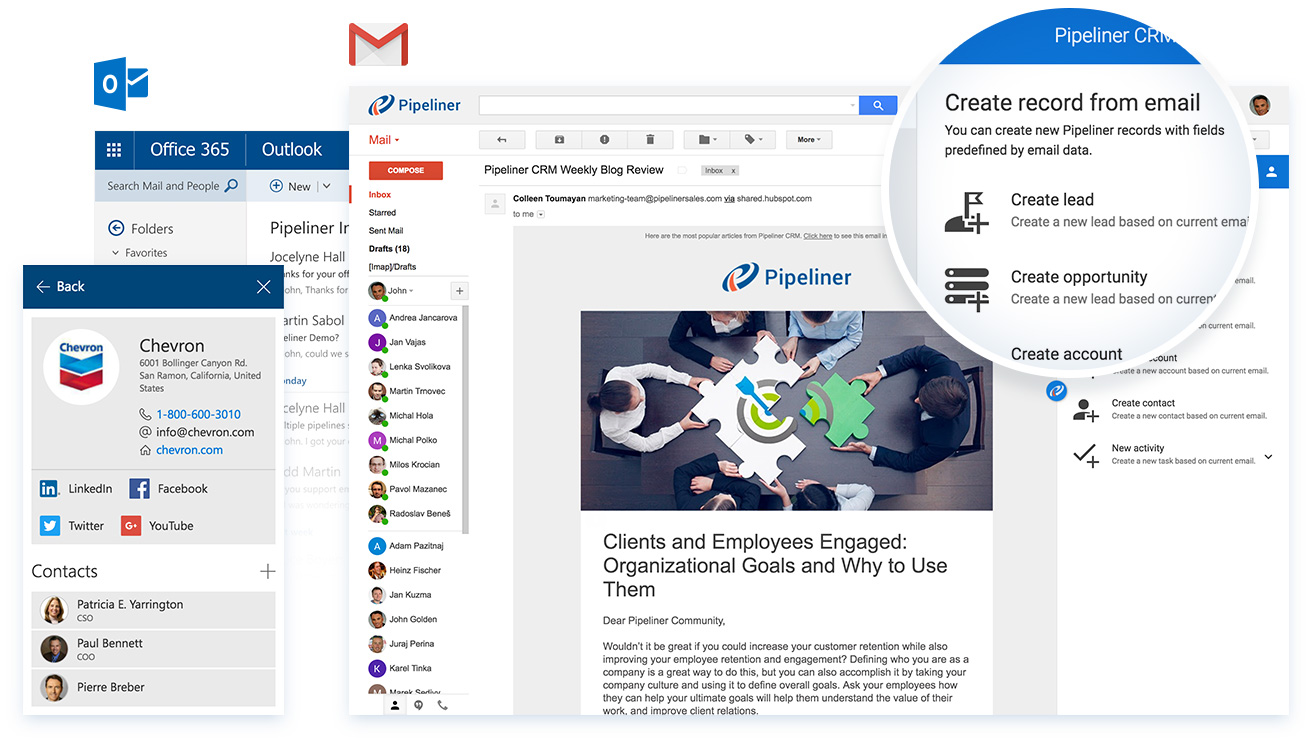
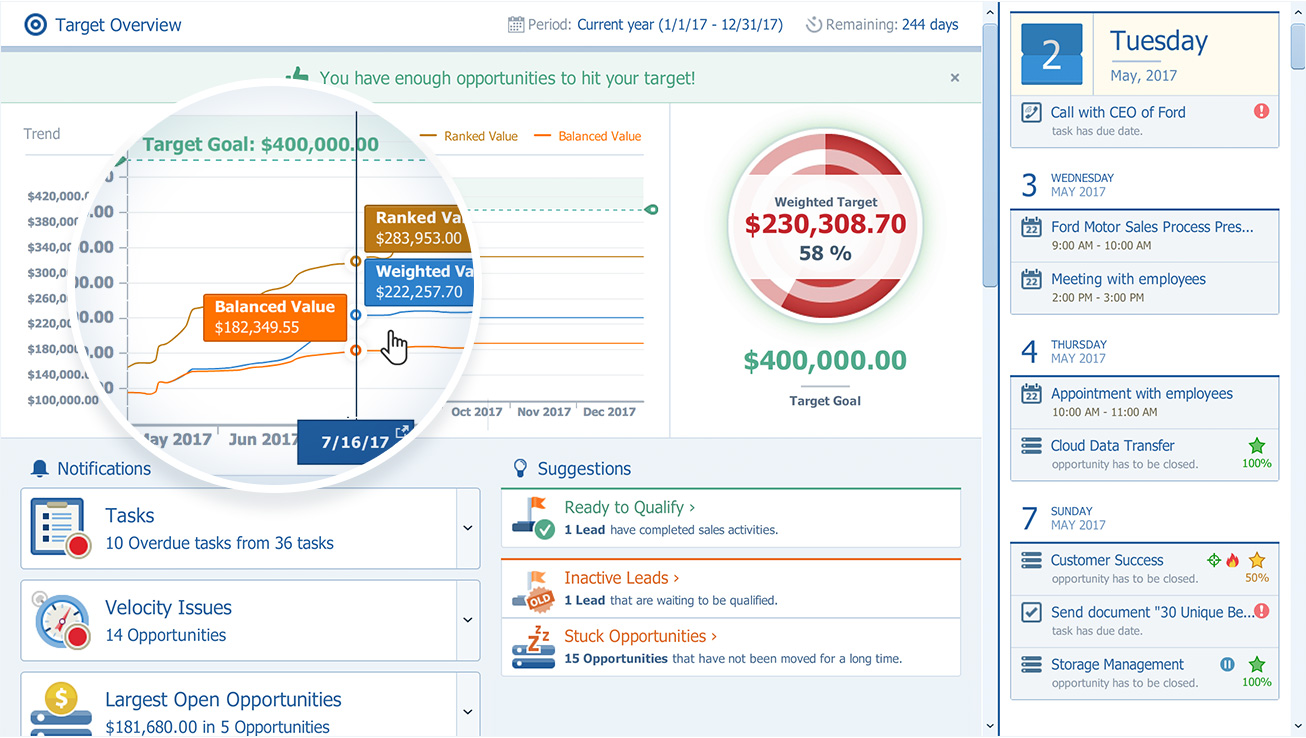
Screenshot of Pipeliner CRM — A sales enablement tool focused  on pipeline management, sales process & analytics.Screenshot of Can be used with email such as MS Outlook, gmailScreenshot of The pipeline view, to review and forecast sales, manage revenue risk, collaborate with a sales teamScreenshot of Pipeliner CRM opportunity viewScreenshot of Analytics: analyse win/loss rates, review sales person/team/territory performance, set key sales metrics & goals, leading & lagging indicatorsScreenshot of Visual Sales Tool: designed to cut through the noise, focuses on high value activities, everything in one place (no need for multiple tools)