Coevera vs. Showpad eOS®

Overview
ProductRatingMost Used ByProduct SummaryStarting Price
Coevera
Score 8.0 out of 10
Mid-Size Companies (51-1,000 employees)
Coevera (formerly Pipeliner CRM) is a sales enablement tool focusing on pipeline management, sales processes, and analytics designed to empower sales professionals. It provides a visual sales process, profiles, and charts, all of which aim to help users take the right actions with their buyers and even helps identify key contacts within an organization. The CRM is available in three versions: Starter, Business & Enterprise. The vendor offers…
$65
Showpad eOS®
Score 8.1 out of 10
N/A
Showpad is an Enablement Operating System (eOS™) that aligns sales and marketing teams around high-impact buyer interactions while generating the insights needed to continuously improve conversion rates.N/A
Pricing
CoeveraShowpad eOS®
Editions & Modules
STARTER - Basic sales management, tracking and collaboration
$65.00 per user per month
STARTER - Basic sales management, tracking and collaboration
$65 per user per month
BUSINESS - Full CRM functionality, customization and unique productivity features.
$85 per user per month
ENTERPRISE - Full CRM functionality with advanced reporting, customization and services.
$115 per user per month
UNLIMITED - Full CRM functionality with advanced reporting, customization and services.
$150 per user per month
UNLIMITED - Advanced CRM functionality including advanced features
$150 per user per month
No answers on this topic
Offerings
Pricing Offerings
CoeveraShowpad eOS®
Free Trial
YesNo
Free/Freemium Version
YesNo
Premium Consulting/Integration Services
NoNo
Entry-level Setup FeeNo setup feeOptional
Additional DetailsThere is also an Ultimate package available. Pricing for Ultimate is available by custom quote only. Contact Showpad for Ultimate pricing.
More Pricing Information
Community Pulse
CoeveraShowpad eOS®
Considered Both Products
Coevera
Chose Coevera
The most important reason for selecting pipeliner CRM:-exceptional user engagement through its sales-friendly interface. With its uniform navigation and visual approach, users can learn the system quickly. Users can easily customize what they see to make the system their own. …
Chose Coevera
Conversely from competitors listed below, Pipeliner CRM does not need expensive certification for its administration daily basis. It is very intuitive and easy to use. Pipeliner CRM has a friendly interface with drag-and-drop functions. this software is designed to deliver …
Chose Coevera
As mentioned before, way easier to adopt too.
Customization was easy to get a hang of, the training was superb, and allows anyone to quickly and easily get running with it.
Chose Coevera
Another CRM like Creatio is not very user-friendly. With a lot of complications, it might take a long time for a new user to master it, but Pipeliner CRM is easier to use and easier to master within a short period of time, which makes it more efficient and effective than any …
Chose Coevera
I will always select Pipeliner CRM because it is very flexible, easy to work with, data capturing is at its best, its integration to other major software’s and it aids in the monitoring of the core work process. One distinctive feature is it is very easy to learn without …
Chose Coevera
Sales friendly interface with uniform navigation
Chose Coevera
Pipeliner is easy to set up and it does not take time to get working other than the other CRM's that take up to 2 months before you can use it. Also pipeliner is easy to use and it is less costly unlike the other CRM's with high prices they charge.
Chose Coevera
We wanted a pure cloud-based solution with a reliable mobile app. This was a key driving force: reducing issues around upgrade and IT maintenance of servers etc. It was the first cloud-based solution welcomed by the team with an attractive interface that was common to both …
Chose Coevera
Easy to integrate, comprehensive navigation, and well-understanding sales process.
Chose Coevera
It is better than Pipedrive since its features are more advanced than Pipedrive. Pipeliner has a better mobile app and its features are great to use.
Chose Coevera
Pipeliner CRM has robust data entry functionality which is a panacea to exquisite output. On Pipeliner, customization and data viewing options are possible. We can choose the way we view data and information on the platform. Reporting is also easier and flexible because we can …
Chose Coevera
Pipeliner's visual user interface is a favorite of our sales team. I love the LinkedIn integration. It makes searching and linking in with prospects and customers easy. I also really enjoy how it pulls the pictures. This is especially handy when meeting with someone that you've …
Chose Coevera
Pipeliner CRM raises the bar far beyond any other currently available CRM. It makes all of your data immediately accessible and usable. It takes you away from constantly having to enter data into your CRM system and allows me to be a consultant and interpret findings from my …
Chose Coevera
We have been in the CRM space for a number of years. We represent and implement on-premise and Saas products regularly. Pipeliner CRM is one of those that provides a powerful set of tools for the sales team from agents to management to C-Team. It is the ONLY tool in our kit …
Showpad eOS®
Chose Showpad eOS®
The only option our company used was cloud-based file-sharing services (Box, Dropbox, etc) and emails like Outlook or Gmail. Both options make it hard for version control and for ease of navigation. Generally, end-users had an easier time finding content on Showpad.
Chose Showpad eOS®
Showpad Content is professionally dedicated software for sales business with better presentation features and completing Crm software features. That's why it's recommended for complementary software for better sales management even in front of the customer.
Chose Showpad eOS®
Honestly, I have yet to see another service similar to Showpad. You might have email trackers that tell you when your clients opened up an email or which links from your email were clicked. Showpad has it all, in addition to having a hub of resources where you can easily share …
Chose Showpad eOS®
This is the first sales enablement tool that I've used. Prior to this, the company I worked at used Google Drive to manage content and it was very tedious.
Chose Showpad eOS®
Showpad Content provides more features than other file sharing tools like Dropbox, Box.com, and Google Drive since it allows you to see who has viewed your content and how long they spent viewing it. This information can impact the approach used during a sales cycle to help …
Chose Showpad eOS®
Ease of use by learners and admins, pricing levels, multi-year contract discounts
Chose Showpad eOS®
Showpad allows users to understand the engagement between content and recipients. Provides a tool to understand how to engage/ tailor the next conversation.
Chose Showpad eOS®
I was mainly using Cornerstone for training and onboarding and now we use Showpad for the training part as well. I honestly don't see much difference besides the fact that Showpad is better as a library than to do training. Cornerstone was good enough but my company …
Chose Showpad eOS®
We originally changed from ClearSlide because I felt we had too many crashes during demos, and it was very slow. Also, the audio quality was poor.
Chose Showpad eOS®
ClearSlide offers a similar solution to Showpad. We found that Showpad had better reporting capabilities and the UI to be easier to use.
Chose Showpad eOS®
There are other ways you could store videos, however, LearnCore and its grading system were one of a kind. This is the reason it was selected to see if it would move the needle at our firm.
Features
CoeveraShowpad eOS®
Sales Force Automation
Comparison of Sales Force Automation features of Product A and Product B
Coevera
9.0
Ratings
14% above category average
Showpad eOS®
-
Ratings
Customer data management / contact management8.10 Ratings00 Ratings
Workflow management8.90 Ratings00 Ratings
Territory management8.90 Ratings00 Ratings
Opportunity management9.00 Ratings00 Ratings
Integration with email client (e.g., Outlook or Gmail)9.70 Ratings00 Ratings
Contract management8.80 Ratings00 Ratings
Quote & order management9.60 Ratings00 Ratings
Interaction tracking8.90 Ratings00 Ratings
Channel / partner relationship management9.00 Ratings00 Ratings
Customer Service & Support
Comparison of Customer Service & Support features of Product A and Product B
Coevera
9.3
Ratings
19% above category average
Showpad eOS®
-
Ratings
Case management9.10 Ratings00 Ratings
Call center management9.10 Ratings00 Ratings
Help desk management9.60 Ratings00 Ratings
Marketing Automation
Comparison of Marketing Automation features of Product A and Product B
Coevera
8.6
Ratings
10% above category average
Showpad eOS®
-
Ratings
Lead management8.90 Ratings00 Ratings
Email marketing8.20 Ratings00 Ratings
CRM Project Management
Comparison of CRM Project Management features of Product A and Product B
Coevera
8.8
Ratings
13% above category average
Showpad eOS®
-
Ratings
Task management8.30 Ratings00 Ratings
Billing and invoicing management9.10 Ratings00 Ratings
Reporting9.00 Ratings00 Ratings
CRM Reporting & Analytics
Comparison of CRM Reporting & Analytics features of Product A and Product B
Coevera
8.3
Ratings
8% above category average
Showpad eOS®
-
Ratings
Forecasting9.00 Ratings00 Ratings
Pipeline visualization8.30 Ratings00 Ratings
Customizable reports7.50 Ratings00 Ratings
Customization
Comparison of Customization features of Product A and Product B
Coevera
8.3
Ratings
8% above category average
Showpad eOS®
-
Ratings
Custom fields8.20 Ratings00 Ratings
Custom objects8.00 Ratings00 Ratings
Scripting environment9.10 Ratings00 Ratings
API for custom integration8.10 Ratings00 Ratings
Security
Comparison of Security features of Product A and Product B
Coevera
8.2
Ratings
3% below category average
Showpad eOS®
-
Ratings
Single sign-on capability8.30 Ratings00 Ratings
Role-based user permissions8.20 Ratings00 Ratings
Social CRM
Comparison of Social CRM features of Product A and Product B
Coevera
8.4
Ratings
11% above category average
Showpad eOS®
-
Ratings
Social data8.00 Ratings00 Ratings
Social engagement8.70 Ratings00 Ratings
Integrations with 3rd-party Software
Comparison of Integrations with 3rd-party Software features of Product A and Product B
Coevera
8.5
Ratings
12% above category average
Showpad eOS®
-
Ratings
Marketing automation7.90 Ratings00 Ratings
Compensation management9.10 Ratings00 Ratings
Platform
Comparison of Platform features of Product A and Product B
Coevera
8.2
Ratings
7% above category average
Showpad eOS®
-
Ratings
Mobile access8.20 Ratings00 Ratings
Best Alternatives
CoeveraShowpad eOS®
Small Businesses
Salesmate
Salesmate
Score 10.0 out of 10
Lead411
Lead411
Score 8.3 out of 10
Medium-sized Companies
Creatio
Creatio
Score 9.3 out of 10
Paperflite
Paperflite
Score 8.0 out of 10
Enterprises
Creatio
Creatio
Score 9.3 out of 10
Paperflite
Paperflite
Score 8.0 out of 10
All AlternativesView all alternativesView all alternatives
User Ratings
CoeveraShowpad eOS®
Likelihood to Recommend
9.0
(0 ratings)
8.4
(0 ratings)
Likelihood to Renew
9.1
(0 ratings)
-
(0 ratings)
Usability
9.7
(0 ratings)
-
(0 ratings)
Support Rating
8.9
(0 ratings)
7.7
(0 ratings)
User Testimonials
CoeveraShowpad eOS®
Likelihood to Recommend
Pipeliner CRM is amazingly flexible to your business model. For example, in addition to tracking movement of leads through your sales pipeline, Pipeliner CRM can be used to track internal processes, like RFQ and RFPs through your organization. It's highly adaptable across your organization.
Read full review
Showpad Content works well to provide a central hub for all document hosting. The interface is simple and easy enough to use. Our sales team likes that you are able to see when a user has opened your file once it has been shared with them and how long they spent viewing it.
Read full review
Pros
  • Clear and easy visualisation of Sales Process
  • Great capability in reporting both in-app with 'filter' and reporting module built-in is easy to use
  • Reporting into pivot table is also easy and very useful
  • Mobile app has always been very good and easy to use since 2015
Read full review
  • User-Friendly. The ability to easily customize to fit your needs
  • Delivering content easily and quickly, reducing cost for print, and out of date information
  • Reporting. Providing the analytical function to track what content has been utilized or not utilized and become more efficient in the type of information you share
  • Offline Use. The ability to be able to view content offline
Read full review
Cons
  • Pipeliner CRM needs to create a video chat room where you can see exactly where your employee is working in the field.
  • Pipeliner CRM needs to integrate a command where a user can use his voice to command what he wants.
Read full review
  • Not truly a limitation, but I would love it if I could customize the design a bit further within the shared spaces that I create.
  • Loading large resources sometimes takes a few seconds - not particularly long and not an issue, but it is not instantaneous in some cases.
Read full review
Likelihood to Renew
Currently the company is using the Pipeliner CRM because we believe it is a tool that puts the customer as the main focus of business processes in order to understand and anticipate their needs, and then serve them in the best way.
Read full review
No answers on this topic
Usability
I gave that rating level because it reflects both my satisfaction and expectations about PipelinerCRM.Plus, the adoption rate of this software. I mean the usability rate is very low. It just takes, for learning, a couple of hours less than three days roughly. Return on time investment is low also.
Read full review
No answers on this topic
Support Rating
The support from Pipeliner CRM is superb; they have instant customer support and they are on time. They also give enough knowledge of sales and other material for the knowledge. They also have AI in the support by talking with customer support directly from the web or app and so on.
Read full review
I have not been involved with support from Showpad so I am not entirely sure. However, we have received some emails from our help desk about an outage and it seems like it didn't last very long so I would say that it was pretty effective support to that extent.
Read full review
Alternatives Considered
I will always select Pipeliner CRM because it is very flexible, easy to work with, data capturing is at its best, its integration to other major software’s and it aids in the monitoring of the core work process. One distinctive feature is it is very easy to learn without extensive training.
Read full review
Honestly, I have yet to see another service similar to Showpad. You might have email trackers that tell you when your clients opened up an email or which links from your email were clicked. Showpad has it all, in addition to having a hub of resources where you can easily share with your clients. The level of engagement tracking from using Showpad is next-level.
Read full review
Return on Investment
  • As a VisualCRM tool, our clients sales teams seem to accelerate their deal closes.
  • The visual tools allow those "no good deals" to be spotted and resource usage limited.
  • A great tool to manage those "pipelines" within the company. A pipe is really a series of actions that constitute a planned result.
Read full review
  • It has improved sales reps in becoming audible ready on different topics via lots of practice via LearnCore.
  • It has made the job more interesting by employing competitions.
  • It has made our reps more polished and client facing out in the field and has reduced ramp up time on new hires.
Read full review
ScreenShots

Coevera Screenshots

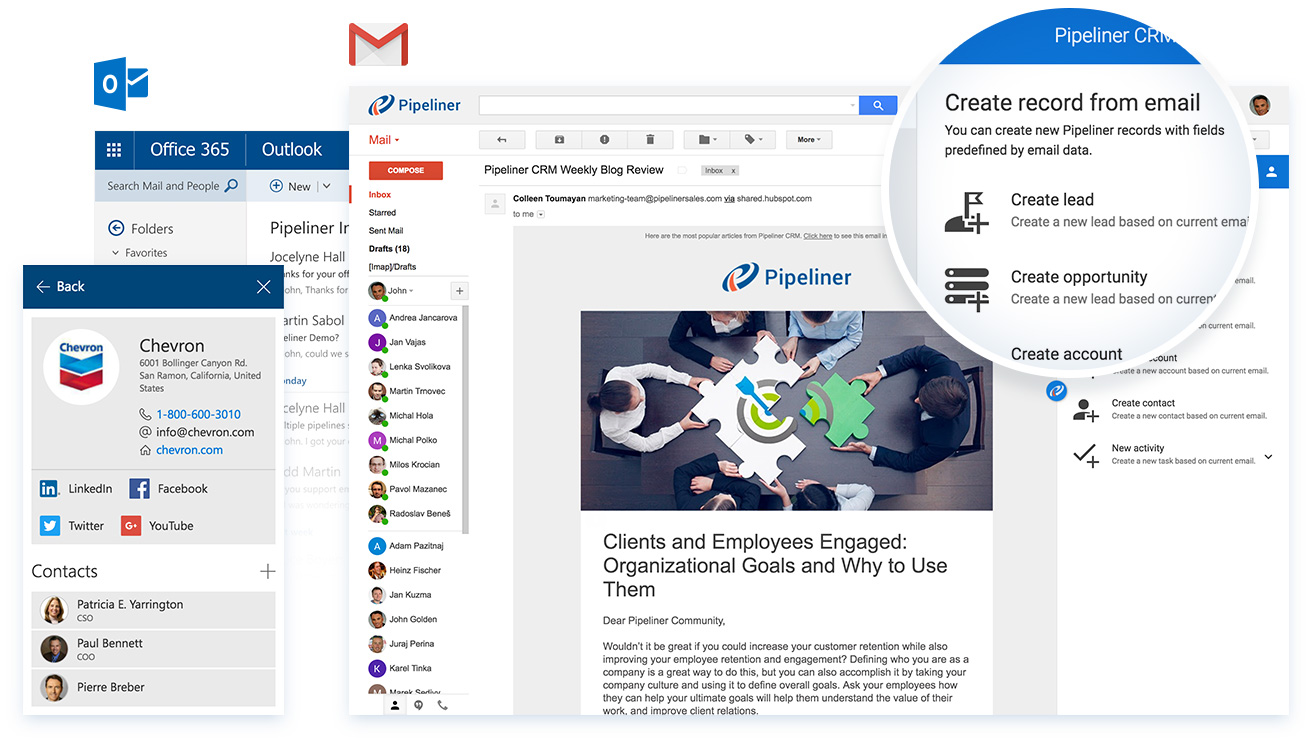
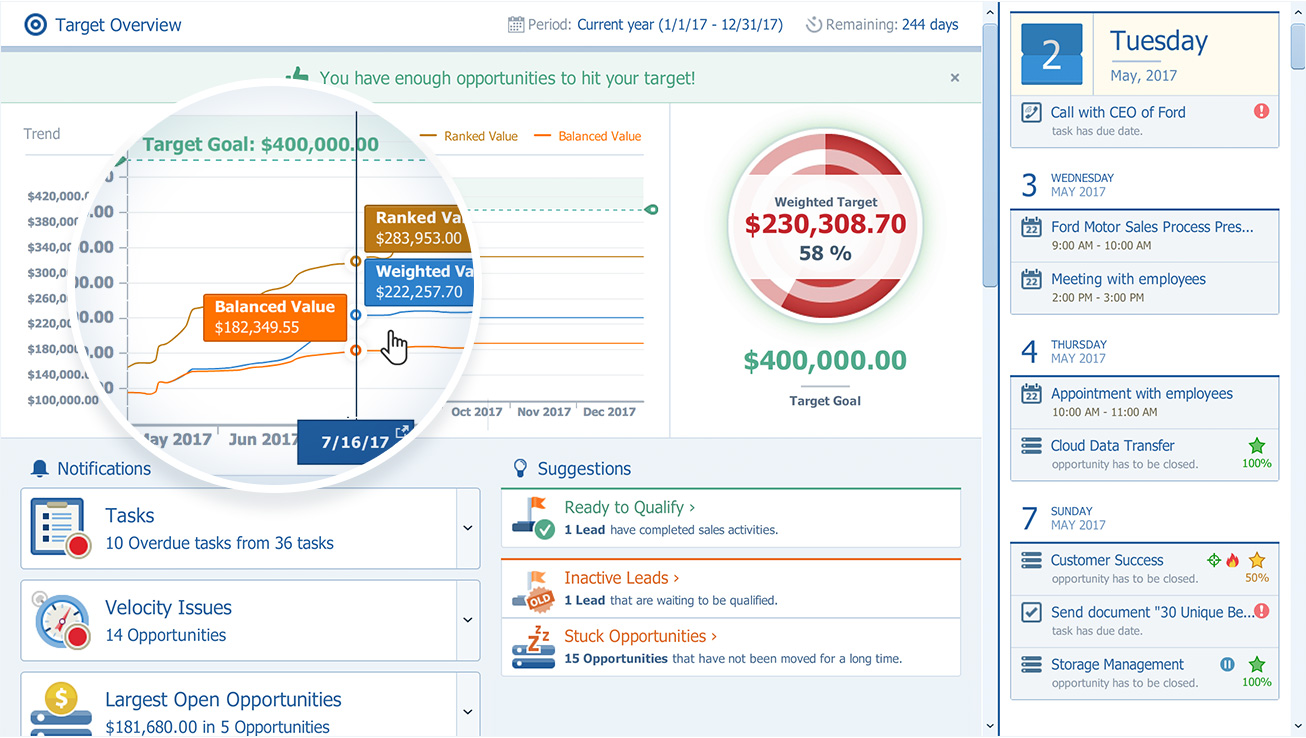
Screenshot of Pipeliner CRM — A sales enablement tool focused  on pipeline management, sales process & analytics.Screenshot of Can be used with email such as MS Outlook, gmailScreenshot of The pipeline view, to review and forecast sales, manage revenue risk, collaborate with a sales teamScreenshot of Pipeliner CRM opportunity viewScreenshot of Analytics: analyse win/loss rates, review sales person/team/territory performance, set key sales metrics & goals, leading & lagging indicatorsScreenshot of Visual Sales Tool: designed to cut through the noise, focuses on high value activities, everything in one place (no need for multiple tools)

Showpad eOS® Screenshots

Screenshot of Content relevant to an opportunity, recommended by marketing and machine learning.Screenshot of A secure branded environment, used to share content and collaborate with buyers and colleagues.Screenshot of Showpad analytics, that support content decisions based on measured performance, and helps users coach their sales teams on best practices.