Conga Composer vs. DocuXplorer

Overview
ProductRatingMost Used ByProduct SummaryStarting Price
Conga Composer
Score 8.6 out of 10
N/A
Conga Composer is a document generation and automation tool designed to simplify and streamline the process of creating and distributing customized documents, presentations, and reports.
$30
per month per user
DocuXplorer
Score 0.0 out of 10
N/A
DocuXplorer is a document management solution for any file belonging to any business, from the company of the same name in Charleston, South Carolina. WIth it, users can control their data with its methods of locating, accessing, and sharing any type of document, whether scanned or electronic. DocuXplorer’s Microsoft's File Explorer-style interface is designed to require little training and virtually no technology expertise to operate, and it is available in 8 languages and suits businesses of…N/A
Pricing
Conga ComposerDocuXplorer
Editions & Modules
No answers on this topic
Offerings
Pricing Offerings
Conga ComposerDocuXplorer
Free Trial
YesNo
Free/Freemium Version
NoNo
Premium Consulting/Integration Services
YesYes
Entry-level Setup FeeOptionalNo setup fee
Additional Details
More Pricing Information
Community Pulse
Conga ComposerDocuXplorer
Best Alternatives
Conga ComposerDocuXplorer
Small Businesses
airSlate WorkFlow
airSlate WorkFlow
Score 9.7 out of 10
Square 9 Softworks
Square 9 Softworks
Score 9.5 out of 10
Medium-sized Companies
Foxit PDF Editor
Foxit PDF Editor
Score 8.7 out of 10
MSB Docs
MSB Docs
Score 9.4 out of 10
Enterprises
DocuSign
DocuSign
Score 8.7 out of 10
Tungsten Capture
Tungsten Capture
Score 7.9 out of 10
All AlternativesView all alternativesView all alternatives
User Ratings
Conga ComposerDocuXplorer
Likelihood to Recommend
8.6
(148 ratings)
-
(0 ratings)
Likelihood to Renew
8.9
(15 ratings)
-
(0 ratings)
Usability
8.1
(7 ratings)
-
(0 ratings)
Availability
3.6
(1 ratings)
-
(0 ratings)
Performance
3.6
(2 ratings)
-
(0 ratings)
Support Rating
6.9
(10 ratings)
-
(0 ratings)
Implementation Rating
3.8
(5 ratings)
-
(0 ratings)
Configurability
1.8
(1 ratings)
-
(0 ratings)
Ease of integration
2.7
(2 ratings)
-
(0 ratings)
Product Scalability
3.6
(1 ratings)
-
(0 ratings)
Professional Services
2.7
(1 ratings)
-
(0 ratings)
Vendor post-sale
1.8
(1 ratings)
-
(0 ratings)
Vendor pre-sale
3.2
(2 ratings)
-
(0 ratings)
User Testimonials
Conga ComposerDocuXplorer
Likelihood to Recommend
Conga
From my experience, Conga Composer is particularly well-suited for generating documents, such as quotes and contracts, directly from Salesforce. It saves us a great deal of time, which is remarkably beneficial for companies with sales teams. Not suitable for companies lacking significant Salesforce expertise or administrative support.
Read full review
DocuXplorer
No answers on this topic
Pros
Conga
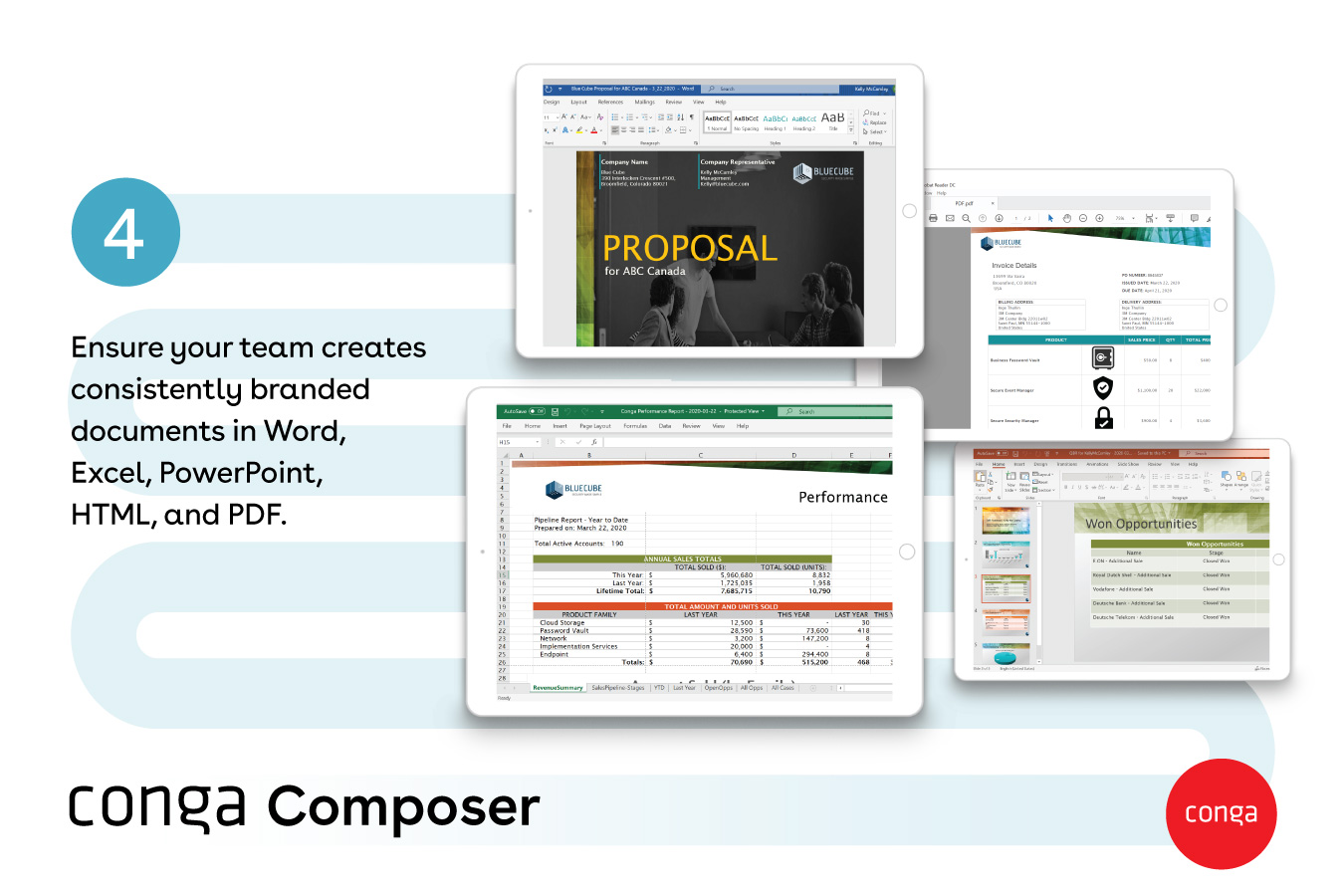
  • One great feature of Conga Composer is the ability to create various document types, including Word files, PDFs, and even PowerPoint presentations.
  • The ability to encrypt and share data is quite impressive with Conga Composer.
  • The integration, especially with different email providers, is quite good with Conga Composer.
Read full review
DocuXplorer
No answers on this topic
Cons
Conga
  • Not very intuitive. Once you know the system it's fine but there is a learning curve
  • I would like to see training opportunities on features that I am not using or aware of
  • I am sure I am only using about 3% of it's full potential
Read full review
DocuXplorer
No answers on this topic
Likelihood to Renew
Conga
Though I love how easily Conga Composer ties into Salesforce and its given analytics, it takes a lot of data entry to get up and running. I don't love that sometimes queries can take a long time to pull. I like keeping our marketing templates consistent via templates in the system. Pulling multiple objects into one report is fantastic too.
Read full review
DocuXplorer
No answers on this topic
Usability
Conga
It's a fairly simple tool to integrate into your current business structure. When we've had issues, we were able to resolve them extremely quickly. The users click a button and it can bring in all the quote lines, and our credit application seamlessly into our tool. I'd definitely recommend it to other colleagues
Read full review
DocuXplorer
No answers on this topic
Reliability and Availability
Conga
It was available, it just didn't always work depending on what glitches were happening within our app
Read full review
DocuXplorer
No answers on this topic
Performance
Conga
This product appears to work well. It was not a fit for us this time, but we would consider in future
Read full review
DocuXplorer
No answers on this topic
Support Rating
Conga
It's been hit and miss depending on the issue. We use javascript to generate the urls which has confused many techs even though it generates a clean url - they are overwhelmed by the concept of code and can't understand that the url is all that matters.
Read full review
DocuXplorer
No answers on this topic
Implementation Rating
Conga
It was painful internally to build out all of the templates, but the actual implementation of the product was okay.
Read full review
DocuXplorer
No answers on this topic
Alternatives Considered
Conga
I think Nintex is the primary competitor for Conga Composer, but I have not personally used it. I was not present for the decision to purchase Conga but I would recommend it in future document automation vendor selection processes because I have seen how well it works! We are especially fond of complementary features in Conga Composer, including Conga Email Templates and Conga Global Merge.
Read full review
DocuXplorer
No answers on this topic
Contract Terms and Pricing Model
Conga
Not fair. Its an upfront cost and then pay per use
Read full review
DocuXplorer
No answers on this topic
Scalability
Conga
We used it for something simple and it was still a pain to use
Read full review
DocuXplorer
No answers on this topic
Professional Services
Conga
Needs additional training on what they are selling, how to install and use to explain to customers
Read full review
DocuXplorer
No answers on this topic
Return on Investment
Conga
  • Could really use better error handling on the product when the document doesn't generate. Zero notifications are provided right now and have no idea where in a 20 page template the error is. Need to keep cutting the template into pieces to find the error.
  • The report generates 90% of the time so far.
  • Getting easier to generate templates when knowing how the JSON will be structured to add to merged fields.
  • Use Work Plan Template Entries and Work Steps to dynamically generate many deliverables.
Read full review
DocuXplorer
No answers on this topic
ScreenShots

Conga Composer Screenshots

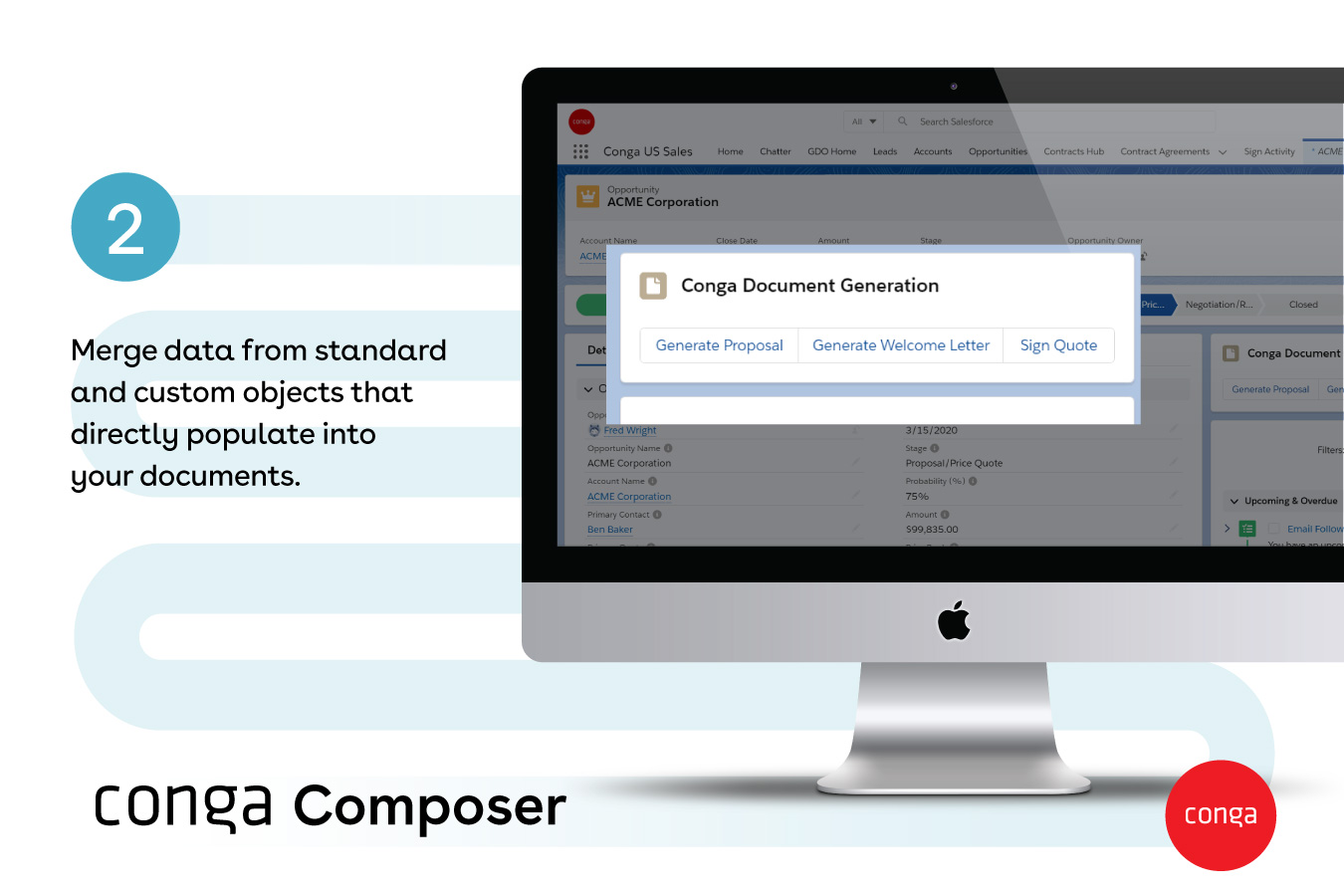
Screenshot of how documents are created automatically, directly from SalesforceScreenshot of documents generated with any data, from any object - standard or customScreenshot of Conga Document GenerationScreenshot of popular document formats available, like Word, Excel, PowerPoint, HTML, and PDFScreenshot of how large documents are sent via a link - and they provide visibility into customer document engagementScreenshot of how multiple documents can be sent with one or no clicks

DocuXplorer Screenshots

Screenshot of the AI Insights that automate analysis securely as a localized large language model (LLM). It operates entirely within the DocuXplorer interface, protecting proprietary company data.

Key benefits of AI Insights include:
- Full text search. Whether or not the information within a document is indexed, Insights can search and retrieve the information, including links or references to documents, when prompted.
- Conversational queries. Quickly locate and summarize company reports, policies, contracts, or financial statements without the research.
- Data privacy. Data remains in a secure storage container within a dedicated LLM model, ensuring security.
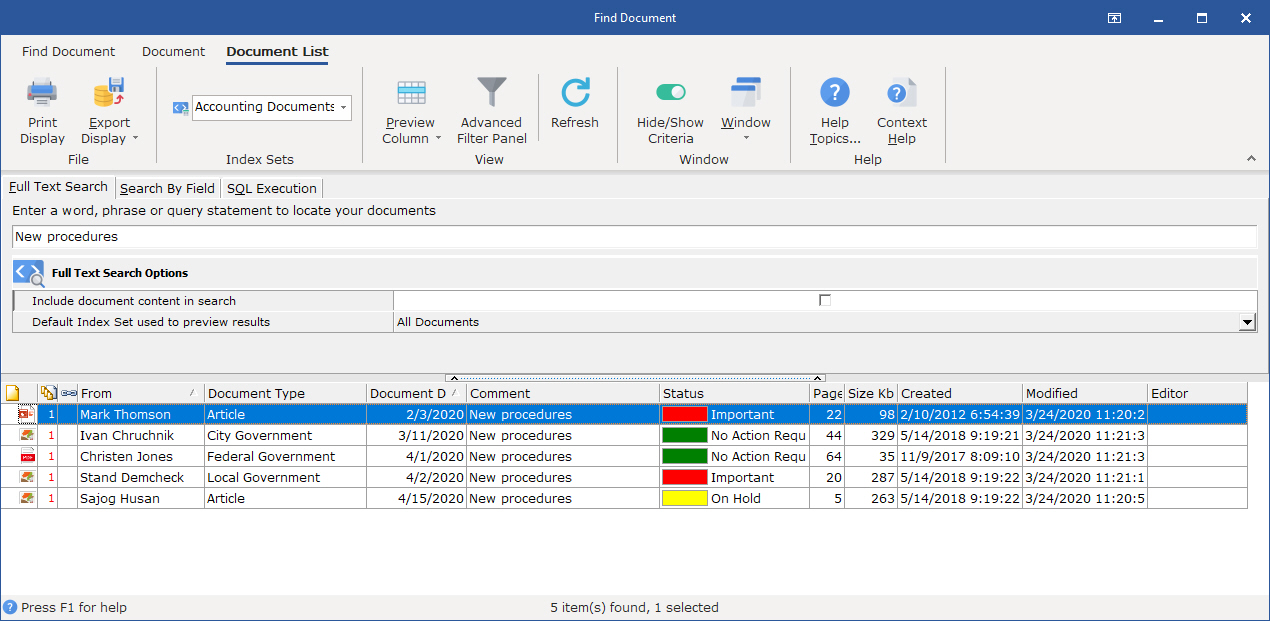
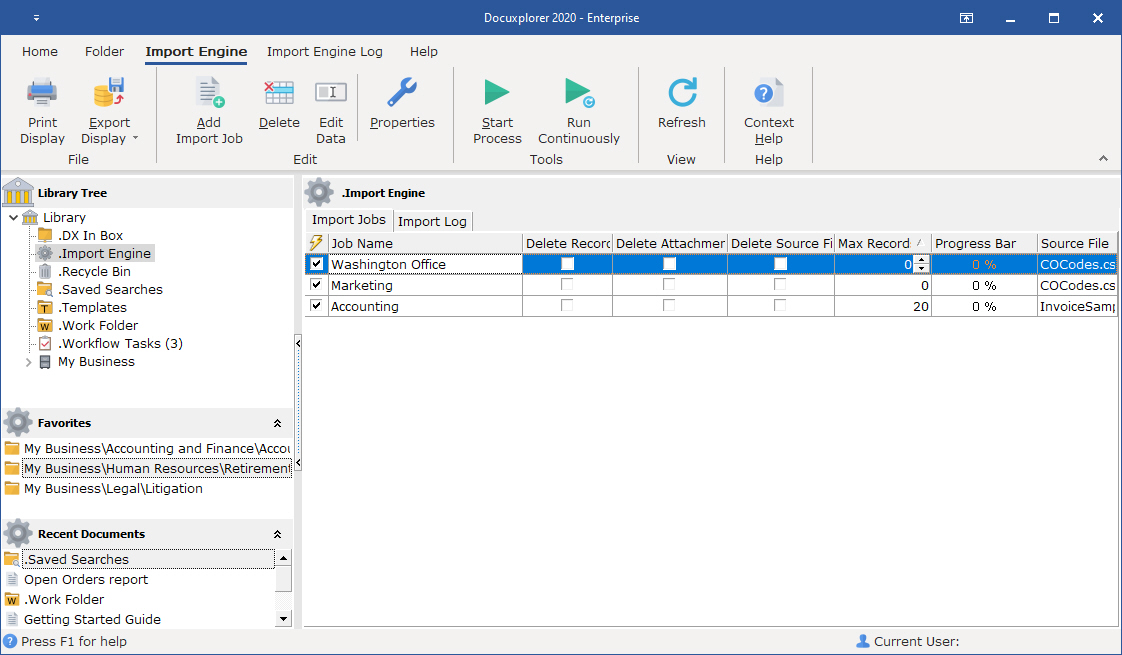
- Permission adherence. Teams only gets answers based on the files they have access to.Screenshot of DocuXplorer's full-text search, which lets users search by key fields (metadata) like date, document type, invoice number, customer/vendor name, or even unstructured data within the document.Screenshot of the Import Engine, used to automate document import from email, local drives, third-party software, and industry systems. It can:
- Handle one-time imports for bulk data migrations—useful when digitizing cabinets of paper records or moving from another system.
- Run ongoing imports by monitoring external folders, email inboxes, or third-party platforms for new files and pulling them into DocuXplorer automatically.
- Create new cabinets, drawers, and folders as needed, so there is no need to build the infrastructure manually.
- Populate index fields with key data during import, so every file is organized and searchable from day one.
- Run in the background—no need to tie up a specific workstation. Imports and organization happen everywhere, all the time, without any user effort.

Everything from PDFs and Word documents to PowerPoint presentations, Excel sheets, and QuickBooks transactions can be automatically pulled into DocuXplorer and organized.